
Community listing page, reviews may not be monitored by the author.
Colorful Armor Bar


No reviews yet
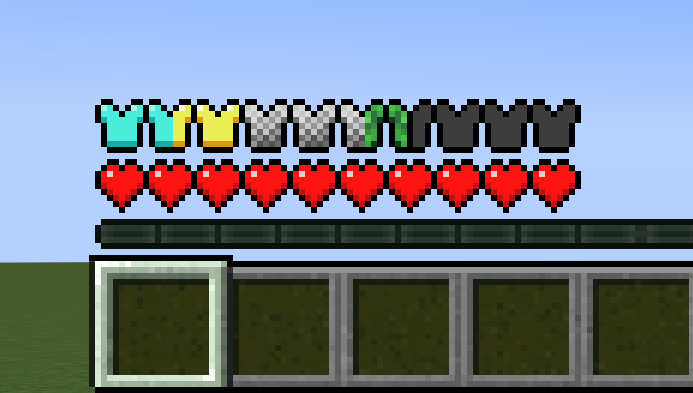
A customizable Minecraft armor HUD that displays different colors for each armor material, including mixed armor, armor trims, and modded equipment!

Community voices
Reviews
No reviews yet. Be the first to review this project!
Get it on
Available Platforms
Compatibility
Supported Environments
Runs entirely on the client. Works on vanilla servers.
About
Project Details
For authors
Embed Badge
If you're the author of this project, you can embed a live badge anywhere that supports HTML or Markdown. It updates automatically whenever ratings change.
Use HTML for any page that supports it, or Markdown for README files and Markdown-based descriptions.
Identifiers
Platform IDs
About
Description
Colorful Armor Bar
Tired of Netherite, Diamond, and Leather looking exactly the same on your HUD? Colorful Armor Bar is a lightweight, client-side mod that colors your armor bar icons based on the exact gear you're wearing.
How it Works
The project is heavily inspired by Detail Armor Bar, but under the hood, this mod takes a completely data-driven approach.
Instead of hardcoding compatibility or waiting for backend code updates, everything is driven by resource packs. Out of the box, the mod dynamically scans for textures mapped to your armor materials. If a mod adds a new armor tier, anyone can easily add flawless visual support for it with a resource pack—no code changes required.
Features
- Mix-and-Match (Split Rendering): If you're wearing a diamond chestplate with netherite boots, the mod automatically splits your armor shield icons to accurately show both materials at once.
- Armor Trims: Trimmed armor adds a small trim mark to its armor points. The mark uses the trim material's color, including colors supplied by other mods.
- 100% Client-Side: Safe to use on any public server or multiplayer network. You don't need it installed on the server for it to work.
- Fully Customizable: Don't like the default colors? You can easily change the icons or add support for modded armor using resource packs.
Configuration
The client config is stored in config/colorful_armor_bar.json5.
Set group_matching_armor to true to combine armor pieces that use the same
icon into one continuous section. The group with the most armor points is shown
first. Equal groups keep their worn-slot order. The default value is false,
which keeps the armor bar in worn-slot order.
Set glint_opacity from 0 to 100 to control the opacity of the enchantment
glint. The default value is 30. Set it to 0 to disable the glint.
For Resource Pack Creators & Mod Developers
Supporting a custom armor set is incredibly straightforward. All you need to do is drop a .png texture into the folder matching the armor's material name.
The mod automatically checks this path structure:
assets/<mod_id_or_namespace>/textures/armoricon/<material_name>.png
- Vanilla Example:
assets/minecraft/textures/armoricon/diamond.png - Modded Example: If a mod named
flingleblobadds arubyarmor set, you would place the texture in:assets/flingleblob/textures/armoricon/ruby.png
Armor-icon textures must be 18 pixels wide by 9 pixels high. The left and right 9-pixel halves are used for full and half-point rendering.
Each trim pattern can provide its own armor-bar texture at
assets/<namespace>/textures/armoricon/trims/<pattern>.png. For example, the
Sentry and Dune trim textures use these paths:
assets/minecraft/textures/armoricon/trims/sentry.pngassets/minecraft/textures/armoricon/trims/dune.png
If a pattern-specific texture is missing, the mod checks
assets/colorful_armor_bar/textures/armoricon/trim.png. It then falls back to
Minecraft's textures/trims/items/chestplate_trim.png. Trim textures can use any
size. Their alpha channel defines the mark, and the mod applies the trim material
color at run time.
Note: If the mod can't find a custom texture for an armor material, it safely falls back to a clean, default iron-style template.
Colorful Armor Bar
Tired of Netherite, Diamond, and Leather looking exactly the same on your HUD? Colorful Armor Bar is a lightweight, client-side mod that colors your armor bar icons based on the exact gear you're wearing.
How it Works
The project is heavily inspired by Detail Armor Bar, but under the hood, this mod takes a completely data-driven approach.
Instead of hardcoding compatibility or waiting for backend code updates, everything is driven by resource packs. Out of the box, the mod dynamically scans for textures mapped to your armor materials. If a mod adds a new armor tier, anyone can easily add flawless visual support for it with a resource pack—no code changes required.
Features
- Mix-and-Match (Split Rendering): If you're wearing a diamond chestplate with netherite boots, the mod automatically splits your armor shield icons to accurately show both materials at once.
- Armor Trims: Trimmed armor adds a small trim mark to its armor points. The mark uses the trim material's color, including colors supplied by other mods.
- 100% Client-Side: Safe to use on any public server or multiplayer network. You don't need it installed on the server for it to work.
- Fully Customizable: Don't like the default colors? You can easily change the icons or add support for modded armor using resource packs.
Configuration
Click to expand
The client config is stored in config/colorful_armor_bar.json5.
Set group_matching_armor to true to combine armor pieces that use the same
icon into one continuous section. The group with the most armor points is shown
first. Equal groups keep their worn-slot order. The default value is false,
which keeps the armor bar in worn-slot order.
Set glint_opacity from 0 to 100 to control the opacity of the enchantment
glint. The default value is 30. Set it to 0 to disable the glint.
For Resource Pack Creators & Mod Developers
Click to expand
Supporting a custom armor set is incredibly straightforward. All you need to do is drop a .png texture into the folder matching the armor's material name.
The mod automatically checks this path structure:
assets/<mod_id_or_namespace>/textures/armoricon/<material_name>.png
- Vanilla Example:
assets/minecraft/textures/armoricon/diamond.png - Modded Example: If a mod named
flingleblobadds arubyarmor set, you would place the texture in:assets/flingleblob/textures/armoricon/ruby.png
Armor-icon textures must be 18 pixels wide by 9 pixels high. The left and right 9-pixel halves are used for full and half-point rendering.
Each trim pattern can provide its own armor-bar texture at
assets/<namespace>/textures/armoricon/trims/<pattern>.png. For example, the
Sentry and Dune trim textures use these paths:
assets/minecraft/textures/armoricon/trims/sentry.pngassets/minecraft/textures/armoricon/trims/dune.png
If a pattern-specific texture is missing, the mod checks
assets/colorful_armor_bar/textures/armoricon/trim.png. It then falls back to
Minecraft's textures/trims/items/chestplate_trim.png. Trim textures can use any
size. Their alpha channel defines the mark, and the mod applies the trim material
color at run time.
Note: If the mod can't find a custom texture for an armor material, it safely falls back to a clean, default iron-style template.
Screenshots
Gallery
-
 8877d6fc8ce1b88ca20a26870cf4e16b7204c575.png 8877d6fc8ce1b88ca20a26870cf4e16b7204c575.png
-
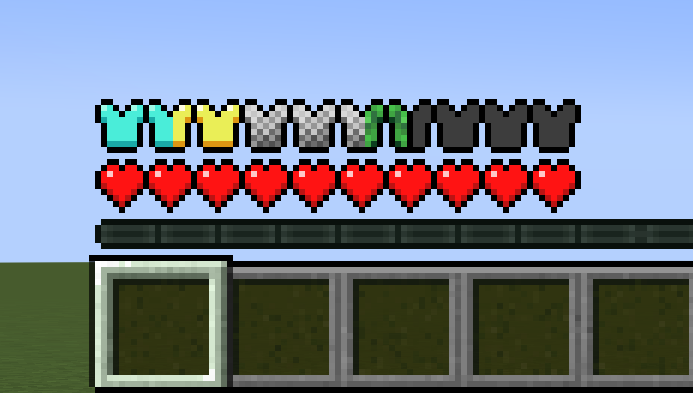 Armor Bar showcase Turtle helmet, chainmal chestplate, gold leggings and diamond boots
Versions
Files
Relations
Project Relations
More like this
Similar Mods
Suggestions use data such as tags, dependencies, dependents, descriptions, titles, and more to rank how much they overlap with this mod.
On ModDex
Community snapshot
By the numbers
Statistics

Get it on
Available Platforms
On ModDex
Community snapshot
By the numbers