Community listing page, reviews here may not be monitored by the author.
Command Block Studio


No reviews yet
A NeoForge-native command block editor upgrade
Community voices
Reviews
No reviews yet. Be the first to review this project!
Get it on
Available Platforms
Compatibility
Supported Environments
Works on the client or the server alone, but does more when on both.
About
Project Details
For authors
Embed Badge
If you're the author of this project, you can embed a live badge anywhere that supports HTML or Markdown. It updates automatically whenever ratings change.
Use HTML for any page that supports it, or Markdown for README files and Markdown-based descriptions.
Identifiers
Platform IDs
About
Description
Summary
An IDE-style native NeoForge editor and inspection toolkit for command blocks and chat commands.
Description
Command Block Studio replaces the vanilla command block screen with a focused command development workspace for map makers, server maintainers and technical creators.
Editor features
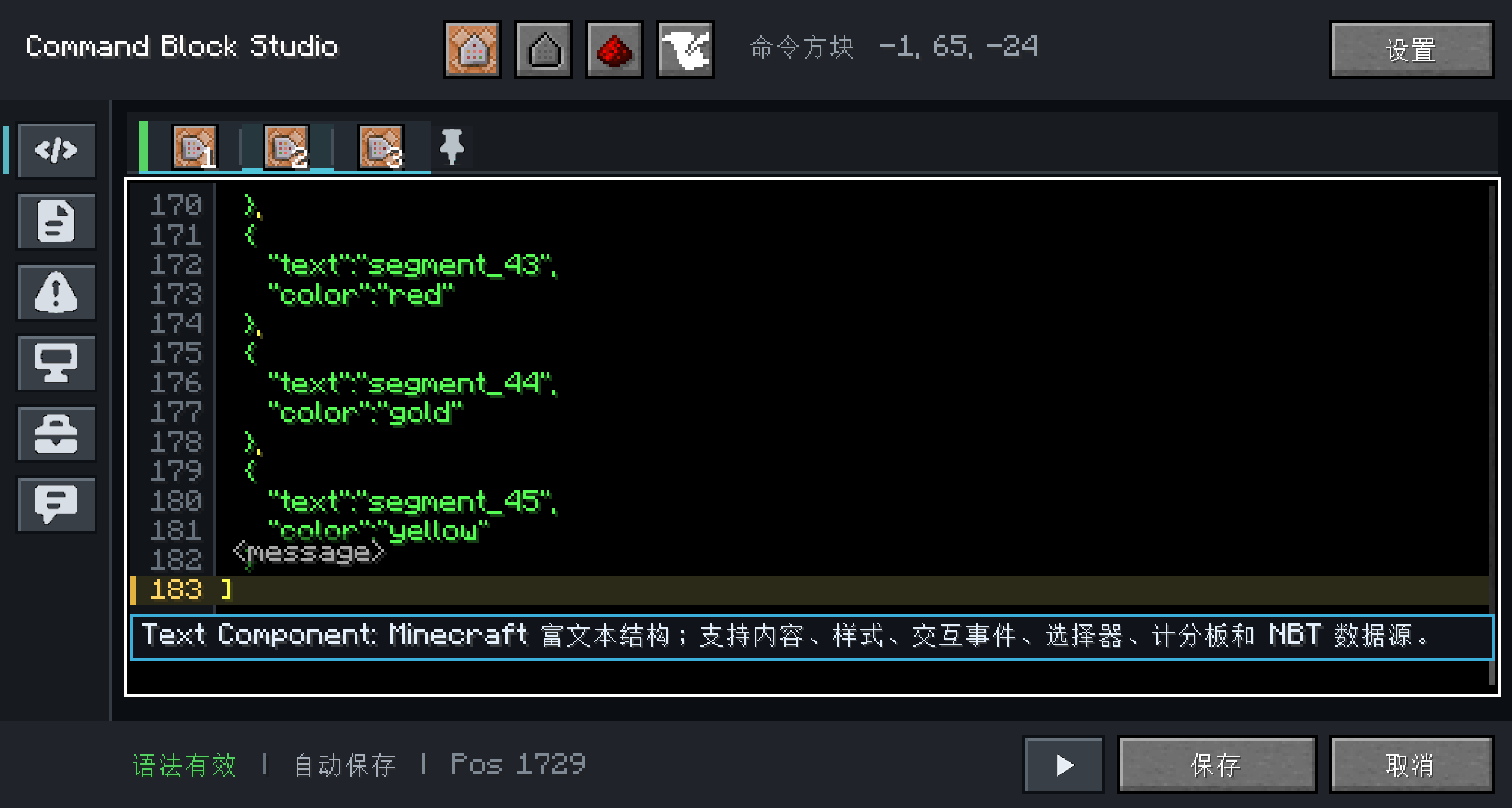
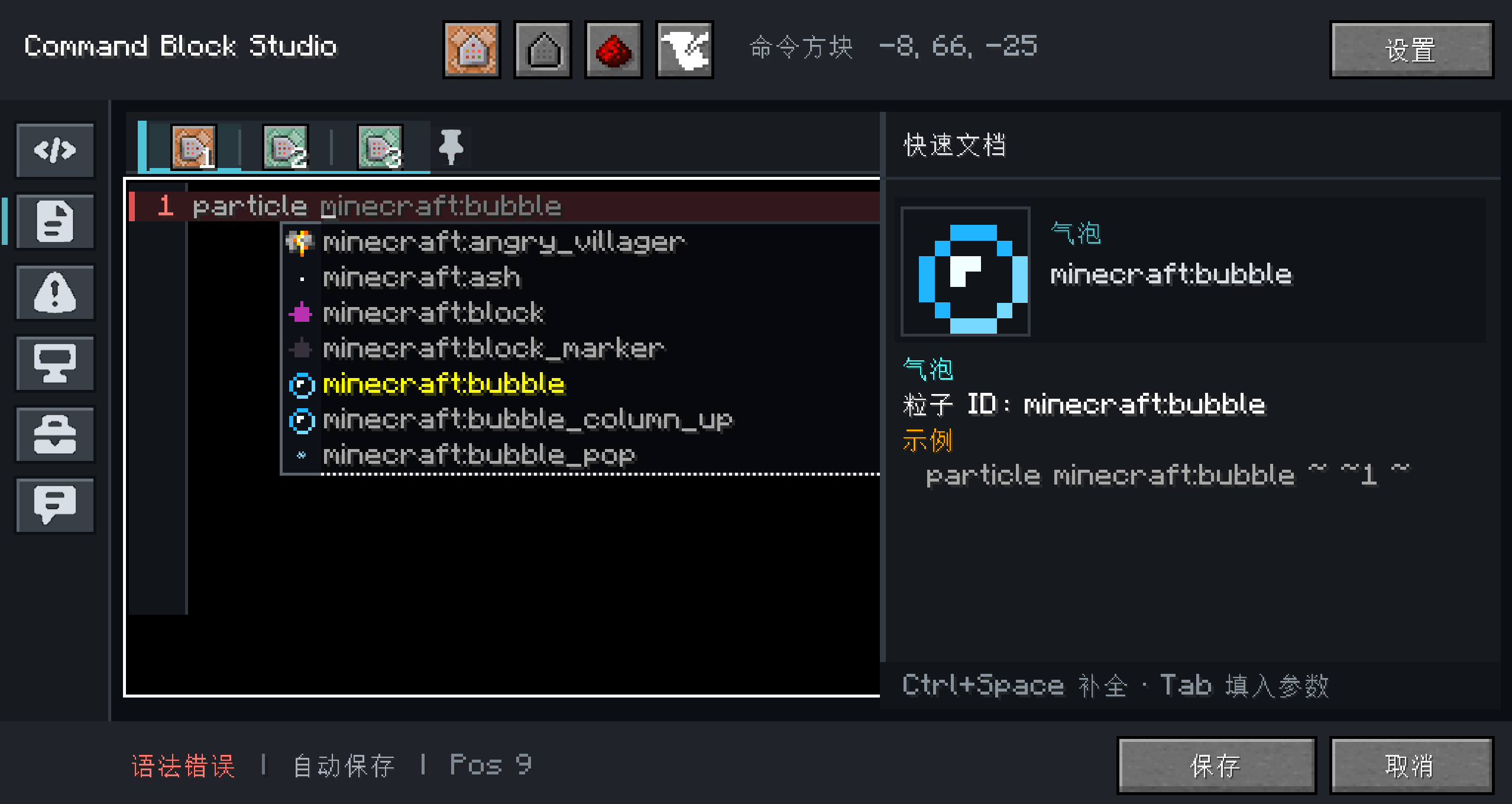
- Multiline command editing with stable wrapping and scrolling
- Line numbers, syntax highlighting and exact error navigation
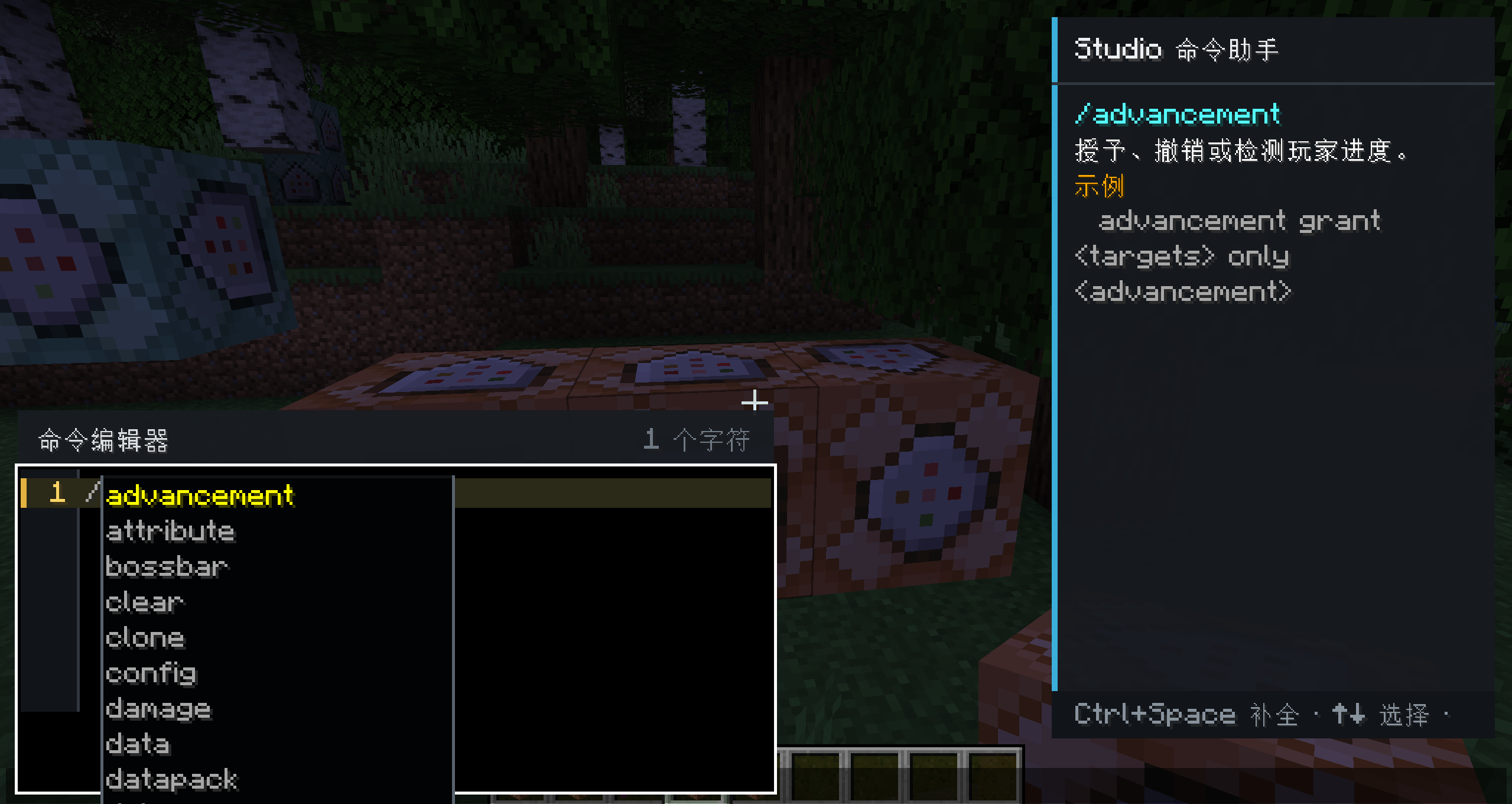
- Brigadier-backed completion from the connected world or server
- Quick documentation for commands, parameters and candidates
- Component, item data-component, particle, block, item, enchantment and player assistance
- Search/replace, command templates, placeholders, undo/redo and bracket matching
- Ordered workspace tabs for individual and chained command block
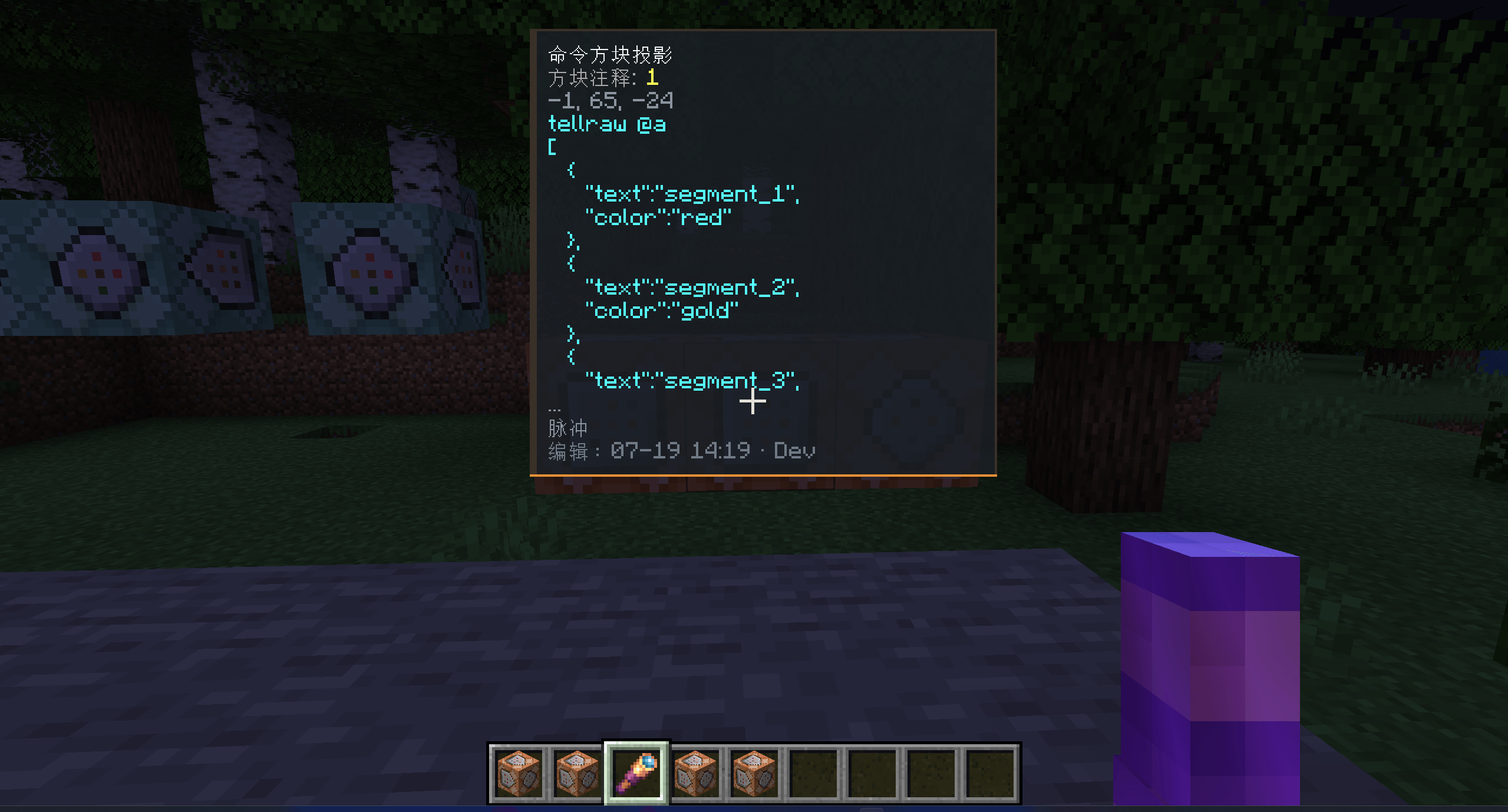
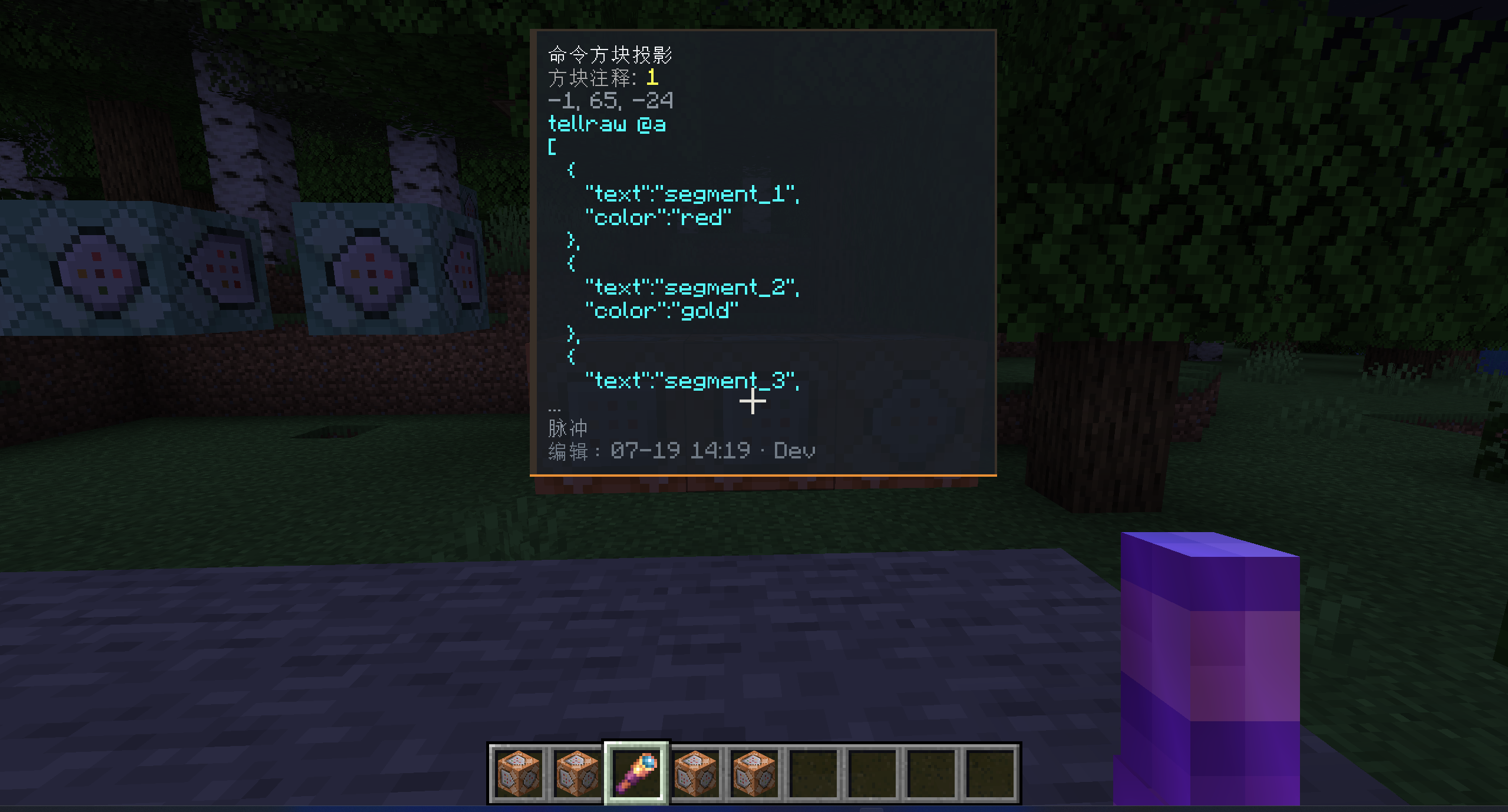
- Command block item tooltips can show wrapped command text, a second-line shared annotation and available edit metadata.
- A configurable work-mode key, defaulting to
Alt+Tab, displays a command panel with shared annotations in front of the targeted command block; a marked vanilla spyglass works as a handheld scanner. - The editor can save and run-test the current command block once.
- Entering
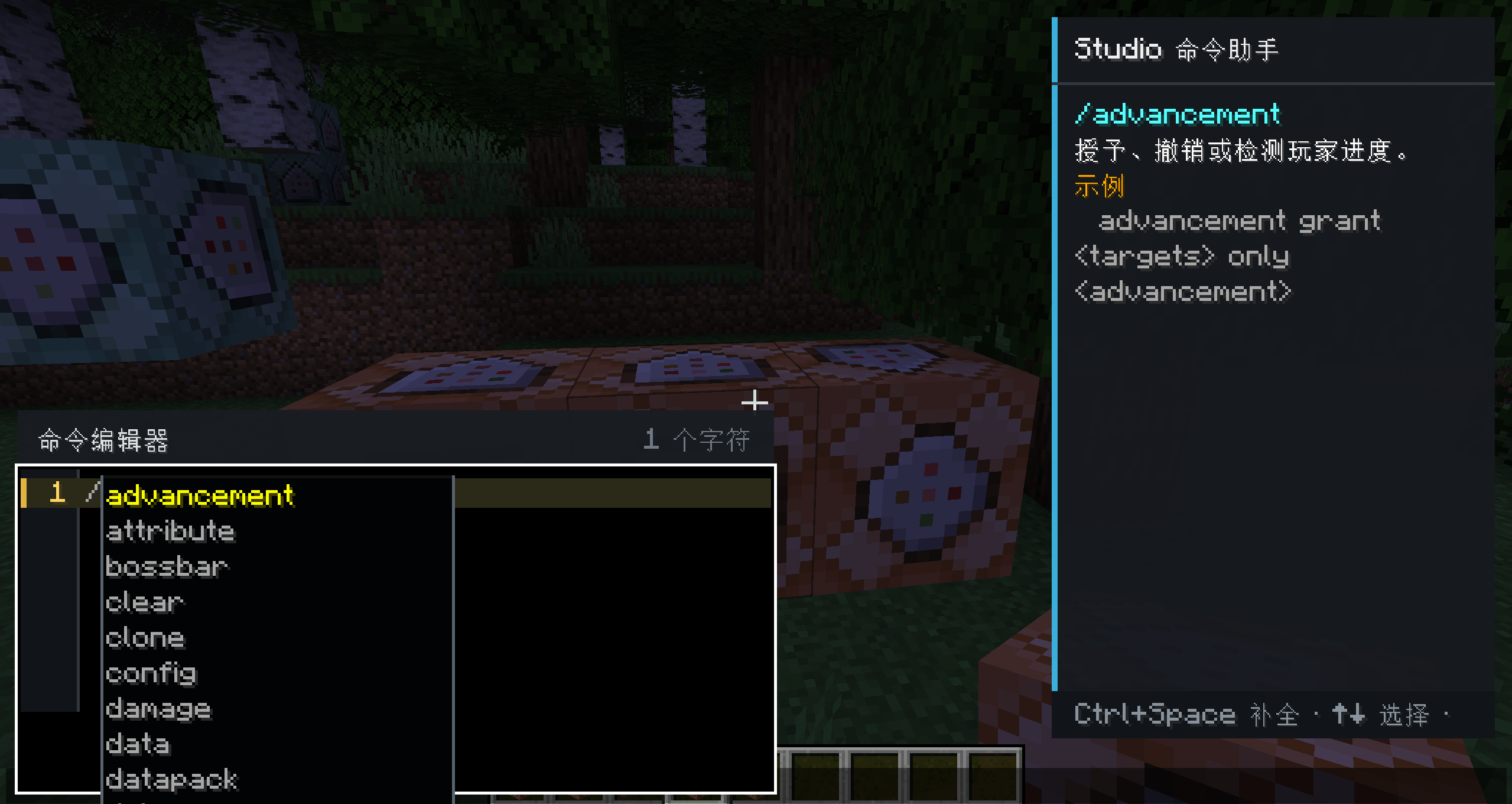
/in chat opens a compact command assistant with completion, documentation and visual previews. - Long-command spacing, wrapping, cursor placement and overlay layout have been corrected.
Installation
The mod can be installed on the client, server or both:
- Client only: full editor, chat assistant, completion, documentation and local visual tools.
- Server only: vanilla clients can still join normally.
- Both sides: shared comments, ten-entry edit history, rollback, run-test and other negotiated features.
Client and server versions do not need to match exactly. Network-assisted features are enabled independently when both sides expose a compatible interface.
Command Block Studio is built with native NeoForge APIs. It does not depend on Fabric API, Architectury, Sinytra Connector or another loader compatibility layer.
1.1.0 Changelog
Added
- Command excerpts and last-edit metadata for copied command block items.
- Configurable in-world work mode with a command block projection.
- One-click command block run testing.
- Chat command assistant with visual block, item, particle and player candidates.
Fixed
- Long-command spaces no longer collapse visually.
- Wrapped command mouse selection and caret placement now remain aligned.
- Completion and documentation overlays avoid the bottom parameter/status area.
- Vanilla chat completions no longer remain behind the Studio editor, and redundant hover documentation is hidden while the right-hand panel is visible.
- Clicking transient Brigadier completion results no longer crashes, and the multiline chat editor receives keyboard focus immediately.
- Quoted-content replacement no longer overlaps completion ghost text.
- Studio icons no longer render enlarged or cropped on Minecraft 1.21.4 and 26.2.
Networking
- Optional client and server installations remain supported.
- Different client/server mod versions can connect.
- Unsupported shared features are hidden or disabled instead of rejecting the connection.
File display names
Command Block Studio 1.1.0 for Minecraft 1.20.4 (NeoForge)
Command Block Studio 1.1.0 for Minecraft 1.21.1 (NeoForge)
Command Block Studio 1.1.0 for Minecraft 1.21.4 (NeoForge)
Command Block Studio 1.1.0 for Minecraft 26.2 (NeoForge)
Upload fields
| Field | Value |
|---|---|
| Release date | 2026-07-25 |
| Release type | Release |
| Mod loader | NeoForge |
| Environment | Client optional / Server optional |
| License | MIT |
| Java | 17 for Minecraft 1.20.4; 21 for 1.21.1 / 1.21.4; 25 for 26.2 |
Build requirements
| Minecraft | NeoForge | Java | File |
|---|---|---|---|
1.20.4 |
20.4.167 |
17 | command_block_studio-1.1.0-1.20.4-NeoForge.jar |
1.21.1 |
21.1.217 |
21 | command_block_studio-1.1.0-1.21.1-NeoForge.jar |
1.21.4 |
21.4.121 |
21 | command_block_studio-1.1.0-1.21.4-NeoForge.jar |
26.2 |
26.2.0.10-beta |
25 | command_block_studio-1.1.0-26.2-NeoForge.jar |
Summary
An IDE-style native NeoForge editor and inspection toolkit for command blocks and chat commands.
Description
Command Block Studio replaces the vanilla command block screen with a focused command development workspace for map makers, server maintainers and technical creators.
Editor features
- Multiline command editing with stable wrapping and scrolling
- Line numbers, syntax highlighting and exact error navigation
- Brigadier-backed completion from the connected world or server
- Quick documentation for commands, parameters and candidates
- Component, item data-component, particle, block, item, enchantment and player assistance
- Search/replace, command templates, placeholders, undo/redo and bracket matching
- Ordered workspace tabs for individual and chained command block
- Command block item tooltips can show wrapped command text, a second-line shared annotation and available edit metadata.
- A configurable work-mode key, defaulting to
Alt+Tab, displays a command panel with shared annotations in front of the targeted command block; a marked vanilla spyglass works as a handheld scanner. - The editor can save and run-test the current command block once.
- Entering
/in chat opens a compact command assistant with completion, documentation and visual previews. - Long-command spacing, wrapping, cursor placement and overlay layout have been corrected.
Installation
The mod can be installed on the client, server or both:
- Client only: full editor, chat assistant, completion, documentation and local visual tools.
- Server only: vanilla clients can still join normally.
- Both sides: shared comments, ten-entry edit history, rollback, run-test and other negotiated features.
Client and server versions do not need to match exactly. Network-assisted features are enabled independently when both sides expose a compatible interface.
Command Block Studio is built with native NeoForge APIs. It does not depend on Fabric API, Architectury, Sinytra Connector or another loader compatibility layer.
1.1.0 Changelog
Added
- Command excerpts and last-edit metadata for copied command block items.
- Configurable in-world work mode with a command block projection.
- One-click command block run testing.
- Chat command assistant with visual block, item, particle and player candidates.
Fixed
- Long-command spaces no longer collapse visually.
- Wrapped command mouse selection and caret placement now remain aligned.
- Completion and documentation overlays avoid the bottom parameter/status area.
- Vanilla chat completions no longer remain behind the Studio editor, and redundant hover documentation is hidden while the right-hand panel is visible.
- Clicking transient Brigadier completion results no longer crashes, and the multiline chat editor receives keyboard focus immediately.
- Quoted-content replacement no longer overlaps completion ghost text.
- Studio icons no longer render enlarged or cropped on Minecraft 1.21.4 and 26.2.
Networking
- Optional client and server installations remain supported.
- Different client/server mod versions can connect.
- Unsupported shared features are hidden or disabled instead of rejecting the connection.
File display names
Command Block Studio 1.1.0 for Minecraft 1.20.4 (NeoForge)
Command Block Studio 1.1.0 for Minecraft 1.21.1 (NeoForge)
Command Block Studio 1.1.0 for Minecraft 1.21.4 (NeoForge)
Command Block Studio 1.1.0 for Minecraft 26.2 (NeoForge)
Upload fields
| Field | Value |
|---|---|
| Release date | 2026-07-25 |
| Release type | Release |
| Mod loader | NeoForge |
| Environment | Client optional / Server optional |
| License | MIT |
| Java | 17 for Minecraft 1.20.4; 21 for 1.21.1 / 1.21.4; 25 for 26.2 |
Build requirements
| Minecraft | NeoForge | Java | File |
|---|---|---|---|
1.20.4 |
20.4.167 |
17 | command_block_studio-1.1.0-1.20.4-NeoForge.jar |
1.21.1 |
21.1.217 |
21 | command_block_studio-1.1.0-1.21.1-NeoForge.jar |
1.21.4 |
21.4.121 |
21 | command_block_studio-1.1.0-1.21.4-NeoForge.jar |
26.2 |
26.2.0.10-beta |
25 | command_block_studio-1.1.0-26.2-NeoForge.jar |
Screenshots
Gallery
-
 å±å¹æªå¾ 2026-07-25 164723.png å±å¹æªå¾ 2026-07-25 164723.png
 -
 å±å¹æªå¾ 2026-07-25 164809.png å±å¹æªå¾ 2026-07-25 164809.png
 -
 å±å¹æªå¾ 2026-07-25 164759.png å±å¹æªå¾ 2026-07-25 164759.png
Versions
Files
Relations
Project Relations
More like this
Similar Mods
Suggestions use data such as tags, dependencies, dependents, descriptions, titles, and more to rank how much they overlap with this mod.
On ModDex
Community snapshot
By the numbers
Statistics
Want to reach Minecraft players?
We're looking for a server hosting partner to feature here and other parts of the site. Interested? Send us a message!
Get in touchGet it on
Available Platforms
On ModDex
Community snapshot
By the numbers