
Community listing page, reviews here may not be monitored by the author.
CompassFindings


No reviews yet
A lightweight client-side HUD compass mod that adds a clean mini compass to the top-left corner of your screen for quick navigation and player tracking.
Community voices
Reviews
No reviews yet. Be the first to review this project!
Get it on
Available Platforms
Compatibility
Supported Environments
Runs entirely on the client. Works on vanilla servers.
About
Project Details
For authors
Embed Badge
If you're the author of this project, you can embed a live badge anywhere that supports HTML or Markdown. It updates automatically whenever ratings change.
Use HTML for any page that supports it, or Markdown for README files and Markdown-based descriptions.
Identifiers
Platform IDs
About
Description
Follow My Github
HUD Compass Mod — Minecraft 1.21.10 (Fabric)
A lightweight client-side HUD compass mod that adds a clean mini compass to the top-left corner of your screen for quick navigation and player tracking.
Perfect for SMPs, PvP, survival, exploration, and team gameplay — all without installing anything on the server.
Features
| Feature | Description |
|---|---|
| 🧭 HUD Compass | Minimal always-visible compass rendered in the top-left corner |
| 🌍 Spawn Mode | Compass needle points directly toward world spawn |
| 👥 Player Mode | Displays separate compass indicators for nearby or tracked players |
| ⚡ Quick Toggle | Switch modes instantly with Ctrl + Alt + Z |
| 🎯 Player Tracking | Pin specific players using /compasstrack commands |
| 📏 Distance Display | Shows real-time direction and distance |
| 🖥 Client-Side Only | No server installation required |
| 🚀 Lightweight | Minimal performance impact and clean UI design |
🎮 Controls
| Action | Keybind |
|---|---|
| Toggle Spawn ↔ Player Mode | Ctrl + Alt + Z |
The current mode is briefly displayed in the action bar whenever you switch modes.
Commands (Client-Side)
/compasstrack add <player>Adds a player to your tracked list.
/compasstrack remove <player>Removes a player from the tracked list.
/compasstrack listDisplays all currently tracked players.
/compasstrack clearClears the tracked list and re-enables automatic nearby player detection.
Player Detection
When no tracked players are set, Player Mode automatically detects and displays nearby players currently loaded in your world/chunks.
This makes the mod useful for:
- SMP coordination
- Tracking teammates
- PvP hunting
- Finding friends nearby
- Navigating crowded multiplayer servers
Compatibility
- Minecraft 1.21.10
- Fabric Loader
- Client-side only
- Works on most multiplayer servers
- No server plugins required
Why Use HUD Compass?
Unlike the vanilla compass, HUD Compass gives you:
- Instant directional awareness
- Multi-player tracking
- Cleaner navigation
- No inventory slot usage
- Better multiplayer utility
A simple but powerful navigation tool built for modern multiplayer gameplay.
** HUD Compass Mod — Minecraft 1.21.10 (Fabric)**
A lightweight client-side HUD compass mod that adds a clean mini compass to the top-left corner of your screen for quick navigation and player tracking.
Perfect for SMPs, PvP, survival, exploration, and team gameplay — all without installing anything on the server.
** Features Feature Description**
-HUD Compass Minimal always-visible compass rendered in the top-left corner
-Spawn Mode Compass needle points directly toward world spawn
-Player Mode Displays separate compass indicators for nearby or tracked players
-Quick Toggle Switch modes instantly with Ctrl + Alt + Z
-Player Tracking Pin specific players using /compasstrack commands
-Distance Display Shows real-time direction and distance
-Client-Side Only No server installation required
-Lightweight Minimal performance impact and clean UI design
** Controls Action Keybind**
Toggle Spawn ↔ Player Mode Ctrl + Alt + Z
The current mode is briefly displayed in the action bar whenever you switch modes.
**Commands (Client-Side) **
/compasstrack add <player>
Adds a player to your tracked list.
/compasstrack remove <player>
Removes a player from the tracked list.
/compasstrack list
Displays all currently tracked players.
/compasstrack clear
Clears the tracked list and re-enables automatic nearby player detection.
** Player Detection ** When no tracked players are set, Player Mode automatically detects and displays nearby players currently loaded in your world/chunks.
This makes the mod useful for:
-SMP coordination
-Tracking teammates
-PvP hunting
-Finding friends nearby
-Navigating crowded multiplayer servers
** Compatibility **
-Minecraft 1.21.10
-Fabric Loader
-Client-side only
-Works on most multiplayer servers
-No server plugins required
Why Use HUD Compass?
Unlike the vanilla compass, HUD Compass gives you:
-Instant directional awareness -Multi-player tracking -Cleaner navigation -No inventory slot usage -Better multiplayer utility
A simple but powerful navigation tool built for modern multiplayer gameplay.
Screenshots
Gallery
-
 CompassFinding A lightweight client-side HUD mod that displays a small compass in the top-left corner of your screen.
 -
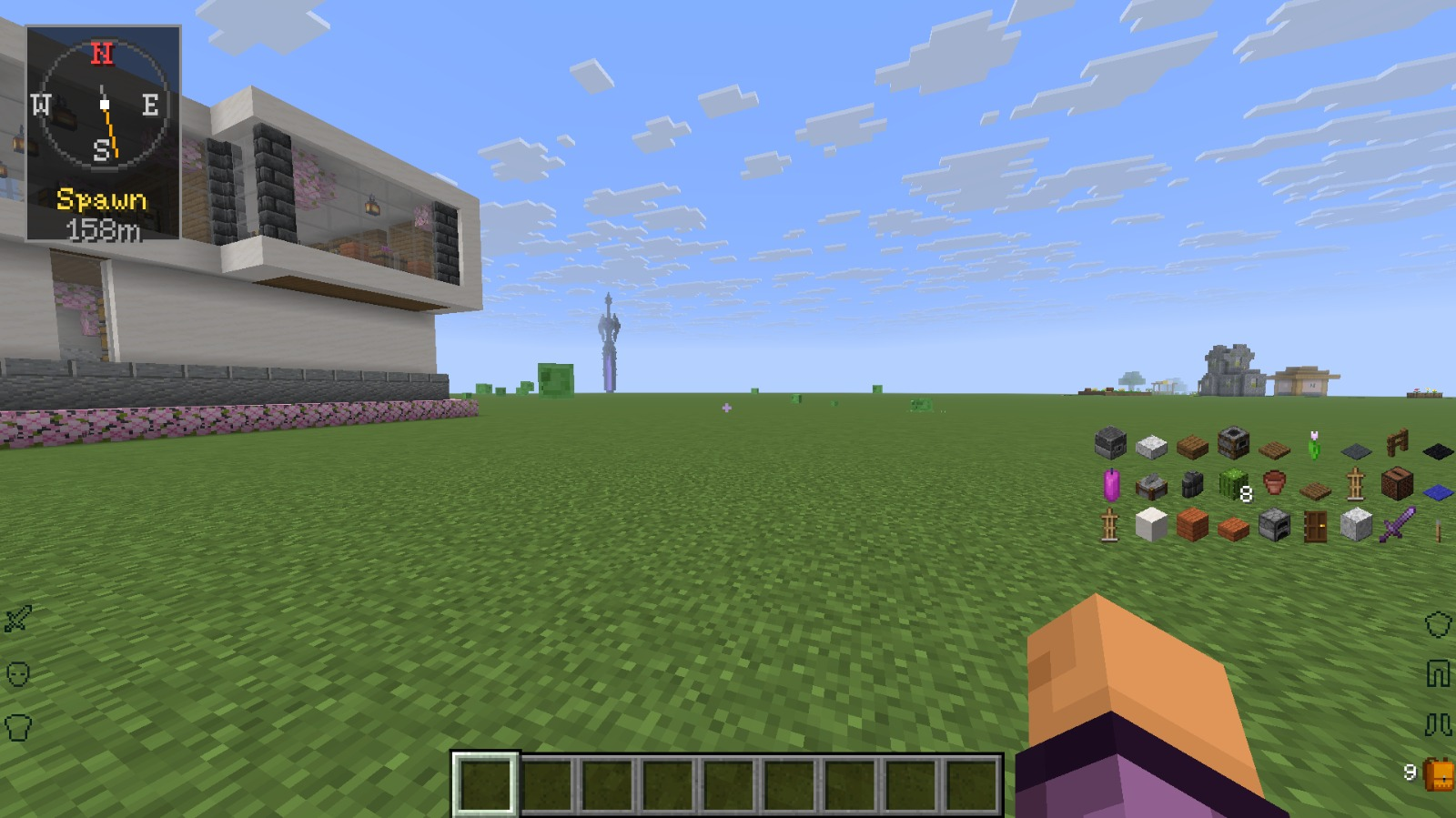 Shows World Spawn Press Ctrl+alt+Z to point it to the world spawn
 -
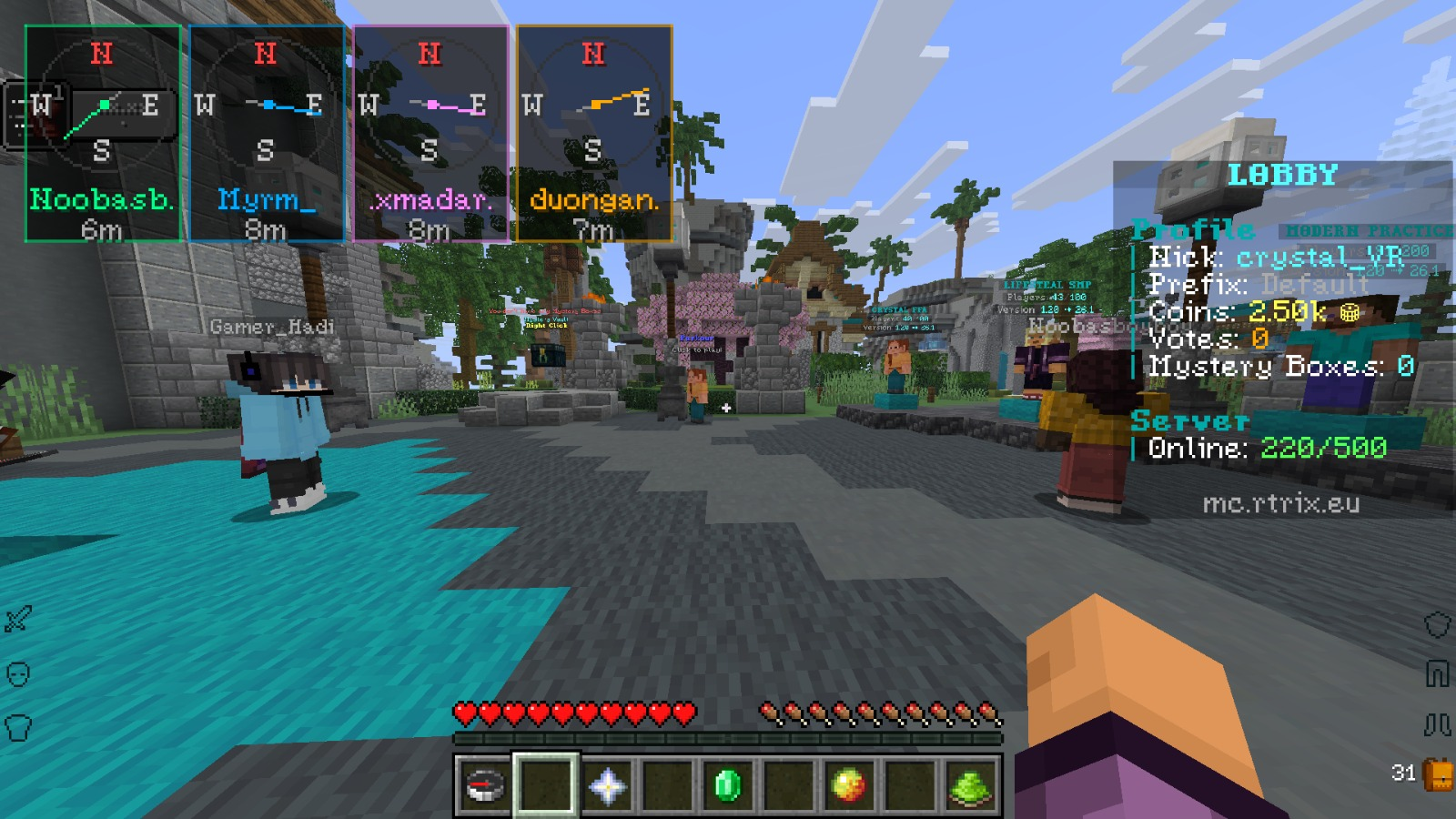 Show possible players to track Press Ctrl+alt+Z to Show all players to track
 -
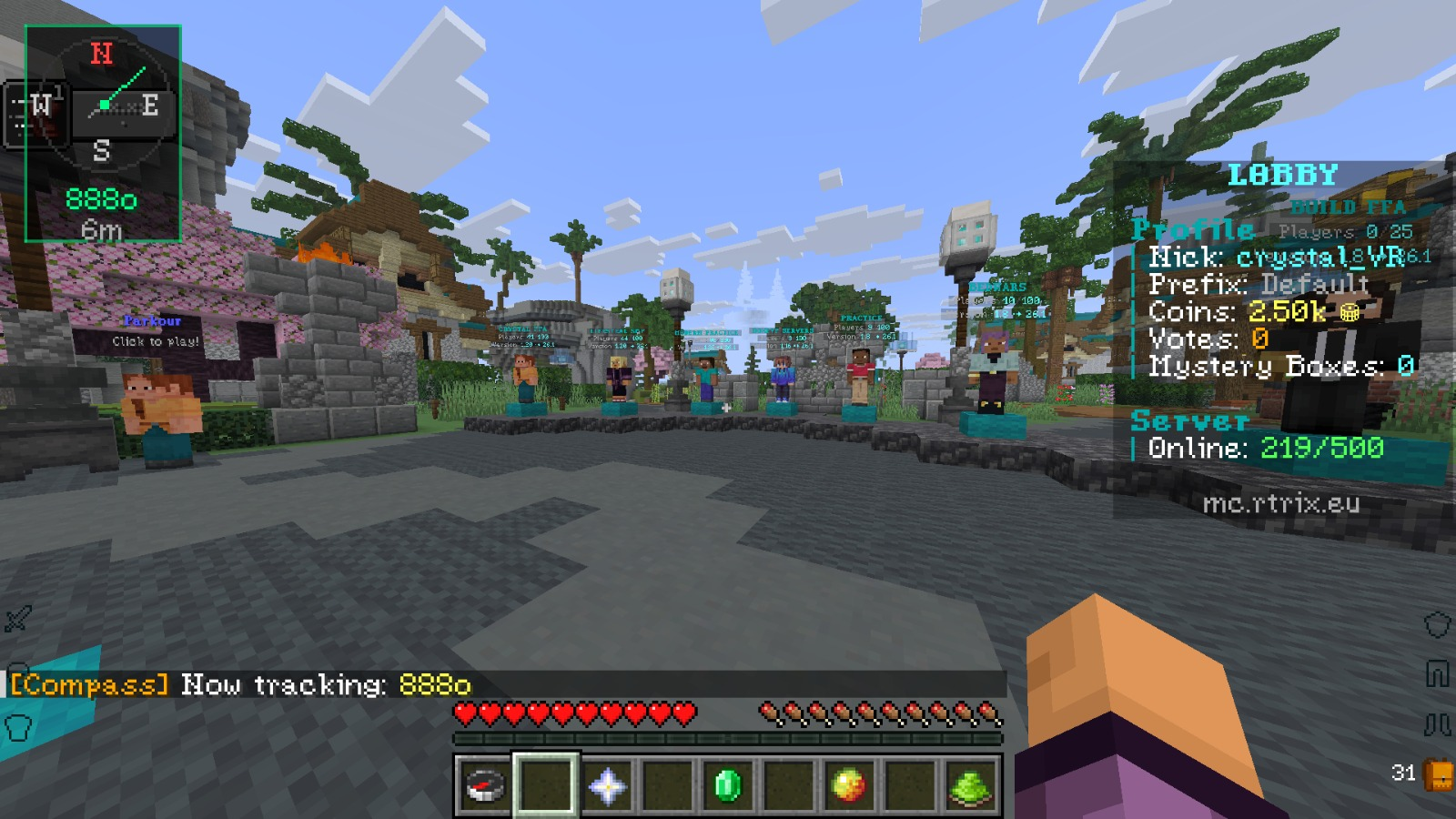 Track a player Use /compasstrack add <player> to track a specific player
 -
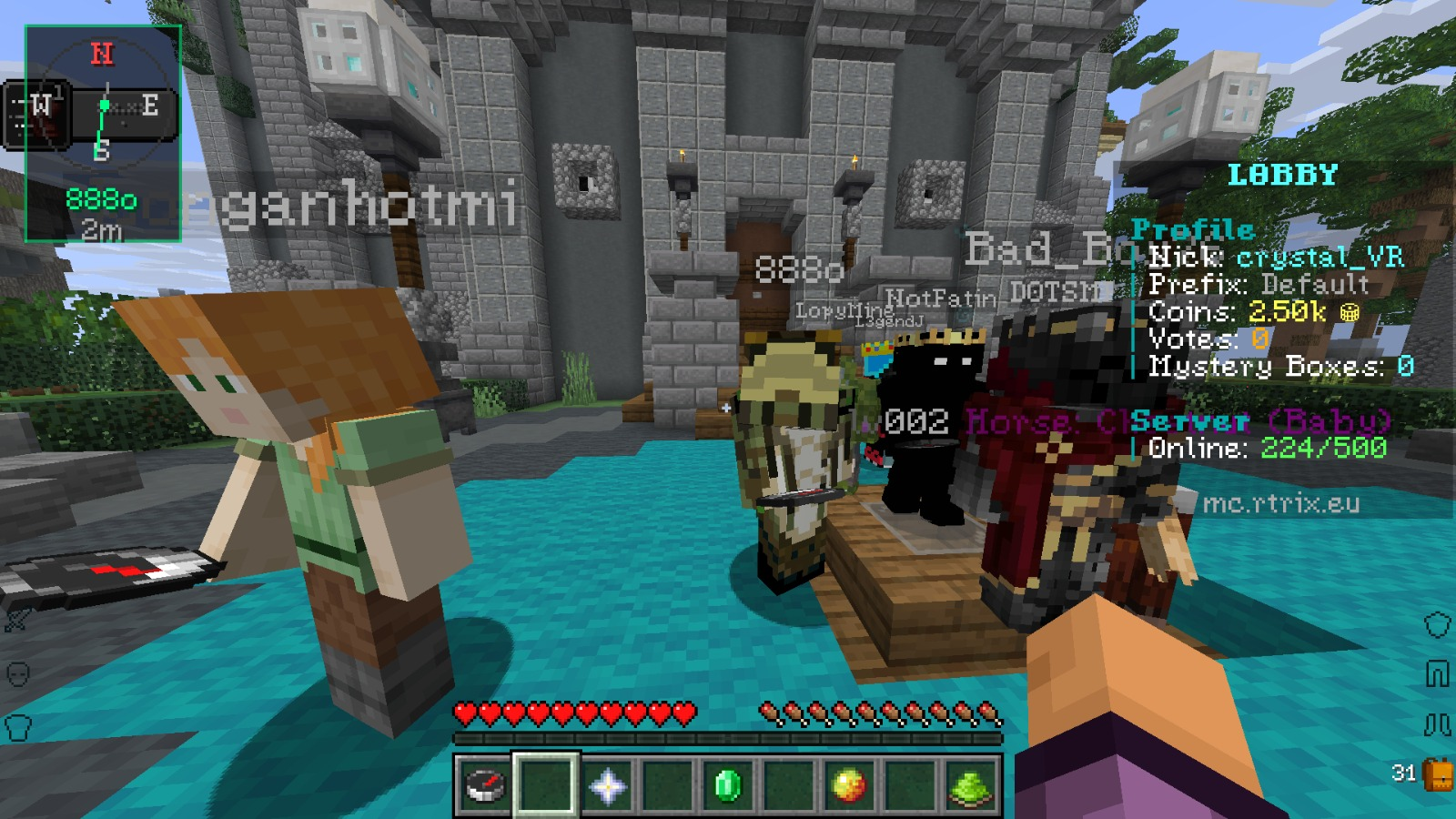 Tracked player Showing the compass that it follows the tracked player
Versions
Files
Relations
Project Relations
More like this
Similar Mods
Suggestions use data such as tags, dependencies, dependents, descriptions, titles, and more to rank how much they overlap with this mod.
On ModDex
Community snapshot
By the numbers
Statistics
Want to reach Minecraft players?
We're looking for a server hosting partner to feature here and other parts of the site. Interested? Send us a message!
Get in touchGet it on
Available Platforms
On ModDex
Community snapshot
By the numbers