
Component Viewer
No reviews yet
Component Viewer is a mod for Minecraft Java Edition that allows you to view and copy components of any item stack.
Does not follow a specific thematic focus apart from vanilla Minecraft.
Used for mods with little to no gameplay elements.
Includes quality of life improvements and small tweaks to enhance and customize gameplay.
Adds client-side tools and features to enhance the user experience.
Neoforge is a fork of the Minecraft Forge available for versions 1.20.1+ of Minecraft. Many Forge mods are compatible with Neoforge and vice versa.
Fabric is a mod loader for versions 1.14+ of Minecraft, particularly popular for client side and optimization mods.
Quilt is a fork of the Fabric mod loader. Many Fabric mods are compatible with Quilt and vice versa.
Community voices
Reviews
Click once to include, again to exclude, again to clear
No reviews yet. Be the first to review this project!
Get it on
Available Platforms
 Modrinth
Compatibility
Supported Environments
About
Project Details
For authors
Embed Badge
If you're the author of this project, you can embed a live badge anywhere that supports HTML or Markdown. It updates automatically whenever ratings change.
Use HTML for any page that supports it, or Markdown for README files and Markdown-based descriptions.
Identifiers
Platform IDs
About
Description
🗒️ Description
Component Viewer is a mod for Minecraft Java Edition that allows you to view and copy components of any item stack. This mod is configurable out of the box by pressing J. If tooltips become extensively large, you can use a mod like Tooltip Scroll or just copy the data to a separate text file. Fabric API is required when using Fabric or Quilt.
I'm running a survey to better understand how people are using this mod. I want to collect ideas to improve this mod based on your feedback. I takes a few minutes and I would appreciate it: Google Form (last updated: July 26, 2026)
Thank you! :D
✨ Features
- Client-side only
- View individual components or the item stack data in tooltips
- Copy component values or item stack data to the clipboard
- Nicely formatted data in e.g. SNBT or JSON
- Configurable without needing to install additional mods
⌨️ Default Controls
- Hold
ALTto display components - While holding
ALT:- Tap
DOWNto switch to the next component - Tap
UPto switch to the previous component - Or scroll with your mouse wheel to select any component
- Press
CTRL+Cto copy component data - Press
Jto open the config screen
- Tap
🚀 Example
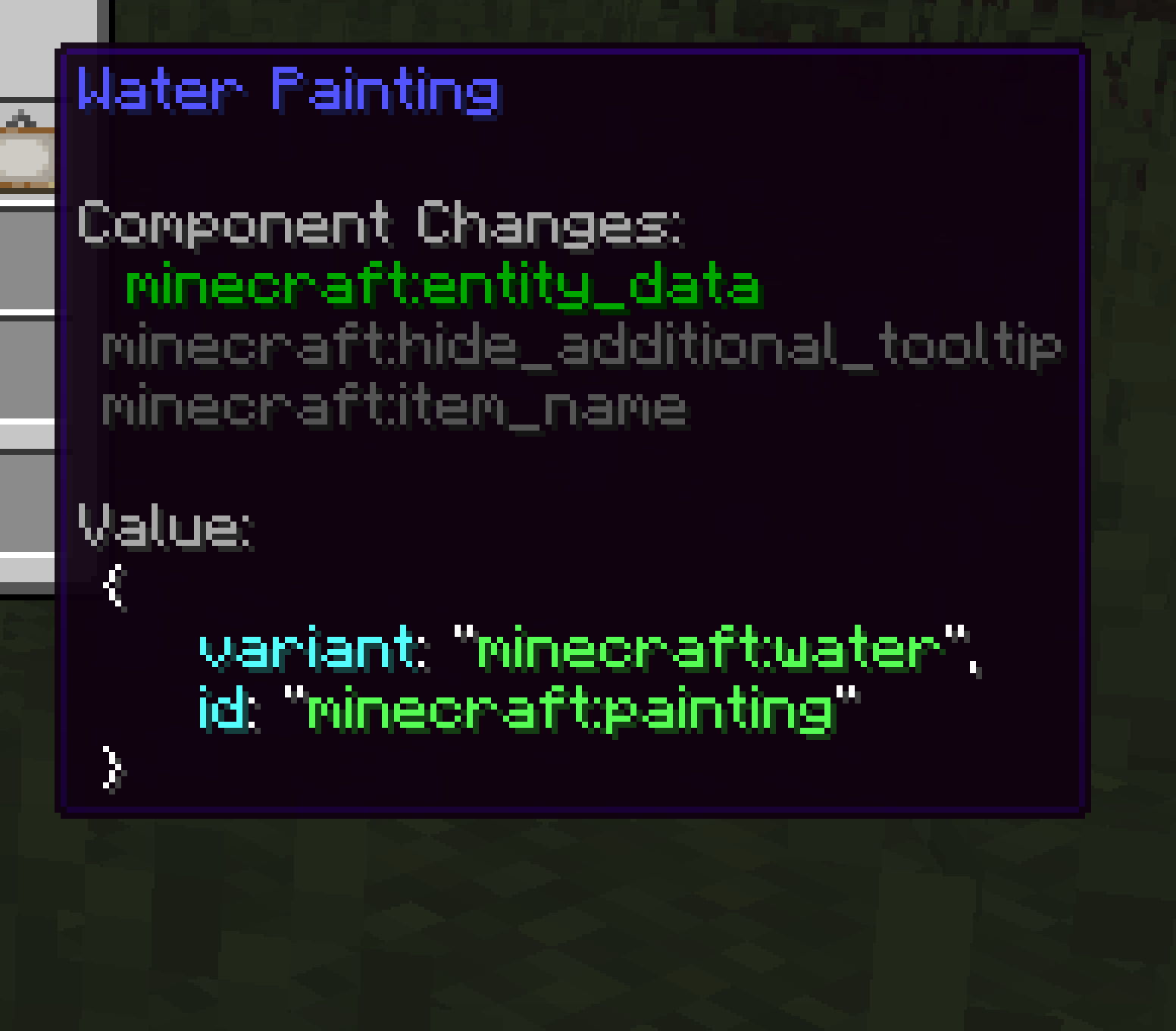
🌍 Languages
Component Viewer is translated by people like you ❤️
If you want to help translate Component Viewer into whatever language you like, take a look at the contributing guidelines.
Translation Progress (Latest Version)
The progress below might not be 100% accurate all the time.
- English
- Simplified Chinese (100%)
- by 4tubborn
- by xFoxty
- Ukrainian (98%)
- by StarmanMine142
🔍 Useful Resources
- 🐛 Issues: For reporting bugs or suggesting features
- 📝 Changelog: Keep track of all notable changes made to the mod
- 🌱 Contributing: How to contribute?
Screenshots
Gallery
-
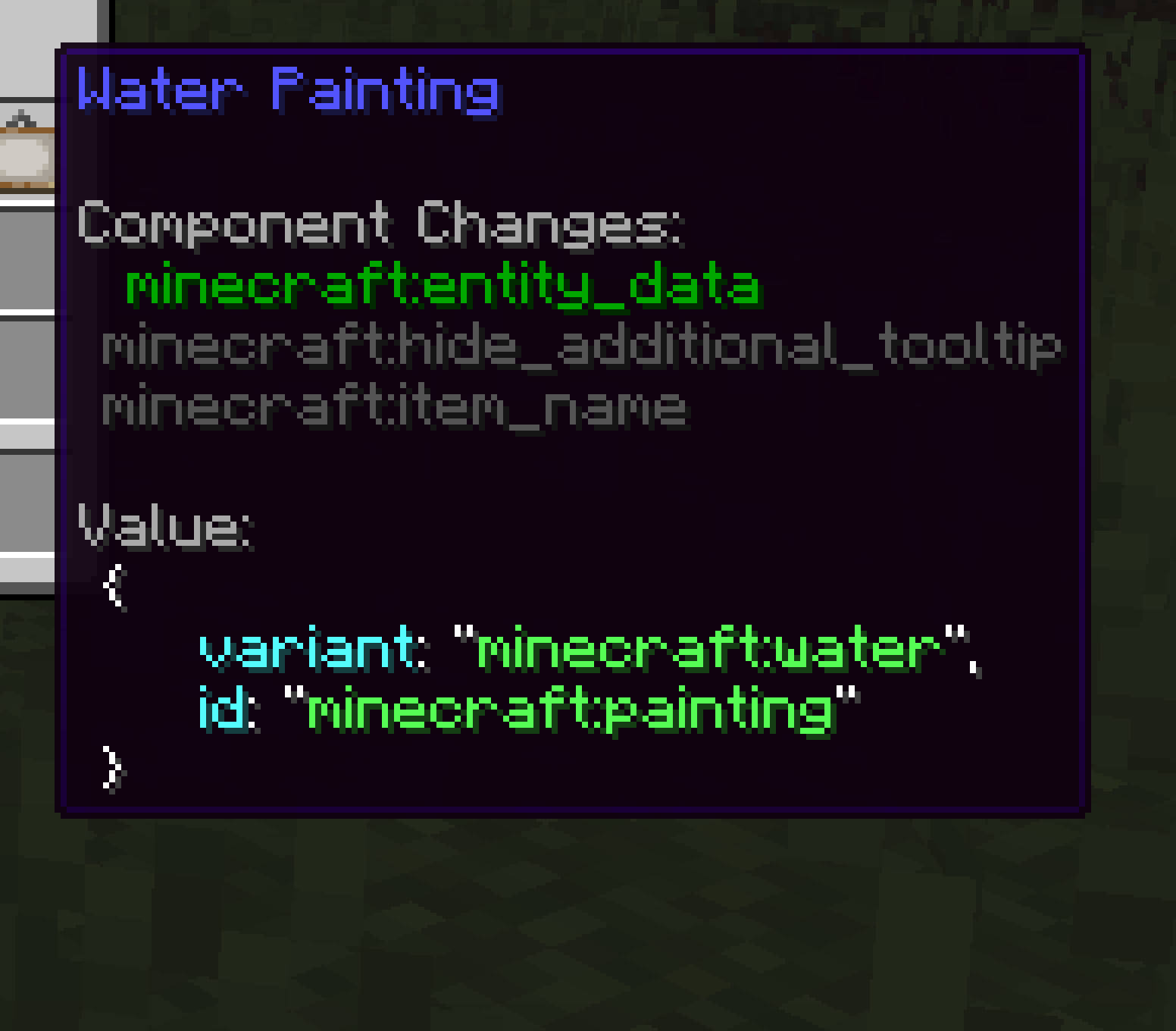 Water Painting Displayed as individual components
 -
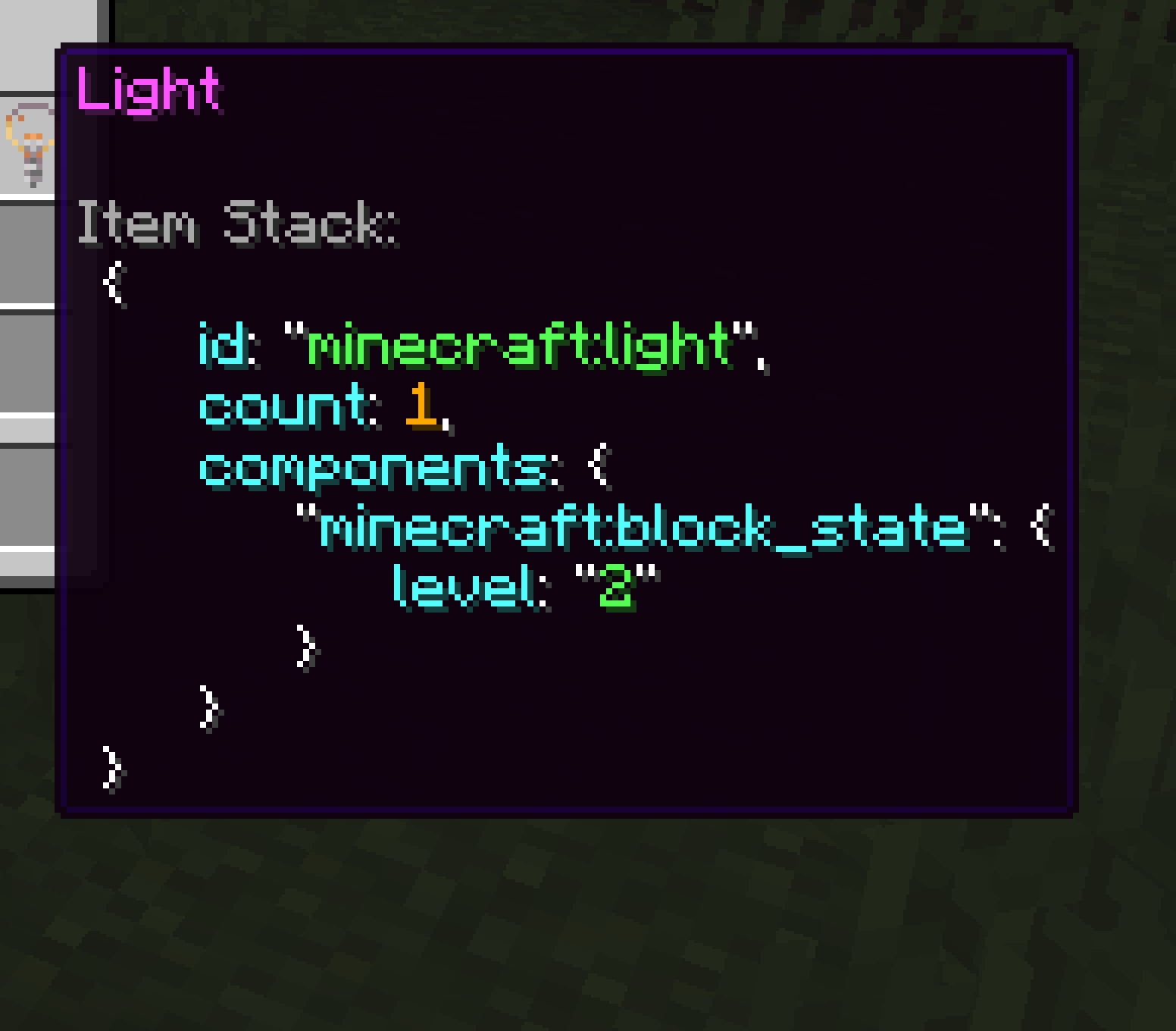 Light Displayed as item stack data
 -
 Tooltip Configs
 -
 Clipboard Configs
 -
 Control Configs
 -
 Preview
Versions
Files
Relations
Project Relations
More like this
Similar Mods
Suggestions use data such as tags, dependencies, dependents, descriptions, titles, and more to rank how much they overlap with this mod.
On ModDex
Community snapshot
By the numbers
Statistics

Want to reach Minecraft players?
We're looking for a server hosting partner to feature here and other parts of the site. Interested? Send us a message!
Get in touchGet it on
Available Platforms
On ModDex
Community snapshot
By the numbers