Community listing page, reviews may not be monitored by the author.
Control Craft

No reviews yet
ControlCraft is a mod about sending and receiving wireless redstone signals

Community voices
Reviews
No reviews yet. Be the first to review this project!
Get it on
Available Platforms
About
Project Details
For authors
Embed Badge
If you're the author of this project, you can embed a live badge anywhere that supports HTML or Markdown. It updates automatically whenever ratings change.
Use HTML for any page that supports it, or Markdown for README files and Markdown-based descriptions.
Identifiers
Platform IDs
Resources
External Links
About
Description

ControlCraft is a mod about sending and receiving wireless redstone signals. The mod adds 2 blocks into the game – the Control Center and the Wireless Receiver. With the Control Center you can add frequencies which you can turn on and off and with the Wireless Receiver you can also set a frequency, but only one at a time. Depending on the Control Center’s redstone signal, the Wireless Receiver will output a redstone signal, or not.
Crafting
Here are all crafting recipes listed:

Security System
The Control Center and Wireless Receiver have got 3 different security types:
- Public
- Friends
- Private
If you have set the security to “Public”, everyone can use the block.
If you have set the security to “Friends”, only your friends can use the block. You can add/remove friends by using the command /friends <add | remove> <player>
If you have set the security to “Private”, only the owner of the block can use it. The owner of a block is the player who placed the block.
The security can only be changed by the owner of the block, although the security is set to Public or Friends.
Lock System
In the Control Center you have the opportunity to "lock" frequencies, so that other people can't add it to their Control Centers to control them. This is very usefull in Multiplayer mode, because no one can control your frequencies.
If you lock a frequency which is already set in another Control Center, the frequency in the other Control Center will be removed.
So, to lock a frequency, just click into the other column next to the frequency (like shown in the picture below):

Side Configuration
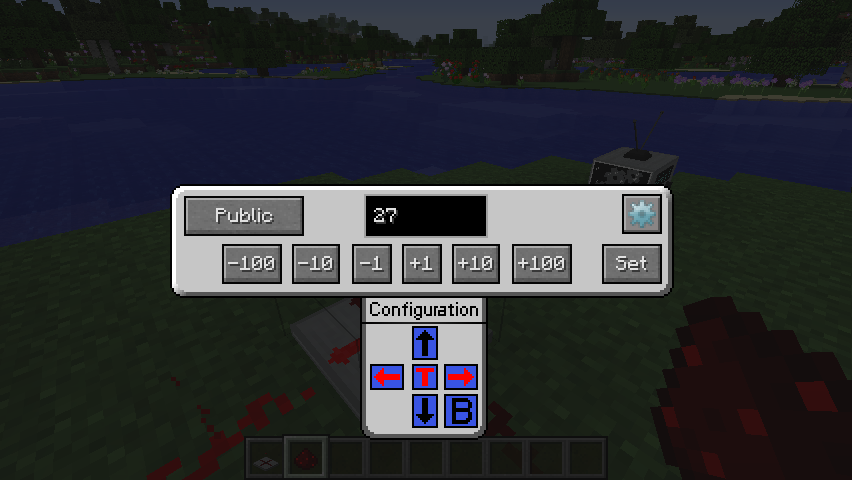
In the Wireless Receiver’s GUI you have the opportunity to change into which directions a redstone signal will be outputted. Just click on the gear button in the top right corner to open the side configuration. By clicking on the arrows you can change the signal. A red arrow means that on this side a redstone signal will be outputted. On the other hand if the arrow is black, no redstone signal will be outputted. The “T” and “B” stand for “Top” and “Bottom”. It’s the same like the arrows, only the direction is different.

Upgrades
The Control Center has got 4 Upgrade slots on the right site of the GUI, although you can only apply one upgrade at this point. I’m planning to add a lot more in the future. So, the upgrade is called the “Range Upgrade”. If you have applied the Range Upgrade, a new “Slider” is added to the GUI when you select a frequency. The value (1-15) of the slider describes the range of the redstone signal which will be outputted at the Wireless Receiver. So, if you set the range to 5, the Wireless Receiver will only output a 5 blocks long redstone signal.
Installation
First, make sure you've downloaded and installed Minecraft Forge. ControlCraft goes in the mods folder inside .minecraft or your server's mods folder.
License and Modpacks
ControlCraft is under the “All Rights Reserved” license. Feel free to use my mod in your modpacks. I would appreciate if you could inform me in which modpack you’re using my mod to keep track of it. Anyway, you don’t need my permission.
Bugs
There are no known bugs yet. However, I would really appreciate if you could contact me if you’ve found any bug. It’s up to you how you like to contact me. Possible ways are:
-) leave a comment on this thread
-) PM me
Screenshots

I hope you enjoy the mod I've created,
Julian
Screenshots
Gallery
-
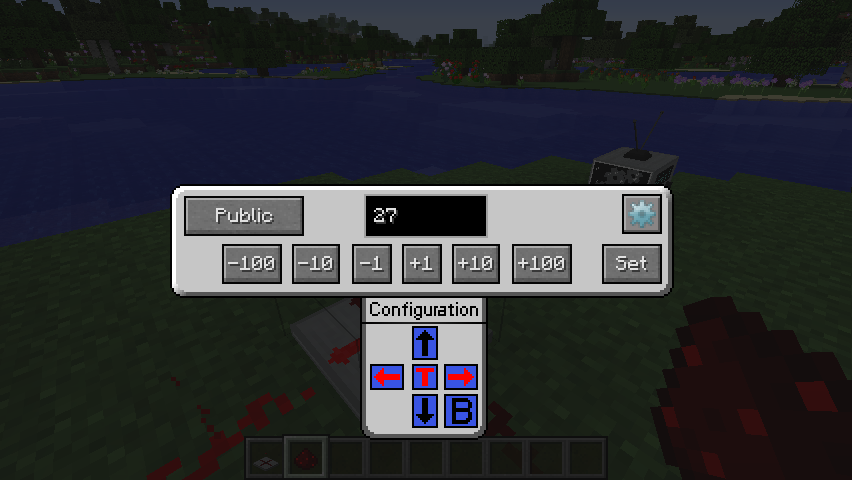 Wireless Receiver GUI
 -
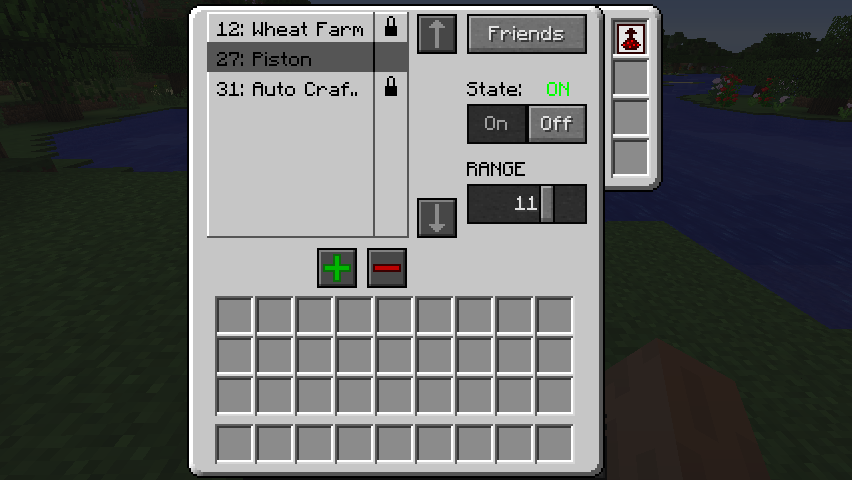 Control Center GUI
Versions
Files
Relations
Project Relations
More like this
Similar Mods
Suggestions use data such as tags, dependencies, dependents, descriptions, titles, and more to rank how much they overlap with this mod.
On ModDex
Community snapshot
By the numbers
Statistics

Get it on
Available Platforms
On ModDex
Community snapshot
By the numbers
Statistics
Resources