Community listing page, reviews here may not be monitored by the author.
Craft++ by Anon10W1z

No reviews yet
A simple vanilla-enhancing mod

Community voices
Reviews
No reviews yet. Be the first to review this project!
Get it on
Available Platforms
About
Project Details
For authors
Embed Badge
If you're the author of this project, you can embed a live badge anywhere that supports HTML or Markdown. It updates automatically whenever ratings change.
Use HTML for any page that supports it, or Markdown for README files and Markdown-based descriptions.
Identifiers
Platform IDs
About
Description
Introduction
Craft++ is a Minecraft mod designed to enhance vanilla Minecraft without going overboard. It is designed to be minimally invasive and configurable to create a user experience like none other.
Quick Links
- Website (for all things Craft++)
- Minecraft Forum thread (to request features and give feedback)
- JavaDoc
Pictures


Installer Interface:
Features
Craft++ adds a multitude of features to enhance your world.
- Several new enchantments!
- Nimble and Hops: These enchantments go on your boots, and can go all the way up to level 3. Each level adds a bit to your movement speed and jump height, respectively.
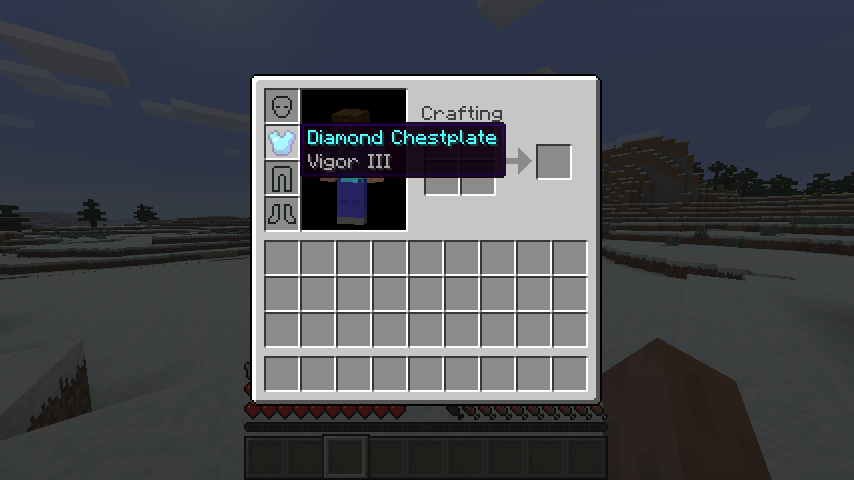
- Vigor: Goes on your chestplate. It will grant the wearer a one heart max health increase per enchantment level, maximum of 3.
- Veteran: Goes on your head, instantly increasing your knowledge! It will attract all experience orbs in a 32-block radius towards you!
- Blazing: Automatically smelts everything the block drops. If you have fortune on your item, it will increase the stack size of the drops accordingly - but not for drops that are blocks themselves. It cannot be applied with Silk Touch, obviously. Only available at level 1.
- Siphon: All mined block drops instantly go into your inventory! You won't have to deal with a pesky zombie or friend stealing your freshly-mined diamonds again! It is friendly with Silk Touch and Blazing.
- Homing: Your arrows will aim right at your target. Level 1 works for entities 32 blocks away, level 2 works for entities 64 blocks away, and level 3 128 blocks away.
- New items!
- Dynamite: Simple throwable TNT! It is crafted out of a string on the top, a sand directly below that, and a piece of gunpowder below that and to the left. You can also dispense it out of a dispenser! It won't work when wet, either by rain or water. Credits to TooMuchTNT, made by MinecraftTNTstuff, for the texture.
- Obsidian Boat: A boat for the nether: It works in lava, but not water. Be careful: it is hard to steer, and breaking it may lead to the loss of the boat if the item falls in lava. Craft it the same way you'd craft a boat, but with obsidian.
- Fried Egg: Simply toss an egg in the furnace to produce it! It will heal 2.5 hunger bars.
- Binocular Lens: A crafting ingredient for binoculars. See above for the crafting recipe picture.
- Binoculars: A non-OP way to zoom! See above for the crafting recipe. The amount of zoom is configurable.
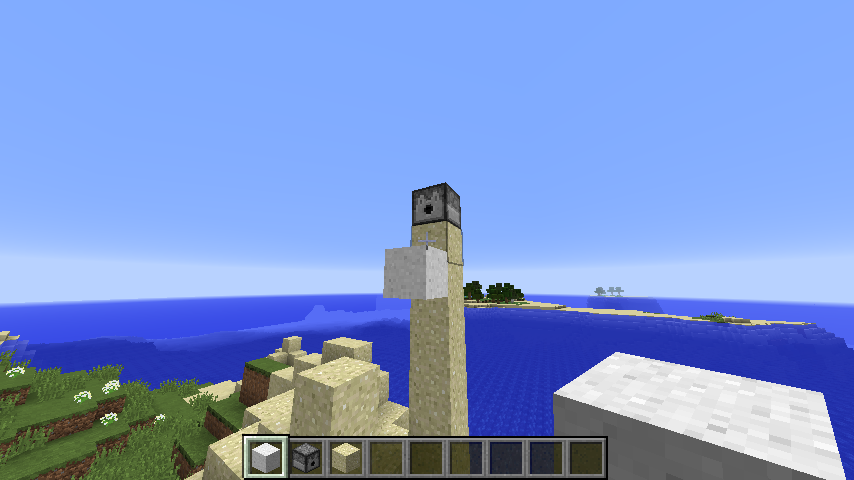
- Storage blocks for flint, sugar, and charcoal. Charcoal blocks can be used like coal blocks, and sugar blocks fall like sand. Credits to Minestrappolation for the textures (IIRC).
- Falling blocks such as sand, sugar, and gravel can be fired out of dispensers. Great for suffocation traps!
- Enhanced mob drops!
- Named mobs will drop their name tags.
- Bats drop leather
- Endermen drop their held blocks.
- Creepers have a 1/10 chance of dropping a TNT block.
- More realistic predator/prey relationships! When ocelots kill chickens, the chickens won't drop meat! Same for wolves and sheep!
- Seeds will plant themselves after a (randomly-determined) couple of seconds delay. Farms can now be more easily automated!
- Enhanced mob spawners!
- When hovering over mob spawners with your mouse in creative mode, you can see the name of the mob it spawns.
- They drop themselves when you use silk touch.
- Crafting table changes!
- 4 planks in a square yields a crafting pad, which is essentially a crafting table as an item that opens up on right click.
- Craft a crafting pad on top of another plank to yield a crafting table.
- You will get the Workbenching achievement upon crafting the crafting pad.
- You can now place cactuses next to solid blocks.
- Command blocks can be found in the redstone creative tab. Dragon eggs can be found in the decorations tab.
- Buttons are named according to their material! (E.g. stone/wooden buttons)
- Stone tools are crafted out of stone rather than cobblestone.
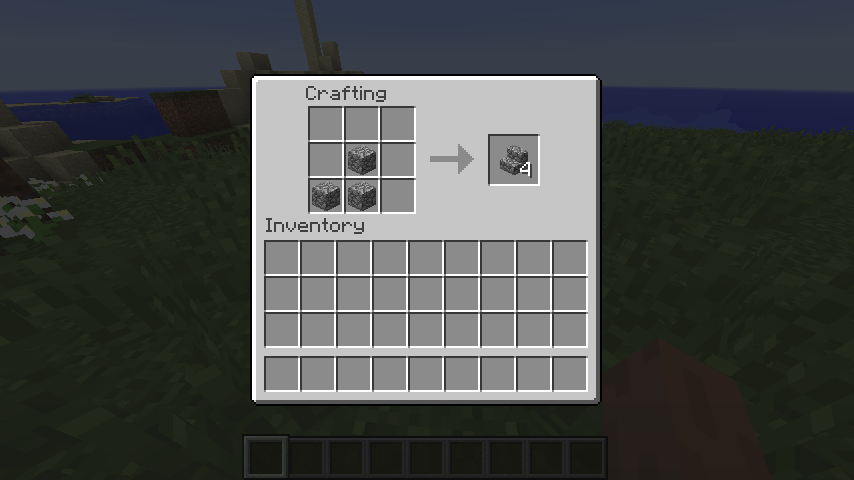
- You only need 3, rather than 6, source blocks to craft stairs. They are still crafted in the same pattern.
- Crafting buttons gives you 4 rather than 1.
- Potion and enchantment level roman numerals now are displayed up to level 128.
- Tools can no longer be repaired by simply putting them together in a workbench. Use an anvil.
- Wool can be back-crafted into 4 string.
- Lastly, dirt and clay fall just like sugar and sand!
Craft++ is extremely configurable. Everything from enabling and disabling enchantments to automatic seed planting can be configured straight from the config GUI, accessible from the mods menu or the game menu. It is advised to delete your config file every time you update Craft++, for the configuration options may have changed.
The Craft++ installer only needs to be downloaded once. From there you can install any version of Craft++, even future versions from when the installer was released.
Downloads
Check out the Files tab of the Craft++ project for downloads.
Miscellaneous
I am the only coder of this mod. My mod uses the Anon10W1z license, included in the Github repository.
The JavaDoc is hosted right on Github here.
I am available on Reddit, the Minecraft Forge Forum, and the Minecraft Forum under the same username (Anon10W1z).
Screenshots
Gallery
-
 Sugar Block
 -
 Vigor
Vigor -
 Stairs
Versions
Files
Relations
Project Relations
More like this
Similar Mods
Suggestions use data such as tags, dependencies, dependents, descriptions, titles, and more to rank how much they overlap with this mod.
On ModDex
Community snapshot
By the numbers
Statistics
 (opens in a new tab)
Get it on
Available Platforms
On ModDex
Community snapshot
By the numbers