![Craftable Uncraftable Objects [CUO]](https://cdn.modrinth.com/data/hsI8RgBE/501f53c05c1c7d25d49f854c7c4e9ac794cda009_96.webp)
Community listing page, reviews here may not be monitored by the author.
Craftable Uncraftable Objects [CUO]

No reviews yet
Minecraft project allows you to craft any object you can't craft it in your vanilla Minecraft world.
Community voices
Reviews
No reviews yet. Be the first to review this project!
Get it on
Available Platforms
About
Project Details
For authors
Embed Badge
If you're the author of this project, you can embed a live badge anywhere that supports HTML or Markdown. It updates automatically whenever ratings change.
Use HTML for any page that supports it, or Markdown for README files and Markdown-based descriptions.
Identifiers
Platform IDs
Resources
External Links
About
Description
A Minecraft Project that adds crafting recipes for normally uncraftable items in Survival mode, along with custom advancements for a more rewarding experience.
✨ Features
- New Crafting Recipes: Craft items like the Enchanted Golden Apple, Totem of Undying, Trident, Horse Armors, Chainmail Armors, and more.
- Custom Advancements: Unique rewards for crafting special items.
- Wide Compatibility: Supports Minecraft Java Edition from version 1.13.x up to the latest snapshots.
🏆 Advancements & 📜 Recipes
Advancements
Not Enough Recycling!

You will get this Advancement when you craft all Recycling recipes.
Who Enchanting Armor Those Days?

You will get this Advancement when you craft or have an Enchanted Golden Apple.
Forget Die.

You will get this Advancement when you craft or have a Totem of Undying.
Water Weapon.

You will get this Advancement when you craft or have a Trident.
It's Time to Take a Horse.

You will get this Advancement when you craft or have a Saddle.
WoW!

You will get this Advancement when you craft or have an Experience Bottle.
Recipes
Bell

Chainmail Armors
Chainmail Helmet

Chainmail Chestplate

Chainmail Leggings

Chainmail Boots

Cobweb

Crying Obsidian (1.17 or newer)

Debug Stick

Recommended to use Tweaker Stick Data Pack to able to use it with full functionality or instead use Creative mode to able to use it until I add an update that fix this problem.
Elytra

Enchanted Golden Apple

Experience Bottle

Gunpowder


It will take 30 seconds to give you 1 Gunpowder.
(Only works on Furnace)
Horse Armors
Diamond Horse Armor

Golden Horse Armor

Iron Horse Armor

Copper Horse Armor (1.21.9 or newer)

Leather Horse Armor

(Only works on Furnace)
Leather

It will take 10 seconds to give you 1 Leather.
(Only works on Furnace)
Name Tag (1.21.11 or older)

Nautilus Armors (1.21.11 or newer)
Diamond Nautilus Armor

Golden Nautilus Armor

Iron Nautilus Armor

Copper Nautilus Armor

Nautilus Shell

Recycling Recipes
Recycling Amethyst Block (1.17 or newer)

Recycling Chainmail Boots

Recycling Chainmail Chestplate

Recycling Chainmail Helmet

Recycling Chainmail Leggings

Recycling Cobweb

Recycling Crying Obsidian

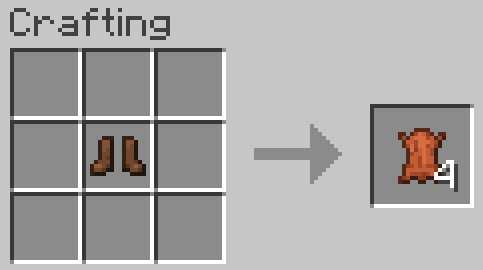
Recycling Leather Boots
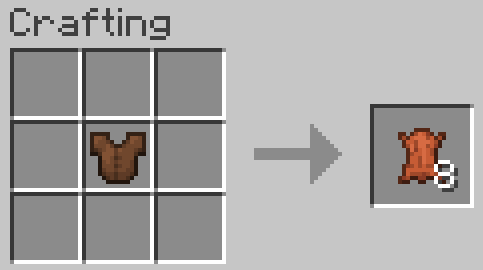
Recycling Leather Chestplate
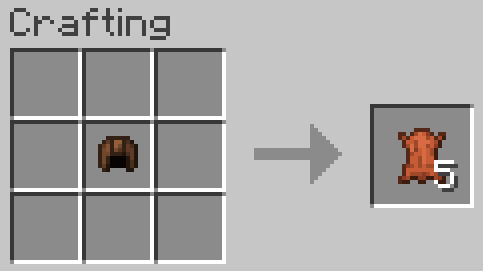
Recycling Leather Helmet
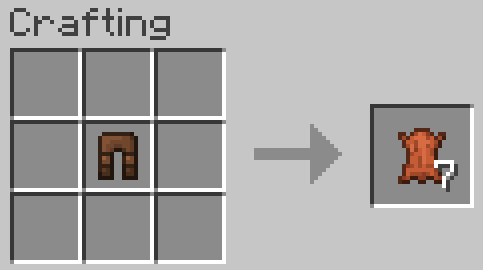
Recycling Leather Leggings
Recycling Packed Ice

Recycling Quartz Block

Saddle (1.21.5 or older)

Totem of Undying
 ~~~~
~~~~
Trident
Trident (1.21 or newer)

Trident (1.20.6 or older)

🗒️ News & Updates
See the latest news about my projects:
📂 Source Code & Issues
GitLab (Source Code)
GitLab (Issues)
📥 Installation
Linux
Data Pack
World that already exists:
- Go to this location "~/.minecraft/saves/" (Make sure you are showing the hidden folders and files by pressing Left Ctrl + H).
- Choose the world folder you want to put the Data Pack into it.
- Open datapacks folder, then put the data pack.zip in the datapacks folder.
- Reload the world by /reload command or by Quit the world and rejoin it.
New World:
- Open Minecraft, then click on "Singleplayer".
- Click on "Create New World", then click "More World Options...".
- Click on "Data Packs" button, then drag the data pack file into Minecraft.
- Click "Done" and "Create New World".
MacOS
Data Pack
World that already exists:
- Go to this location "~/Library/Application Support/minecraft/saves/".
- Choose the world folder you want to put the Data Pack into it.
- Open datapacks folder, then put the data pack.zip in the datapacks folder.
- Reload the world by /reload command or by Quit the world and rejoin it.
New World:
- Open Minecraft, then click on "Singleplayer".
- Click on "Create New World", then click "More World Options...".
- Click on "Data Packs" button, then drag the data pack file into Minecraft.
- Click "Done" and "Create New World".
Windows
Data Pack
World that already exists:
- Press Win + R, then type %appdata%, then press Enter.
- Open "Roaming" folder, then ".minecraft" folder, then open "saves" (Make sure you are showing the hidden folders and files by pressing Left Ctrl + Left Shift + period).
- Choose the world folder you want to put the Data Pack into it.
- Open datapacks folder, then put the data pack.zip in the datapacks folder.
- Reload the world by /reload command or by Quit the world and rejoin it.
New World:
- Open Minecraft, then click on "Singleplayer".
- Click on "Create New World", then click "More World Options...".
- Click on "Data Packs" button, then drag the data pack file into Minecraft.
- Click "Done" and "Create New World".
🛑 Deletion
Linux
Data Pack
- Go to this location "~/.minecraft/saves/" (Make sure you are showing the hidden folders and files by pressing Left Ctrl + H).
- Find the world folder that you put the Data Pack into it.
- Open datapacks folder, then remove the data pack.zip in the datapacks folder.
- Reload the world by /reload command or by quit the world and rejoin it.
MacOS
Data Pack
- Go to this location "~/Library/Application Support/minecraft/saves/".
- Find the world folder that you put the Data Pack into it.
- Open datapacks folder, then remove the data pack.zip in the datapacks folder.
- Reload the world by /reload command or by quit the world and rejoin it.
Windows
Data Pack
- Press Win + R, then type %appdata%, then press Enter.
- Open "Roaming" folder, then ".minecraft" folder, then open "saves" (Make sure you are showing the hidden folders and files by pressing Left Ctrl + Left Shift + period).
- Find the world folder that you put the Data Pack into it.
- Open datapacks folder, then remove the data pack.zip in the datapacks folder.
- Reload the world by /reload command or by Quit the world and rejoin it.
Enjoy.
Screenshots
Gallery
-
 Recycling Crying Obsidian Recipe
 -
 Totem of Undying Recipe
 -
 Chainmail Helmet Recipe
 -
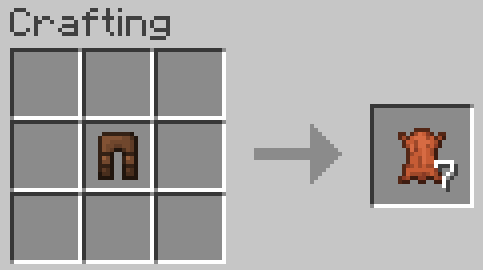 Recycling Leather Leggings Recipe
 -
 Enchaning Golden Apple Recipe
 -
 Recycling Amethyst Block Recipe
 -
 Debug Stick Recipe
 -
 Elytra Recipe
 -
 Nautilus Shell Recipe
 -
 Chainmail Leggings Recipe
 -
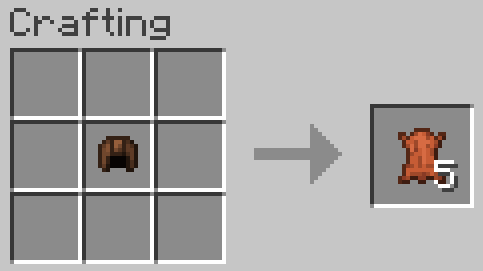 Recycling Leather Helmet Recipe
 -
 Copper Horse Armor Recipe
 -
 Trident Recipe (1.20.6 or older)
 -
 Crying Obsidian Recipe
 -
 Recycling Chainmail Chestplate Recipe
 -
 Gunpowder Recipe (Coal)
 -
 Recycling Chainmail Boots Recipe
 -
 Recycling Quartz Block Recipe
 -
 Recycling Chainmail Helmet Recipe
 -
 Name Tag Recipe (1.21.11 or older)
 -
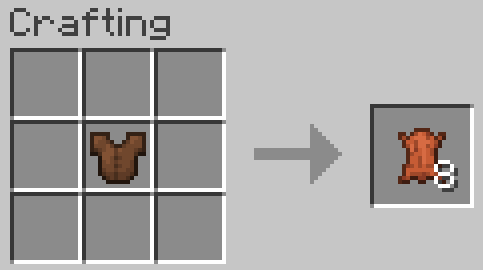 Recycling Leather Chestplate Recipe
 -
 Trident Recipe (1.21 or newer)
 -
 Experience Bottle Recipe
 -
 Golden Horse Armor Recipe
 -
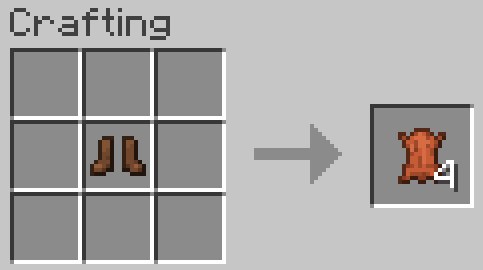 Recycling Leather Boots Recipe
 -
 Copper Nautilus Armor Recipe (1.21.11 or newer)
 -
 Diamond Horse Armor Recipe (1.21.11 or newer)
 -
 Recycling Packed Ice Recipe
 -
 Chainmail Boots Recipe
 -
 Recycling Chainmail Leggings Recipe
 -
 Recycling Cobweb Recipe
 -
 Gunpowder Recipe (Charcoal)
 -
 Chainmail Chestplate Recipe
 -
 Leather Horse Armor Recipe
 -
 Saddle Recipe (1.21.5 or older)
 -
 Cobweb Recipe
 -
 Iron Horse Armor Recipe
 -
 Bell Recipe
 -
 Diamond Nautilus Armor Recipe (1.21.11 or newer)
 -
 Golden Nautilus Armor Recipe (1.21.11 or newer)
Versions
Files
Relations
Project Relations
More like this
Similar Mods
Suggestions use data such as tags, dependencies, dependents, descriptions, titles, and more to rank how much they overlap with this mod.
- Craftable Uncraftable
- Craftable Uncraftable
- Craftable Uncraftable Items More
- Craftable Uncraftable Items
- Craftable/uncraftable cowbwebs
- Craftable Uncraftable Items/Blocks (CUIB)
- Uncraftable craftable : Unlock Everything
- wangle's uncraftable craftable
- Craft the Uncraftable (Craftable)
- TheUnCraftable
- Why Can't I Craft That?
- Uncraftable Items Craftable!
On ModDex
Community snapshot
By the numbers
Statistics

Want to reach Minecraft players?
We're looking for a server hosting partner to feature here and other parts of the site. Interested? Send us a message!
Get in touchGet it on
Available Platforms
On ModDex
Community snapshot
By the numbers
Statistics
Resources