
CraneMod-ZombieZ
No reviews yet
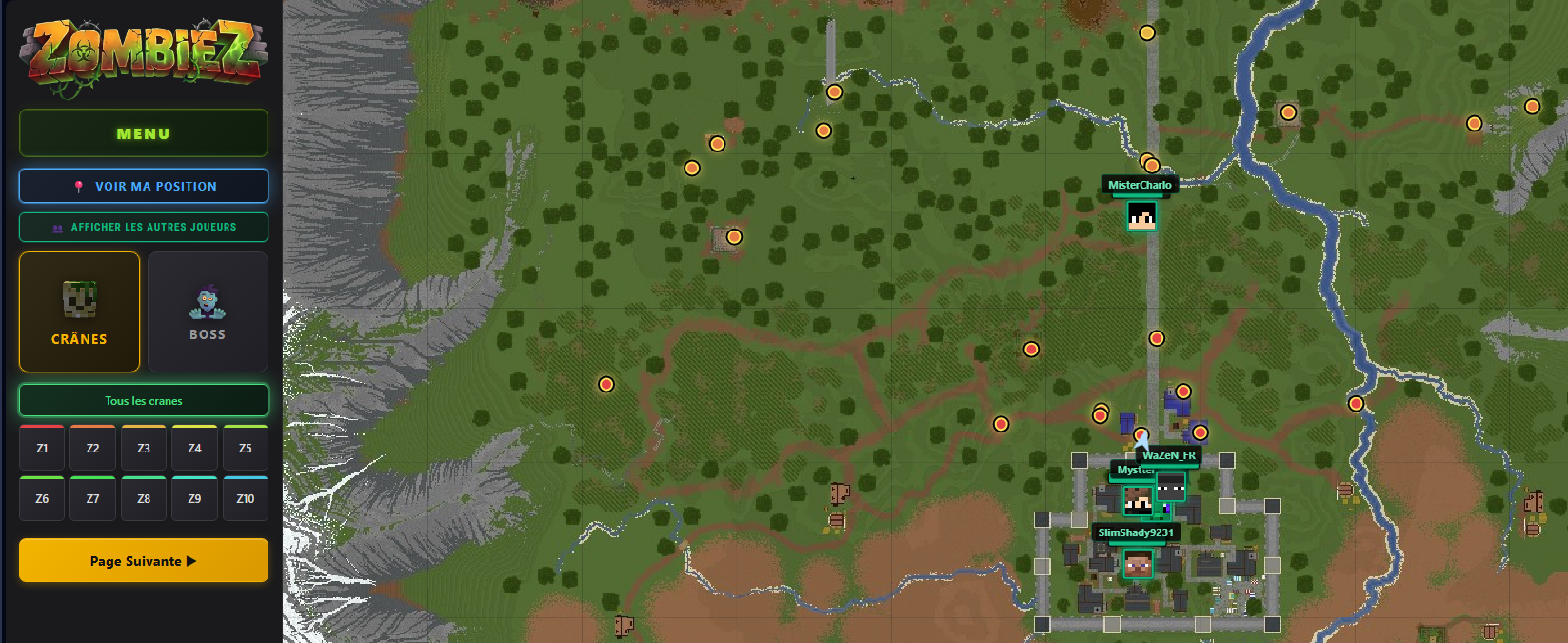
Minimap, interactive map with all skull zones, bosses, and real-time player positions — for the ZombieZ server on Rinaorc.
Fabric is a mod loader for versions 1.14+ of Minecraft, particularly popular for client side and optimization mods.
Community voices
Reviews
Click once to include, again to exclude, again to clear
No reviews yet. Be the first to review this project!
Get it on
Available Platforms
 Modrinth
Compatibility
Supported Environments
About
Project Details
For authors
Embed Badge
If you're the author of this project, you can embed a live badge anywhere that supports HTML or Markdown. It updates automatically whenever ratings change.
Use HTML for any page that supports it, or Markdown for README files and Markdown-based descriptions.
Identifiers
Platform IDs
Resources
External Links
About
Description
CraneMod ZombieZ
CraneMod ZombieZ is a client-side Fabric 1.21.4 mod that enhances your experience on the ZombieZ server (Rinaorc). An interactive map, a minimap, and the real-time position of other players using the mod.
✨ Main features
🎮 How to use
Press M (rebindable in key options) to open the menu:
- Maps → opens the full HTML map in your browser
- Information → mod info & updates
- Complete guide / Video guide / Official wiki → links to community resources
🗺️ Interactive HTML map
- The 50 skull zones displayed with their exact positions (X, Y, Z)
- All bosses with their respawn zones
- Real-time position of your character on the map
- Other players' positions (those using the mod) with their skin head and HP
- Waypoints: visible in-game to help you find each skull
📍 In-game minimap
- Pixel-art minimap directly in the HUD
- Movable and resizable via the menu (M key)
- Shows skulls, bosses and other players around you
- Player head, directional arrow, and chunks rendered in real time
🎯 Quality of life
- Right-click on a skull → it disappears from the minimap (handy to track those already collected)
- Active waypoints HUD with distance and directional arrow
- Promo banner displayed automatically in certain NPC GUIs
rinaorc.comautomatically added to the top of your server list on first launch
🔒 Privacy info
The mod sends your position (X, Y, Z, dimension, HP, mod version) to an HTTP relay only when you're playing on Rinaorc.com, so other mod users can see you on the map.
You can disable position sharing at any time in config/maps-cranes-zombiez.json by setting sharePositionOnRinaorc: false. You'll then be invisible to others and won't see them either.
No data is shared outside the Rinaorc server.
💬 Support / Bugs / Suggestions

Join the Discord to report a bug, suggest improvements, or stay updated on releases:
Screenshots
Gallery
Versions
Files
Relations
Project Relations
More like this
Similar Mods
Suggestions use data such as tags, dependencies, dependents, descriptions, titles, and more to rank how much they overlap with this mod.
On ModDex
Community snapshot
By the numbers
Statistics

Want to reach Minecraft players?
We're looking for a server hosting partner to feature here and other parts of the site. Interested? Send us a message!
Get in touchGet it on
Available Platforms
On ModDex
Community snapshot
By the numbers
Statistics
Resources