Community listing page, reviews here may not be monitored by the author.
Crash Doctor

No reviews yet
Diagnose Minecraft crashes and mod conflicts in plain English, with suspect mod ranking and privacy-redacted support reports.
Community voices
Reviews
No reviews yet. Be the first to review this project!
Get it on
Available Platforms
About
Project Details
For authors
Embed Badge
If you're the author of this project, you can embed a live badge anywhere that supports HTML or Markdown. It updates automatically whenever ratings change.
Use HTML for any page that supports it, or Markdown for README files and Markdown-based descriptions.
Identifiers
Platform IDs
Resources
External Links
About
Description
Crash Doctor
Crash Doctor helps you understand Minecraft crashes without digging through Java stack traces.
When your game crashes, Crash Doctor analyzes your crash reports, `latest.log`, installed mods, and recent mod changes to identify the most likely cause. It explains the diagnosis in plain English, shows the evidence it used, ranks likely suspect mods, and generates a clean support report you can share with mod developers, modpack support, or friends helping you troubleshoot.
Features
- Diagnoses common Minecraft crash causes in plain English
- Ranks likely suspect mods with evidence-based reasoning
- Parses Fabric and Forge dependency errors into clear fixes
- Detects mixin failures, missing classes, Java version problems, memory crashes, native library issues, graphics driver failures, config corruption, registry errors, and network mismatches
- Detects duplicate mod jars and wrong-loader jars in your mods folder
- Shows a crash popup after crashes when possible
- Shows a “you crashed last time” prompt on the next launch after abnormal exits
- Generates copy-ready Markdown support reports
- Redacts usernames, home folders, emails, tokens, session IDs, and UUIDs from shared reports
- Works fully offline and does not upload logs anywhere
Usage
Install the matching Fabric or Forge jar, launch Minecraft, and use:
- `/crashdoctor`
- `/crashdoctor analyze`
You can also bind the “Open Crash Doctor” key in Minecraft’s controls menu.
Privacy
Crash Doctor runs locally on your computer. It does not upload crash reports, logs, mod lists, or analytics.
Support reports are only created when you choose to copy them, and sensitive information is redacted before sharing.
Source Code
Crash Doctor is currently closed source while the project is still early. This may change in the future.
Permissions
You may use Crash Doctor in modpacks, including public modpacks, as long as the download points to the official CurseForge or Modrinth page.
Modified redistribution, reuploads, or source reuse are not permitted without permission.
Limitations
Crash Doctor gives evidence-based suggestions, not guaranteed answers. Complex mod interactions may still need manual troubleshooting.
The crash popup depends on the game process shutting down normally. If Minecraft is killed hard, Crash Doctor will try to show the diagnosis on the next launch instead.
I post updates, sneak peeks, reveals, and a lot of stuff in there. You can meet new people, suggest things, and be a part of the community. DISCORD LINK HERE!
Screenshots
Gallery
-
 crash doctor.png crash doctor.png
 -
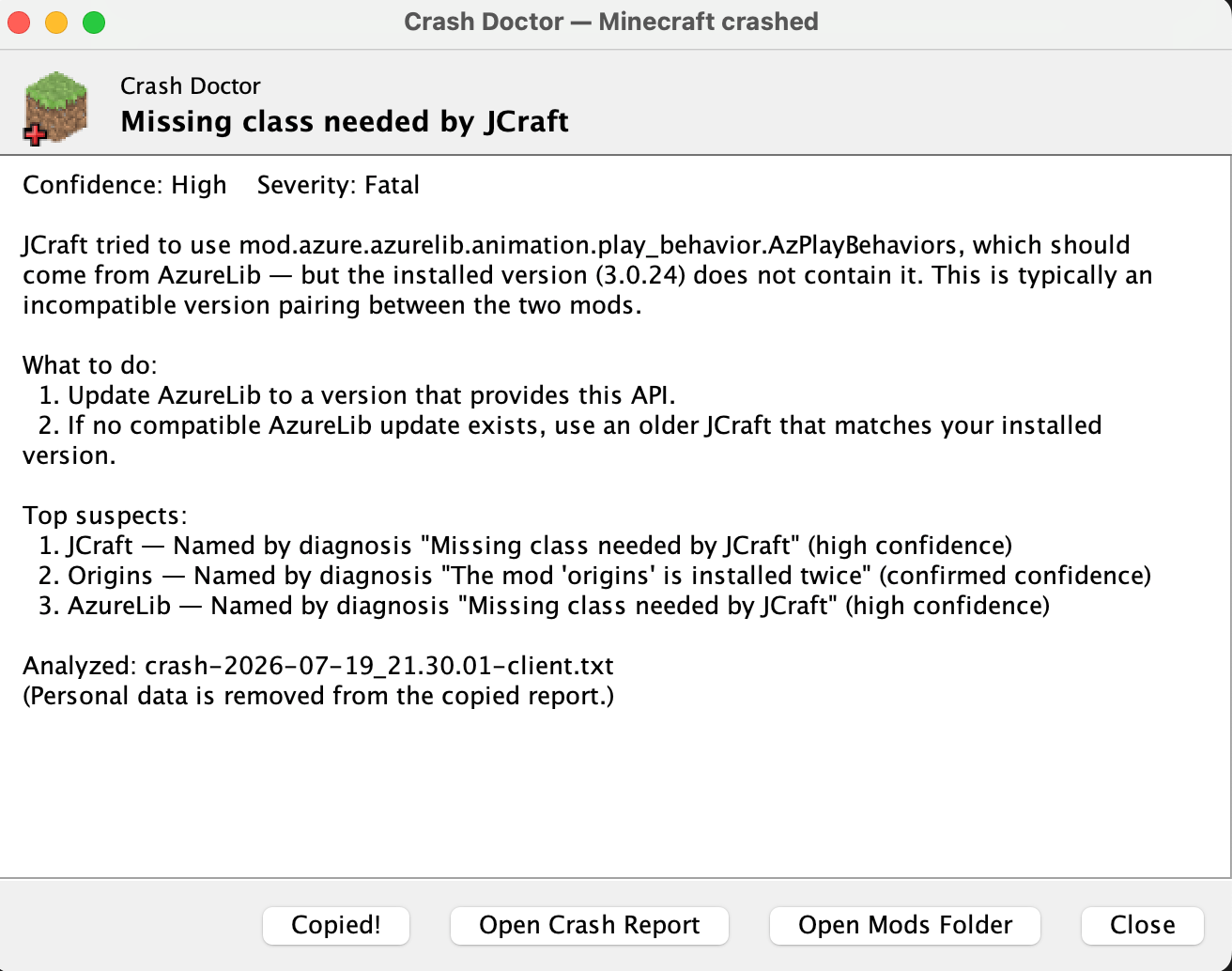 crash doctor analysis.png crash doctor analysis.png
Versions
Files
Relations
Project Relations
More like this
Similar Mods
Suggestions use data such as tags, dependencies, dependents, descriptions, titles, and more to rank how much they overlap with this mod.
On ModDex
Community snapshot
By the numbers
Statistics
Want to reach Minecraft players?
We're looking for a server hosting partner to feature here and other parts of the site. Interested? Send us a message!
Get in touchGet it on
Available Platforms
On ModDex
Community snapshot
By the numbers
Statistics
Resources