
Community listing page, reviews here may not be monitored by the author.
Create: Additional Logistics


No reviews yet
Adds a few new logistics-oriented blocks to Create, and tweaks a few behaviors.

Community voices
Reviews
No reviews yet. Be the first to review this project!
Get it on
Available Platforms
Compatibility
Supported Environments
Must be installed on both the client and the server.
About
Project Details
For authors
Embed Badge
If you're the author of this project, you can embed a live badge anywhere that supports HTML or Markdown. It updates automatically whenever ratings change.
Use HTML for any page that supports it, or Markdown for README files and Markdown-based descriptions.
Identifiers
Platform IDs
About
Description
An addition for Create 6 for Minecraft 1.20.1 and Minecraft 1.21.1.
This mod aims to improve or expand several areas related to logistics with the Create mod.
Additions
Promise Limits (Factory Gauge Improvement)
We've all been there. You set up a new factory gauge, and request 100 stacks of whatever, only to find out that your production facility can't keep up and Create tried sending 1,000 packages worth of ingredients and now everything is awful.
Promise Limits are here to help. When configuring a factory gauge, you can now set a limit for how many promises it can have open at once. This allows you to, for example, limit it to only waiting for at most a stack of something at a time.
Your factory's logistics grid will thank you.
Additional Stock (Restocker Gauge Improvement)
Restockers are pretty cool, but something I don't like about them is how they stock to a specific value and as soon as so much as a single cobblestone is missing, they'll request the exact number needed to reach that value again. This can be a bit silly and wasteful. As such, additional stock! Say, for example, you have a Restocker that's set to keep one stack of cobblestone on hand. With this, you can tell the Restocker to request 8 additional stacks of items whenever the available quantity falls under the requested level (1 stack). Then, say the number of cobblestone in storage drops to 32. Half of a stack. Instead of requesting 32 cobblestone to get back up to one stack, it'll request 544 cobblestone. That's the missing 32, and 8 more stacks. Kind of like a Threshold Switch, but for restocking. And with a somewhat clunkier UI because of how the Restocker works.
Regular Expressions (Package Address Improvement)
Globs are nice, but sometimes they just lack a little something, right? Well, go ahead and use regex if you dare. No, really. You can now. Just start your address pattern with regex: (case-insensitive) and the rest of it will be treated as a regular expression.
Cash Register (New Block, Stock Ticker-Like)
A new block that serves as an alternative to the Stock Ticker. Cash Registers are meant for use in shops specifically. They feature UIs for extracting items rather than right-clicking like the Stock Ticker. Additionally, they track all sales made through them in a Sales Ledger. Plus, they look neat!
As a little bonus, you can take the Sale Ledger out of a Cash Register and click a Stock Keeper with it to quickly select all the items you sold. Good for restocking your shop, if you're doing that manually. (This works just like a clipboard list of items for a Schematicannon.)
Package Accelerator (New Block, Packagers Go Zoom)
An auxiliary block to accompany Packagers, this block uses stress units to speed up the Packager in front of it. I use Sophisticated Storage for bulk storage of items, and as the system has grown, having a single packager has presented a bottleneck for sending items out. This is my solution, allowing packages to be sent out much quicker but at a cost.
Package Accelerators require at least 30 RPM to function.
Package Editor (New Block, Rename Packages)
A new package handling block. The Package Editor is similar to a Re-Packager, but rather than combining packages from the same order, it allows you to edit the addresses of packages using rules. Rules are input by either placing a sign next to the Package Editor, or by attaching a clipboard to the side of the Package Editor. Clipboards are recommended.
When writing rules for a Package Editor, the first line is the pattern to match and the second line is the text to replace the match with. For example, say you have packages being routed into a warehouse with the prefix Ware1- and a full package name might be Ware1-Floor2-Storage. What if you want to chop off the Ware1- once the package gets to your warehouse? That's easy, just send the packages through a Package Editor with this pattern and a blank replacement line:
Ware1-The Package Editor will search each package name for Ware1- at the start, and if it finds it, replace it with nothing. You could also write that like this:
Ware1-{*}
$1
So what's going on there? The Package Editor treats anything inside { and } as a capture group. In other words, that text is saved and can be referenced in your replacement text by adding a $ followed one you want. You can also use regular expressions, of course, if you want to do something more advanced than globs allow for.
Finally, there are two special behaviors you can manage if you're using a clipboard:
- If you check the box next to the pattern line, the pattern will be interpreted as case-insensitive.
- If you check the box next to the replacement line, then the Package Editor will stop after this rule (assuming this rule matched). You could use this, for example, to make a catch-all rule that sends packages to some Lost & Found if it doesn't match any other rules.
Train Network Monitor Peripheral (New Block, CC: Tweaked Only)
You know what's cool? Trains. You know what's cooler? Having some big cool wall of data about your trains. Arrivals, departures, the status of trains. And trains are pretty important for logistics, too. The Train Network Monitor is a single block that allows you to look up live data for any station and any train on a given train network. This includes everything the normal Train Station peripheral gives you, and additional events for train arrivals and departures. You can also see how many packages are in the system, and the status of every postbox attached to the various train stations.
If you're feeling particularly adventurous, you can enable optional features for viewing more details about train inventories and for read-write access to remote trains and stations. Want to update schedules on the fly using a computer? Be my guest. However, this is disabled by default because it seems a bit too unbalanced to me.
Short and Tall Seats (New Block, Basically… Seats?)
Err, seats aren't logistics? Whatever do you mean? You can, erm… sit on them, and—okay, fine. These are a bit out of scope for 'Additional Logistics', but there's a good reason we've added seats! Aesthetics, of course.
Depending on what kind of mob you choose for your Stock Keeper, the default seat isn't always at a good height for whatever build you're doing. As such, we've added Short Seats and Tall Seats. Short Seats are 2/16ths of a block tall, while Tall Seats are 14/16ths of a block tall. (Normal Seats are, of course, 8/16ths or 1/2 of a block tall.)
Lazy Shafts (New Block, Basically Shafts)
I know what you're thinking. This isn't logistics either. And Create has had shafts for years. Get it together, Khloe. But this is important, I promise. Lazy Shafts are my attempt at creating lag friendly shafts. Basically, normal shafts have a block entity for each individual block, right? These try to avoid that when possible. As long as you have more than two Lazy Shafts in a row, you're going to be coming out ahead on block entities. If you use a lot of shafts, and I mean a lot, then replacing them with these might help your server performance.
Flexible Lazy Shafts (New Block, Basically Gearboxes + Lazy Shafts + ???)
There are Flexible Lazy Shafts too. These are like Lazy Shafts, but they can connect in any direction. Not just that, but they have configurable sides. Just use your wrench on a side to expose a shaft. Use your wrench again to reverse the direction.
Just be careful when connecting things. Due to how they're connected in code, sometimes Create ends up breaking an inconvenient Flexible Lazy Shaft if there's a problem with incompatible rotations.
Did I mention Lazy Shafts, Flexible Lazy Shafts, and Lazy Cogs can be encased? They support Andesite Casing, Brass Casing, Copper Casing, Industrial Iron Block, and Weathered Iron Block. (Yes, I want to implement Train Casing, but it's actually a bit weird to do for some weird technical reasons, at least if I want the connected textures to work properly. It's coming Eventually™.)
Improvements
Address Matcher Optimization
Create's package address matching is just a little slow and unoptimized. This can be fine, but it can also cause issues when using Create with other mods. We're here to address the problem with a couple easy changes:
Cache the compiled matchers. Every package address is compiled into a regular expression when performing package matching. This involves first parsing the glob into regex, and then compiling the regex into a Java Pattern. All we have to do is cache that.
There are technically two caches because of how the internals of the package address system works, so I'm counting it as two things. But really, just caching was enough to make things work better in a doomsday scenario my SMP server saw recently thanks to Sophisticated Storage handling packages with package filters.
Regular Expressions (Safety)
I'm actually aware there was already another mod that let you do regex with package addresses, but when we tried that in our SMP the server was crashed by a player almost immediately. Regular expressions can actually be fairly dangerous, so I've included a few basic things that should hopefully stop someone from at least accidentally killing a server with them. Namely:
- Star Height Limit. Did you know the regular expression
(a+)+is dangerous? It's because of something called catastrophic backtracking, and the Java regular expression library is vulnerable to it. They're not impossible to write by accident for that matter. We check the star height of all regular expressions and prevent them from running if they're problematic. - Repetition Limit. It's not quite as bad, but if you try to match, say, 1000 of something in a row, the performance can start to drag. That should never come up for package addresses in the first place, so we put a protection on.
- No Backreferences. A backreference in regular expressions allows you to say "match this thing that was already matched", which can be useful, but it's also likely irrelevant for package addresses and it can be slow. They're disallowed by default.
We also make sure to test every regular expression at the moment it's parsed through Create's Glob.toRegexPattern method, even though this doesn't normally compile the expression, just convert it from a glob to regex. This is important because it's implied that all regular expressions returned from this method should compile without any errors.
Longer Frogport Names
Regular expressions tend to be a bit… bigger than globs, which could be a problem for frogs. As such, we've increased the maximum name length of frogports and postboxes to 100. … it's a good thing you can copy and paste.
Let Your Stock Keepers Remain Seated
Let me set a scene for you. You're at a honey shop. The stock keeper is a bee. You get a shopping list and you're ready to check out, so you click on the stock keeper and-- oh no! You clicked the seat instead! You just sat down, and the bee took to the skies with newfound freedom. You don't have a lead. How are you supposed to get a bee back on a seat? Flying mobs are the worst.
This is a simple change. If you click on a seat occupied by a stock keeper, nothing will happen. If you need to dislodge the stock keeper, you can break the seat or the stock ticker. But at least you won't do it by accident.
An addition for Create 6 for Minecraft 1.20.1 and 1.21.1.
This mod aims to improve or expand several areas related to logistics with the Create mod.
Additions
Promise Limits (Factory Gauge Improvement)
We've all been there. You set up a new factory gauge, and request 100 stacks of whatever, only to find out that your production facility can't keep up and Create tried sending 1,000 packages worth of ingredients and now everything is awful.
Promise Limits are here to help. When configuring a factory gauge, you can now set a limit for how many promises it can have open at once. This allows you to, for example, limit it to only waiting for at most a stack of something at a time.
Your factory's logistics grid will thank you.
Additional Stock (Restocker Gauge Improvement)
Restockers are pretty cool, but something I don't like about them is how they stock to a specific value and as soon as so much as a single cobblestone is missing, they'll request the exact number needed to reach that value again. This can be a bit silly and wasteful. As such, additional stock! Say, for example, you have a Restocker that's set to keep one stack of cobblestone on hand. With this, you can tell the Restocker to request 8 additional stacks of items whenever the available quantity falls under the requested level (1 stack). Then, say the number of cobblestone in storage drops to 32. Half of a stack. Instead of requesting 32 cobblestone to get back up to one stack, it'll request 544 cobblestone. That's the missing 32, and 8 more stacks. Kind of like a Threshold Switch, but for restocking. And with a somewhat clunkier UI because of how the Restocker works.
Regular Expressions (Package Address Improvement)
Globs are nice, but sometimes they just lack a little something, right? Well, go
ahead and use regex if you dare. No, really. You can now. Just start your address
pattern with regex: (case-insensitive) and the rest of it will be treated as a
regular expression.
Cash Register (New Block, Stock Ticker-Like)
A new block that serves as an alternative to the Stock Ticker. Cash Registers are meant for use in shops specifically. They feature UIs for extracting items rather than right-clicking like the Stock Ticker. Additionally, they track all sales made through them in a Sales Ledger. Plus, they look neat!
As a little bonus, you can take the Sale Ledger out of a Cash Register and click a Stock Keeper with it to quickly select all the items you sold. Good for restocking your shop, if you're doing that manually. (This works just like a clipboard list of items for a Schematicannon.)
Package Accelerator (New Block, Packagers Go Zoom)
An auxiliary block to accompany Packagers, this block uses stress units to speed up the Packager in front of it. I use Sophisticated Storage for bulk storage of items, and as the system has grown, having a single packager has presented a bottleneck for sending items out. This is my solution, allowing packages to be sent out much quicker but at a cost.
Package Accelerators require at least 30 RPM to function.
Package Editor (New Block, Rename Packages)
A new package handling block. The Package Editor is similar to a Re-Packager, but rather than combining packages from the same order, it allows you to edit the addresses of packages using rules. Rules are input by either placing a sign next to the Package Editor, or by attaching a clipboard to the side of the Package Editor. Clipboards are recommended.
When writing rules for a Package Editor, the first line is the pattern to
match and the second line is the text to replace the match with. For example,
say you have packages being routed into a warehouse with the prefix Ware1-
and a full package name might be Ware1-Floor2-Storage. What if you want to
chop off the Ware1- once the package gets to your warehouse? That's easy,
just send the packages through a Package Editor with this pattern and a
blank replacement line:
Ware1-
The Package Editor will search each package name for Ware1- at the start,
and if it finds it, replace it with nothing. You could also write that like this:
Ware1-{*}
$1
So what's going on there? The Package Editor treats anything inside { and } as
a capture group. In other words, that text is saved and can be referenced in your
replacement text by adding a $ followed one you want. You can also use regular
expressions, of course, if you want to do something more advanced than globs
allow for.
Finally, there are two special behaviors you can manage if you're using a clipboard:
- If you check the box next to the pattern line, the pattern will be interpreted as case-insensitive.
- If you check the box next to the replacement line, then the Package Editor will stop after this rule (assuming this rule matched). You could use this, for example, to make a catch-all rule that sends packages to some Lost & Found if it doesn't match any other rules.
Train Network Monitor Peripheral (New Block, CC: Tweaked Only)
You know what's cool? Trains. You know what's cooler? Having some big cool wall of data about your trains. Arrivals, departures, the status of trains. And trains are pretty important for logistics, too. The Train Network Monitor is a single block that allows you to look up live data for any station and any train on a given train network. This includes everything the normal Train Station peripheral gives you, and additional events for train arrivals and departures. You can also see how many packages are in the system, and the status of every postbox attached to the various train stations.
If you're feeling particularly adventurous, you can enable optional features for viewing more details about train inventories and for read-write access to remote trains and stations. Want to update schedules on the fly using a computer? Be my guest. However, this is disabled by default because it seems a bit too unbalanced to me.
Short and Tall Seats (New Block, Basically... Seats?)
Err, seats aren't logistics? Whatever do you mean? You can, erm... sit on them, and—okay, fine. These are a bit out of scope for 'Additional Logistics', but there's a good reason we've added seats! Aesthetics, of course.
Depending on what kind of mob you choose for your Stock Keeper, the default seat isn't always at a good height for whatever build you're doing. As such, we've added Short Seats and Tall Seats. Short Seats are 2/16ths of a block tall, while Tall Seats are 14/16ths of a block tall. (Normal Seats are, of course, 8/16ths or 1/2 of a block tall.)
Lazy Shafts (New Block, Basically Shafts)
I know what you're thinking. This isn't logistics either. And Create has had shafts for years. Get it together, Khloe. But this is important, I promise. Lazy Shafts are my attempt at creating lag friendly shafts. Basically, normal shafts have a block entity for each individual block, right? These try to avoid that when possible. As long as you have more than two Lazy Shafts in a row, you're going to be coming out ahead on block entities. If you use a lot of shafts, and I mean a lot, then replacing them with these might help your server performance.
Flexible Lazy Shafts (New Block, Basically Gearboxes + Lazy Shafts + ???)
There are Flexible Lazy Shafts too. These are like Lazy Shafts, but they can connect in any direction. Not just that, but they have configurable sides. Just use your wrench on a side to expose a shaft. Use your wrench again to reverse the direction.
Just be careful when connecting things. Due to how they're connected in code, sometimes Create ends up breaking an inconvenient Flexible Lazy Shaft if there's a problem with incompatible rotations.
Did I mention Lazy Shafts, Flexible Lazy Shafts, and Lazy Cogs can be encased? They support Andesite Casing, Brass Casing, Copper Casing, Industrial Iron Block, and Weathered Iron Block. (Yes, I want to implement Train Casing, but it's actually a bit weird to do for some weird technical reasons, at least if I want the connected textures to work properly. It's coming Eventually™.)
Improvements
Address Matcher Optimization
Create's package address matching is just a little slow and unoptimized. This can be fine, but it can also cause issues when using Create with other mods. We're here to address the problem with a couple easy changes:
-
Cache the compiled matchers. Every package address is compiled into a regular expression when performing package matching. This involves first parsing the glob into regex, and then compiling the regex into a Java Pattern. All we have to do is cache that.
-
There are technically two caches because of how the internals of the package address system works, so I'm counting it as two things. But really, just caching was enough to make things work better in a doomsday scenario my SMP server saw recently thanks to Sophisticated Storage handling packages with package filters.
Regular Expressions (Safety)
I'm actually aware there was already another mod that let you do regex with package addresses, but when we tried that in our SMP the server was crashed by a player almost immediately. Regular expressions can actually be fairly dangerous, so I've included a few basic things that should hopefully stop someone from at least accidentally killing a server with them. Namely:
- Star Height Limit. Did you know the regular expression
(a+)+is dangerous? It's because of something called catastrophic backtracking, and the Java regular expression library is vulnerable to it. They're not impossible to write by accident for that matter. We check the star height of all regular expressions and prevent them from running if they're problematic. - Repetition Limit. It's not quite as bad, but if you try to match, say, 1000 of something in a row, the performance can start to drag. That should never come up for package addresses in the first place, so we put a protection on.
- No Backreferences. A backreference in regular expressions allows you to say "match this thing that was already matched", which can be useful, but it's also likely irrelevant for package addresses and it can be slow. They're disallowed by default.
We also make sure to test every regular expression at the moment it's parsed through
Create's Glob.toRegexPattern method, even though this doesn't normally compile the
expression, just convert it from a glob to regex. This is important because it's
implied that all regular expressions returned from this method should compile without
any errors.
Longer Frogport Names
Regular expressions tend to be a bit... bigger than globs, which could be a problem for frogs. As such, we've increased the maximum name length of frogports and postboxes to 100. ... it's a good thing you can copy and paste.
Let Your Stock Keepers Remain Seated
Let me set a scene for you. You're at a honey shop. The stock keeper is a bee. You get a shopping list and you're ready to check out, so you click on the stock keeper and-- oh no! You clicked the seat instead! You just sat down, and the bee took to the skies with newfound freedom. You don't have a lead. How are you supposed to get a bee back on a seat? Flying mobs are the worst.
This is a simple change. If you click on a seat occupied by a stock keeper, nothing will happen. If you need to dislodge the stock keeper, you can break the seat or the stock ticker. But at least you won't do it by accident.
Screenshots
Gallery
-
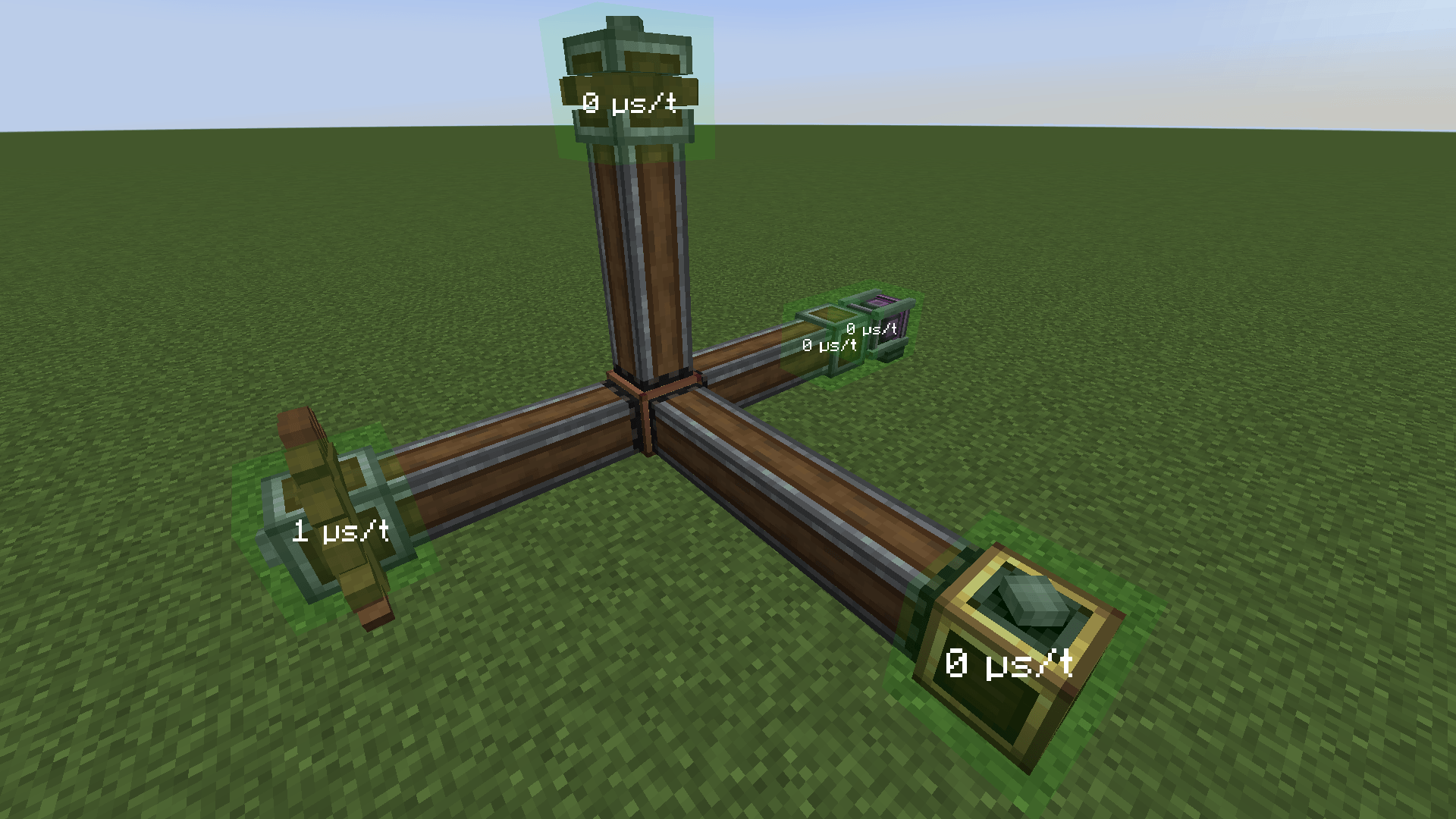 Lazy Shafts and Cogs Lazy Shafts are like normal Shafts, but only the endpoints have ticking block entities to help with performance.
 -
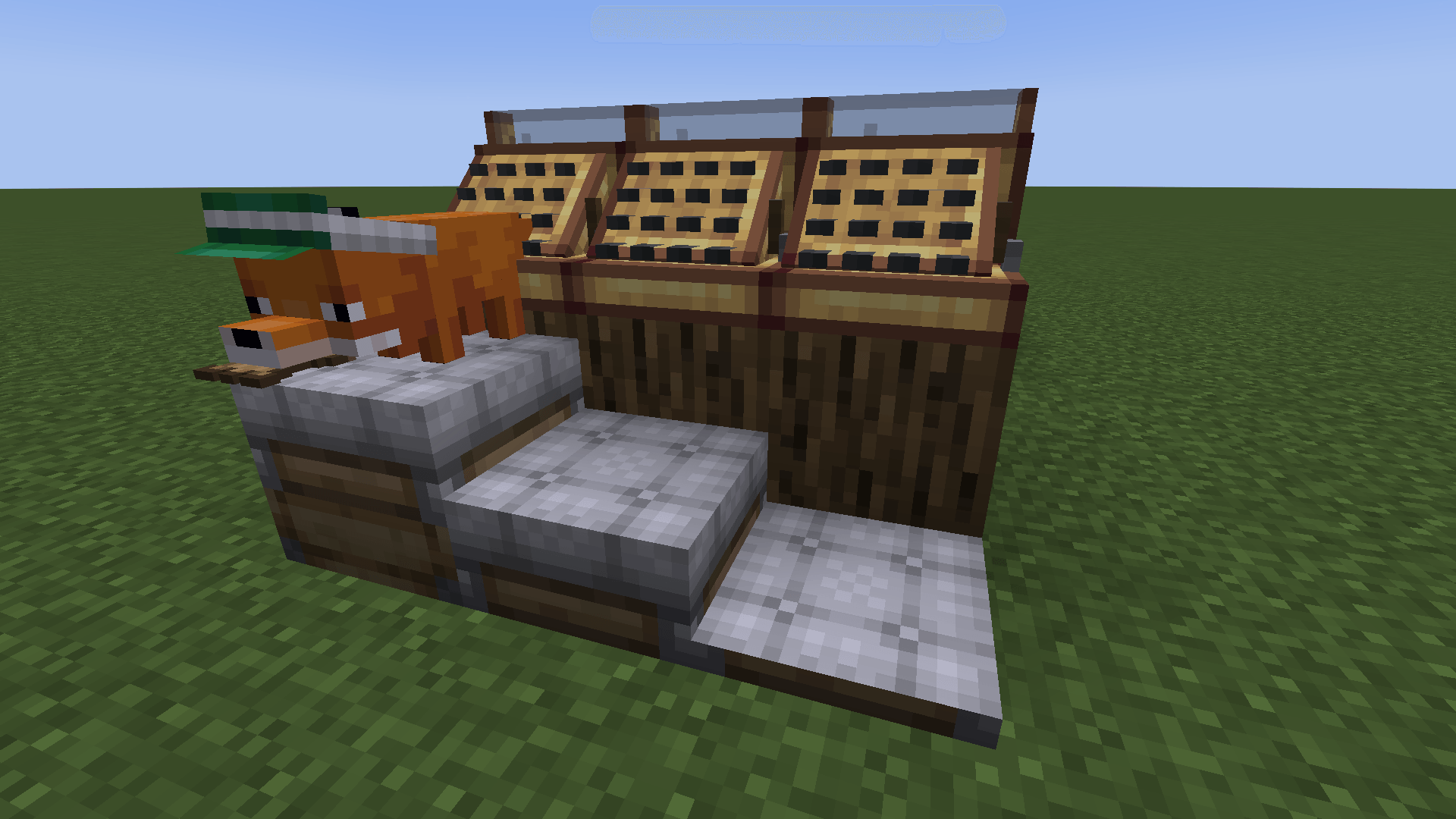 Tall Seats and Short Seats Available in every color, these seats work just like normal seats. (With the exception that mobs falling onto a Short Seat do not get picked up by it, so you need to use a lead to put something on it.)
 -
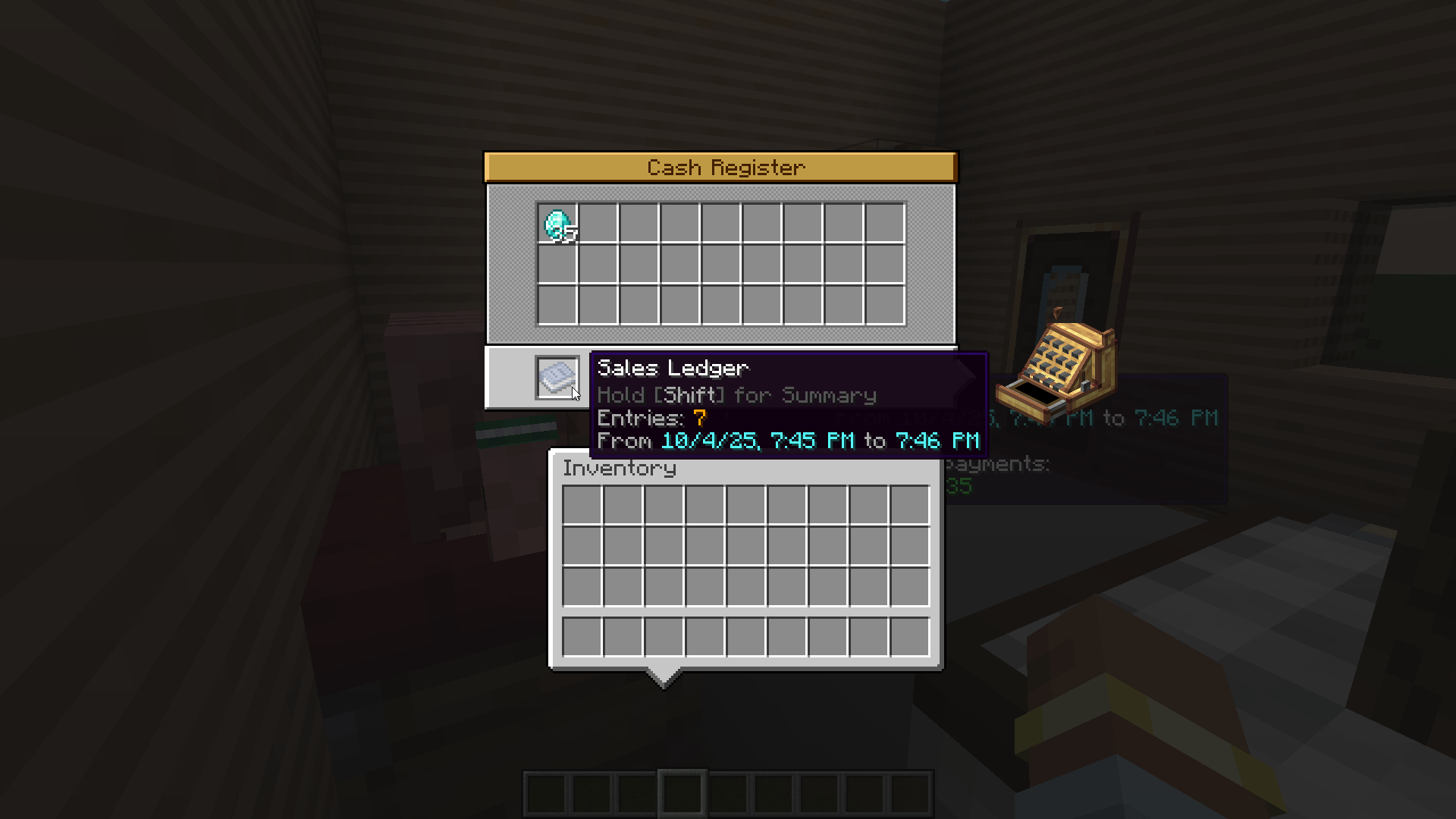 Cash Register - GUI The Cash Register has a custom UI for taking out payments, which gives you access to the Sales Ledger. Take the Ledger with you, and you can right-click with it to view a list of all the items that were sold.
 -
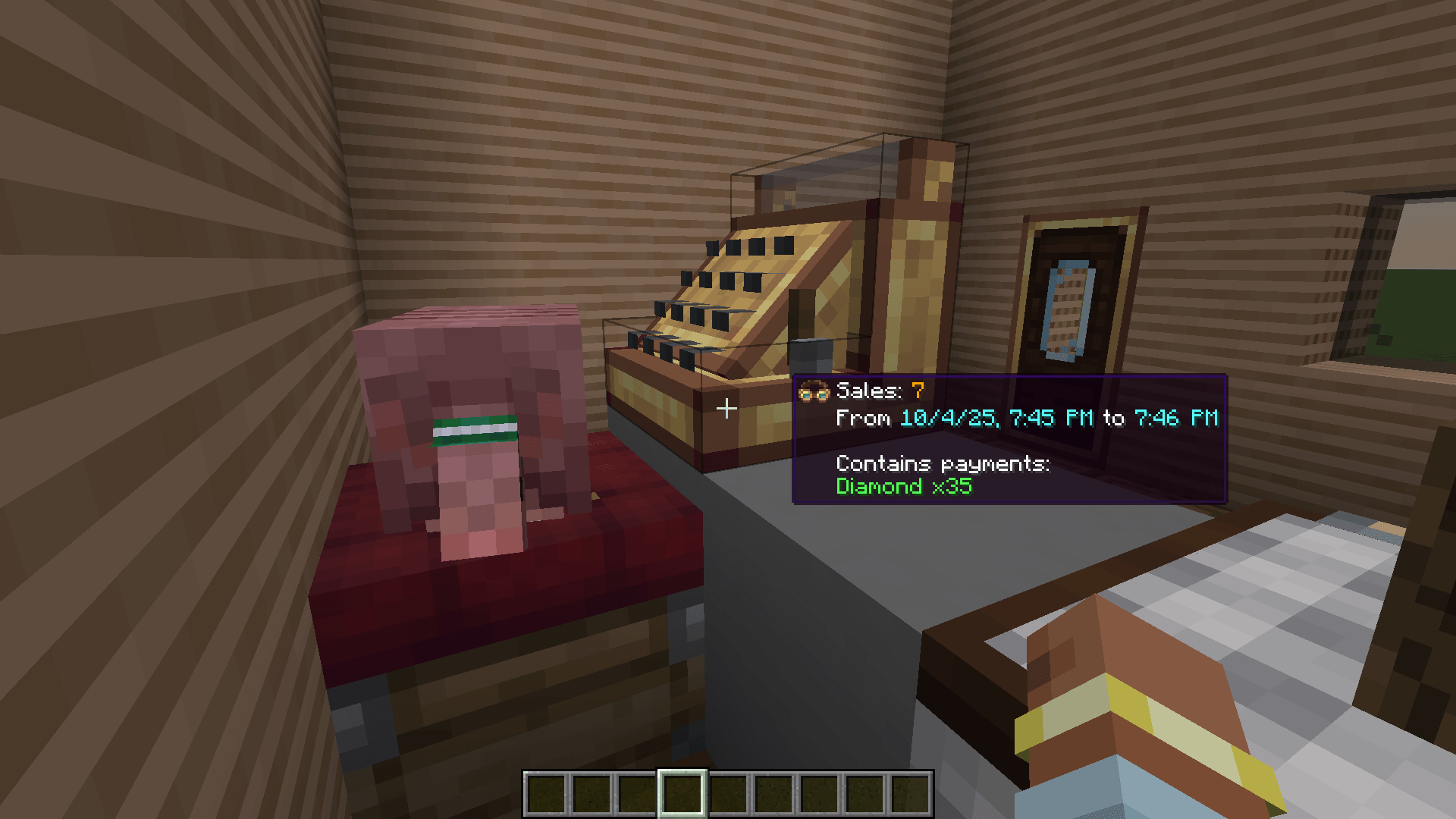 Cash Register Using a Cash Register for your shops, rather than a Stock Ticker, records every sale you make into a Sales Ledger. See which items are actually selling.
 -
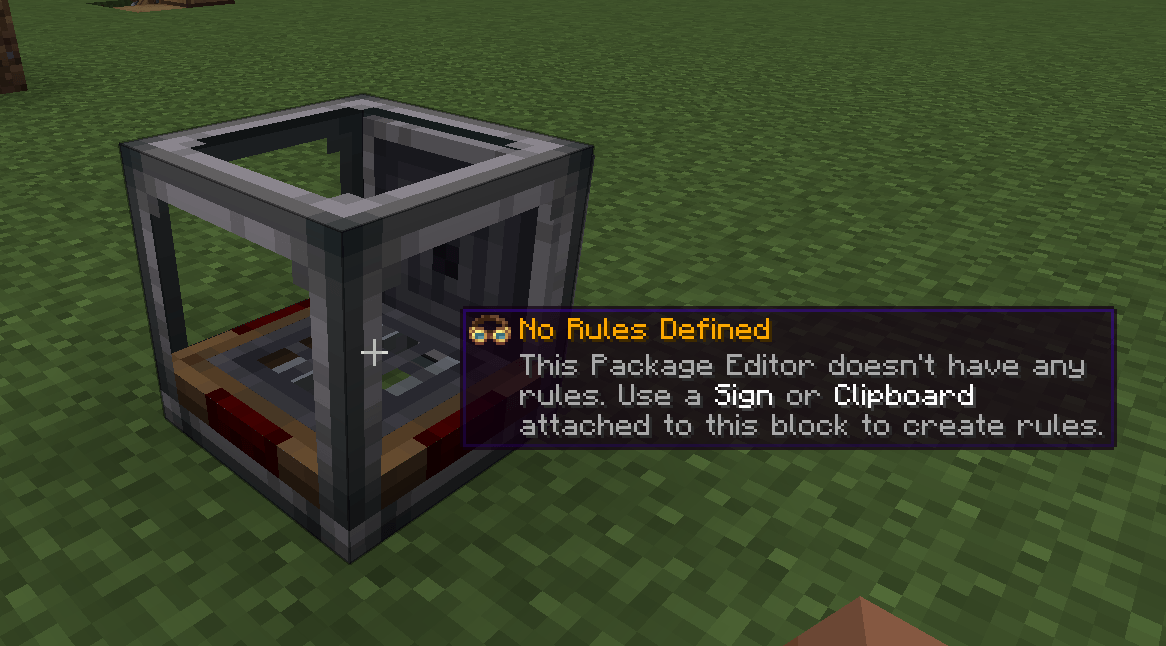 Package Editor It looks like a Packager, but it's slightly different! The Package Editor modifies the address of existing packages.
 -
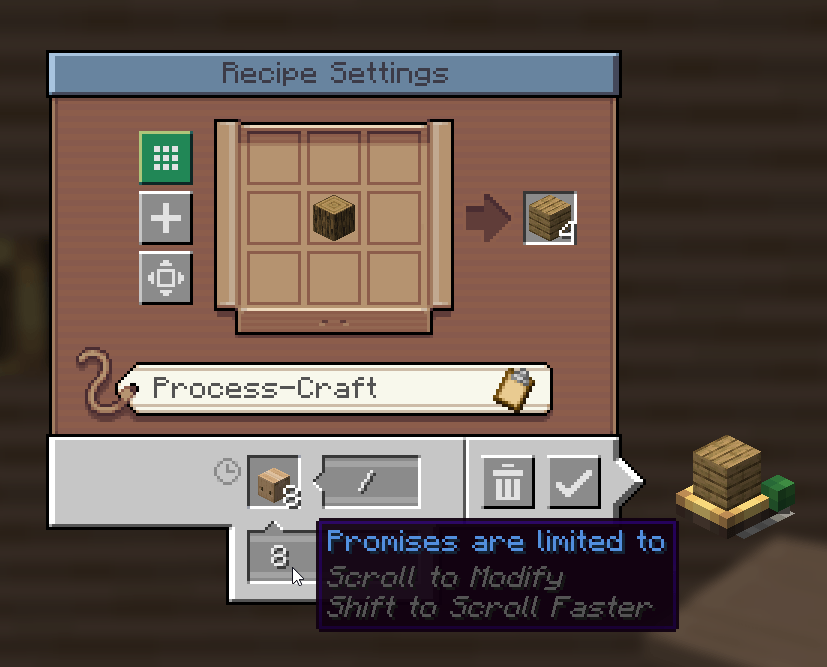 Promise Limits Use a new input field on Factory Gauges to limit how many promises they can have going at one time.
 -
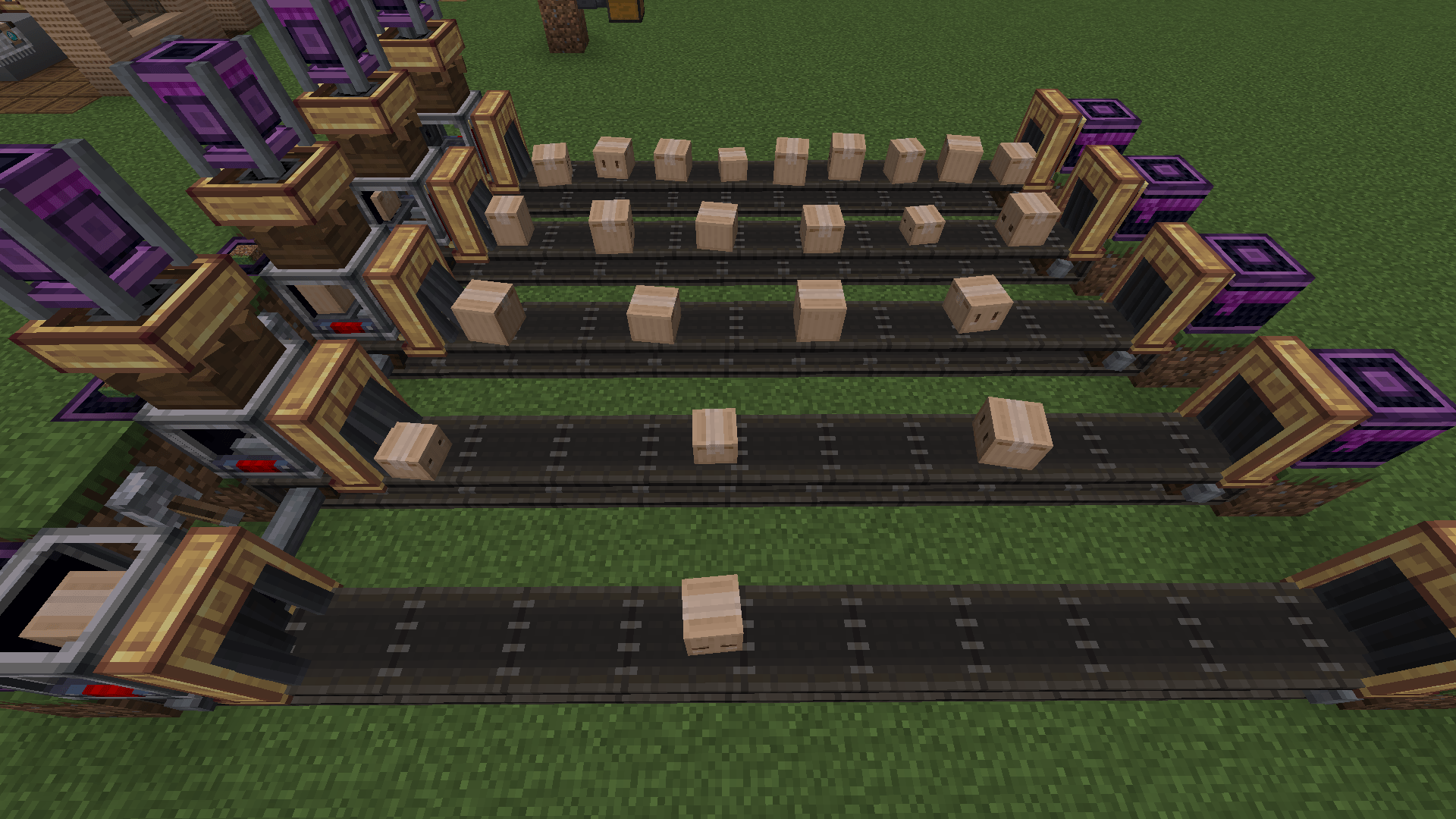 Package Accelerators Add a Package Accelerator to a Packager and speed it up! The more RPM, the faster it goes. (Funnels were sped up for this screenshot.)
-
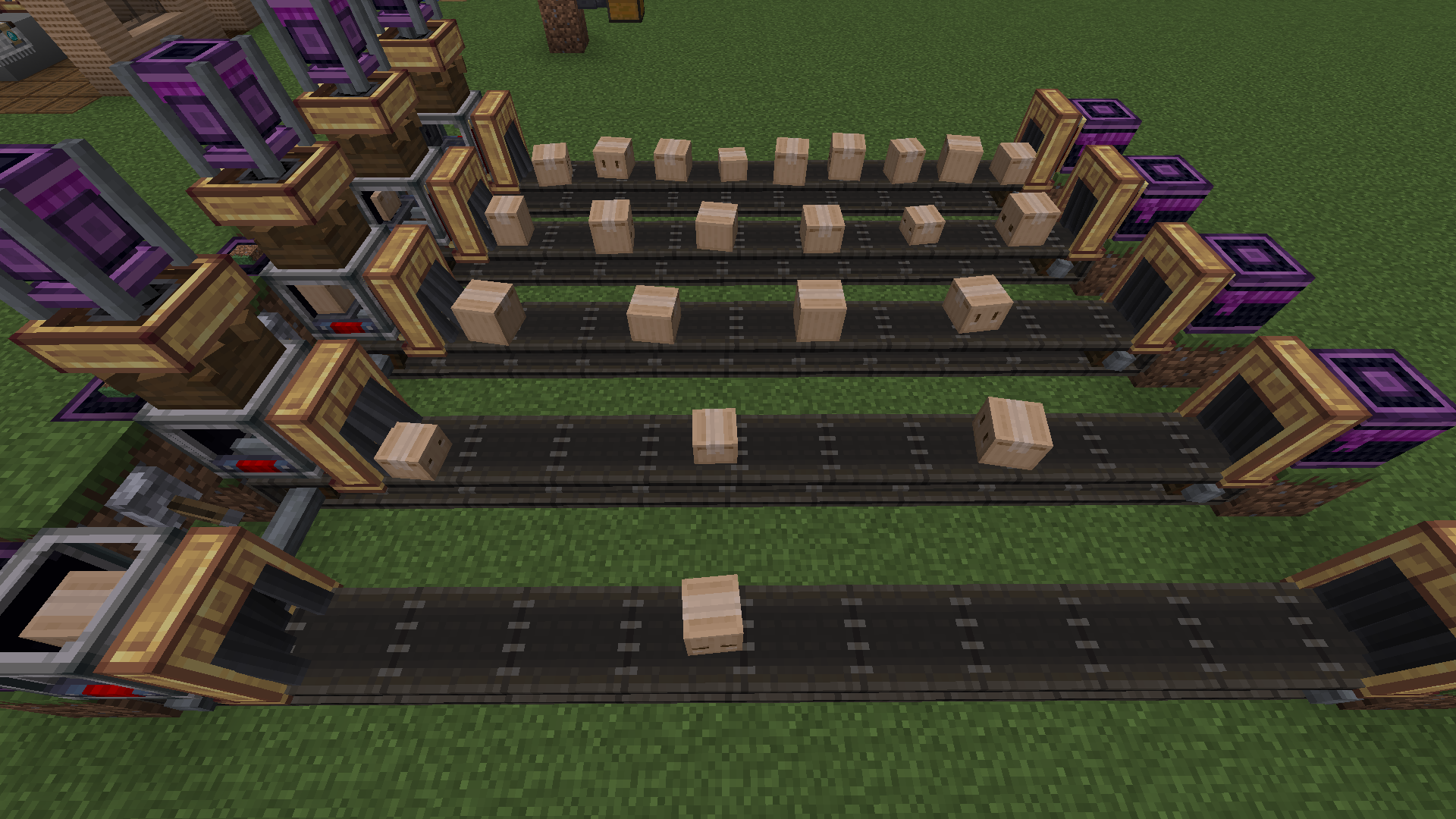 Package Accelerators Add a Package Accelerator to a Packager and speed it up! The more RPM, the faster it goes.
 -
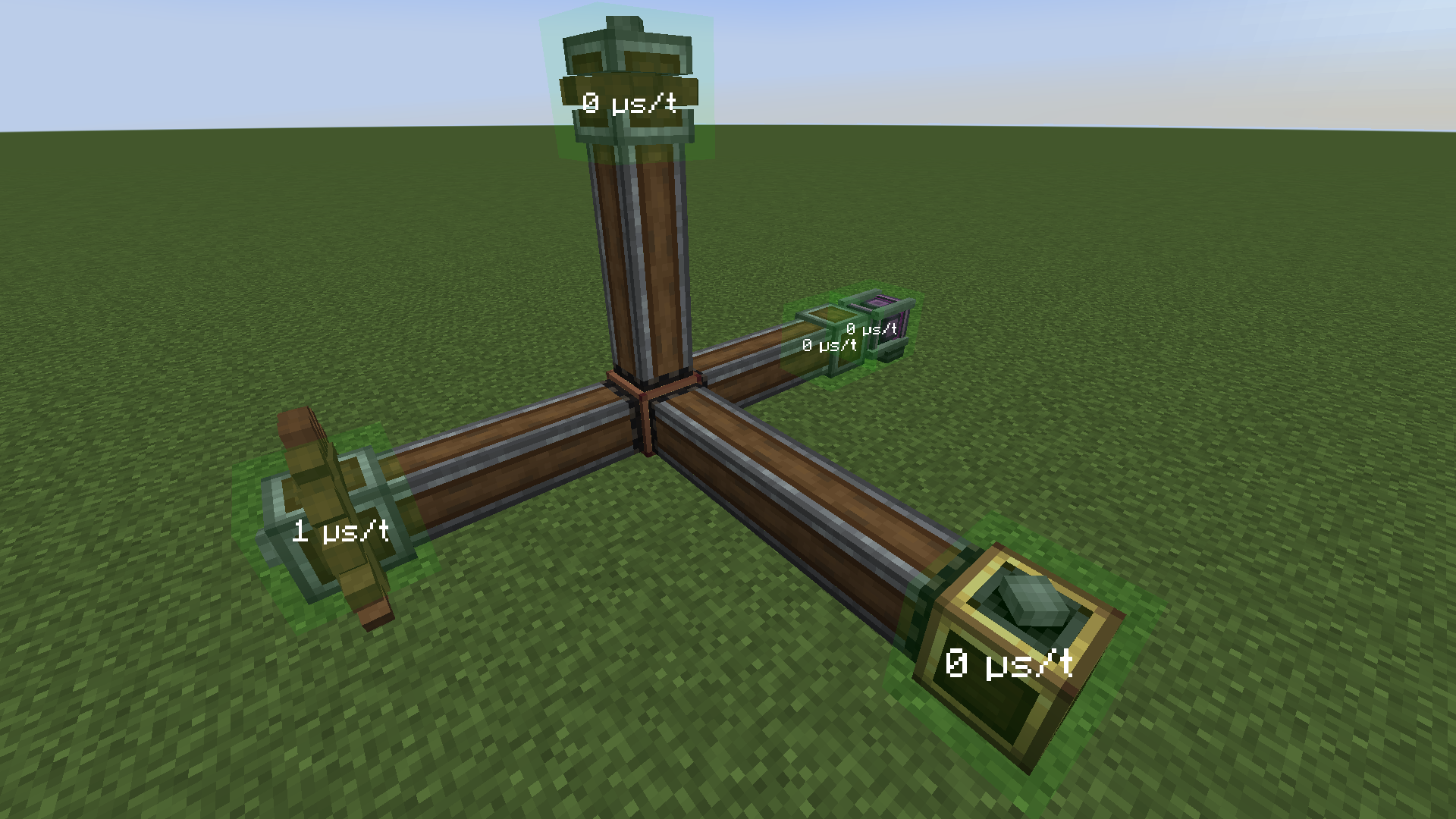 Lazy Shafts and Lazy Cogs Lazy Shafts are like normal Shafts, but only the endpoints have ticking block entities to help with performance.
 -
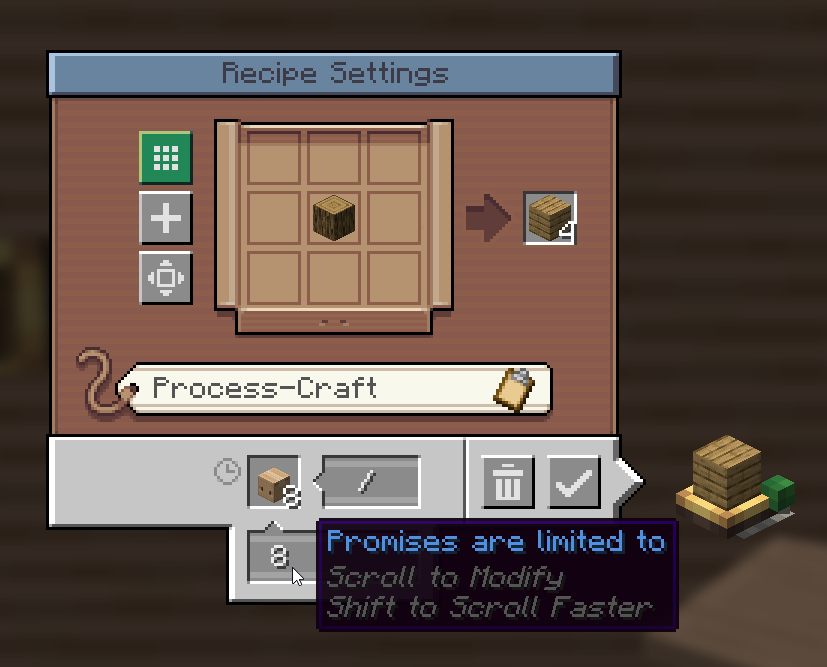 Promise Limits Use a new input field on Factory Gauges to limit how many promises they can have going at one time.
 -
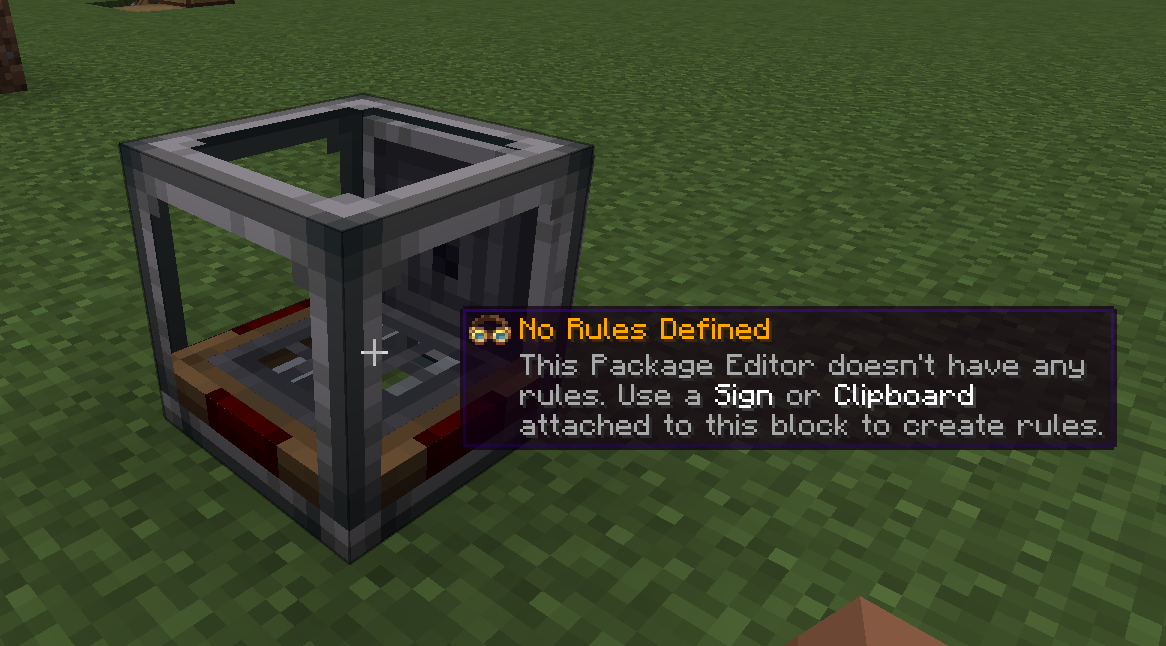 Package Editor It looks like a Packager, but it's slightly different! The Package Editor modifies the address of existing packages.
 -
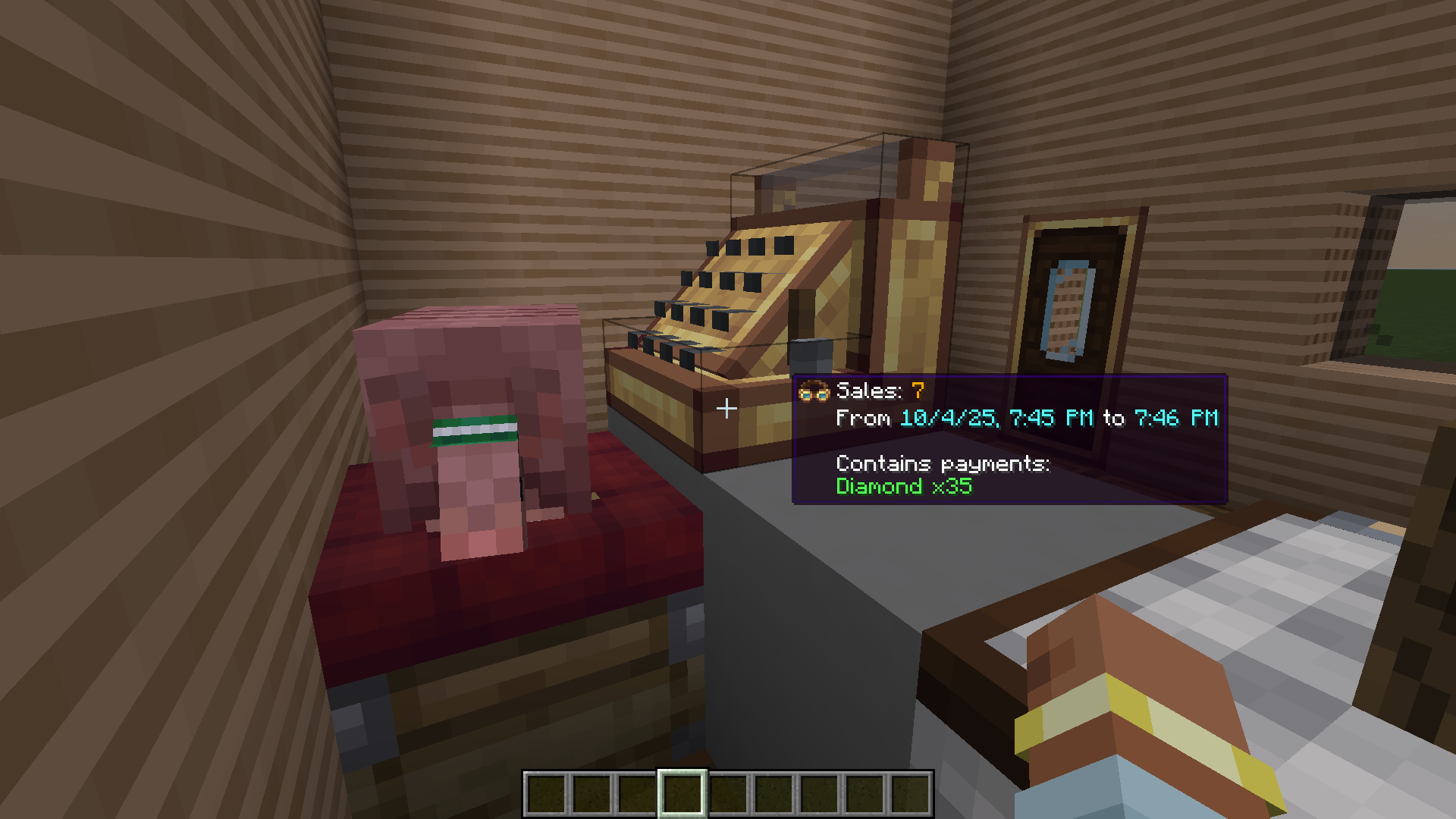 Cash Register Using a Cash Register for your shops, rather than a Stock Ticker, records every sale you make into a Sales Ledger. See which items are actually selling.
 -
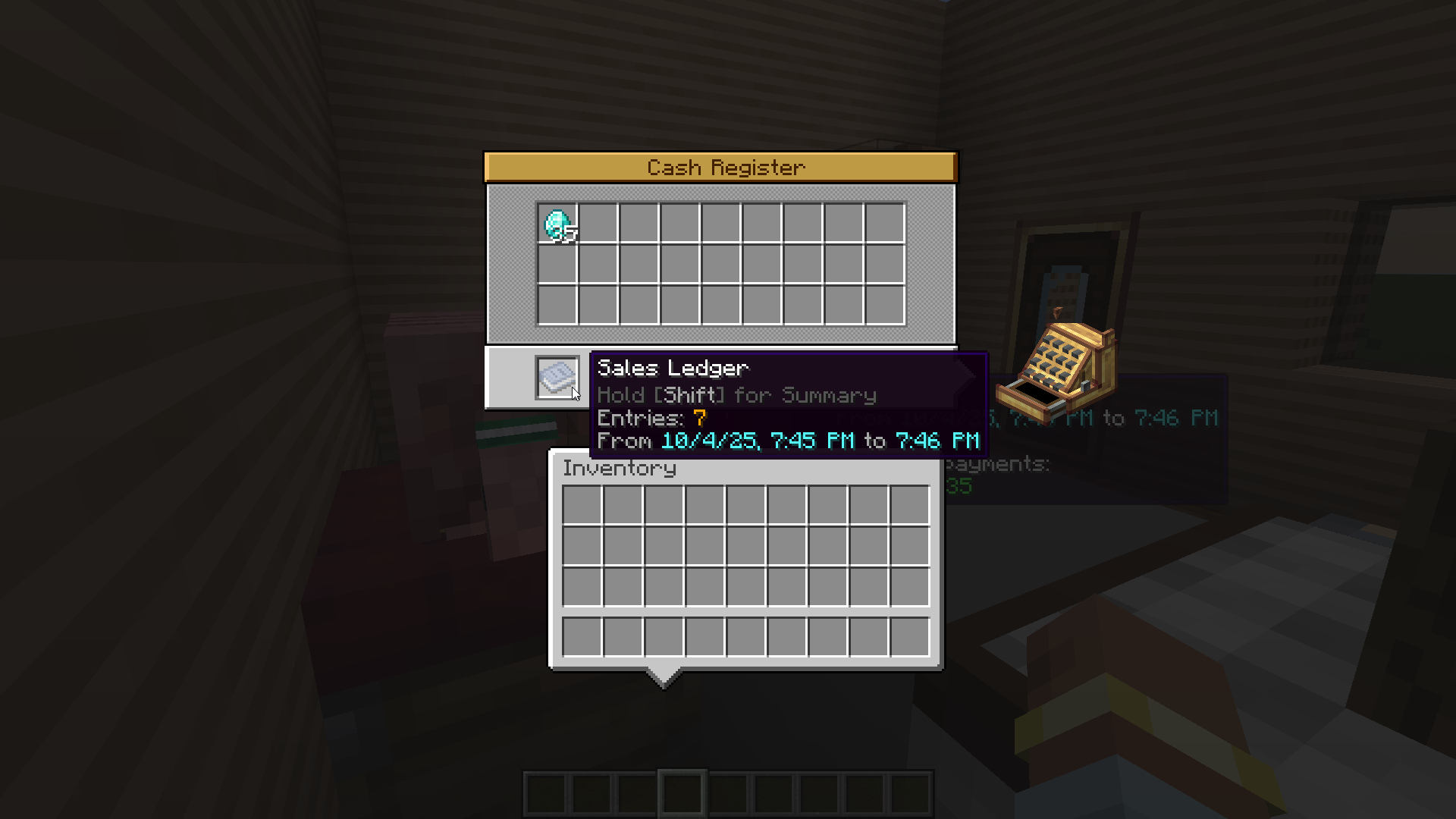 Cash Register - GUI The Cash Register has a custom UI for taking out payments, which gives you access to the Sales Ledger. Take the Ledger with you, and you can right-click with it to view a list of all the items that were sold.
 -
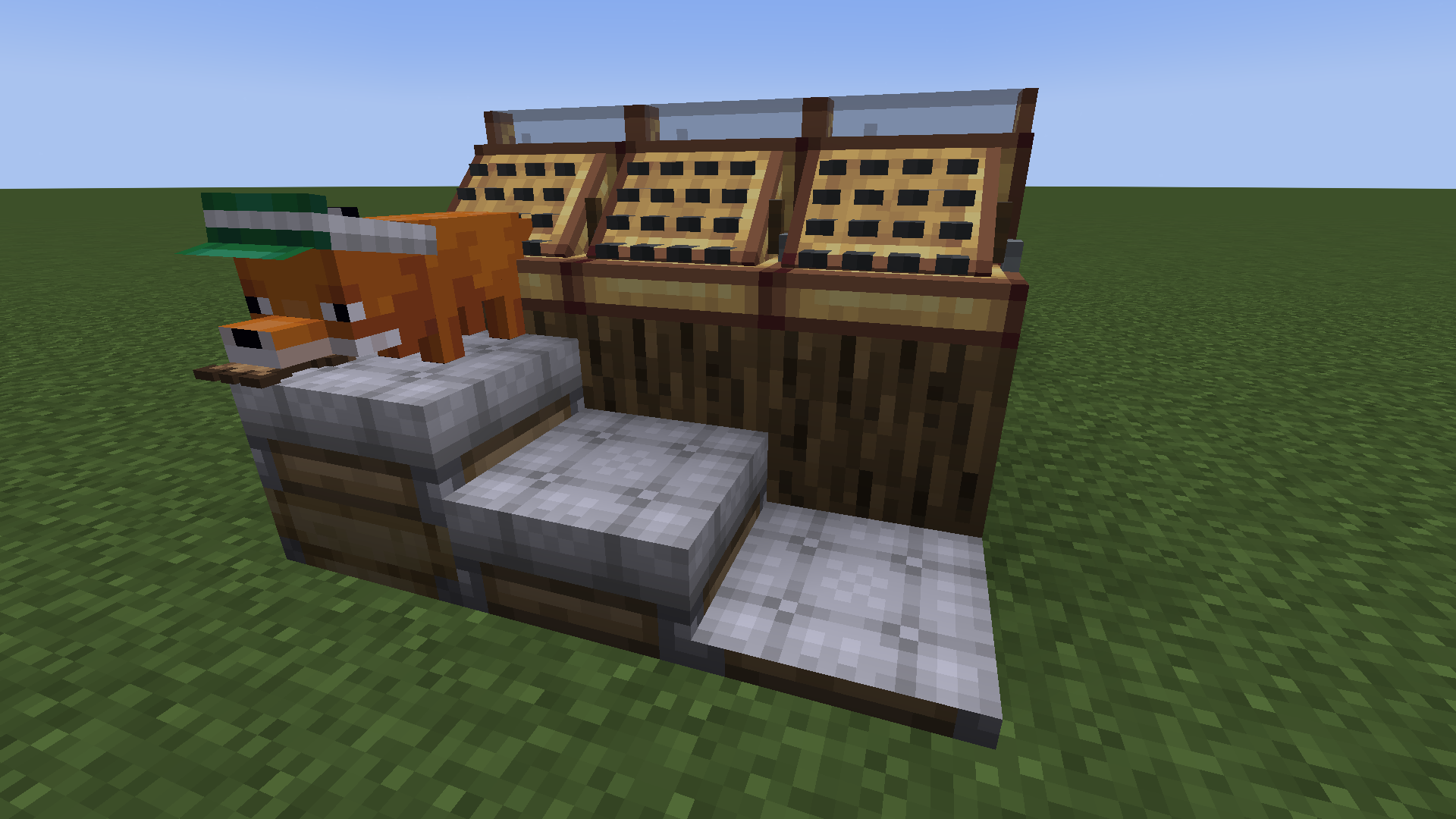 Tall Seats and Short Seats Available in every color, these seats work just like normal seats. (With the exception that mobs falling onto a Short Seat do not get picked up by it, so you need to use a lead to put something on it.)
Versions
Files
Relations
Project Relations
More like this
Similar Mods
Suggestions use data such as tags, dependencies, dependents, descriptions, titles, and more to rank how much they overlap with this mod.
- Create: Station Decor
- Create: Train-Deco
- Create: Props And Misc
- Create:Now that's a train!
- Create: Luminous
- VS2/CBC Armor Blocks
- Create: Modern Train Parts
- Create: Designed Decor [INDEFINITELY ARCHIVED]
- Create: Crafts & (More) Additions
- Create: Extra Casing
- Create: Extended Cogwheels Unofficial
- Create: Copycats+
On ModDex
Community snapshot
By the numbers
Statistics
 (opens in a new tab)
Get it on
Available Platforms
On ModDex
Community snapshot
By the numbers