
Community listing page, reviews may not be monitored by the author.
Create:More transmission

No reviews yet
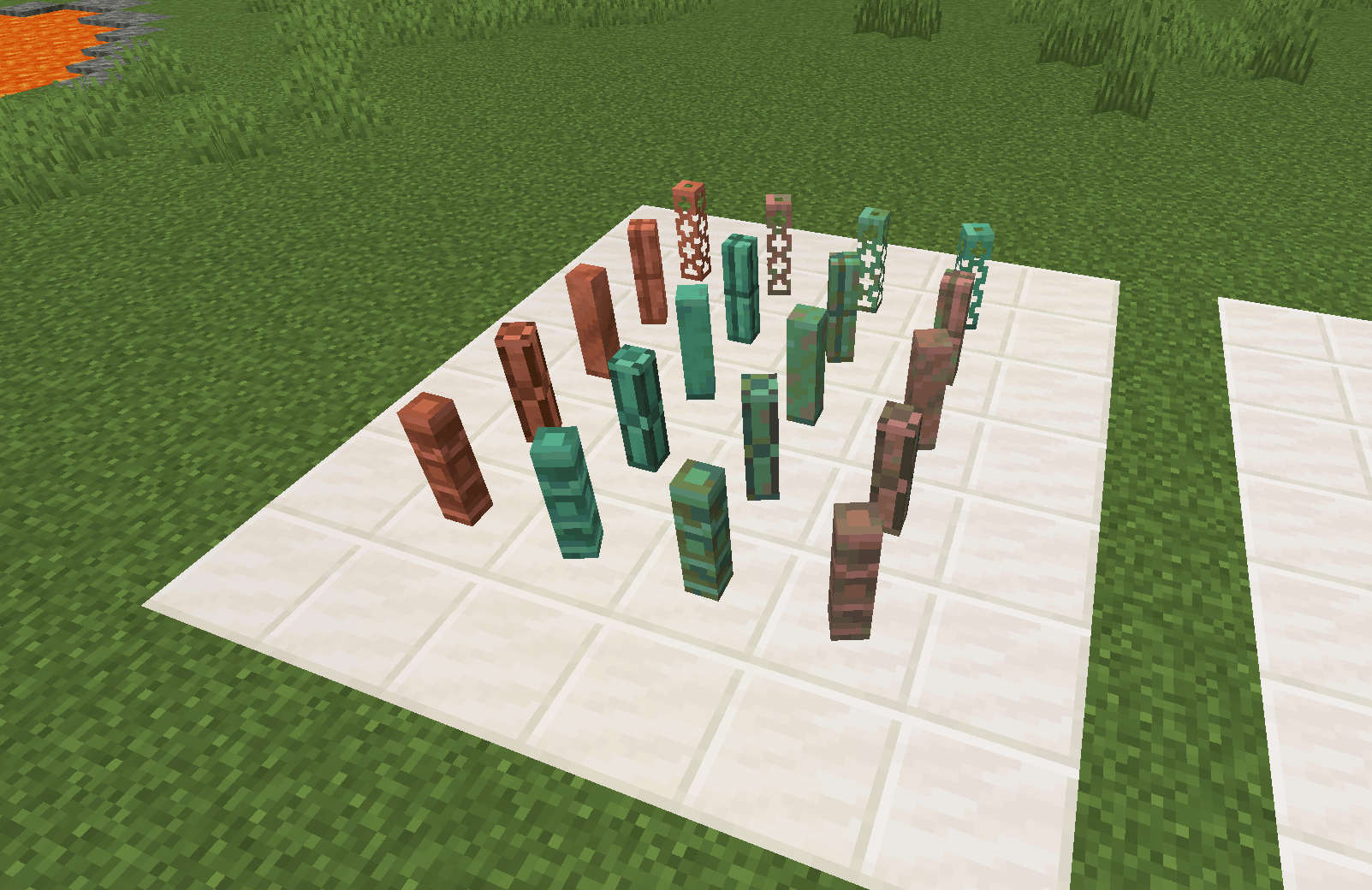
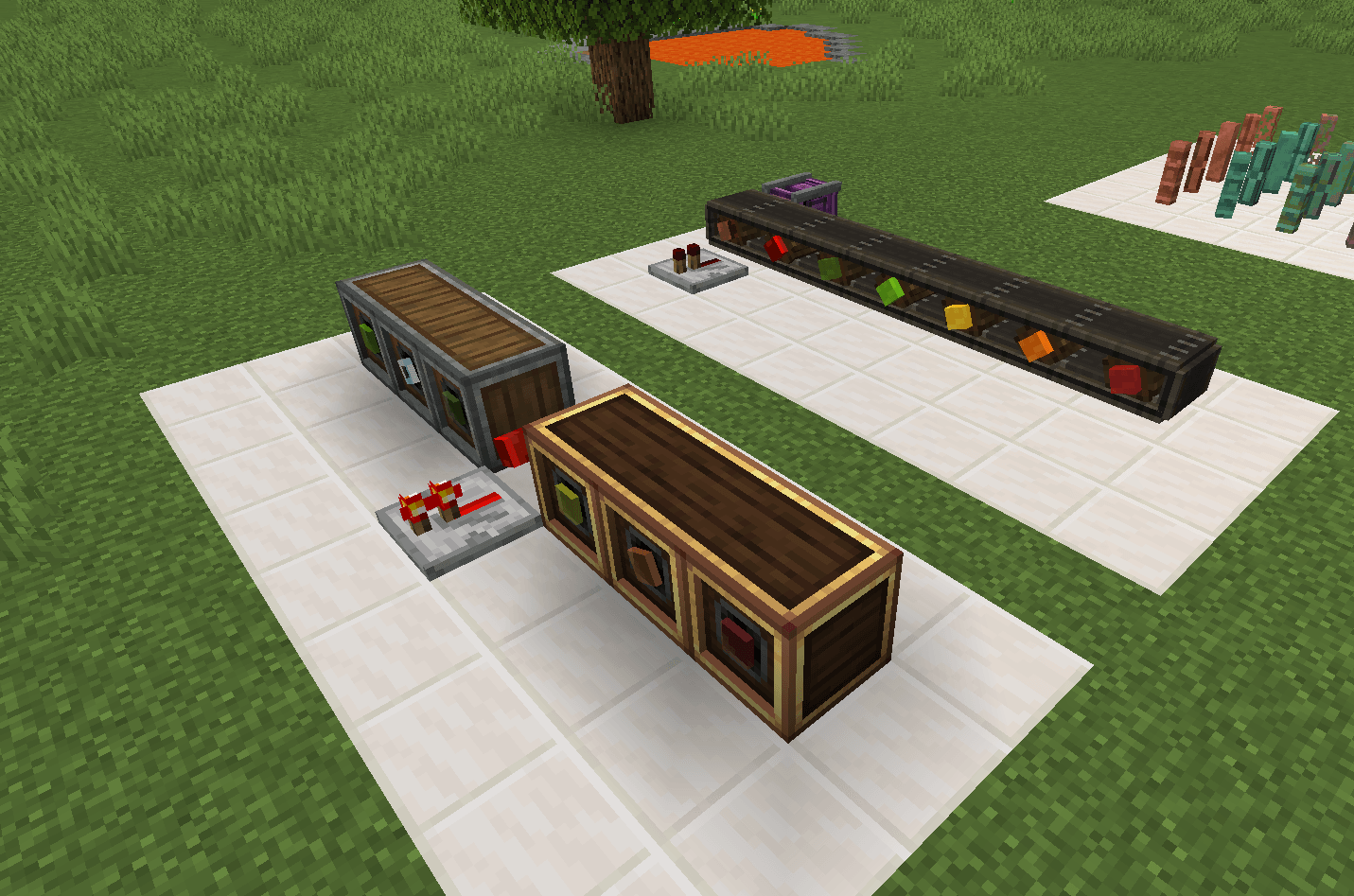
Adds 144 material shafts to Create — they work exactly like vanilla shafts, but each carries its own material properties and configurable speed limit, and shatters when overspun.

Community voices
Reviews
No reviews yet. Be the first to review this project!
Get it on
Available Platforms
About
Project Details
For authors
Embed Badge
If you're the author of this project, you can embed a live badge anywhere that supports HTML or Markdown. It updates automatically whenever ratings change.
Use HTML for any page that supports it, or Markdown for README files and Markdown-based descriptions.
Identifiers
Platform IDs
Resources
External Links
About
Description
More Transmission
183 material shafts for Create — dirt, wood, stone, mineral blocks, wool and glass, each with its own look and the physical properties of the block it is made from.
Minecraft 1.21.1 | NeoForge 21.1.250+ | Create 6.0.10+ | MIT | by sheng_zi
English
Adds 183 material shafts to Create. Every shaft extends Create's vanilla shaft, so it behaves exactly like a normal Create shaft: it transmits rotation, meshes with cogwheels, accepts casings, holds brackets, supports waterlogging and can be moved by pistons. On top of that each material brings its own texture and the block properties of the vanilla block it is made from.
✨ Features
- 183 material shafts — wood, plants, stone, deepslate, nether and end blocks, mineral blocks, wool, glass, copper oxidation states, and more.
- Material-derived properties — hardness, sound, mining tool and drops are inherited from the matching vanilla block:
- Wooden shafts → axe; soft blocks (dirt, sand…) → shovel; stone and mineral → pickaxe.
- Wool shafts behave like wool: no pickaxe needed, shears 5× / sword 1.5× faster.
- Glass shafts behave like glass: breakable with anything, but only drop with Silk Touch.
- Encasable, with the material preserved — right-click any material shaft with an Andesite or Brass Casing, exactly like a vanilla shaft. Unlike vanilla, the material is kept: the shaft inside still spins as your material shaft, and unwrenching or breaking it gives that material shaft back.
- Optional maximum speed limit — off by default — turn it on and every shaft from this mod gets an RPM limit (Create's own shaft is covered too, at 128): exceeding it shatters the shaft (the TNT shaft explodes instead). Limits are editable per shaft, with no upper bound; shafts from other mods have no entry in the config and are never limited. Left off, the game plays exactly like vanilla Create.
- Visible limit — while the switch is on, the item tooltip shows
Max Speedat a glance. - Special shafts
- 🧨 TNT Shaft — ignites from fire / flint & steel / fire charge and detonates instantly. It also explodes when overspun, but only while the speed limit is enabled.
- 🔴 Redstone Shaft — emits a constant redstone signal of 15, just like a block of redstone.
- 💡 Redstone Lamp Shaft — lights up while it spins: the texture switches to the lit version and the shaft itself emits light level 15. It also acts as a redstone source then, sending a signal of 15 to its neighbours just like a block of redstone. It goes dark and silent again as soon as it stops.
- 🔆 Copper Bulb Shafts — 8 of them: copper bulb, exposed, weathered and oxidized, each also waxed. Same behaviour as the lamp shaft, except that the light level follows the oxidation stage just like vanilla copper bulbs: 15 / 12 / 8 / 4.
- Interoperability — an item tag plus conversion recipes let any material shaft enter Create's crafting chain (see Recipes).
- Bilingual — built-in English and Simplified Chinese language files.
🧱 Materials & Default Max Speed
The table below lists the default limits. They only take effect once enable_shaft_max_speed = true; see Configuration.
| Default speed (RPM) | Examples | Count |
|---|---|---|
| 16 | dirt, sand, red sand, gravel, clay, soul sand, snow block, ice, moss, sponge, hay, slime, honey, honeycomb, sculk, TNT, 16 wool colours, glass, tinted glass and 16 stained glass | 50 |
| 32 | all wood and plant blocks: logs · stripped logs · planks (oak / spruce / birch / jungle / acacia / dark oak / mangrove / cherry), bamboo block, stripped bamboo block and bamboo planks, crimson & warped stems | 33 |
| 48 | sandstone / smooth sandstone, red sandstone / smooth red sandstone, bricks, packed mud, mud bricks, netherrack, sea lantern, glowstone, redstone lamp | 11 |
| 64 | stone, cobblestone, mossy cobblestone, smooth stone, stone bricks, mossy stone bricks, granite / diorite / andesite (incl. polished), the tuff set, prismarine / dark prismarine, the end stone set, calcite, bone block | 21 |
| 96 | the deepslate set (cobbled / polished / bricks) | 4 |
| 112 | nether bricks, red nether bricks | 2 |
| 128 | the basalt set, the blackstone set, gilded blackstone, purpur block, dripstone block | 8 |
| 160 | the copper family, 40 in total — copper, cut copper, copper bulbs, chiseled copper and copper grates (each in the exposed / weathered / oxidized stages, and every one also in a waxed variant) — plus coal block and magma block | 42 |
| 192 | iron block, gold block, lapis block, quartz block, quartz pillar, emerald block, amethyst block, redstone block | 8 |
| 224 | diamond block | 1 |
| 256 | obsidian, netherite block, bedrock | 3 |
183 shafts in total. Every value above can be edited individually.
⚙️ Configuration
The config file is created the first time you enter a world:
config/more_transmission-server.tomlYou can also change everything in-game — pause menu → Mods → More Transmission → Config. Changes apply immediately: no game restart, no need to re-enter the world.
This is a
SERVER-type config. The server syncs it to clients so that tooltips always show the values the server actually enforces — on a server you cannot talk yourself into believing the limit is off. The trade-off is that it only loads once a server is running, so the Config button on the title screen is greyed out; enter a world first.
Master switch — off by default
#是否启用「最大转速」限制。默认 false = 不限制,所有传动轴想转多快就转多快。
enable_shaft_max_speed = false
Yes, the comments in the generated file are Chinese —
ModConfigSpeccomments are not localised. The per-shaft entries below do use English keys.
With the switch off there is no speed limit, just like vanilla Create:
- nothing ever shatters from overspeeding;
- the TNT shaft never explodes from spinning (it can still be lit by fire / flint & steel / fire charge);
- the
Max Speedtooltip line is not shown.
The limit is off by default on purpose — most players prefer Create's usual feel, and the RPM rules are there for anyone who wants the harder version.
Per-shaft limits (only active while the switch is on)
[shaft_max_speed]
    #Max speed for dirt_shaft (default 16)
    dirt_shaft = 16
    #Max speed for oak_log_shaft (default 32)
    oak_log_shaft = 32
    ...
    #Max speed for shaft (default 128)
    shaft = 128
    #Max speed for bedrock_shaft (default 256)
bedrock_shaft = 256- Lower bound
0(shatters as soon as it spins), no upper bound — Create speeds can go far beyond 256 (stacked gearboxes, rotation speed controllers, orkinetics.maxRotationSpeedincreate-server.toml), so fill in whatever you need; - Spinning faster than the value triggers shattering (or an explosion for the TNT shaft).
shaftis Create's owncreate:shaft— the limit covers it as well, so a vanilla shaft is no safer than a material one. Shafts added by other mods have no entry here and are never limited.
🛠 Recipes
Every shaft has three base recipes (the dirt shaft is shown as an example):
| Type | Recipe |
|---|---|
| Crafting (shaped) | 2 matching blocks stacked in a column → 8 shafts |
| Stonecutter | 1 matching block → 8 shafts |
| Crafting (shapeless, reverse) | 9 shafts → 1 matching block |
Create interoperability (conversion recipes)
Create's machine recipes mostly reference create:shaft and cogwheel items directly, so conversion recipes let any material shaft enter Create's crafting chain:
| Recipe (shapeless) | Result |
|---|---|
| any shaft from this mod + 1 × Andesite Alloy | create:shaft |
| any shaft from this mod + 1 × any planks | create:cogwheel |
| any shaft from this mod + 2 × any planks | create:large_cogwheel |
"any shaft from this mod" is the item tag more_transmission:shafts (all 183 of them), so the recipes automatically cover every current and future shaft.
📦 Installation
- Install Minecraft 1.21.1 and NeoForge 21.1.250+;
- Install Create 6.0.10 or newer (Create bundles Flywheel / Ponder / Registrate);
- Drop
more_transmission-neo_1.21.1-<version>.jarinto.minecraft/mods/; - Launch the game — a "More Transmission" tab appears in the creative inventory.
JEI is optional and only used for recipe viewing.
Encased shafts are not listed in the creative tab: the only way to get one is to encase a shaft in-game.
🧑💻 Building from Source
# Compile
./gradlew build
# Output: build/libs/more_transmission-neo_1.21.1-<version>.jar

# Run a development client
./gradlew runClient

# Regenerate data (blockstates / item models / loot tables / tags / lang / recipes)
./gradlew runData
Generated resources live in src/generated/resources/ and are committed, so a fresh clone builds out of the box.
🌏 Localization
en_us— English (default)zh_cn— Simplified Chinese (src/main/resources/assets/more_transmission/lang/zh_cn.json)
Pull requests for other languages are welcome.
🔧 Create Compatibility Notes
- Every shaft extends Create's
ShaftBlock/BracketedKineticBlockEntity. Kinetic networks, rotating rendering, brackets, waterlogging and casings are all driven by Create's own logic. - Encasing matches vanilla, with one difference: the shaft inside keeps its material, so unwrenching or breaking it returns that material shaft. As in vanilla, the casing itself is not returned.
- The max speed behaviour is injected through Create's
BlockEntityBehaviourEvent, with no change to Create's code. It is off by default and short-circuits entirely while disabled.- It applies to encased shafts too, looked up by the inner shaft's material — encasing a shaft does not shield it from its limit.
- Belts work with these shafts exactly like with a vanilla shaft — as an endpoint, as a pulley in the middle of a line, and in the placement preview. The material survives the belt, too: the shaft showing inside a pulley is textured as your material, and breaking the belt (or wrenching a pulley off) gives your material shaft back rather than a plain one.
They can also be inserted into a belt like vanilla shafts: right-clicking a middle segment with a material shaft turns that segment into a pulley and consumes the item, and the segment remembers which material it was given from then on.
Known gaps: slicing a belt into pieces, and the shaft refund in the belt repair flow, still hand back plain
create:shaftitems — Create normalises shafts to vanilla in those two flows and there is no per-position information to read there. - That belt behaviour is the one place where the mod has to touch Create's bytecode: four small mixins (all in
com.shengzi.more_transmission.mixin).ShaftBlockMixin— Create'sShaftBlock.isShaft()is literallyAllBlocks.SHAFT.has(state), an exact block check rather than a tag, with no API hook; this lets it recognise the material shafts so belts can attach at all.BeltConnectorItemMixin— records which material shaft each belt segment replaced. Create destroys that shaft outright when the belt is placed and only keeps a boolean "there was a shaft here", so the material would otherwise be lost.BeltBlockMixin— puts the recorded material back in the three places where Create recreates a shaft out of thin air (the block restored when the belt is removed, the drop from the broken segment, and the item refunded when a pulley is wrenched off), and also lets a material shaft item be right-clicked into a middle segment by widening that check (see the belt paragraph above).BeltVisualMixin— Create's pulley model carries its own axis rod (textured with the vanilla shaft textures), a full 4×4×16 solid rod sitting right behind ours. That was fine while ours only had to cover it, but not for transparent materials: the holes of a copper grate, or anything translucent, showed that rod instead of the background. This points Create at a copy of the same model with the rod element removed, so the rod the mod draws is the only one — and for plain shafts it falls back to the vanilla shaft model, which is field-for-field the element that was removed.
- On the rendering side the pulley's shaft is painted by
MaterialBeltVisual, which subclasses Create's belt visual, draws that rod itself (the material's model, or the vanilla shaft when the segment held a plain shaft), and replaces the visualizer forcreate:beltat client setup. It only affects the Flywheel path — with Flywheel visualization disabled, the fallbackBeltRendererstill shows the vanilla shaft, which is where it always was. - The item tag
more_transmission:shaftsand the conversion recipes are provided for integration with other mods and datapacks.
📜 License
Released under the MIT license. Thanks to Create and its team for the excellent open-source base and API.
🐛 Feedback
Questions or suggestions? Open an Issue.
中文
为 机械动力(Create) 添加 183 种不同材质的传动轴。每根轴都以 Create 原版轴为基类扩展,因此可以像普通 Create 轴一样使用:传动、连接齿轮、套上齿轮箱/封套、挂支架、含水、被活塞推动……全部照旧;在此之上,每种材质还带有自己的贴图和对应原版方块的物性。
支持版本:Minecraft 1.21.1 | NeoForge 21.1.250+ | Create 6.0.10+ | 许可证:MIT | 作者:sheng_zi
✨ 特色
- 183 种材质传动轴 —— 木头、植物、石头、深板岩、下界与末地系列、矿物块、羊毛、玻璃、铜的各氧化态等等。
- 材质化物性 —— 硬度、音效、挖掘工具、是否掉落都继承对应原版方块:
- 木质轴 → 用斧头;松软材质(泥土、沙……)→ 用铲子;石质与矿物 → 用镐。
- 羊毛轴和羊毛一样:不需要镐,剪刀 5× / 剑 1.5× 加速。
- 玻璃轴和玻璃一样:任意工具都能破坏,但普通破坏不掉落,只有精准采集才能回收。
- 可被机壳包裹(封套),且材质会保留 —— 拿着安山机壳或黄铜机壳右键任意材质轴即可,和原版操作一致。与原版不同的是里面包的还是你原来那根材质轴:扳手拆开或直接破坏,拿回的都是该材质的轴。
- 可选的最大转速限制(默认关闭) —— 打开后本模组每根轴都有转速上限(原版
create:shaft也在内,默认 128),超过即碎裂(TNT 轴则是爆炸),数值可逐根调整、不设上限;其它模组的轴没有配置条目,永远不会被限制。保持关闭时,手感和原版 Create 完全一致。 - 原地显示上限 —— 开关打开时,物品悬浮提示里会显示
Max Speed,一眼看出这轴能转多快。 - 特殊机制轴
- 🧨 TNT 传动轴 —— 可被火 / 打火石 / 火焰弹点燃,一点即爆;转速超限时也会爆炸(仅在限速开关打开时)。
- 🔴 红石传动轴 —— 像红石块一样持续向相邻发出 15 级红石信号。
- 💡 红石灯传动杆 —— 转动时点亮:贴图换成亮着的那版,轴自身也发出 15 级光;同时像红石块一样向相邻发出 15 级红石信号。停下即熄灭、信号也一起断掉。
- 🔆 铜灯传动杆(8 种) —— 铜灯 / 斑驳 / 锈蚀 / 氧化,每种还有涂蜡版。行为与红石灯轴相同,区别是亮度跟随氧化程度,和原版铜灯一致:15 / 12 / 8 / 4。
- 与其它模组互通 —— 提供物品标签与转换配方,让任意材质的轴都能进入 Create 的合成链(见配方)。
- 中英双语 —— 内置英文与简体中文语言文件。
🧱 材质与默认最大转速
下表是默认值,需要先在配置里打开 enable_shaft_max_speed 才会生效,详见配置文件。
| 默认转速 (RPM) | 材质举例 | 数量 |
|---|---|---|
| 16 | 泥土、沙、红沙、沙砾、黏土、灵魂沙、雪块、冰、苔藓、海绵、干草、黏液、蜂蜜、蜜脾、幽匿、TNT、16 色羊毛、玻璃、遮光玻璃与 16 色染色玻璃 | 50 |
| 32 | 全部木质与植物:原木 · 去皮原木 · 木板(橡木/云杉/白桦/丛林/金合欢/深色橡木/红树/樱花)、竹子块、去皮竹块与竹板、绯红与诡异菌柄 | 33 |
| 48 | 砂岩 / 平滑砂岩、红砂岩 / 平滑红砂岩、砖块、泥坯、泥砖、下界岩、海晶灯、荧石、红石灯 | 11 |
| 64 | 石头、圆石、苔石、平滑石头、石砖、苔石砖、花岗岩 / 闪长岩 / 安山岩(含磨制)、凝灰岩系、海晶石 / 暗海晶石、末地石系、方解石、骨块 | 21 |
| 96 | 深板岩系(圆石 / 磨制 / 深板岩砖) | 4 |
| 112 | 下界砖块、红色下界砖块 | 2 |
| 128 | 玄武岩系、黑石系、镶金黑石、紫珀块、滴水石 | 8 |
| 160 | 铜系共 40 根 —— 铜块、切制铜块、铜灯、雕纹铜块、铜格栅各含本体与斑驳 / 锈蚀 / 氧化三态,且每种都有涂蜡版 —— 另加煤炭块、岩浆块 | 42 |
| 192 | 铁块、金块、青金石块、石英块、石英柱、绿宝石块、紫水晶块、红石块 | 8 |
| 224 | 钻石块 | 1 |
| 256 | 黑曜石、下界合金块、基岩 | 3 |
合计 183 根。上表每个数值都可以逐根修改。
⚙️ 配置文件
首次进入存档时会自动生成:
config/more_transmission-server.toml也可以完全在游戏里改 —— 暂停菜单 → Mods → More Transmission → Config。改完立刻生效,不用重启游戏,也不用重进存档。
这份配置是
SERVER类型:由服务端同步给客户端,保证提示里显示的数值就是服务端真正在用的数值——在服务器上不会出现"以为自己关了限速、其实还在碎轴"。代价是它要等服务器起来才加载,所以标题界面上那个 Config 按钮是灰的,进存档后才能点。
转速上限总开关(默认关闭)
#是否启用「最大转速」限制。默认 false = 不限制,所有传动轴想转多快就转多快。
enable_shaft_max_speed = false开关关闭时完全不限制转速,和原版 Create 一样:
- 不会超速碎裂;
- TNT 轴不会因为转速爆炸(但仍然可以被火 / 打火石 / 火焰弹点燃);
- 物品提示里不显示
Max Speed。
默认关闭是有意为之——多数玩家更喜欢原版 Create 的手感,转速规则留给想要硬核设定的玩家自己开。
逐根轴的转速上限(仅在开关打开时生效)
[shaft_max_speed]
    #Max speed for dirt_shaft (default 16)
    dirt_shaft = 16
    #Max speed for oak_log_shaft (default 32)
    oak_log_shaft = 32
    ...
    #Max speed for shaft (default 128)
    shaft = 128
    #Max speed for bedrock_shaft (default 256)
bedrock_shaft = 256- 下限
0(一有转速就碎裂),上限不设——Create 的转速能远超 256(齿轮箱叠加、转速控制器,或改create-server.toml里的kinetics.maxRotationSpeed),想填多少填多少; - 转速超过该值即触发碎裂(TNT 轴则是爆炸)。
shaft这一条是原版的create:shaft—— 限速对它一样生效,原版轴并不比材质轴安全。其它模组新增的轴在这里没有条目,因此永远不会被限速。
🛠 配方
每根轴都有三条基础配方(以泥土轴为例):
| 类型 | 配方 |
|---|---|
| 工作台(有序) | 同一列竖放 2 个对应方块 → 8 根轴 |
| 切石机 | 1 个对应方块 → 8 根轴 |
| 工作台(无序·逆向) | 9 根轴 → 1 个对应方块 |
与机械动力互通(转换配方)
因为 Create 的机器配方大多直接引用 create:shaft 和齿轮物品,模组提供了转换配方,让任意材质的轴都能进入 Create 的合成链:
| 配方(无序) | 产出 |
|---|---|
| 任意本模组传动轴 + 1 × 安山合金 | create:shaft |
| 任意本模组传动轴 + 1 × 任意木板 | create:cogwheel |
| 任意本模组传动轴 + 2 × 任意木板 | create:large_cogwheel |
其中「任意本模组传动轴」用的是物品标签 more_transmission:shafts(含全部 183 根),所以这些配方会自动覆盖现有和以后新增的每一根轴。
📦 安装
- 安装 Minecraft 1.21.1 与 NeoForge 21.1.250+;
- 安装 机械动力 Create 6.0.10 或以上(Create 会自带 Flywheel / Ponder / Registrate 依赖);
- 把
more_transmission-neo_1.21.1-<版本>.jar放进.minecraft/mods/; - 启动游戏,创造物品栏中会出现 「更多传动 / More Transmission」 分类。
JEI 为可选,仅用于查看配方,不装也不影响使用。
封套传动杆不会出现在创造物品栏里——唯一获得方式就是在游戏里用机壳把轴包起来。
🧑💻 从源码构建
# 编译
./gradlew build
# 产物:build/libs/more_transmission-neo_1.21.1-<版本>.jar

# 本地开发运行
./gradlew runClient

# 重新生成数据(方块状态 / 物品模型 / 掉落表 / 标签 / 语言 / 配方)
./gradlew runData
数据生成产物位于 src/generated/resources/,已随仓库提交,克隆后可直接构建。
🌏 本地化
en_us:英文(默认)zh_cn:简体中文(src/main/resources/assets/more_transmission/lang/zh_cn.json)
欢迎提交其它语言的翻译(PR 即可)。
🔧 与 Create 的兼容说明
- 所有轴都继承 Create 的
ShaftBlock/BracketedKineticBlockEntity。动能网络、旋转渲染、支架(bracket)、含水、封套(casing)等行为全部由 Create 原生逻辑驱动。 - 封套与原版一致,只有一点不同:里面包的轴会保留材质,所以扳手拆开或破坏时拿回的是该材质的轴。机壳本身和原版一样不返还。
- 最大转速通过 Create 的
BlockEntityBehaviourEvent注入,不改动 Create 代码;默认关闭,关闭时整条逻辑直接放行、等于不存在。- 它对封套轴同样生效,并按内轴材质查表——给轴套上机壳并不能让它绕过转速上限。
- 传送带可以像连接原版轴一样连接这些轴:既能当起终点,也能被传送带绕成中段滑轮,拖拽预览线同样正常。而且材质过带不丢:滑轮里露出的那根轴用的是你那种材质,拆掉传送带、或用扳手把滑轮拆成平带,拿回的也都是原来那根材质轴,不是普通轴。
材质轴也能像原版轴一样右键塞进传送带中段(那一格变成滑轮、扣掉一个物品),并且这一格从此记住塞进去的是哪种材质——之后拆掉传送带、或把滑轮拆成平带,拿回的都是那根材质轴。
已知的两处例外:把传送带切片与修复传送带流程里的退轴,仍然返还原版
create:shaft物品——这两条流程里 Create 本来就是把轴统一换成原版轴处理的,那里也拿不到「哪一格原本是什么」的信息。 - 传送带这套行为是本模组唯一需要碰 Create 类字节码的地方,共四个小 mixin(都在
com.shengzi.more_transmission.mixin):ShaftBlockMixin—— Create 的ShaftBlock.isShaft()实现就是AllBlocks.SHAFT.has(state)(写死认create:shaft这个方块,不是 tag、也没有 API 钩子)。补上这个判定,传送带才连得上。BeltConnectorItemMixin—— 记录每一格传送带当初顶掉的是哪根材质轴。Create 贴带时会把那根轴直接销毁,只留一个布尔式的「这格原来是轴」,不记下来材质就丢了。BeltBlockMixin—— 在 Create 凭空造轴的三个地方把材质换回去:拆掉传送带时还原的方块、被破坏那一格的掉落、扳手拆滑轮时返还的物品;另外还负责放宽「右键往中段塞轴」那一步的物品判定(见上面传送带那段)。BeltVisualMixin—— Create 画滑轮用的那个模型自带一根轴杆(贴原版轴贴图、4×4×16 的实心杆),正好挡在我们那根后面。只求「盖住它」时这没关系,但透明材质不行:铜格栅的镂空、玻璃的半透明,透过去看到的正是它而不是背景。这里让 Create 改用去掉那根杆的同一份模型,滑轮里就只剩本模组画的那根;原本就是原版轴时回落到原版轴 partial,正是被去掉的那个元素。
- 提供
more_transmission:shafts物品标签与转换配方,方便与其它模组 / 数据包对接。
📜 许可
本项目以 MIT 许可证开源。感谢 机械动力(Create) 及其团队提供了优秀的开源基础与 API。
🐛 反馈
遇到问题或有建议,欢迎提 Issue。
Screenshots
Gallery
-
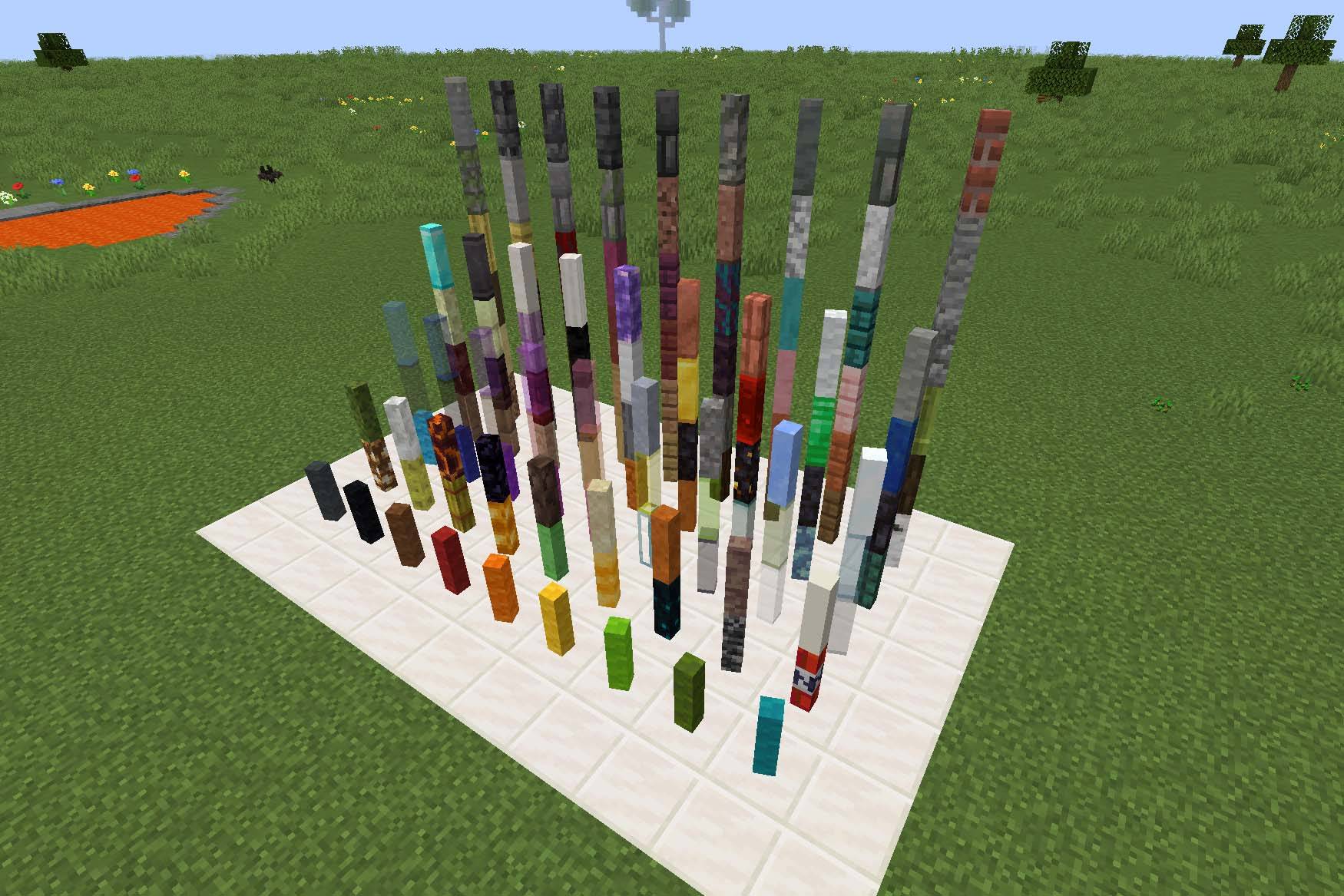 image-attachment_c6365bdd-c101-4611-bc80-4f2dcf154dbe.jpg
 -
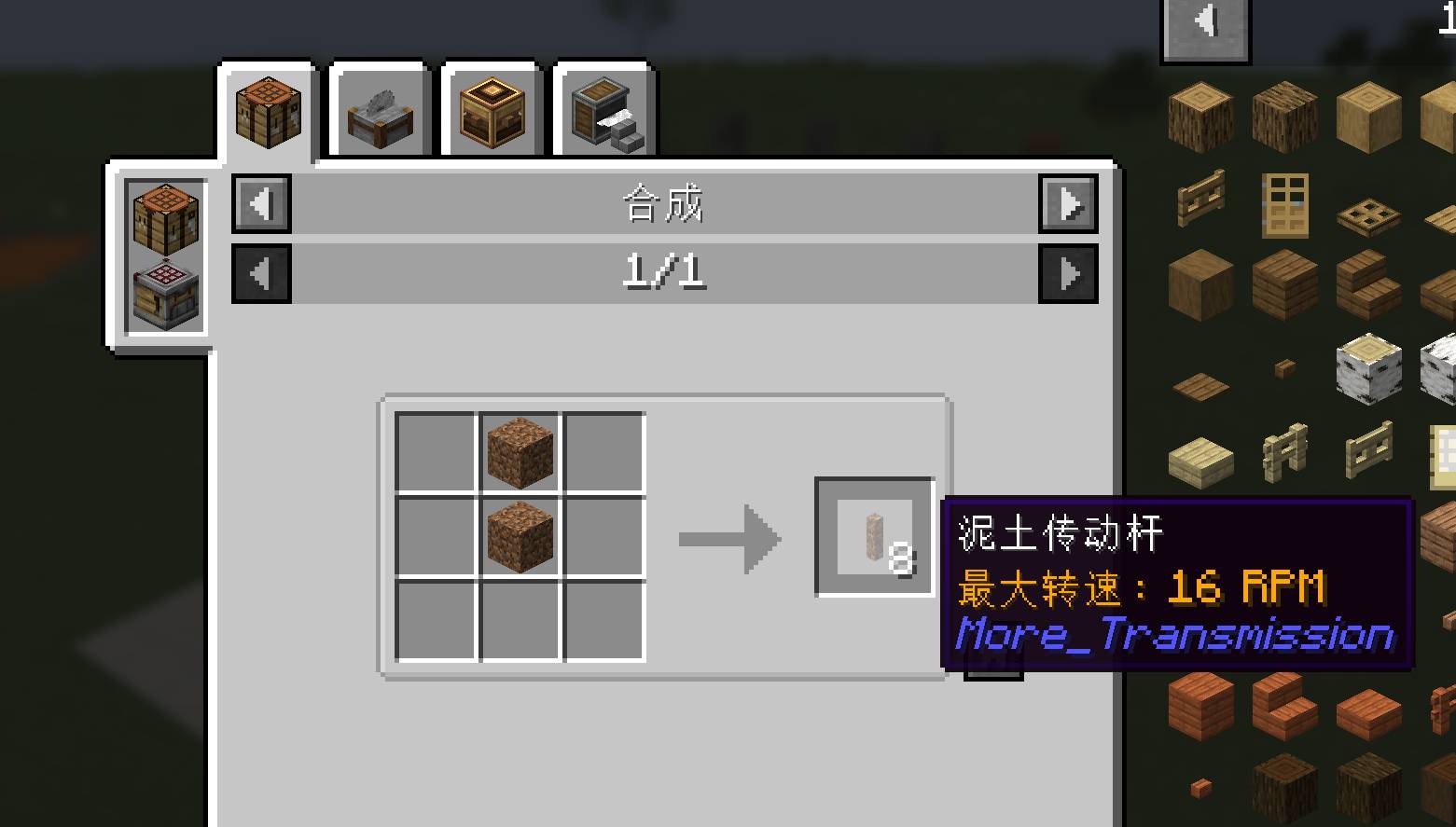 image-attachment_18edccfd-4cfe-4dec-b6e7-8e890ed01488.jpg
 -
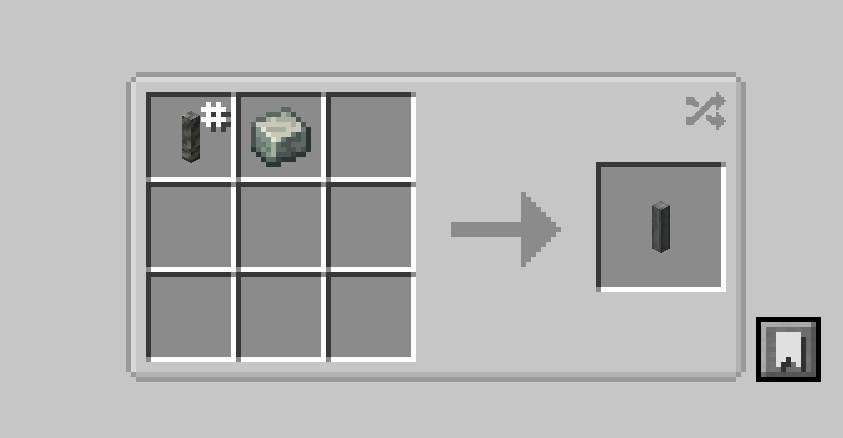 image-attachment_72eec4f5-d87e-4c99-8203-d725a1591fb7.jpg
 -
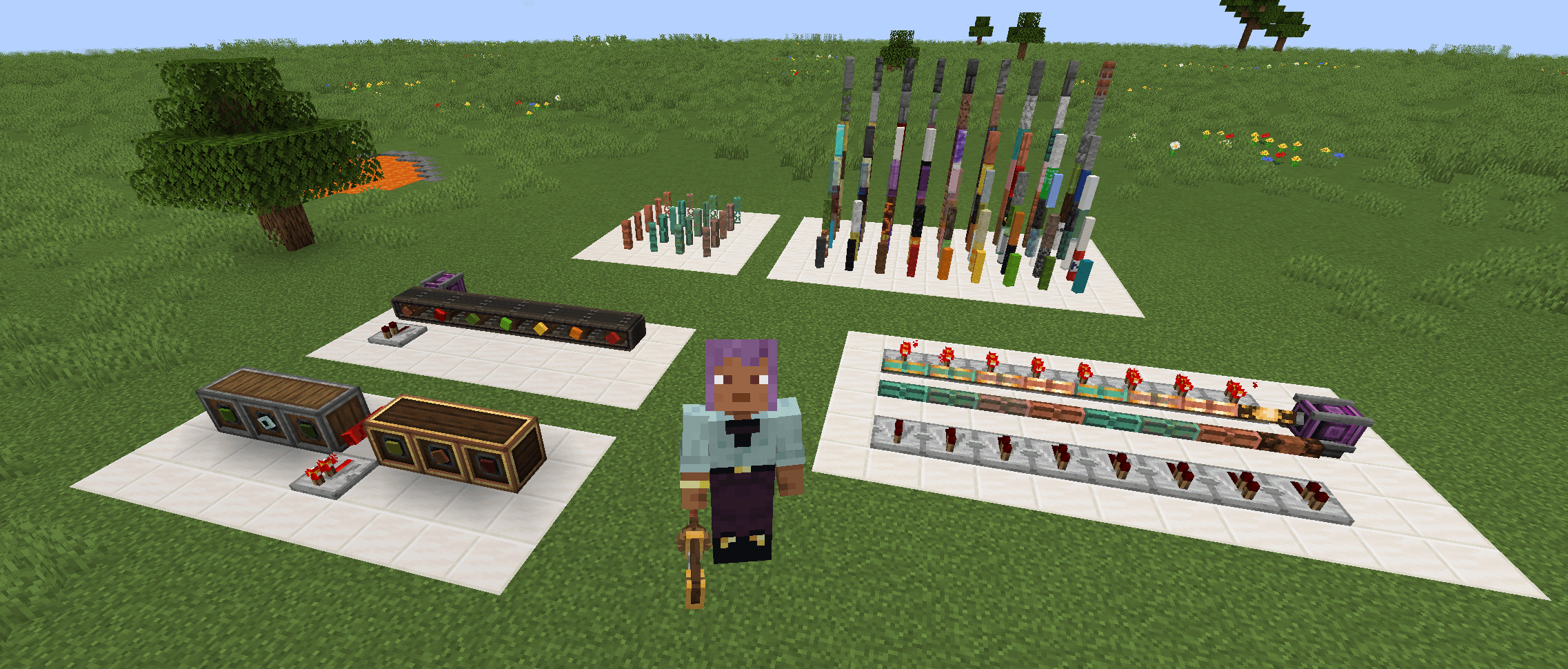 image-attachment_bc204f3f-d296-49c4-8224-dc5b8162289a.png
 -
 QQ20260918-164020.png QQ20260918-164020.png
 -
 QQ20260918-164154.png QQ20260918-164154.png
 -
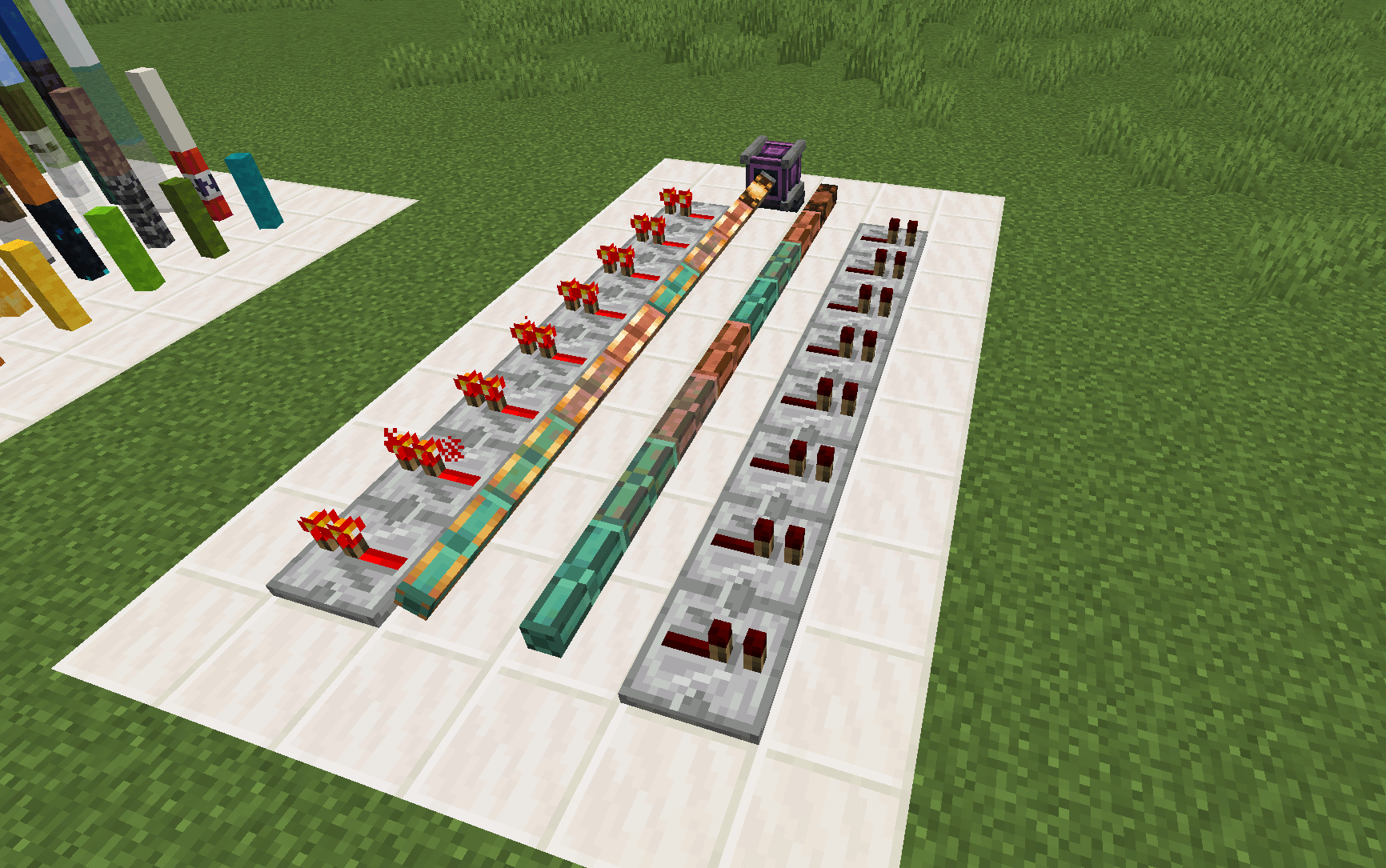 image-attachment_2ecd8d87-14c0-42d1-9e06-8361d70d4ac6.png
Versions
Files
Relations
Project Relations
More like this
Similar Mods
Suggestions use data such as tags, dependencies, dependents, descriptions, titles, and more to rank how much they overlap with this mod.
- Create More: Package Couriers
- Create More: Parallel Pipes
- Create: More Drill Heads
- Create More Recipes
- Create: More Features
- Create More Automation
- Create: More Chocolate
- Create: More Girder
- Create: More Features - Overhauled
- Create: More Sand Papers
- Create More: Pipe Bombs in Packages
- Create More Seats
On ModDex
Community snapshot
By the numbers
Statistics

Get it on
Available Platforms
On ModDex
Community snapshot
By the numbers
Statistics
Resources