
create-schematic-compute
No reviews yet
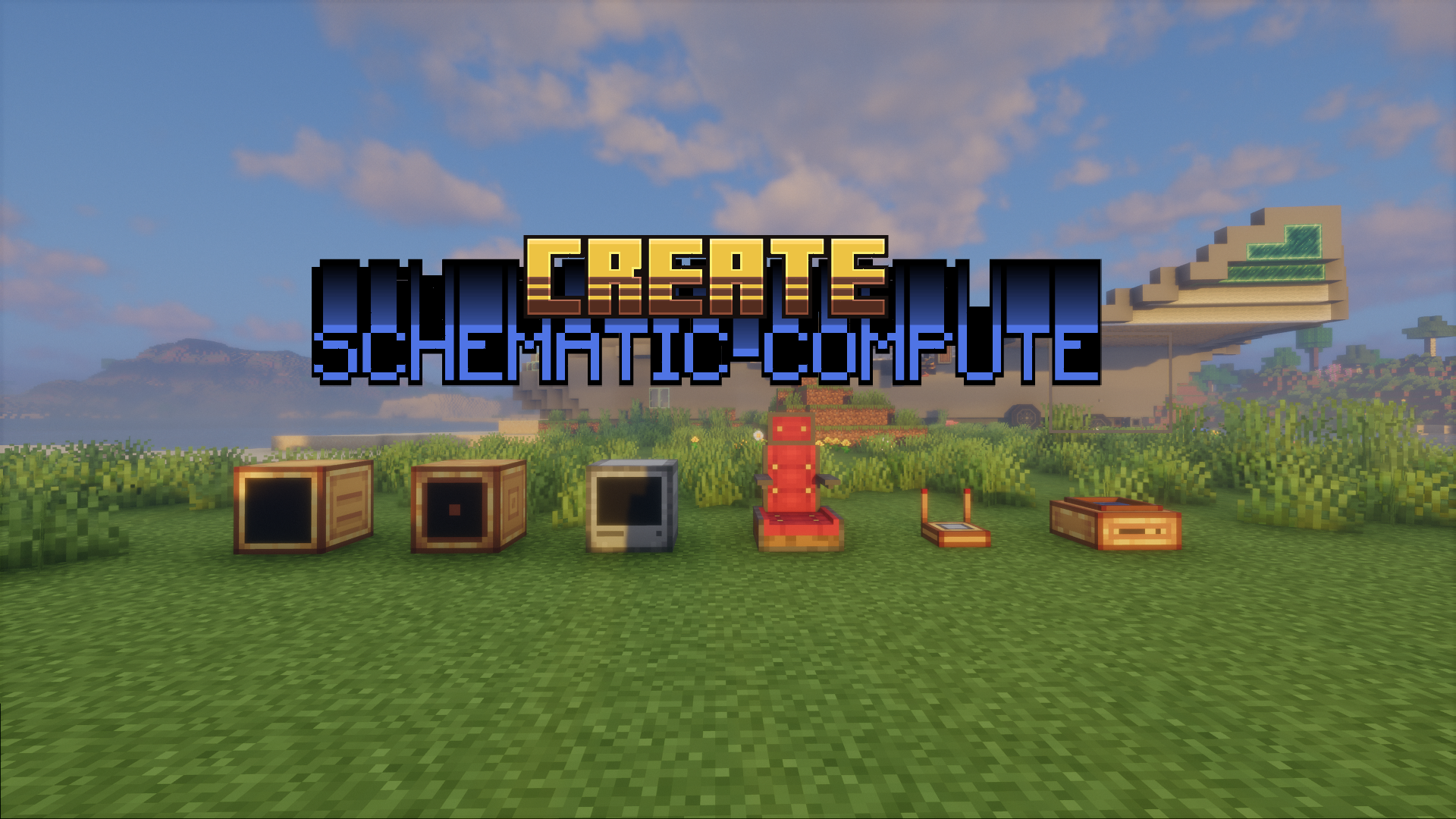
Create: Schematic Compute brings a graph-based visual programming interface to the Create ecosystem, allowing you to build complex computational blueprints without messy redstone dust.
Neoforge is a fork of the Minecraft Forge available for versions 1.20.1+ of Minecraft. Many Forge mods are compatible with Neoforge and vice versa.
Community voices
Reviews
Click once to include, again to exclude, again to clear
No reviews yet. Be the first to review this project!
Get it on
Available Platforms
 Modrinth
Compatibility
Supported Environments
About
Project Details
For authors
Embed Badge
If you're the author of this project, you can embed a live badge anywhere that supports HTML or Markdown. It updates automatically whenever ratings change.
Use HTML for any page that supports it, or Markdown for README files and Markdown-based descriptions.
Identifiers
Platform IDs
About
Description
Create: Schematic Compute
🎮 7 Programmable Blocks · 86 Node Types · Formula Syntax Highlighting & Autocomplete · Multiplayer Collaboration
七种可编程方块 · 86种节点 · 公式语法高亮与自动补全 · 多人实时协作
Drag, connect, and build logic — just like Unreal Engine Blueprints!
拖拽连接,构建逻辑 — 像虚幻引擎蓝图一样直观!
Created by StarryNight_Luo (y15173334444)






📖 Overview / 简介
🇬🇧 Create: Schematic Compute is a Create mod addon that introduces 7 programmable blocks + 1 portable terminal with a visual node-based programming system. Instead of writing complex redstone circuits, simply drag and connect nodes to build logic — just like Unreal Engine Blueprints or Blender Geometry Nodes. Each computer runs at 20Hz (every game tick) for real-time control. All 7 blocks support real-time multiplayer collaborative editing with live cursor tracking and node lock protection. The FORMULA script editor features syntax highlighting (9 token colours), intelligent autocomplete (functions, variables, @output), real-time validation with error badges, and named constants (PI)/(E).
🇨🇳 机械动力:蓝图计算机 是一个机械动力附属模组,添加了七种可编程方块和一个便携终端,采用可视化节点图编程系统。无需搭建复杂红石电路,只需拖拽连接节点即可构建逻辑——就像虚幻引擎的蓝图系统或 Blender 的几何节点一样直观。每台设备拥有独立的节点图,以 20Hz(每游戏刻) 的频率运行,适合实时控制应用。全部 7 种方块支持多人实时协作编辑,带实时光标追踪和节点锁定保护。FORMULA 公式脚本编辑器 支持语法高亮(9 种词法颜色)、智能自动补全(函数、变量、@output)、实时校验与错误徽章、以及命名常量 (PI)/(E)。
🖥️ Blocks / 方块
🖥️ Holographic Monitor / 全息显示器
3D floating display / 3D 悬浮显示方块
| Feature / 功能 | Description / 说明 |
|---|---|
| 🖼️ Display Nodes / 显示节点 | TEXT, DATA, IMAGE, IMAGE_SEQUENCE / 文本、数值、图片、动画 |
| 🎨 16×16 Pixel Editor / 16×16像素编辑器 | Multi-frame animation + undo/redo / 多帧动画+撤销重做 |
| 📋 Layer Panel / 图层面板 | Drag-drop reorder + 24×24 thumbnails / 拖拽排序+缩略图预览 |
| 🎯 3D Positioning / 3D定位 | X/Y/Z + Roll/Pitch/Yaw freely adjustable / 自由调整位置和旋转 |
| 📡 Signal-Driven / 信号驱动 | IMAGE position/rotation via input signals / 通过输入信号驱位置旋转 |
| 📡 Redstone Input / 红石输入 | Read Redstone Link signals / 从红石链接网络读取信号 |
🖥️ Blueprint Computer / 蓝图计算机
Redstone Link controller / 红石链接控制器
| Feature / 功能 | Description / 说明 |
|---|---|
| 📡 Redstone I/O / 红石I/O | Read/Write Redstone Link network / 读写红石链接网络 |
| 🔗 Private Signal / 私有信号 | Named channel cross-computer communication / 命名通道跨计算机通信 |
| 🚌 Bus System / 总线系统 | BUS_IN/BUS_OUT multi-band data sharing / 多频段数据共享 |
| 📦 Encapsulation I/O / 封装导入导出 | File browser import/export .nbt files / 文件浏览器导入导出 |
⚡ Speed Proxy / 转速代理控制器
Speed Controller direct control / 转速直控
| Feature / 功能 | Description / 说明 |
|---|---|
| 🔄 Speed Control / 转速控制 | Set adjacent Speed Controller RPM (-256~256) / 设置相邻转速控制器RPM |
| 🔗 Private Signal / 私有信号输入 | Named channel cross-computer coordination / 命名通道跨计算机联动 |
🔌 Program Computer / 编程计算机
Sequential logic / 时序逻辑专用机
| Feature / 功能 | Description / 说明 |
|---|---|
| 📡 Redstone I/O / 红石I/O | Redstone Link network communication / 红石链接网络通信 |
| 🔗 Private Signal / 私有信号 | PRIVATE_IN/PRIVATE_OUT named channel I/O / 命名通道I/O |
| ⏱️ Sequential Nodes / 时序节点 | Delay/Latch/T Flip-Flop/Gate/Pulse Extend/Loop/Fuse/Accumulator/Integrator / 延时/锁存器/T触发器/闸门/脉冲延长/循环/保险/累计器/连续积分器 |
🪑 Control Seat / 控制座椅
Sit-able controller / 可乘坐控制器
| Feature / 功能 | Description / 说明 |
|---|---|
| ⌨️ 58 Key Bindings / 58键绑定 | Click-to-bind UI / 点击绑定 |
| 🖱️ Dual Mode / 双模式 | Joystick (mouse delta) / View Angle (rotation difference) / 摇杆/视角差 |
| 🎮 Gamepad / 手柄 | Dual stick + 15 buttons + analog triggers LT/RT / 双摇杆+15键+模拟扳机 |
| 🔄 Sable Compatible / Sable兼容 | Two camera modes (FIXED / VIEW_DIFFERENCE), world-orientation tracking via quaternion / 双相机模式,四元数世界朝向追踪 |
| 🚪 Controls / 操作 | Right-click sit / Shift+Right-click editor / ~ dismount / TAB mode / ESC release |
📐 Attitude Sensor / 姿态传感器
Physics structure orientation / 物理结构姿态读取
| Feature / 功能 | Description / 说明 |
|---|---|
| 📐 ATTITUDE / 姿态 | Sub-level pitch and roll / 子世界俯仰和横滚 |
| 🧭 FORWARD / 前方朝向 | World-space forward yaw/pitch / 结构世界空间朝向 |
| ⚡ ACCELERATION / 加速度 | Structure-local X/Y/Z acceleration / 结构本地加速度 |
| 🚀 VELOCITY / 速度 | Structure-local velocity ×2 m/s / 结构本地速度 |
| 🔄 POSE_CONVERT / 姿态换算 | Coordinate conversion / 坐标系转换 |
📡 3D Holographic Radar / 3D全息显示雷达
Real-time scanner / 实时实体扫描器
| Feature / 功能 | Description / 说明 |
|---|---|
| 📡 Scan Range / 扫描范围 | 1-128 blocks configurable / 1-128格可配置 |
| 🎯 Target Lock / 目标锁定 | Manual right-click + auto closest / 手动右键锁定+自动最近 |
| 🖥️ Display Style / 显示风格 | Classic XYZ axes / Holographic (white cube + blue plane) / 经典/全息 |
| 📊 TARGET_OUT | Output X/Y/Z/entity ID/distance / 输出坐标/实体ID/距离 |
| 🔍 Filters / 过滤 | Show/hide players, mobs, Sable structures / 独立显示玩家/生物/Sable |
📱 Portable Terminal / 便携终端
Handheld remote editor / 手持远程编辑器
| Feature / 功能 | Description / 说明 |
|---|---|
| 📡 Device Scan / 设备扫描 | Scan 1-128 blocks for programmable blocks / 扫描1-128格可编程方块 |
| ✏️ One-Click Edit / 一键编辑 | Open native GUI instantly / 即时打开原生GUI |
| 📦 All 7 Blocks / 全7方块 | Monitor, Blueprint, Program, Radar, Seat, Sensor, SpeedProxy |
| 🔄 Sable Compatible / Sable兼容 | Sub-level scanning with rotation correction / 子世界扫描+旋转修正 |
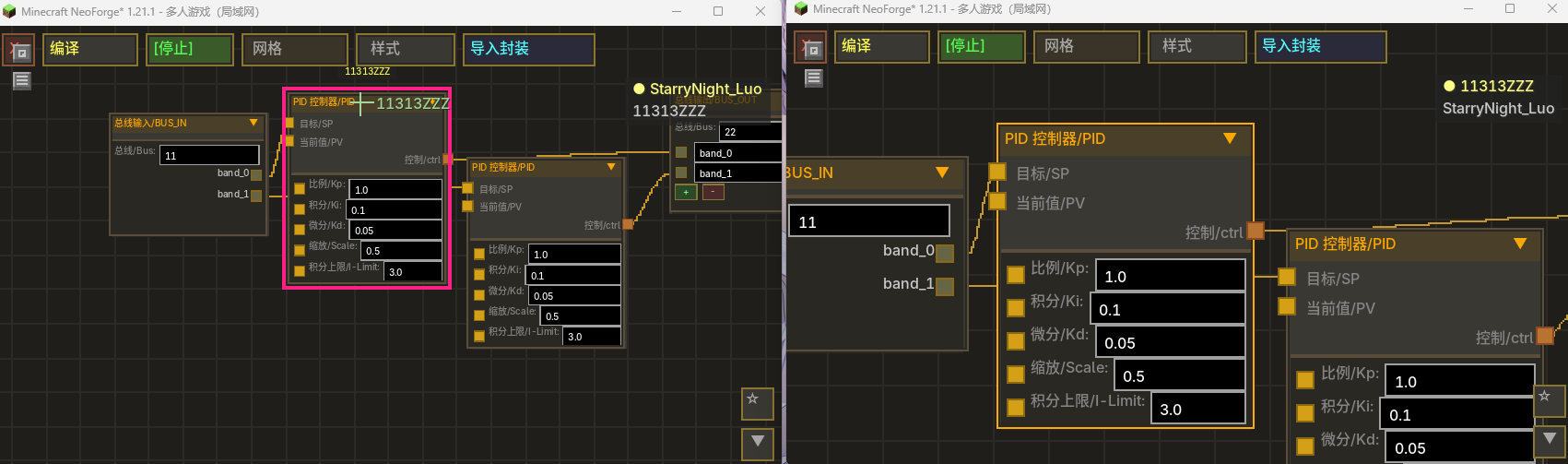
👥 Multiplayer Collaboration / 多人协作(v1.2.4+)
Real-time collaborative graph editing for all 7 block types. Multiple players can edit the same graph simultaneously. 全部 7 种方块支持多人实时协作编辑同一节点图。
| Feature / 功能 | Description / 说明 |
|---|---|
| 🖱️ Live Cursor Tracking / 实时光标 | Colored crosshairs with player names / 彩色十字准星+玩家名 |
| 📦 Remote Drag / 远程拖拽 | Smooth animated node movement / 平滑动画节点移动 |
| 🔗 Wire Preview / 连线预览 | Live bezier curve while dragging / 实时贝塞尔曲线预览 |
| 👤 Player List / 玩家列表 | Right-side vertical list, host highlighted / 右侧竖向列表,房主高亮 |
| 🔒 Node Lock / 节点锁定 | IMAGE nodes protected during pixel edit / 像素编辑时锁定IMAGE节点 |
| 🚪 Auto-Close / 自动关闭 | UI closes when block destroyed / 方块破坏时自动关闭 |
| ⚡ Join/Leave / 加入离开 | Appear immediately on open, disappear on close / 打开即现,关闭即消 |
📝 Formula Script Node / 公式脚本节点
Multi-line script editor (v1.2.0+) — assignments, named outputs, comments, line continuation. 多行脚本编辑器 — 支持赋值、命名输出、注释、续行。
🎨 Syntax Highlighting / 语法高亮
Real-time colour-coded editing with 9 token categories. 9 种词法分类的实时彩色标注。
| Token Type / 词法类型 | Colour / 颜色 | Examples / 示例 |
|---|---|---|
| Functions / 函数 | 🟡 Yellow / 黄色 | sin, cos, sqrt, exp |
| Constants / 常量 | 🩷 Pink / 粉色 | (PI), (E) — 仅分组括号内视为字面量 |
| Identifiers / 标识符 | 🩵 Light Cyan / 浅青 | x, speed, myVar |
| Numbers / 数字 | 🟠 Orange / 橙色 | 3.14, 42, 0.5 |
| Operators / 运算符 | ⬜ Grey / 灰色 | +, -, *, /, ^, % |
| Parens / 括号 | ⬜ Grey / 灰色 | (, ) |
| Comments / 注释 | 🟢 Green / 绿色 | -- this is a comment |
| @output / 输出 | 🟣 Purple / 紫色 | @output |
| Assignment / 赋值 | 🟣 Purple / 紫色 | = |
| Unknown / 未知 | 🔴 Red / 红色 | Invalid characters / 非法字符 |
🔍 Autocomplete / 自动补全
Type to trigger suggestions near the caret, rendered above all pins. 输入即触发,候选框显示在光标下方、所有引脚上方。
| Trigger / 触发方式 | Behaviour / 行为 |
|---|---|
| Type identifier char / 输入标识符字符 | Filtered dropdown: functions, constants, current variables / 过滤候选:函数、常量、当前变量 |
Type @ / 输入 @ |
Immediately suggests @output / 立即建议 @output |
Tab / Enter |
Accept selected candidate / 接受选中候选项 |
↑ ↓ |
Navigate candidates / 导航候选项 |
Esc / any other key |
Close popup / 关闭候选框 |
| Click candidate / 点击候选项 | Accept and insert / 接受并插入 |
| Zoom-aware / 缩放感知 | Popup scales with graph zoom level / 候选框随图缩放 |
✅ Real-Time Validation / 实时校验
Issues shown as red ⚠ badge on the node title bar. Hover the badge to see details. 错误以红色 ⚠ 徽章显示在节点标题栏,悬停查看详情。
| Check / 校验项 | Type / 类型 |
|---|---|
| Bracket matching / 括号匹配 | Error / 错误 |
| Unknown function / 未知函数 | Error / 错误 |
| Function arity / 函数参数数量不符 | Error / 错误 |
| Invalid assignment / 无效赋值 | Error / 错误 |
| Duplicate output names / 重复输出名 | Warning / 警告 |
| @output without identifier / @output 缺少变量名 | Warning / 警告 |
| Red border on MLE / 输入框红色边框 | Visual feedback / 视觉反馈 |
📐 Named Constants / 命名常量
(PI) and (E) in grouping parentheses are literal constants (π ≈ 3.14159, e ≈ 2.71828).
Bare PI / E or PI / E inside function calls like sin(PI) are treated as variable references (create input pins).
(PI) 和 (E) 在分组括号内视为字面常量。裸 PI/E 或函数调用内的 sin(PI) 视为变量(创建输入引脚)。
-- (PI) = literal π, not a variable / 字面量π,不是变量
-- sin(PI) = PI is a variable input / PI 是变量输入
result = (PI) + sin(PI)
@output result
→ 1 input pin (PI) + 1 output / 1 输入引脚 + 1 输出
-- Ballistic calculation / 弹道计算
dx = X1 - X0
dz = Z1 - Z0
w = sqrt(dx*dx + dz*dz)
secTheta = 1 / cos(THETA)
y = (99*secTheta/(20*N)+tan(THETA))*w + 99*ln(1-2*(w*secTheta-K)/(199*N))/(20*ln(100/99)) - 99*K/(20*N) + 2
@output y
@output w
@output secTheta
→ 7 inputs + 3 outputs / 7输入 + 3输出
18 Functions / 18个数学函数: sin cos tan asin acos atan2 sinh cosh sqrt ln log exp sec csc cot abs
🚌 BUS System / BUS 总线系统
Global named-channel communication across computers. Like publish-subscribe message bus. 全局命名通道跨计算机通信系统,类似发布-订阅消息总线。
| Feature / 功能 | Description / 说明 |
|---|---|
| 🚌 BUS_OUT / 总线输出 | Write values to named channel with bands / 写入命名通道+频段 |
| 🚌 BUS_IN / 总线输入 | Read band values from channel / 从通道读取频段值 |
| 📋 Band System / 频段 | Named sub-fields per channel / 每通道命名字段 |
| 🔢 Ref Counting / 引用计数 | Auto-cleanup when no BUS_OUT references / 无引用时自动清理 |
| ⚠️ Conflict Detection / 冲突检测 | Reject duplicate channel names / 拒绝重名通道 |
🧩 Node Reference / 节点参考(86 种)
📦 Values / 数值
| Node / 节点 | Description / 说明 |
|---|---|
| Constant / 常量 | Outputs constant value / 输出常量值 |
| Redstone Input / 红石输入 | Reads from Redstone Link / 从红石链接网络读取 |
| Private Signal Input / 私有信号输入 | Reads float from named channel / 从命名通道读取浮点数 |
| Bus Input / 总线输入 | Reads bus channel bands / 从总线通道读取频段值 |
🔢 Basic Math / 基础运算
| Node / 节点 | Description / 说明 |
|---|---|
| Add / 加法 | A + B |
| Subtract / 减法 | A - B |
| Multiply / 乘法 | A × B |
| Divide / 除法 | A ÷ B (0 if B=0) |
| Modulo / 模运算 | A % B |
| Power / 次幂 | A ^ B |
| Root / 次方根 | B-th root of A |
| Absolute Value / 绝对值 | |input| |
| Ceil / 向上取整 | Round up |
| Floor / 向下取整 | Round down |
📐 Advanced Math / 高级运算
| Node / 节点 | Description / 说明 |
|---|---|
| Formula / 公式 | Multi-line script editor / 多行脚本编辑器 |
| Round / 保留N位小数 | Round to N decimals / 保留N位小数 |
| Comparison Router / 比较路由 | |A-B| smart routing / 智能信号分流 |
| Pose Convert / 姿态换算 | Pitch/Yaw/Roll coordinate conversion / 姿态角转换 |
| Split / 分割 | Positive/negative signal split / 正负信号分离 |
Trig / 三角函数(度): Sine · Cosine · Tangent · Arc Sine · Arc Cosine · Arc Tangent 2 · Hyperbolic Sine · Hyperbolic Cosine
Other / 其他: Square Root · Natural Log · Base-10 Log · Exponential · Secant · Cosecant · Cotangent · Angle Unwrap · Direction (3-in 3-out)
🧠 Logic / 逻辑
| Node / 节点 | Description / 说明 |
|---|---|
| Greater Than / 大于 | A > B |
| Less Than / 小于 | A < B |
| Greater or Equal / 大于等于 | A ≥ B |
| Less or Equal / 小于等于 | A ≤ B |
| Equals / 等于 | A = B |
| OR Gate / 或门 | A > 0.5 or B > 0.5 |
| Bool / 布尔 | Boolean with invert toggle / 布尔(可反转) |
| Gate / 闸门 | Signal gate with Set/Reset/Toggle / 信号门 |
| Relay A / 继电器A | SPDT relay — contact false→A, contact true→B / 双掷继电器 |
| Relay B / 继电器B | SPST relay — out = contact ? B : A / 单掷合并继电器 |
🎛️ Control / 控制
| Node / 节点 | Description / 说明 |
|---|---|
| PID Controller / PID控制器 | SP/PV PID (scalable output, anti-windup) / SP/PV 双输入 PID(输出可缩放,抗积分饱和) |
| Power PID / 动力PID | PID with base power input / 带基础动力PID |
| Clamp / 限制 | Min/Max clamp / 限幅 |
| Map Range / 映射范围 | Range mapping / 范围映射 |
📤 Output / 输出
| Node / 节点 | Description / 说明 |
|---|---|
| Redstone Output / 红石输出 | Write to Redstone Link (0~15) / 写入红石链接 |
| Private Signal Output / 私有信号输出 | Write to named channel / 写入命名通道 |
| Bus Output / 总线输出 | Writes to bus channel / 写入总线通道 |
| Speed Control / 转速控制 | Speed Controller RPM (-256~256) / 转速控制 |
⏱️ Sequential / 时序 (Program Computer only / 仅编程计算机)
| Node / 节点 | Description / 说明 |
|---|---|
| Delay / 延时 | Delay N ticks / 延时N tick |
| Latch / 锁存器 | Set/Reset latch, configurable default / 可配置默认状态 |
| T Flip-Flop / T触发器 | Toggle flip-flop, configurable default / 可配置默认状态 |
| Pulse Extender / 脉冲延长 | Extend input pulse N ticks / 脉冲延长N tick |
| Loop / 循环 | Fire pulse every interval, repeat count times / 循环脉冲 |
| Safety Timer / 保险 | Trigger → 2-tick pulse → cooldown / 触发→脉冲→冷却 |
| Accumulator / 累计器 | Rising-edge step counter / 累计器 |
| Continuous Integrator / 连续积分器 | Continuous integration, configurable limit / 连续积分器 |
🎮 Input / 输入 (Control Seat + Attitude Sensor / 控制座椅+姿态传感器)
| Node / 节点 | Description / 说明 |
|---|---|
| Keyboard Key / 键盘按键 | 58 bindable keys / 58键绑定 |
| Mouse Joystick / 鼠标摇杆 | Dual mode: incremental (mouse delta) / absolute (stick with memory). Toggle in edit panel. / 双模式:增量/绝对值,编辑区切换 |
| View Angle / 视角差 | View angle delta / 视角差 |
| Mouse Button / 鼠标按键 | Left/Right mouse buttons / 鼠标按键 |
| Gamepad Joystick / 手柄摇杆 | Dual stick LX/LY/RX/RY / 双摇杆 |
| Gamepad Button / 手柄按键 | 15 buttons / 15按键 |
| Gamepad Trigger / 手柄扳机 | Analog triggers LT/RT (0~1) / 模拟扳机 |
| World View / 世界视角 | Player absolute world view direction / 玩家绝对视角 |
| Attitude / 姿态 | Sub-level pitch and roll / 子世界姿态 |
| Forward / 前方朝向 | World-space forward yaw/pitch / 结构朝向 |
| Acceleration / 加速度 | Structure-local X/Y/Z acceleration / 结构本地加速度 |
| Velocity / 速度 | Structure-local velocity ×2 m/s / 结构本地速度 |
| World Position / 世界坐标 | World position with offset / 世界坐标(可偏移) |
| Target Output / 目标输出 | Radar target X/Y/Z/entityId/distance / 雷达目标 |
🖼️ Display / 显示 (Monitor only / 仅全息显示器)
| Node / 节点 | Description / 说明 |
|---|---|
| Text / 文本 | Text display with color / 文字显示 |
| Data Display / 数值显示 | Float value display / 数值显示 |
| Image / 图像 | 16×16 pixel image, signal-driven position / 像素图片 |
| Image Sequence / 图像序列 | Multi-frame animation, signal-driven frame / 多帧动画 |
📦 Structure / 结构
| Node / 节点 | Description / 说明 |
|---|---|
| Encapsulation / 封装 | Nest sub-graphs inside a node / 嵌套子图 |
| ENCAP_INPUT / 封装输入 | External input pin / 外部输入引脚 |
| ENCAP_OUTPUT / 封装输出 | External output pin / 外部输出引脚 |
🔧 Debug / 调试 (All blocks / 全部方块)
| Node / 节点 | Description / 说明 |
|---|---|
| Comment / 便利贴 | Sticky-note annotation, resizable (80 |
| Signal Generator / 信号发生器 | Test signal source with XY curve preview + Y-axis range label, manual control-point curve or custom f(x) formula, frequency-generate or input-driven output modes, percentile-based robust auto-scale / 测试信号源,XY曲线预览+Y轴范围标注,手动控制点曲线或自定义f(x)公式,频率发生/指定模式输出,百分位数稳健自动缩放 |
| Signal Probe / 信号探针 | Real-time signal monitor with 100-tick trend chart, percentile-based robust auto-scale (p1-p99), freeze/clear / 实时信号监视,100 tick趋势图,百分位数稳健自动缩放(p1-p99),冻结/清除 |
Signal Generator Modes / 信号发生器模式:
| Mode / 模式 | Description / 说明 |
|---|---|
| 🎯 Manual Curve / 手动曲线 | Drag control points on XY chart. Double-click to add, right-click to delete, drag X/Y freely (X clamped between neighbors, server-sorted). Points synced via multiplayer collaboration. / XY图上拖拽控制点。双击添加,右键删除,XY双向自由拖拽(X被相邻点夹持,服务端排序)。多人协作同步。 |
| 📐 Custom f(x) / 自定义公式 | Enter formula expression using variable x (0x(0 |
| 🔄 Frequency Generate / 频率发生 | X auto-advances 0→1 cyclically. Speed control (manual mode only). Current X position shown as sky-blue marker on chart. / X自动0→1循环推进。speed控制速度(仅手动模式)。天蓝色标记线显示当前X位置。 |
| 🎯 Input-Driven / 指定模式 | X set by dragging sky-blue marker line on chart. No EditBox — pure drag interaction. / 拖拽天蓝色标记线设置X值。无输入框,纯拖拽交互。 |
Signal Probe Features / 信号探针功能:
- 100-tick ring buffer trend chart with percentile-based robust auto-scale (p1-p99)
- Percentile filtering replaces fixed ±5 clipping — correctly displays large-range data (e.g. 0~360)
- Right-click: Freeze/Unfreeze, Clear History
- Shows "---" when blueprint not running
🎮 Controls / 操作指南
| Action / 操作 | Input / 按键 |
|---|---|
| Add node menu / 添加节点 | Right-click empty / 右键空白 |
| Edit params / 编辑参数 | Left-click → ▶ / 左键→▶ |
| Connect / 连接 | Drag output pin → input pin / 拖拽输出→输入 |
| Delete node / 删除节点 | Hover + X / 悬停+X |
| Delete connection / 删除连线 | TAB + Left-click / TAB+左键点击 |
| Delete selected / 删除选中 | Delete / Backspace |
| Box select / 框选 | TAB + drag / TAB+拖拽 |
| Duplicate / 复制 | Ctrl + D |
| Undo / 撤回 | Ctrl + Z |
| Redo / 重做 | Ctrl + Y |
| Wrap in Comment / 注释包裹 | Select nodes + C / 选中节点+C |
| Edit Comment text / 编辑注释文本 | Double-click comment body / 双击注释节点 |
| Resize Comment / 调整注释大小 | Drag bottom-right corner / 拖动右下角 |
| Scroll Comment / 滚动注释 | Ctrl + Scroll / Ctrl+滚轮 |
| Zoom / 缩放 | Scroll wheel / 滚轮 |
| Pan / 平移 | Right-click drag / 右键拖拽 |
| Open editor (most blocks) / 打开编辑器 | Right-click / 右键 |
| Control Seat — Sit / 乘坐 | Right-click (empty hand) / 右键(空手) |
| Control Seat/Radar — Editor / 编辑器 | Shift + Right-click / Shift+右键 |
| Control Seat — Dismount / 下马 | ~ |
| Control Seat — Switch mode / 切换模式 | TAB |
| Control Seat — Release mouse / 释放鼠标 | ESC |
| Signal Gen — Add control point / 添加控制点 | Double-click XY chart / 双击XY图 |
| Signal Gen — Delete control point / 删除控制点 | Right-click control point / 右键控制点 |
| Signal Gen — Drag control point / 拖拽控制点 | Left-drag (X clamped, Y free) / 左键拖拽 |
| Signal Gen — Drag X marker / 拖拽X标记 | Left-drag sky-blue line (input mode) / 左键拖拽天蓝色线 |
| Signal Gen — Switch mode / 切换模式 | Click toggle button (confirm with second click) / 点击切换按钮(二次点击确认) |
| Probe — Freeze/Unfreeze / 冻结解冻 | Double-click probe node / 双击探针节点 |
| Probe — Clear/Clear History / 清除历史 | Right-click probe node / 右键探针节点 |
| Bookmark — Open panel / 打开书签面板 | Click ★ bottom-right / 点击右下角★ |
| Bookmark — Add / 添加书签 | [+] in panel or Ctrl+M / 面板内[+]或Ctrl+M |
| Bookmark — Rename / 重命名 | Click ✎ on bookmark row / 点击书签行✎ |
| Bookmark — Delete / 删除 | Click × on bookmark row / 点击书签行× |
| Bookmark — Jump / 跳转 | Click → or name / 点击→或名称 |
| Bookmark — Reorder / 拖拽排序 | Drag name area to new position / 拖拽名称区域到新位置 |
| Bookmark — Reset view / 重置视角 | [↺] in panel or Home key / 面板[↺]或Home键 |
🔄 Sable Physics Integration / Sable 物理集成
Deep integration with Sable physics engine for rotating structures. / 与Sable物理引擎深度集成,支持旋转结构。
| Block / 方块 | Feature / 功能 |
|---|---|
| Control Seat / 控制座椅 | Entity yaw tracks sub-level rotation / 实体yaw追踪子世界 |
| Attitude Sensor / 姿态传感器 | Read logicalPose() quaternion / 读取姿态四元数 |
Thread safe / 线程安全: Shared fields
volatile. Without Sable / 无Sable: Control Seat fully functional, Sensor outputs 0 / 控制座椅完全可用,传感器输出0
💾 Schematic Support / 蓝图兼容
All 7 blocks support Create's Schematicannon — graphs and state fully preserved. / 全部七种方块支持蓝图大炮,图与状态完整保留。
Uses Create's IMergeableBE + SafeNbtWriter / 采用 Create 官方接口
📦 Recipes / 合成配方
| Block / 方块 | Materials / 材料 |
|---|---|
| 🖥️ Monitor / 全息显示器 | Redstone Link×2 + Precision Mechanism + Glass Pane×2 + Brass Casing + Glowstone Dust×2 |
| 🖥️ Blueprint / 蓝图计算机 | Redstone Link×2 + Precision Mechanism + Glass Pane×2 + Repeater + Comparator + Brass Casing×2 |
| ⚡ Speed Proxy / 转速代理 | Brass Ingot×4 + Cogwheel + Glass Pane×2 + Comparator + Andesite Casing |
| 🔌 Program / 编程计算机 | Andesite Casing×4 + Repeater + Glass Pane×2 + Comparator + Andesite Alloy |
| 🪑 Control Seat / 控制座椅 | Heavy Weighted Pressure Plate + Iron Ingot×2 + Brass Casing + Redstone + Redstone Link×4 |
| 📐 Attitude Sensor / 姿态传感器 | Iron Ingot×6 + Repeater + Comparator + Brass Casing×2 |
| 📡 Radar / 雷达 | Monitor×2 + Iron Ingot×4 + Brass Casing + Redstone Block×2 |
| 📱 Portable Terminal / 便携终端 | Redstone Link×4 + Blueprint Computer + Glass Pane×4 |
⚙️ Block Properties / 方块属性
| Property / 属性 | Value / 值 |
|---|---|
| Hardness / 硬度 | 1.0 (hand breakable / 空手可破坏) |
| Hand break / 空手破坏 | Drops without NBT / 掉落无NBT |
| Wrench right-click / 扳手右键 | Rotate FACING / 旋转方向 |
| Wrench Shift+right-click / 扳手Shift+右键 | Pick up with full NBT / 收回保留NBT |
🔧 Technical Highlights / 技术亮点
| Feature / 特性 | Description / 说明 |
|---|---|
| 👥 Multiplayer Collaboration / 多人协作 | Real-time editing, cursor tracking, node lock / 实时编辑、光标追踪、节点锁 |
| ⚡ Server-Authoritative Eval / 服务端权威评估 | Client receives EvalSnapshot — no local evaluator / 客户端接收快照,无本地评估器 |
| ⚡ Topological Sort Eval / 拓扑排序求值 | O(1) input query cache / O(1) 输入查询缓存 |
| 🚀 GC-Friendly / GC友好 | Reused evaluator instances / 重用求值器 |
| 🔄 Signal Bus / 信号总线 | Global named-channel communication / 全局命名通道通信 |
| 🧹 PID Anti-Windup / PID抗饱和 | Integral capping / 积分上限钳制 |
| 🛡️ Cycle Detection / 环检测 | Compile-time circular dependency check / 编译时循环引用检测 |
| 🎮 GLFW Raw Input / GLFW原始输入 | Bypass Minecraft keybinding system / 绕过MC键位系统 |
| 🔄 Sable Integration / Sable集成 | BlockEntitySubLevelActor sub-level pose reading / 子世界姿态读取 |
📜 Changelog / 更新日志
v1.2.4.1 — 回归审计 · 总线系统 · 封装状态 · 公式一致性 · Sable 加固 / Regression Audit · Bus System · Encapsulation State · Formula Consistency · Sable Hardening
🔍 回归审计 + 总线系统 / Regression Audit + Bus System
- 回归审计 / Regression audit:对
1915202起的改动做全量业务逻辑审计(6 路并行 + 对抗验证),修复雷达红石输出失效、传感器子关卡姿态误用、flipflop 同步风暴、子图状态泄漏、Sable 专用服务器反射错误等。/ Full business-logic audit of changes since1915202(6 parallel + adversarial verification): fixed radar redstone output, sensor sub-level pose misuse, flipflop sync storm, sub-graph state leak, and Sable dedicated-server reflection errors. - 总线跨方块编辑修复 / BUS cross-block editing fixes:创建同名 BUS_OUT 不再自动同步覆盖原频道 owner 的 band 定义;改名保留自身 band 与连线(BUS_IN 采用新频道 band);点击空白处提交频道名;修复反复编译+运行导致 BUS_IN 读 0(
loadGraphFromBytes的 generation 冲突);自身 BUS_OUT 不再误报冲突。/ Creating a same-name BUS_OUT no longer overwrites the original owner's band definitions; rename preserves the node's bands and connections (BUS_IN adopts the new channel's bands); clicking empty space commits the channel name; fixed BUS_IN reading 0 after repeated compile+run (generation conflict inloadGraphFromBytes); a node's own BUS_OUT no longer reports a false conflict. - 编译 BUS 断线修复 / Compile-time BUS disconnection fix:移除
loadGraphFromBytes中cleanupBusChannels(),防止编译时向客户端广播空频段导致连线永久丢失。/ RemovedcleanupBusChannels()fromloadGraphFromBytesto stop empty band syncs from permanently deleting connections. - 编辑器冲突检测 / Editor conflict detection:修复
crossConflict死代码(客户端从不显示跨方块冲突),改名/删除时localBusNames保持同步。/ Fixed thecrossConflictdead code (cross-block conflicts were never shown client-side);localBusNamesstays in sync on rename/delete.
📦 封装节点 / Encapsulation Nodes
- 封装节点输出假数值 / Fake outputs from encapsulated nodes:修复
recompileEvaluatorFull()的runtimeState.clear()清除子图时序组件状态(DELAY/LATCH/flipflop 等),导致封装内部计算偏差。1.2.3 的子评估器缓存掩盖了此问题,修复缓存失效后暴露。现在重编译前保存并恢复subStates。/runtimeState.clear()no longer wipes sub-graph sequential state (DELAY/LATCH/flipflop etc.) —subStatesare saved and restored before a full recompile; previously masked by the v1.2.3 sub-evaluator cache. - 封装内时序节点编辑区状态 / In-encapsulation sequential node state:扩展
RuntimeStateSyncPacket携带子图 flipflop 状态,编辑器在子图内显示正确的时序节点实时状态。/RuntimeStateSyncPacketnow carries sub-graph flipflop state so the editor shows correct live sequential state inside encapsulation. - 子图展开状态初始化 / Sub-graph expansion state init:修复进出封装节点后
expandedInitDone未重置,导致子图展开节点不恢复。/ FixedexpandedInitDonenot resetting when entering/leaving encapsulation, so expanded sub-graph nodes fail to restore.
📝 公式编辑器 / Formula Editor
- 公式节点双缓存统一 / Unified formula cache:移除
GraphEvaluator.scriptCache,改为node.cachedScript单一真相源,消除引脚解析与求值的缓存漂移。/ RemovedGraphEvaluator.scriptCache;node.cachedScriptis now the single source of truth, eliminating pin-resolution vs. evaluation cache drift. - 公式节点清空回弹 A+B / Formula empty-value bounce-back A+B:
createEditState不再强制默认值。/createEditStateno longer forces default values. - 公式编辑器光标与选区 / Formula editor caret & selection:MLE 图空间坐标转换 + 方向键折叠选区。/ MLE graph-space coordinate conversion + arrow-key selection folding.
- V3→V4 迁移 / V3→V4 migration:
GraphMigration复用GraphNode.inputPinId/outputPinId,支持旧版动态引脚连线保留。/ Migration reusesGraphNode.inputPinId/outputPinIdso legacy dynamic-pin connections are preserved.
🔄 Sable 兼容 / Sable Compat
- Sable 兼容层加固 / Compat layer hardening:反射访问改编译期桥,专用服务器不再触发 ClientLevel 加载错误;雷达 Sable 结构扫描在专用服务器正常;无 Sable 环境安全回退。/ Reflection access replaced with a compile-time bridge — dedicated servers no longer trigger ClientLevel load errors; radar Sable structure scanning works on dedicated servers; safe fallback without Sable.
- Sable 重连 / Sable reconnection:
sable$getLoadingDependencies通过getPlot(chunkPos)安全返回子世界引用,修复重进存档后 Sable 节点失效。/ Safe sub-level reference viagetPlot(chunkPos)— Sable nodes survive world reload.
🛠️ 其他修复 / Other Fixes
- 雷达锁定 / Radar lock:空中 blip 锁定不再被方块 UI 拦截;移除编辑会话成员校验(锁定是使用操作)。/ Air-blip lock is no longer intercepted by the block-UI; removed the edit-session membership check (locking is a use operation).
- 数值输入回弹 / Numeric input bounce-back:编辑器打开时跳过 NBT 全量图替换,防止服务端同步覆盖本地编辑值。/ Skipped full-graph NBT replacement on editor open so server sync cannot overwrite local edits.
- 临时视角跨方块污染 / Temp camera-view contamination:改为按
BlockPos存储。/ Temp camera view is now stored perBlockPos. - 中途加入玩家获取完整图 / Mid-game joiners get the full graph:
loadAdditional守卫由graphReady锁存改为本地待 ACK 编辑计数(pendingLocalOps)—— 加入者无本地编辑时总是应用服务端权威图;活跃编辑者仍受回弹保护(仅在发送 op 且未 ACK 期间跳过替换)。/ TheloadAdditionalguard now uses a pending-local-op counter instead of thegraphReadylatch — joiners with no local edits always apply the authoritative graph, while active editors keep bounce-back protection (replacement skipped only while ops are un-ACKed).
v1.2.4 — Multiplayer Collaboration + Debug Toolchain + Formula Editor UX / 多人协作 + 调试工具链 + 公式编辑器体验
👥 Multiplayer Collaboration / 多人协作
All 7 blocks now support real-time collaborative graph editing — multiple players can edit the same node graph simultaneously. / 全部 7 种方块支持多人实时协作编辑同一节点图。
| Feature / 功能 | Description / 说明 |
|---|---|
| 🖱️ Live Cursors / 实时光标 | Colored crosshairs with player names / 彩色十字准星 + 玩家名 |
| 📦 Remote Node Drag / 远程拖拽节点 | Smooth lerp animation on remote moves / 远程移动平滑插值动画 |
| 🔗 Wire Preview / 连线预览 | Live bezier curve while dragging wires / 拖拽连线时实时贝塞尔曲线 |
| 👤 Player List / 玩家列表 | Right-side vertical list, host highlighted / 右侧竖向列表,房主高亮 |
| 🔒 Node Lock / 节点锁定 | IMAGE nodes protected during pixel editing / 像素编辑时自动锁定 |
| ⚡ Join/Leave / 加入离开 | Appear immediately on open, disappear on close / 打开即现,关闭即消 |
| ✏️ Op-Based Editing / 操作同步 | GraphOp + OpExecutor model, server-authoritative ID allocation / 服务器权威 ID 分配 |
⚡ Architecture Refactoring / 架构重构
| Change / 改动 | Description / 说明 |
|---|---|
| 🖥️ Server-Authoritative Eval / 服务端评估 | Client-side GraphEvaluator removed. All evaluation runs server-side; results synced via ClientboundGraphEvalPacket + EvalSnapshot. Fixes PRIVATE_IN/BUS_IN always returning 0 on client. |
| 🏗️ Unified BE Base / 统一 BE 基类 | SyncedGraphBlockEntity consolidates ~200 lines duplicated across 7 BEs (BUS lifecycle, RedstoneLink, NBT, sync, EvalSnapshot). |
| 📦 Blob Data Channel / Blob 通道 | BlobDataPacket + BlobRegistry for chunked large data. SET_IMAGE_PIXELS from Base64 to direct int[]. |
🔧 Debug Toolchain / 调试工具链
| Tool / 工具 | Description / 说明 |
|---|---|
| 📶 Signal Generator / 信号发生器 | Test signal source. Manual curve mode (draggable control points, X-clamped, server-sorted) or custom f(x) formula (all math functions, auto full-width paren conversion). Frequency-generate (auto-cycling X) or input-driven (drag sky-blue marker). Auto-scale Y axis with ±5 outlier clipping. |
| 📊 Signal Probe / 信号探针 | Real-time monitor with 100-tick trend chart. Auto-scale Y axis with outlier clipping. Right-click freeze/unfreeze/clear. |
📌 View Bookmarks / 视角书签
- ★ button (bottom-right, above ▼) toggles bookmark panel / ★按钮开关书签面板
[+]/Ctrl+Msave current view,[↺]/Homereset to origin[✎]rename,[✕]delete,[→]or click name to jump with 200ms ease-in-out transition- Drag name area to reorder, synced via
MOVE_BOOKMARKop - Click outside naming dialog to cancel; Esc handled by unified popup stack
- Multiplayer-synced via
ADD_BOOKMARK/REMOVE_BOOKMARK/RENAME_BOOKMARK/MOVE_BOOKMARKops
🐛 Fixes & Polish / 修复与打磨
- 🔧 Graph Init —
onLoad()bumps generation to force full recompile on first tick. - 🚌 BUS Channel —
registerChannels()no longer requiresbandCount()>0; empty-band channels register so BUS_IN reads immediately. - 🎨 Color Picker UX — ESC closes picker + panels together. Duplicated nodes get
sortB = original+1. - 📝 Bilingual Comments — All
graph/,blocks/,network/source comments now Chinese+English. - 🐛 Encapsulation DEBUG Visibility —
EvalSnapshotnow captures sub-evaluator outputs + debugTimes. Signal Generator (blue X marker) and Signal Probe work correctly inside encapsulation sub-graphs. / 封装内信号发生器(蓝色X标记线)和探针现在正确显示。 - ⌨️ Esc Key Delegation — Esc now closes sub-UI (bookmark rename, export/import dialog, color picker) before closing the entire editor screen. / Esc 先关闭子 UI 再关整个编辑界面。
- 🔒 Soft-Lock Scope — Node locking now scoped by
ownerNodeId. Selecting a node inside encapsulation no longer falsely locks main-graph nodes with the same ID. / 封装内选中节点不再误锁主图同 ID 节点。 - 🖱️ Cursor Scope Isolation — Remote player cursors are now filtered by scope; cursors inside encapsulation are hidden from main-graph view and vice versa. / 远端光标按作用域隔离。
- 🟡 ENCAPSULATION Occupant Highlight — Golden border + player name label on ENCAPSULATION nodes in the main graph when other players are editing inside. / 主图中被占用的封装节点显示金色边框+玩家名。
- 📝 ENCAP I/O Rename Sync — Renaming
ENCAP_INPUT/ENCAP_OUTPUTnow sendsSET_DISPLAY_TEXTop for server sync + undo support. / 封装I/O改名现在同步到服务端并支持撤销。 - 📋 Ctrl+D Copy Fix — Copy now uses server-authoritative ID allocation (
ADD_NODE_REQUEST→ ACK); data ops are deferred until all real IDs assigned. Sub-graph content recursively synced for ENCAPSULATION nodes. Fixes "empty node on other clients". / 复制走服务端权威ID分配,封装子图递归同步。 - 📐 Manual Curve Fixed Y-Axis — Signal Generator manual curve mode now uses fixed Y range
[-1.1, 1.1]; auto-scaling retained for formula mode. Control points clamped to visible range and rendered above border. / 手动曲线Y轴固定,控制点钳制+边框上方渲染。
🔗 Stable PinId Refactoring / 稳定引脚ID重构
Connections now bind to stable string pin identifiers instead of positional integer indices. Pin insertion, deletion, or reordering no longer breaks existing connections — they follow the pin by name.
| System / 系统 | pinId Source / pinId 来源 | Before / 修复前 | After / 修复后 |
|---|---|---|---|
| FORMULA inputs | Variable name (e.g. A, B, x) |
Adding/removing variables shifted pin indices — connections broke or pointed to wrong pins | Connections follow variable names; ensureScriptParsed() eliminates lazy-parse race conditions |
| FORMULA outputs | @output label (e.g. result, angle) |
Output reordering broke downstream connections | Connections track output labels; "out0" default handled correctly |
| ENCAPSULATION I/O | Sub-node ID (sorted by Y, then ID) | Dragging ENCAP_INPUT/OUTPUT nodes changed pin order — external connections silently shifted | pinId = sub-node ID, invariant under drag; parent cache rebuilt after sub-graph structural edits |
| BUS bands | Band name (e.g. band_0, band_1) |
Inserting/removing/reordering bands cleared all connections or caused index drift | Only connections on actually-deleted bands are removed; reordered bands preserved |
Key changes:
NodeConnectiongainsfromPinId/toPinIdfields;save()/load()backward-compatibleGraphNodeaddsinputPinIndex(id)/outputPinIndex(id)/inputPinId(i)/outputPinId(i)— pinId↔index resolution per node typeNodeGraph.rebuildInputCache()resolves all pinIds to current indices, prunes stale connectionsGraphMigrationV3→V4: one-time NBT upgrade converting integer pins to stable pinIds for FORMULA, ENCAP, BUS, and generic nodes (recursive into sub-graphs)GraphEvaluatorBUS evaluation and ENCAP pin injection now match by pinId rather than cache positionBusChannelHelper.syncBandsFromServeronly disconnects actually-removed bands (by name), preserving reordered bandsNbtVersions.DATA_VERSIONbumped 3→4- Eliminates ~200 lines of REWIRE/reconnect complexity from the v1.2.5 roadmap — pin reordering is now free
Related docs: docs/v1.2.4-pin-id-stability-plan.md
🧠 Relay Nodes / 继电器节点
Two new logic nodes for conditional signal routing — available in both Blueprint and Program Computers.
| Node / 节点 | Description / 说明 |
|---|---|
| Relay A / 继电器A | SPDT (双掷) — 3 inputs (A, B, Contact), 2 outputs. Contact ≤0.5 → A输出=A, B输出=0; Contact >0.5 → A输出=0, B输出=B. Mutually exclusive throws like a physical relay. |
| Relay B / 继电器B | SPST (单掷) — 3 inputs (A, B, Contact), 1 output. Contact >0.5 → out=B; else → out=A. Merged single-throw variant. |
Both use the standard >0.5 threshold consistent with BOOL/GATE/OR. No parameters, pure combinatorial logic — compatible with multiplayer collaboration and encapsulation out of the box.
🪑 Sable Sub-Level Control Seat Camera / Sable 子关卡控制座椅相机
Two camera modes for Control Seat riders inside Sable rotating structures. Camera orientation computed client-side from block FACING + Sable render-pose quaternion — bypasses entity yaw sync (unreliable for retain_in_sub_level entities).
Sable 旋转结构上控制座椅的两种相机模式。座椅世界朝向由客户端根据方块 FACING + Sable 渲染姿态四元数实时计算,不依赖 entity yaw 同步。
| Mode / 模式 | Camera / 相机 | Output / 输出 |
|---|---|---|
| FIXED (default) | Locked to seat world orientation (yaw + pitch). ControlSeatCameraMixin disables Sable camera rotation to prevent double-rotation. / 锁定到座椅世界朝向(偏航+俯仰) |
Joystick mx/my from raw mouse delta / 摇杆来自鼠标增量 |
| VIEW_DIFFERENCE | Free camera, mouse-controlled. Sable does not rotate the view. / 自由相机,鼠标控制 | vy = playerYaw - seatWorldYaw, vp = playerPitch - seatWorldPitch |
ControlSeatBlockEntitySable: fixed missingsetYRot()— entity yaw now properly updates bothyRotandyRotO. / 修复缺失的 setYRot()。ControlSeatEntity: manualsetPosskipped inside sub-levels (Sable handles positioning). / 子关卡内跳过手动 setPos。ControlSeatCameraMixin: registered inrequired:falsesable mixin config — silently skipped without Sable. / 无 Sable 时静默跳过。
🎮 MOUSE_JOYSTICK Absolute Mode / 鼠标摇杆绝对值模式
Per-node toggle in the edit panel switches between incremental (direct mouse delta, default) and absolute (accumulated stick position with memory, clamped to [-1,1]).
编辑区提供每节点独立开关,在增量(默认,鼠标位移即输出)和绝对值(累积摇杆位置,停手保持)之间切换。
- Uses
TOGGLE_BOOLop pipeline — server-authoritative, undo-supported, multiplayer-synced. / 复用 BOOL 开关流水线。 - Absolute accumulation uses
ABS_SCALE=1/6per tick for smooth control. / 绝对值每 tick 累积系数 1/6。 - Stick position persists across GUI open/close. / 开菜单再关闭位置保持。
- Both x and y axes accumulate independently. / X/Y 轴独立累积。
🔧 Signal Generator Auto-Scale Fix / 信号发生器自动缩放修复
- Root cause:
computeVisibleRange()used fixed ±5 clipping, squashing large-range formulas (e.g.x*360) into a ~6-unit Y window while rendering used raw values → curve painted to chart corners looking like an inverse-proportional function. - Fix: Replaced ±5 hard clipping with percentile-based robust range (p1–p99). Only extreme outliers (|v| ≥ 1e6) and NaN/Inf are filtered. Both
DEBUG_SIGNAL_GENandDEBUG_PROBEcharts use the same logic. - Y-axis range label: Chart top-right now shows
min … max(e.g.0.0 … 360.0) so the scale is immediately visible. - Cache: Formula compilation cache (
debugFormulaRpn) properly invalidated on formula edits — chart refreshes instantly.
🎨 Formula Editor UX / 公式编辑器体验
Syntax Highlighting / 语法高亮 — Real-time token-based colouring with 9 categories: functions (yellow), constants (pink), identifiers (cyan), numbers (orange), operators/parens (grey), comments (green), @output/assignment (purple), unknown (red underline). Token cache avoids per-frame re-parsing. / 实时词法彩色标注,9 种分类:函数(黄)、常量(粉)、标识符(青)、数字(橙)、运算符/括号(灰)、注释(绿)、@output/赋值(紫)、未知(红色下划线)。Token 缓存避免每帧重复解析。
Autocomplete Popup / 自动补全候选框 — Type identifier characters to trigger filtered dropdown (functions, named constants, current variables); type @ for immediate @output. Keyboard: ↑↓ navigate, Tab/Enter accept, Esc dismiss. Mouse: click any candidate to accept. Popup renders above all pins (z-layer C=5.5) with zoom-aware scaling — text and layout scale proportionally with graph zoom. Deleted variables immediately disappear from suggestions. / 输入标识符触发过滤候选框;输入 @ 立即建议 @output。键盘导航/接受/关闭,点击候选项接受。候选框渲染在所有引脚上方(C=5.5 层),支持缩放感知。删除变量立即从候选消失。
Real-Time Validation / 实时校验 — Red ⚠ badge on FORMULA node title bar; hover for tooltip list. Checks: bracket matching, unknown function, wrong arity, invalid assignment (errors), duplicate outputs, @output without identifier (warnings). Red border on the edit box when errors present. Validation cached after NBT reload to avoid per-frame re-parse. / 红色 ⚠ 徽章 + 悬停工具提示。校验:括号匹配、未知函数、参数数错误、无效赋值(错误),重复输出名、@output 缺变量(警告)。输入框红色边框。NBT 重载后缓存避免每帧重解析。
Named Constants / 命名常量 — (PI) and (E) in grouping parentheses are literal constants (π / e). Bare PI/E or inside function calls like sin(PI) are variable references (create input pins). Consistent across extractVariables(), compile(), and tokenize(). / (PI)/(E) 在分组括号内为字面常量。裸 PI/E 或函数调用内 sin(PI) 视为变量。三种解析入口行为一致。
Robustness / 健壮性 — Mouse drag selection restored (hlPos sync scoped). SET_FORMULA self-skip prevents EditState recreation → no focus loss during typing. Formula responder re-fetches graph node each keystroke (handles NBT sync between keystrokes). Connection cleanup corrected to use inputs()/outputs() clamps. Screen-width hardcoded 1920 replaced with getGuiScaledWidth(). Null safety in suggestion filtering. / 拖拽选区修复、SET_FORMULA 自跳、按键间图引用重获取、连线清理用 clamp 值、屏幕宽度动态获取、候选过滤 null 防护。
Tests / 测试 — 27 new unit tests covering tokenize, extractVariables, compile/evaluate, validate, parseScript, countFunctionArgs, and edge cases. / 27 个新单元测试。
v1.2.3 — A.B.C Occlusion System + Comment Node / A.B.C遮挡系统+注释节点
- 🔄 A.B.C Three-Layer Occlusion System — Grid→Comments→Connections→Nodes→Overlays→Tooltips / 三层遮挡系统
- 📊 Dynamic B-Value Ordering — Drag to top, auto-renormalize / 动态B值排序
- 🎯 Spatial Index — Grid-based spatial hash, O(k) filtering / 空间索引加速
- 📝 COMMENT Node (82 total) — Sticky-note, resizable, 3-color customizable / 便利贴注释节点
- 🐛 Dedicated Server crash fix / 专用服务器崩溃修复
v1.2.2 — Portable Terminal + Layer Panel + Undo/Redo / 便携终端+图层面板+撤销重做
- 📱 Portable Terminal — Handheld remote editor, scan 1-128 blocks / 便携终端
- 🖼️ Layer Panel — Photoshop-style with drag-drop + thumbnails / 图层面板
- ↩️ Undo/Redo — Graph + pixel editor, 50-step history / 撤销重做
v1.2.1 — Performance + Atomic Colors / 性能优化+原子调色板
- ⚡ GUI perf — Eliminated per-frame allocations / 消除每帧分配
- 🎨 Atomic colors — No cross-thread tearing / 原子调色板
- 🏗️ Dirty flags — Cache invalidation / 脏标记缓存失效
- 📐 Precision — Unified layout constants / 统一布局常量
v1.2.0 — Formula Script + Radar + Bus / 公式脚本+雷达+总线
- ✨ Formula → Multi-line script editor / 公式→多行脚本编辑器
- ✨ 8 new math nodes / 8个新数学节点
- ✨ 3D Holographic Radar / 3D全息雷达
- ✨ BUS_IN/BUS_OUT system / BUS总线系统
- ✨ Encapsulation import/export / 封装导入导出
v1.1.x — Monitor + Seat + Sensor / 全息显示器+控制座椅+姿态传感器
v1.1.0: Monitor, Control Seat, Attitude Sensor, 14 new nodes / 显示器、座椅、传感器、14新节点 v1.1.1: Encapsulation node, Redstone input for Monitor, Mixin / 封装节点、显示器红石输入 v1.1.2: Gate node, Monitor GUI fixes / 闸门节点、显示器修复 v1.1.3: 7 new nodes, IMAGE rotation input, i18n / 7新节点、图像旋转、多语言 v1.1.4: Velocity node, universal param pins, NBT migration v1→v2 / 速度节点、参数引脚、NBT兼容 v1.1.5: Latch config panel, runtime state sync / 锁存器面板、运行时状态同步
v1.0.0 — Initial Release / 初始发布
3 programmable computers, 24 node types, visual node editor, Redstone Link integration. 3台可编程计算机、24种节点、可视化编辑器、红石链接集成。
❓ FAQ / 常见问题
Node editor laggy? / 节点编辑器卡顿?
Too many nodes or complex PID. Keep PIDs reasonable. / 节点过多或PID复杂,单计算机PID不宜超过5-6个。Speed Proxy not working? / 转速代理不工作?
Place directly adjacent to a Speed Controller. / 放置在转速控制器相邻面。State lost after schematic? / 蓝图放置后状态丢失?
Use Create 6.0.10+. Full NBT interfaces registered. / 确保使用Create 6.0.10+。Can computers communicate? / 计算机可以通信吗?
Yes — Private Signal I/O (named channels) or BUS_IN/BUS_OUT (banded). / 可以——私有信号I/O或BUS总线。📥 Installation / 安装
| Dependency / 依赖 | Version / 版本 |
|---|---|
| Minecraft | 1.21.1 |
| NeoForge | 21.1.233+ |
| Create | 6.0.10+ |
Sable is optional / Sable 为可选
- Install NeoForge + Create / 安装 NeoForge + Create
- Place
.jarinmodsfolder / 将.jar放入mods - Launch! / 启动!
🌐 Links / 链接
- GitHub: github.com/y15173334444/create-schematic-compute
- Modrinth: modrinth.com/mod/create-schematic-compute
- License / 许可证: MIT © 2026 StarryNight_Luo
⭐ If you enjoy this mod, star us on GitHub! / 喜欢请在GitHub点⭐!
Unleash Create's potential with visual programming! / 用可视化编程释放机械动力的潜力!🚀
Screenshots
Gallery
-
 Multiplayer Collaboration / 多人协作(v1.2.4+)
 -
Versions
Files
Relations
Project Relations
More like this
Similar Mods
Suggestions use data such as tags, dependencies, dependents, descriptions, titles, and more to rank how much they overlap with this mod.
On ModDex
Community snapshot
By the numbers
Statistics

Want to reach Minecraft players?
We're looking for a server hosting partner to feature here and other parts of the site. Interested? Send us a message!
Get in touchGet it on
Available Platforms
On ModDex
Community snapshot
By the numbers