Community listing page, reviews here may not be monitored by the author.
Create: Station Voices

No reviews yet
A Create addon that brings automated, customizable Text-to-Speech announcements to your railway network.
Community voices
Reviews
No reviews yet. Be the first to review this project!
Get it on
Available Platforms
About
Project Details
For authors
Embed Badge
If you're the author of this project, you can embed a live badge anywhere that supports HTML or Markdown. It updates automatically whenever ratings change.
Use HTML for any page that supports it, or Markdown for README files and Markdown-based descriptions.
Identifiers
Platform IDs
About
Description
Create: Station Voices
A Create addon that brings automated, customizable Text-to-Speech announcements to your railway network.
Work in Progress: While version 1.0.0 has been released most of the mod is still in beta. You may encounter bugs. If you find any, please open an issue on GitHub! If you want to be notified when the mod gets updated, take part in polls for new features or suggest your own, join the dedicated Discord server
Currently only available for NeoForge



Showcase
Features
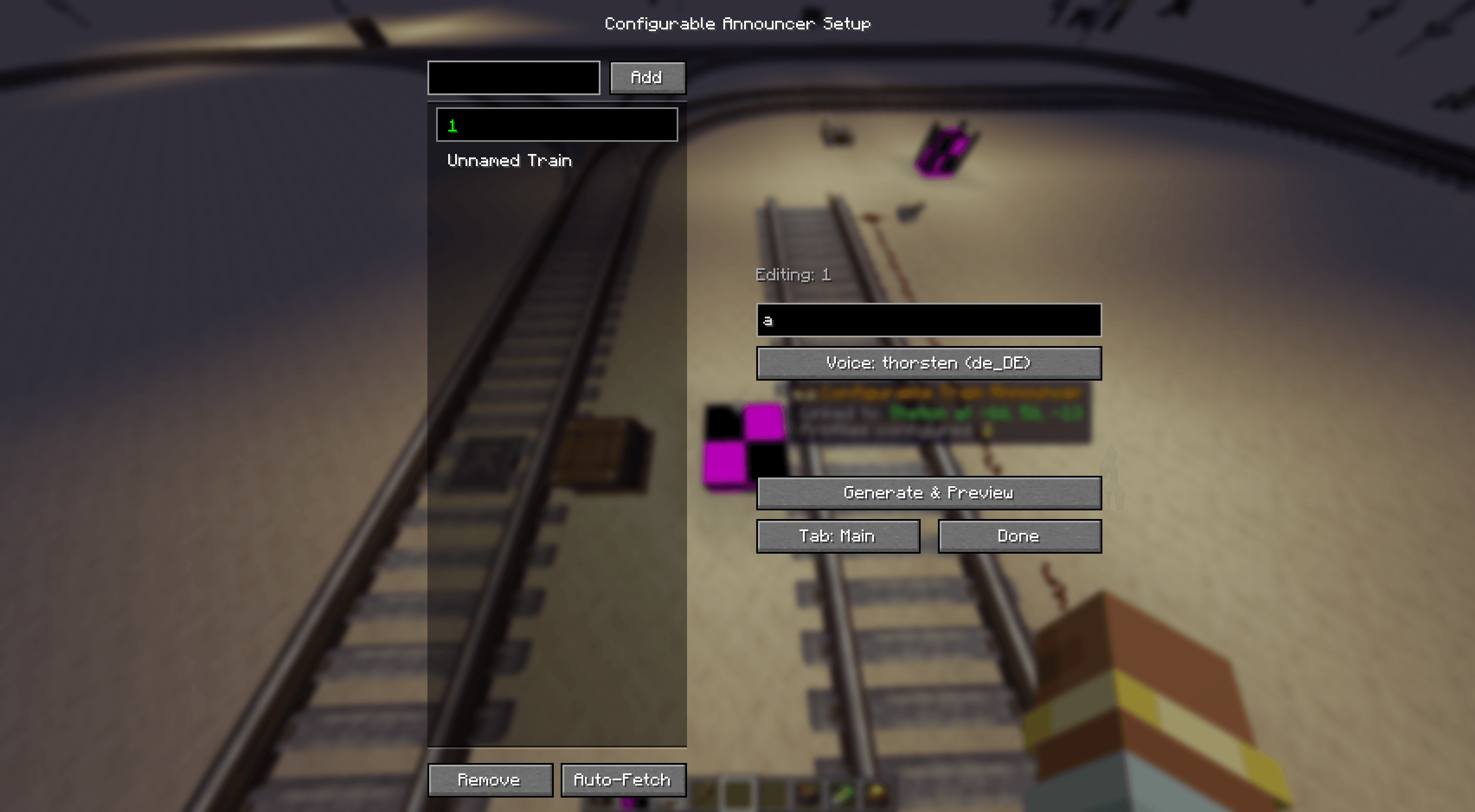
- Dynamic TTS (Piper TTS)
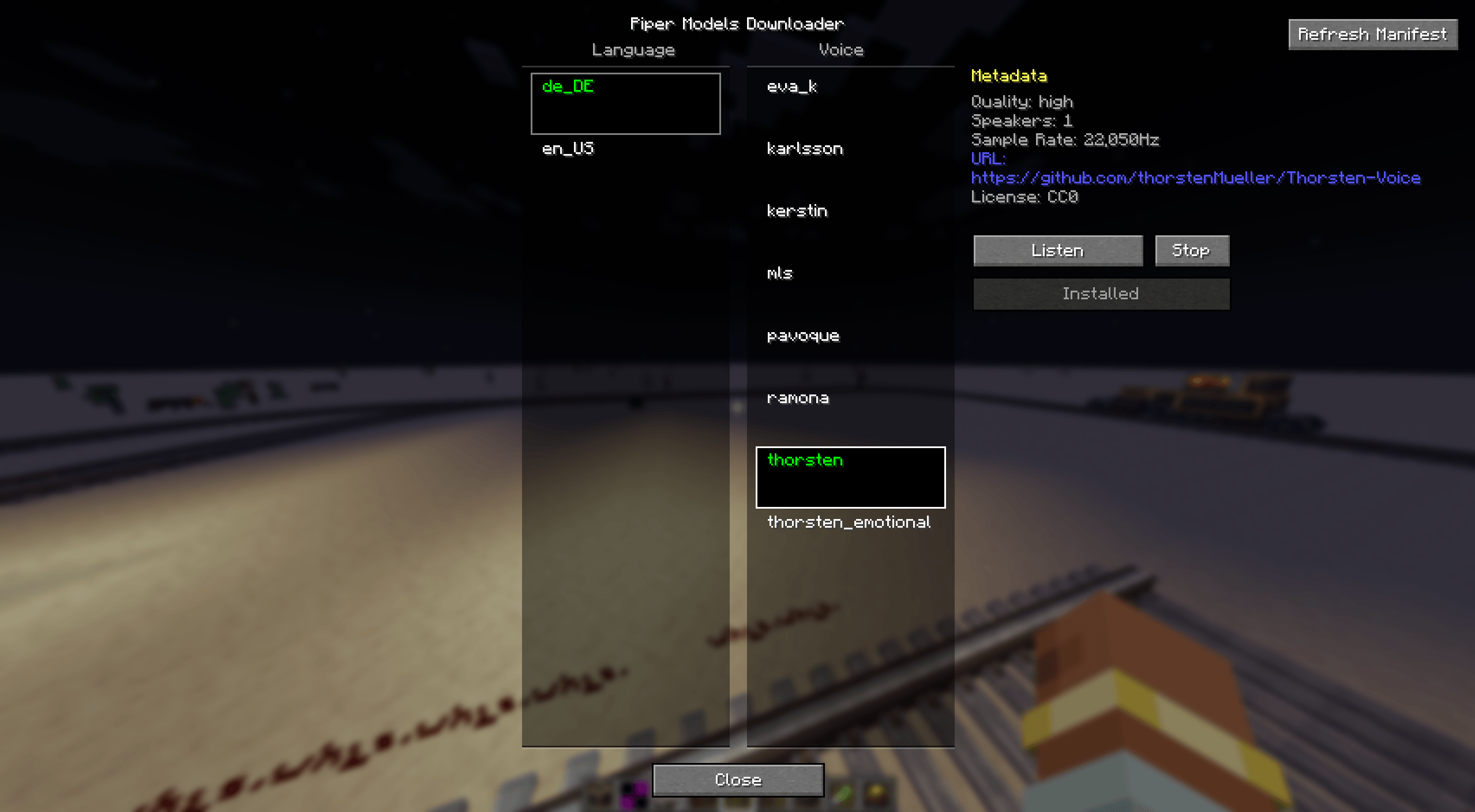
Voices can be downloaded on-demand to minimize the mod's file size. TTS lines are generated once when set (via the Preview button) and then cached. Open the voice manager GUI in-game (requires OP 2 or higher) using:/create_station_voices piper_models - Redstone Announcer Block
Plays a set text-to-speech announcement whenever it receives a redstone signal. - Train Announcer Block
Links to either a Train Station or a Train Observer. It supports multiple profiles for different trains, triggering the announcement when a train arrives or passes by. - Custom Audio Effects
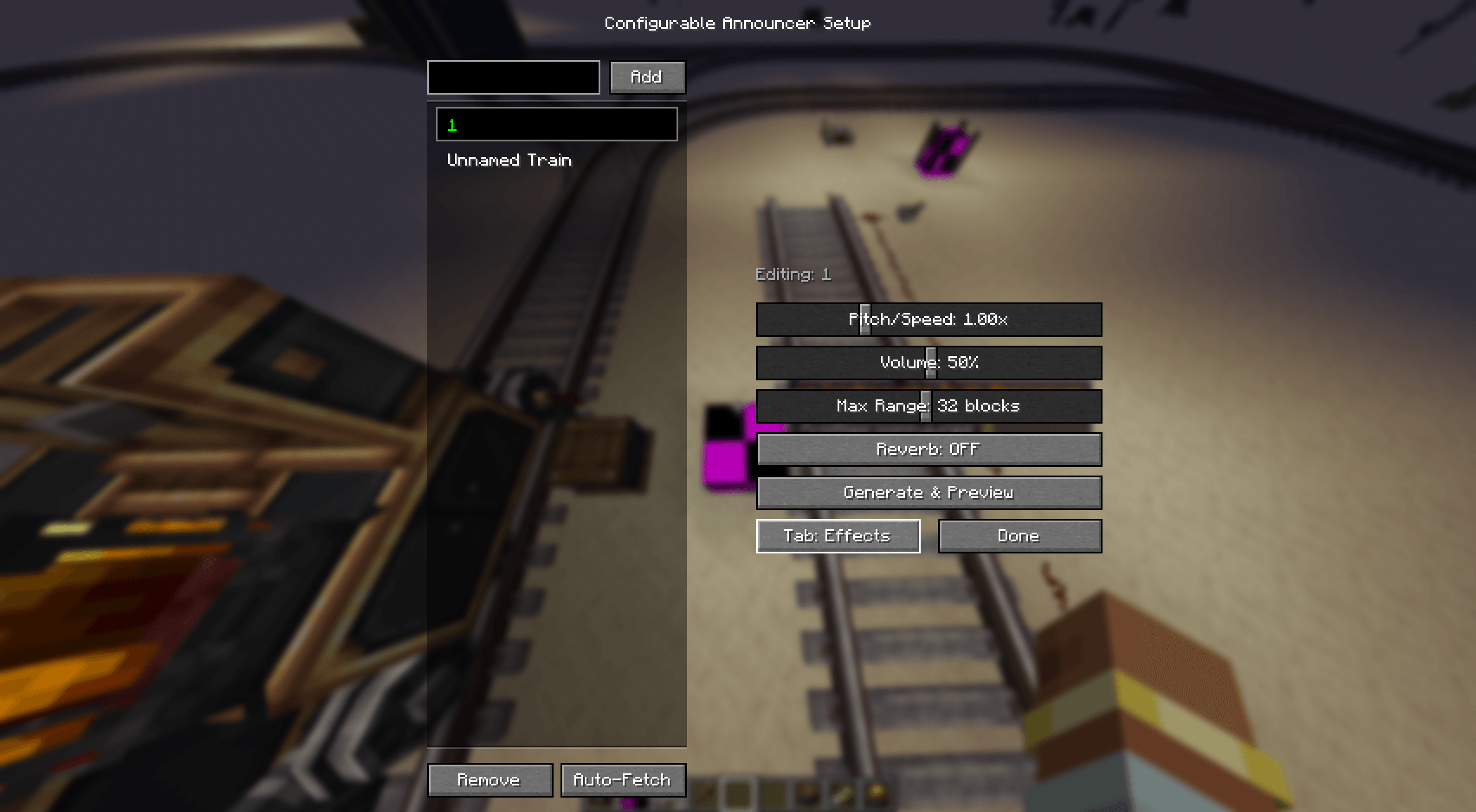
Configure audio directly per announcer block/profile:- Pitch & Speed
- Volume
- Audible Range (1-64 blocks)
- A realism slider (noticeably reduces the quality of the announcement to be more in-line with real-world station announcements)
- Jingles can be turned on in the effects menu, the selected jingle will play either before, after or before and after the announcement depending on the selected option. Supported jingles include DB Gong, SNCF, NS, and UK chime.
- Custom Jingles
You can manage Jingles by opening the GUI using/create_station_voices jingles. Alternatively you can add your own jingles to the mod by placing them in theconfig/create_station_voices/jinglesfolder. After placing your jingles run/create_station_voices reload_jinglesto reload the jingles. The mod supports.wav,.ogg, and.mp3files. - Audio Falloff
Announcements feature natural sound falloff (volume begins to decrease after one-third of the max range). - Auto-Populate Profiles
Automatically detects and populates profiles for all trains scheduled to pass the station. - Speaker Block
A cheap speaker block that can be linked to already placed announcers and will act as a secondary speaker for the announcer - Display Link Compatibility
Use a display link to automatically read active announcements from announcer blocks and display them on display boards, nixie tubes, signs and more. - In-Game Documentation
Beginning with v0.9.0-beta, all blocks feature in-game Ponder scenes to help you set them up. - Train-Mounted Announcer
A announcer block that can be mounted on a train. It functions like the configurable announcer but has profiles for each station the train passes. It can be configured to only broadcast the announcement to either all players in range or only to players riding the train.
(Note: While textures and a mod logo were added in v0.5.0-beta, all visuals are subject to change as development continues).
Voice Models & TTS Engine
- Voice models are downloaded from Hugging Face.
- By default, TTS is generated locally using native in-process ONNX runtime Piper TTS and downloaded models.
- The configuration file includes an option to use an external API (currently limited to a private API).
- Supports Windows, Linux, and macOS out of the box via native libraries.
- You can find a list of all languages here. If you want to request another language or voice to be added please open a suggestion in the Discord server.
Due to mod-hosting site moderation policies regarding bundled executable binaries, all mod versions prior to
v0.7.0-beta(v0.6.0-betaand earlier) are exclusively available on GitHub. Starting withv0.7.0-beta, the mod uses in-process native ONNX Runtime bindings.
Planned features
With v1.0.0-rc1 all features I planned are added. If you wish to suggest a feature please create a suggestion in the Discord server.
Getting Started
- Download the latest version of the mod from CurseForge or GitHub (If you downloaded the .jar file instead of using a modpack, place it in your
modsfolder) - Launch Minecraft with NeoForge 21.1.219+, KotlinForForge and Create 6.0+ installed
- Open the in-game voice manager GUI using
/create_station_voices piper_modelsto download voice models - Place a Redstone Announcer or Train Announcer block and configure it to your liking
- For more information, check out the in-game Ponder scenes for each block.
Questions that nobody asked (FAQ):
Q: Will there be a Fabric or Forge port?
A: Main development will remain strictly on NeoForge for now. However, I might consider porting to Fabric or Forge in the future once the mod is feature-complete.
Q: Will you backport this to older Minecraft versions?
A: Similar to the modloader situation, backports (e.g., to 1.20.1) are not currently planned, but may be considered in the future.
Q: Can I use this mod in my modpack?
A: Yes! Feel free to include Create: Station Voices in any CurseForge or Modrinth modpack, aslong as credit is given (CurseForge/Modrinth linking back to the mod in the mod list is enough).
Dependencies
- Minecraft:
1.21.1 - NeoForge:
21.1.219+ - KotlinForForge (NeoForge version)
- Create:
6.0+
Licensing & Permissions
This mod is provided under a Custom License. Please see the LICENSE.txt file in the repository for full legal phrasing. Here is a quick summary of what you can and cannot do:
- Modpacks: You are free to include this mod in any free-to-download modpack on standard platforms (like CurseForge/Modrinth). However, distributing modpacks containing this mod behind early-access paywalls (e.g., Patreon) is strictly prohibited.
- Servers & Pay-to-Win: You can use this mod freely on public/private servers. However, you may not lock this mod's features or items behind real-money purchases, mandatory donations, or any other pay-to-win structure.
- Content Creators: You are welcome to feature and monetize videos/streams of this mod. If the video is specifically a showcase or tutorial about this mod, a credit link in the description is required.
- Add-ons & Derivatives: You can create independent compatibility add-ons (using APIs or Mixins) under your own license. If you modify this mod's actual source code, your modified version must be source-available and shared under this exact same custom license.
Third-Party Credits
- Piper TTS: Bundled under the MIT License (Copyright © 2023 Michael Hansen / Rhasspy).
- KotlinForForge: Portions derived from this project, licensed under the MIT License (Copyright © 2020 TheDarkColour).
- Voice Models: Downloaded voice models are not bundled with the mod, are not covered by this mod's license, and belong to their respective creators under various licenses (e.g., Creative Commons). Proper attribution for these models is displayed within the in-game UI.
Screenshots
Gallery
-
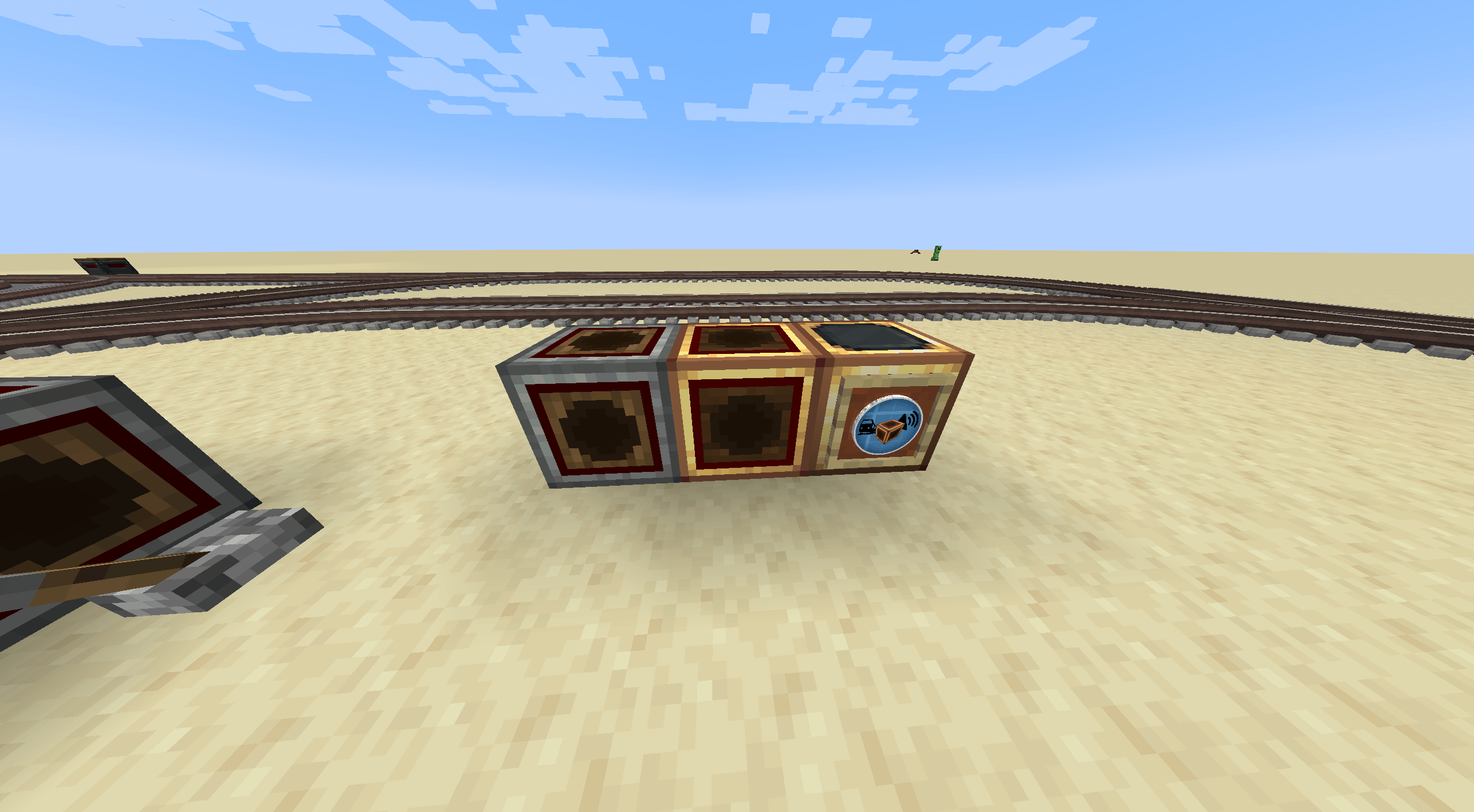 image-attachment_18b1bab8-0ee1-49b9-a788-2b249d58dda4.png
 -
 Screenshot 2026-08-24 043730.png Screenshot 2026-08-24 043730.png
 -
 Screenshot 2026-08-24 043742.png Screenshot 2026-08-24 043742.png
 -
 Screenshot 2026-08-24 043804.png Screenshot 2026-08-24 043804.png
Versions
Files
Relations
Project Relations
More like this
Similar Mods
Suggestions use data such as tags, dependencies, dependents, descriptions, titles, and more to rank how much they overlap with this mod.
On ModDex
Community snapshot
By the numbers
Statistics
Want to reach Minecraft players?
We're looking for a server hosting partner to feature here and other parts of the site. Interested? Send us a message!
Get in touchGet it on
Available Platforms
On ModDex
Community snapshot
By the numbers