
Community listing page, reviews here may not be monitored by the author.
Create: Transit Tickets


No reviews yet
A Create addon that focuses on transit fares/ticketing system.
Community voices
Reviews
No reviews yet. Be the first to review this project!
Get it on
Available Platforms
Compatibility
Supported Environments
Must be installed on both the client and the server.
About
Project Details
For authors
Embed Badge
If you're the author of this project, you can embed a live badge anywhere that supports HTML or Markdown. It updates automatically whenever ratings change.
Use HTML for any page that supports it, or Markdown for README files and Markdown-based descriptions.
Identifiers
Platform IDs
Resources
External Links
About
Description
🎟️ Create: Transit Tickets 🚂
🚉 Survival-friendly, configurable transit tickets and ticket gates for Create train networks.



CREATE 0.5.x WILL BE DEPRECATED. IF YOU NEED SUPPORT FOR THOSE VERSIONS, PLEASE ASK NOW.
🚆 About
Create: Transit Tickets adds reusable ticket blueprints, issued transit tickets, and working ticket gates for public transportation systems built with the Create mod.
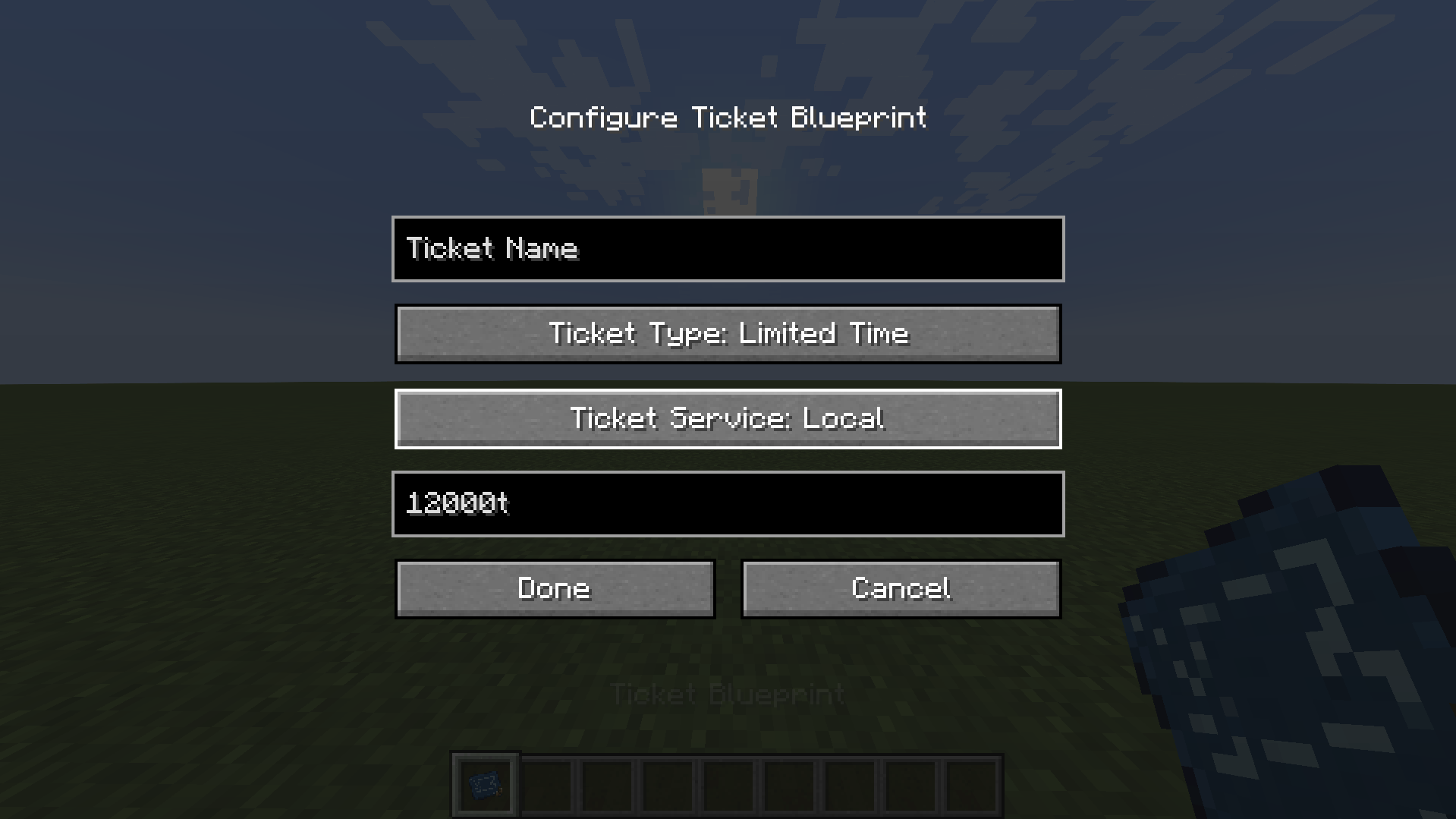
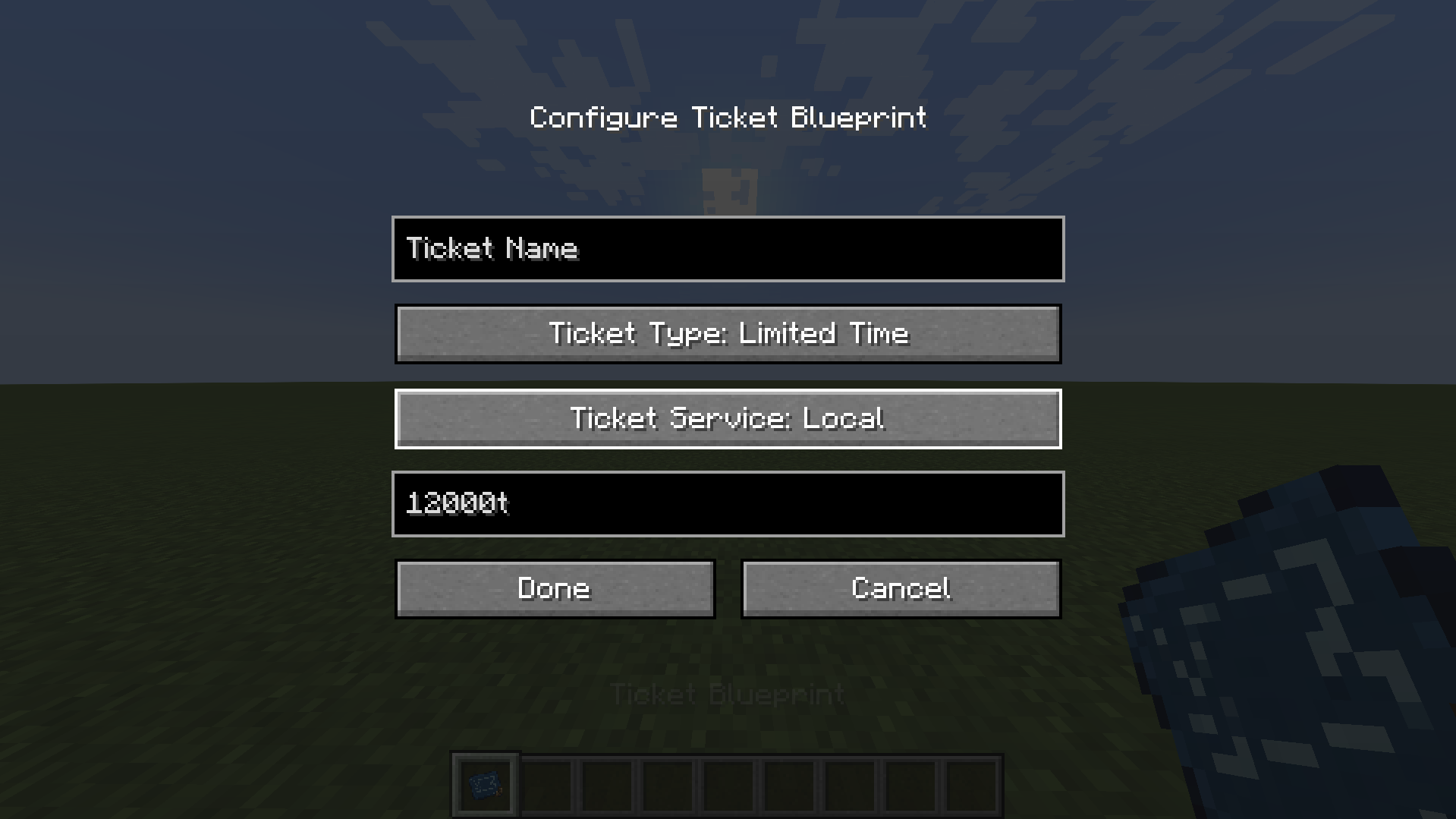
Ticket blueprints are configured through an in-game menu—commands are no longer required for normal use. A blueprint stores a custom name, usage type, and transit service.
- 🎫 Single Use tickets allow one gate passage.
- 🔢 Multiple Use tickets allow a configurable number of passages.
- ⏳ Limited Time tickets remain valid for a configurable duration.
- ♾️ Unlimited Time tickets never expire.
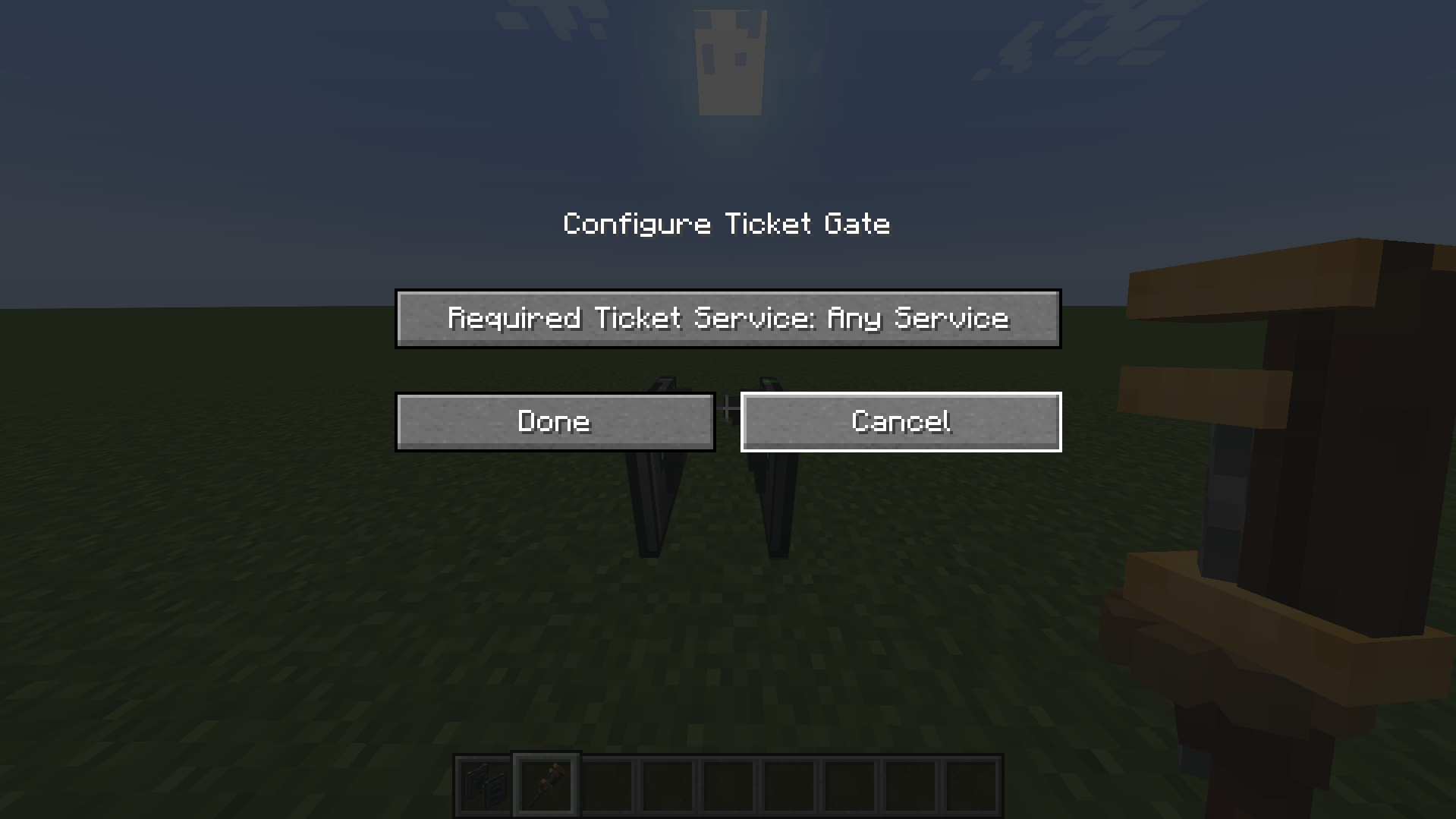
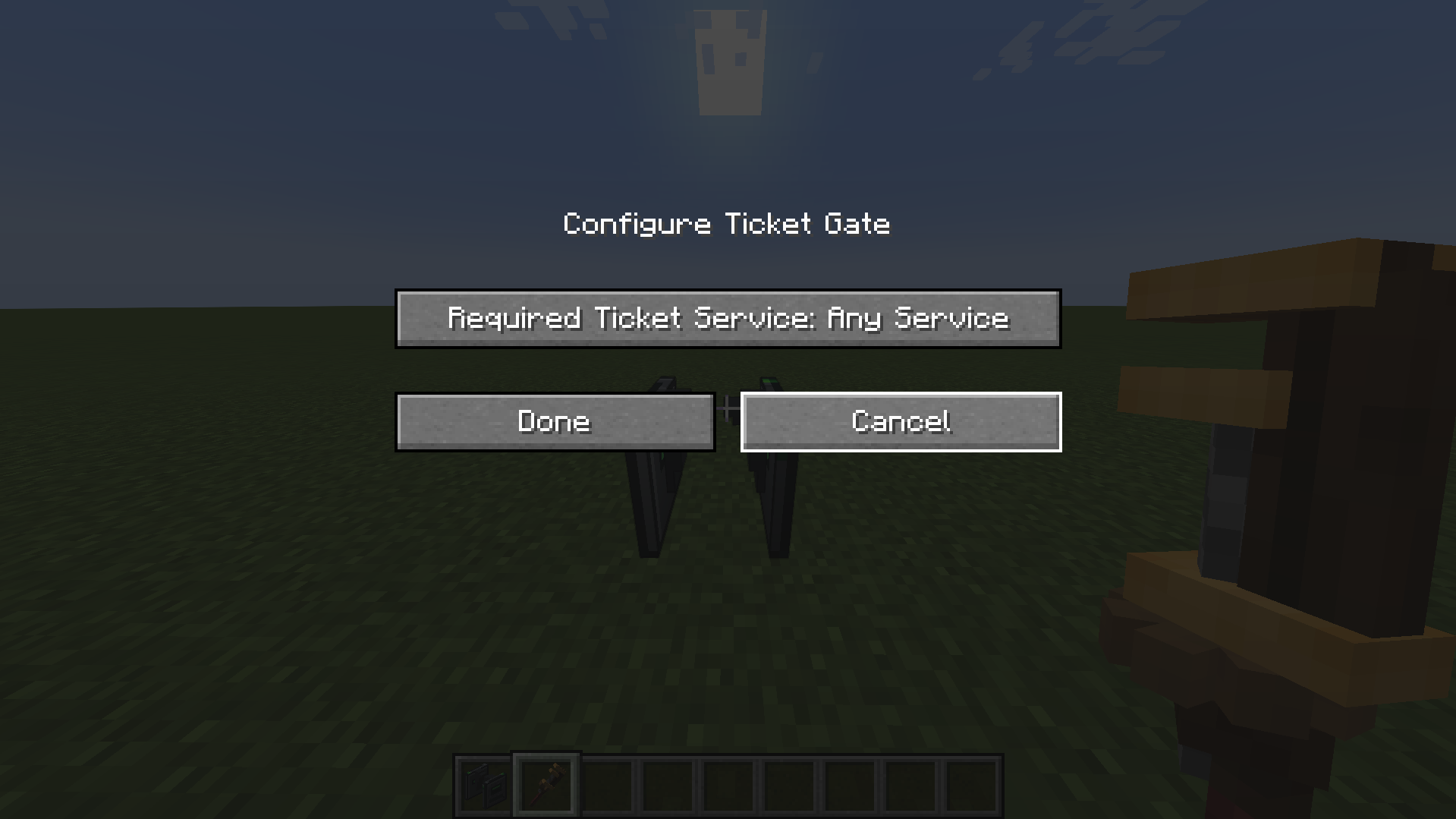
Tickets can use the Local, Semi-Fast, or Express service. Operators can configure each gate to accept any service or require one specific service.
The Blank Ticket, Ticket Blueprint, Transit Ticket, and Ticket Gate use Create-style tooltips. Hold Shift while hovering to see their summaries and usage instructions. Incomplete Transit Tickets display their recipe progress and next required machine directly in the tooltip.
Create-style Ponder scenes are available for the Blank Ticket and Ticket Gate. They explain ticket production, validation rules, gate behavior, service requirements, and operator controls in-game.
✨ Current Version Highlights
The current 1.0.0-c6 release includes:
- 🚂 Support for Create 6.0.8 on Minecraft 1.21.1 with NeoForge 21.1.251 or newer.
- 📝 An in-game Ticket Blueprint configuration menu with name, type, service, passage, and duration controls.
- 🎫 Single Use, Multiple Use, Limited Time, and Unlimited Time ticket types.
- 🚉 Local, Semi-Fast, and Express ticket services.
- 🔧 Per-gate service requirements configured by operators with Create's Wrench.
- 📦 Operator-only wrench dismantling that returns the Ticket Gate item.
- 🚶 Gates that close after a player passes through or after a hard five-second timeout.
- 🛡️ Server-validated configuration packets for blueprints and gates.
- 📖 Create-style Shift summaries for the Blank Ticket, Ticket Blueprint, Transit Ticket, and Ticket Gate.
- 💭 Create-style Ponder tutorials for producing tickets and operating, configuring, and dismantling Ticket Gates.
- ⚙️ Two-stage ticket production using a Deployer followed by a Mechanical Press.
- 🟨 An Incomplete Transit Ticket that preserves blueprint data and shows recipe progress
1/2.
💭 In-Game Ponders
Hover over a supported item and hold Create's Ponder key—W by default—to open its tutorial.
📄 Using Blank Tickets
The Blank Ticket Ponder explains the complete production sequence:
- Configure a reusable Ticket Blueprint.
- Deploy the blueprint onto a Blank Ticket.
- Receive an Incomplete Transit Ticket containing the copied settings.
- Finish the ticket with a Mechanical Press before using it at a Ticket Gate.
🚧 Using Ticket Gates
The Ticket Gate includes two Ponder chapters:
- Using Ticket Gates covers issued-ticket validation, expired and used-up tickets, service matching, passage consumption, acceptance and denial feedback, the passable open state, closing after a passenger exits, and the five-second safety timeout.
- Configuring Ticket Gates covers the operator-only Wrench menu, the Any Service, Local, Semi-Fast, and Express requirements, permission restrictions, and sneak-wrench dismantling.
🎫 Ticket Workflow
📄 Blank Ticket + 📝 Ticket Blueprint → ⚙️ Deployer → 🟨 Incomplete Transit Ticket → 🔨 Mechanical Press → 🎟️ Valid Transit Ticket → 🚧 Ticket Gate
⚙️ Creating a Valid Ticket with Create Machinery
- Craft a Blank Ticket and a Ticket Blueprint.
- Hold the Ticket Blueprint and right-click to open its configuration menu.
- Choose the ticket name, type, service, and any required duration or passage count, then select Done.
- Put the configured Ticket Blueprint into the hand of a powered Deployer positioned over a belt, depot, or other valid processing surface.
- Send a Blank Ticket underneath the Deployer. The Deployer applies the blueprint and produces an Incomplete Transit Ticket without consuming the reusable blueprint.
- Send the Incomplete Transit Ticket beneath a powered Mechanical Press.
- The press produces an issued Transit Ticket containing the blueprint's configured name, type, service, and validity data.
- Hold the finished ticket and use it on a compatible Ticket Gate.
The Transit Ticket becomes valid when the Mechanical Press finishes. A Limited Time ticket's validity period begins at that moment—not when the blueprint is deployed. Removing the intermediate item before pressing leaves it incomplete and unable to open a Ticket Gate.
Incomplete Transit Tickets created before blueprint-data transfer was added do not contain the required settings. Deploy a new Blank Ticket after updating if an older intermediate produces an invalid ticket.
📄 Blank Ticket
- The material consumed when a Ticket Blueprint is deployed onto it.
- Contains no validity or expiration data by itself.
- Two sheets of paper craft four blank tickets.
- Hold Shift while hovering to display its Create-style summary.
📝 Ticket Blueprint
- A reusable template applied to Blank Tickets by a Deployer.
- Right-click it to open its configuration menu.
- Stores the ticket name, usage type, service, and any required passage or duration value.
- The service selector supports Local, Semi-Fast, and Express.
- Multiple Use displays a passage-count field.
- Limited Time displays a duration field. Supported suffixes are
t(ticks),s(seconds),m(minutes),h(hours), andd(Minecraft days). - One second equals 20 ticks, and one Minecraft day equals 24,000 ticks.
- Single Use and Unlimited Time require no additional value.
- Hold Shift while hovering to display its Create-style summary and usage instructions.
🟨 Incomplete Transit Ticket
- Produced when a Deployer applies a configured Ticket Blueprint to a Blank Ticket.
- Stores a copy of the blueprint's configuration data while moving between machines.
- Is not issued and cannot open a Ticket Gate.
- Displays a half-filled progress bar representing step
1/2. - Shows Recipe Sequence, Progress: 1/2, and Next: Process in Press in its tooltip.
- Must be processed by a Mechanical Press to become a valid Transit Ticket.
- Uses a damaged, Create-styled version of the completed ticket texture.
🎟️ Transit Ticket
- Uses the name configured on its blueprint.
- Retains the type and service configured on its blueprint.
- A Limited Time ticket stores its issue time, duration, and expiration time using the world's game time.
- Single Use and Multiple Use tickets store their original and remaining passage counts.
- An Unlimited Time ticket does not expire.
- Clearly displays Valid, Expired, or Used Up in the tooltip.
- Hold Shift while hovering to display its Create-style summary.
💻 Blueprint Commands (Optional)
The in-game blueprint menu is the recommended configuration method. Legacy helper commands remain available to Creative players and command sources with permission level 2 or higher.
Command-created blueprints use the Local service and cover the legacy limited-time and passage-limited formats. Use the in-game menu for all four ticket types and all service choices.
⏳ Time-limited tickets
/transittickets blueprint <duration_ticks> [name]duration_ticks must be at least 1. The optional name may contain spaces and is limited to 64 characters. If no name is supplied, the ticket is named Transit Ticket.
For example, a 30-minute ticket lasts 36,000 ticks:
/transittickets blueprint 36000 30 Minute PassMinecraft normally runs at 20 ticks per second. Ticket time advances with the world's game time and pauses when the world is not running.
🔢 Passage-limited tickets
/transittickets blueprint passages <count> [name]count must be at least 1. Each successful validation at a ticket gate consumes one passage immediately.
Examples:
/transittickets blueprint passages 1 Single Ride
/transittickets blueprint passages 5 Five Ride Pass
🚧 Ticket Gate Behavior
- Use the gate while holding an issued, valid Transit Ticket.
- Gates accept Any Service by default.
- An operator can right-click a placed gate with Create's Wrench to require Local, Semi-Fast, or Express service instead.
- Gate configuration is restricted to operators with permission level 2 or higher.
- An operator can sneak and right-click with Create's Wrench to dismantle the gate and drop its item.
- A valid ticket plays an acceptance sound and opens the center barrier.
- A valid ticket with the wrong service is rejected without consuming a passage.
- Passage-limited tickets lose one passage as soon as the gate accepts them. At zero passages, the ticket becomes Used Up and cannot open another gate.
- Limited Time tickets can open gates repeatedly until their world-time expiration. Unlimited Time tickets never expire.
- The gate closes after the player passes through and leaves the gate block.
- The gate always closes after 100 ticks (about five seconds), even if a player remains inside it.
- An empty hand, an unissued ticket, an expired ticket, a used-up ticket, or any other item is rejected with a denial sound and an on-screen error message.
- Hold Shift while hovering over the gate item to display its Create-style summary and wrench instructions.
🔮 Planned Features
- Optional compatibility with other Create transit and security add-ons
Planned features may change as development continues.
🌐 Available Languages
- English (US)
Translations are welcome through pull requests.
📦 Installation
- Install Minecraft 1.21.1.
- Install NeoForge 21.1.251 or newer for Minecraft 1.21.1.
- Install Create 6.0.8 for NeoForge 1.21.1 and its required dependencies.
- Download Create: Transit Tickets from the GitHub Releases page.
- Place both Create and Create: Transit Tickets in the Minecraft
modsfolder. - Launch Minecraft with the NeoForge profile.
This branch builds Create: Transit Tickets
1.0.0-c6for Minecraft 1.21.1 and requires NeoForge 21.1.251 or newer and Create 6.0.8. Older Forge 1.20.1 builds are not compatible with this release.
🛠️ Building from Source
Requirements:
- Java Development Kit 21
- Git
Clone and build the project:
git clone https://github.com/RSlover521/Create-Transit-Tickets.git
cd Create-Transit-Tickets
./gradlew build
On Windows PowerShell or Command Prompt, use:
.\gradlew.bat buildThe built mod jar will be created in build/libs/.
To launch the NeoForge development client:
.\gradlew.bat runClient🔗 Links
✅ Version Compatibility
| Transit Tickets version | Minecraft 1.21.1 | Minecraft 1.20.1 | Create 6.0.8 | Create 0.5.1.f | NeoForge 21.1.251+ | Forge 47.x |
|---|---|---|---|---|---|---|
| 1.0.0-c6 (current) | ✅ | ✅ | ✅ | ✅ | ✅ | ✅ |
| 0.1.4-beta | ❌ | ✅ | ✅ | ✅ | ❌ | ✅ |
| 0.1.3-beta | ❌ | ✅ | ✅ | ❌ | ❌ | ✅ |
| 0.1.2-beta | ❌ | ✅ | ❌ | ✅ | ❌ | ✅ |
| 0.1.1-beta | ❌ | ✅ | ❌ | ✅ | ❌ | ✅ |
| 0.1.0-beta | ❌ | ✅ | ❌ | ✅ | ❌ | ✅ |
✅ Compatible ❌ Not compatible
Downloads for every available build are on the GitHub Releases page.
📜 License
- MIT License — see the project license for details.
- Minecraft, NeoForge, Minecraft Forge, and Create belong to their respective owners.
🎟️ Create: Transit Tickets 🚂
🚉 Survival-friendly, configurable transit tickets and ticket gates for Create train networks.
CREATE 0.5.x WILL BE DEPRECATED. IF YOU NEED SUPPORT FOR THOSE VERSIONS, PLEASE ASK NOW.
🚆 About
Create: Transit Tickets adds reusable ticket blueprints, issued transit tickets, and working ticket gates for public transportation systems built with the Create mod.
Ticket blueprints are configured through an in-game menu—commands are no longer required for normal use. A blueprint stores a custom name, usage type, and transit service.
- 🎫 Single Use tickets allow one gate passage.
- 🔢 Multiple Use tickets allow a configurable number of passages.
- ⏳ Limited Time tickets remain valid for a configurable duration.
- ♾️ Unlimited Time tickets never expire.
Tickets can use the Local, Semi-Fast, or Express service. Operators can configure each gate to accept any service or require one specific service.
The Blank Ticket, Ticket Blueprint, Transit Ticket, and Ticket Gate use Create-style tooltips. Hold Shift while hovering to see their summaries and usage instructions. Incomplete Transit Tickets display their recipe progress and next required machine directly in the tooltip.
Create-style Ponder scenes are available for the Blank Ticket and Ticket Gate. They explain ticket production, validation rules, gate behavior, service requirements, and operator controls in-game.
✨ Current Version Highlights
The current 1.0.0-c6 release includes:
- 🚂 Support for Create 6.0.8 on Minecraft 1.21.1 with NeoForge 21.1.251 or newer.
- 📝 An in-game Ticket Blueprint configuration menu with name, type, service, passage, and duration controls.
- 🎫 Single Use, Multiple Use, Limited Time, and Unlimited Time ticket types.
- 🚉 Local, Semi-Fast, and Express ticket services.
- 🔧 Per-gate service requirements configured by operators with Create's Wrench.
- 📦 Operator-only wrench dismantling that returns the Ticket Gate item.
- 🚶 Gates that close after a player passes through or after a hard five-second timeout.
- 🛡️ Server-validated configuration packets for blueprints and gates.
- 📖 Create-style Shift summaries for the Blank Ticket, Ticket Blueprint, Transit Ticket, and Ticket Gate.
- 💭 Create-style Ponder tutorials for producing tickets and operating, configuring, and dismantling Ticket Gates.
- ⚙️ Two-stage ticket production using a Deployer followed by a Mechanical Press.
- 🟨 An Incomplete Transit Ticket that preserves blueprint data and shows recipe progress
1/2.
💭 In-Game Ponders
Hover over a supported item and hold Create's Ponder key—W by default—to open its tutorial.
📄 Using Blank Tickets
The Blank Ticket Ponder explains the complete production sequence:
- Configure a reusable Ticket Blueprint.
- Deploy the blueprint onto a Blank Ticket.
- Receive an Incomplete Transit Ticket containing the copied settings.
- Finish the ticket with a Mechanical Press before using it at a Ticket Gate.
🚧 Using Ticket Gates
The Ticket Gate includes two Ponder chapters:
- Using Ticket Gates covers issued-ticket validation, expired and used-up tickets, service matching, passage consumption, acceptance and denial feedback, the passable open state, closing after a passenger exits, and the five-second safety timeout.
- Configuring Ticket Gates covers the operator-only Wrench menu, the Any Service, Local, Semi-Fast, and Express requirements, permission restrictions, and sneak-wrench dismantling.
🎫 Ticket Workflow
📄 Blank Ticket + 📝 Ticket Blueprint → ⚙️ Deployer → 🟨 Incomplete Transit Ticket → 🔨 Mechanical Press → 🎟️ Valid Transit Ticket → 🚧 Ticket Gate
⚙️ Creating a Valid Ticket with Create Machinery
- Craft a Blank Ticket and a Ticket Blueprint.
- Hold the Ticket Blueprint and right-click to open its configuration menu.
- Choose the ticket name, type, service, and any required duration or passage count, then select Done.
- Put the configured Ticket Blueprint into the hand of a powered Deployer positioned over a belt, depot, or other valid processing surface.
- Send a Blank Ticket underneath the Deployer. The Deployer applies the blueprint and produces an Incomplete Transit Ticket without consuming the reusable blueprint.
- Send the Incomplete Transit Ticket beneath a powered Mechanical Press.
- The press produces an issued Transit Ticket containing the blueprint's configured name, type, service, and validity data.
- Hold the finished ticket and use it on a compatible Ticket Gate.
The Transit Ticket becomes valid when the Mechanical Press finishes. A Limited Time ticket's validity period begins at that moment—not when the blueprint is deployed. Removing the intermediate item before pressing leaves it incomplete and unable to open a Ticket Gate.
Incomplete Transit Tickets created before blueprint-data transfer was added do not contain the required settings. Deploy a new Blank Ticket after updating if an older intermediate produces an invalid ticket.
📄 Blank Ticket
- The material consumed when a Ticket Blueprint is deployed onto it.
- Contains no validity or expiration data by itself.
- Two sheets of paper craft four blank tickets.
- Hold Shift while hovering to display its Create-style summary.
📝 Ticket Blueprint
- A reusable template applied to Blank Tickets by a Deployer.
- Right-click it to open its configuration menu.
- Stores the ticket name, usage type, service, and any required passage or duration value.
- The service selector supports Local, Semi-Fast, and Express.
- Multiple Use displays a passage-count field.
- Limited Time displays a duration field. Supported suffixes are
t(ticks),s(seconds),m(minutes),h(hours), andd(Minecraft days). - One second equals 20 ticks, and one Minecraft day equals 24,000 ticks.
- Single Use and Unlimited Time require no additional value.
- Hold Shift while hovering to display its Create-style summary and usage instructions.
🟨 Incomplete Transit Ticket
- Produced when a Deployer applies a configured Ticket Blueprint to a Blank Ticket.
- Stores a copy of the blueprint's configuration data while moving between machines.
- Is not issued and cannot open a Ticket Gate.
- Displays a half-filled progress bar representing step
1/2. - Shows Recipe Sequence, Progress: 1/2, and Next: Process in Press in its tooltip.
- Must be processed by a Mechanical Press to become a valid Transit Ticket.
- Uses a damaged, Create-styled version of the completed ticket texture.
🎟️ Transit Ticket
- Uses the name configured on its blueprint.
- Retains the type and service configured on its blueprint.
- A Limited Time ticket stores its issue time, duration, and expiration time using the world's game time.
- Single Use and Multiple Use tickets store their original and remaining passage counts.
- An Unlimited Time ticket does not expire.
- Clearly displays Valid, Expired, or Used Up in the tooltip.
- Hold Shift while hovering to display its Create-style summary.
💻 Blueprint Commands (Optional)
The in-game blueprint menu is the recommended configuration method. Legacy helper commands remain available to Creative players and command sources with permission level 2 or higher.
Command-created blueprints use the Local service and cover the legacy limited-time and passage-limited formats. Use the in-game menu for all four ticket types and all service choices.
⏳ Time-limited tickets
/transittickets blueprint <duration_ticks> [name]
duration_ticks must be at least 1. The optional name may contain spaces and is limited to 64 characters. If no name is supplied, the ticket is named Transit Ticket.
For example, a 30-minute ticket lasts 36,000 ticks:
/transittickets blueprint 36000 30 Minute Pass
Minecraft normally runs at 20 ticks per second. Ticket time advances with the world's game time and pauses when the world is not running.
🔢 Passage-limited tickets
/transittickets blueprint passages <count> [name]
count must be at least 1. Each successful validation at a ticket gate consumes one passage immediately.
Examples:
/transittickets blueprint passages 1 Single Ride
/transittickets blueprint passages 5 Five Ride Pass
🚧 Ticket Gate Behavior
- Use the gate while holding an issued, valid Transit Ticket.
- Gates accept Any Service by default.
- An operator can right-click a placed gate with Create's Wrench to require Local, Semi-Fast, or Express service instead.
- Gate configuration is restricted to operators with permission level 2 or higher.
- An operator can sneak and right-click with Create's Wrench to dismantle the gate and drop its item.
- A valid ticket plays an acceptance sound and opens the center barrier.
- A valid ticket with the wrong service is rejected without consuming a passage.
- Passage-limited tickets lose one passage as soon as the gate accepts them. At zero passages, the ticket becomes Used Up and cannot open another gate.
- Limited Time tickets can open gates repeatedly until their world-time expiration. Unlimited Time tickets never expire.
- The gate closes after the player passes through and leaves the gate block.
- The gate always closes after 100 ticks (about five seconds), even if a player remains inside it.
- An empty hand, an unissued ticket, an expired ticket, a used-up ticket, or any other item is rejected with a denial sound and an on-screen error message.
- Hold Shift while hovering over the gate item to display its Create-style summary and wrench instructions.
🔮 Planned Features
- Optional compatibility with other Create transit and security add-ons
Planned features may change as development continues.
🌐 Available Languages
- English (US)
Translations are welcome through pull requests.
📦 Installation
- Install Minecraft 1.21.1.
- Install NeoForge 21.1.251 or newer for Minecraft 1.21.1.
- Install Create 6.0.8 for NeoForge 1.21.1 and its required dependencies.
- Download Create: Transit Tickets from the GitHub Releases page.
- Place both Create and Create: Transit Tickets in the Minecraft
modsfolder. - Launch Minecraft with the NeoForge profile.
This branch builds Create: Transit Tickets
1.0.0-c6for Minecraft 1.21.1 and requires NeoForge 21.1.251 or newer and Create 6.0.8. Older Forge 1.20.1 builds are not compatible with this release.
🛠️ Building from Source
Requirements:
- Java Development Kit 21
- Git
Clone and build the project:
git clone https://github.com/RSlover521/Create-Transit-Tickets.git
cd Create-Transit-Tickets
./gradlew build
On Windows PowerShell or Command Prompt, use:
.\gradlew.bat build
The built mod jar will be created in build/libs/.
To launch the NeoForge development client:
.\gradlew.bat runClient
🔗 Links
✅ Version Compatibility
| Transit Tickets version | Minecraft 1.21.1 | Minecraft 1.20.1 | Create 6.0.8 | Create 0.5.1.f | NeoForge 21.1.251+ | Forge 47.x |
|---|---|---|---|---|---|---|
| 1.0.0-c6 (current) | ✅ | ✅ | ✅ | ✅ | ✅ | ✅ |
| 0.1.4-beta | ❌ | ✅ | ✅ | ✅ | ❌ | ✅ |
| 0.1.3-beta | ❌ | ✅ | ✅ | ❌ | ❌ | ✅ |
| 0.1.2-beta | ❌ | ✅ | ❌ | ✅ | ❌ | ✅ |
| 0.1.1-beta | ❌ | ✅ | ❌ | ✅ | ❌ | ✅ |
| 0.1.0-beta | ❌ | ✅ | ❌ | ✅ | ❌ | ✅ |
✅ Compatible ❌ Not compatible
Downloads for every available build are on the GitHub Releases page.
📜 License
- MIT License — see the project license for details.
- Minecraft, NeoForge, Minecraft Forge, and Create belong to their respective owners.
Screenshots
Gallery
-
 Ticket Blueprint Configuration Screen Ticket Blueprint Configuration Screen
 -
 Ticket Gate Configuration Screen Ticket Gate Configuration Screen
-
 Ticket Blueprint Configuration Menu Ticket Blueprint Configuration Menu
 -
 Ticket Gate Configuration Menu Ticket Blueprint Configuration Menu
Versions
Files
Relations
Project Relations
More like this
Similar Mods
Suggestions use data such as tags, dependencies, dependents, descriptions, titles, and more to rank how much they overlap with this mod.
On ModDex
Community snapshot
By the numbers
Statistics
Want to reach Minecraft players?
We're looking for a server hosting partner to feature here and other parts of the site. Interested? Send us a message!
Get in touchGet it on
Available Platforms
On ModDex
Community snapshot
By the numbers
Statistics
Resources