
Community listing page, reviews here may not be monitored by the author.
Crystalix


No reviews yet
Adds super customizable glass blocks, allowing everyting rom color to properties to be changed
Community voices
Reviews
No reviews yet. Be the first to review this project!
Get it on
Available Platforms
Compatibility
Supported Environments
Must be installed on both the client and the server.
About
Project Details
For authors
Embed Badge
If you're the author of this project, you can embed a live badge anywhere that supports HTML or Markdown. It updates automatically whenever ratings change.
Use HTML for any page that supports it, or Markdown for README files and Markdown-based descriptions.
Identifiers
Platform IDs
About
Description
Crystalix




Crystalix is a mod centered around glass with a bunch of properties that can be applied to it.
Information
- Adds
Crystalix Glass, a glass block which can hold any mix and match of properties you like. - Adds the
Crystalix Wand, which is used to apply properties to the Crystalix Glass. - Any property can be mixed with any other property, so you can decide yourself which combination works best.

The Crystalix Wand
- Using the wand on a Crystalix Glass block applies the stored properties to that block.
- Crouching while using the wand will apply the stored properties to all connected blocks up to a configurable limit.
- If the wand is held in your Offhand, the properties will be applied immediately when placing the block.
- Pressing
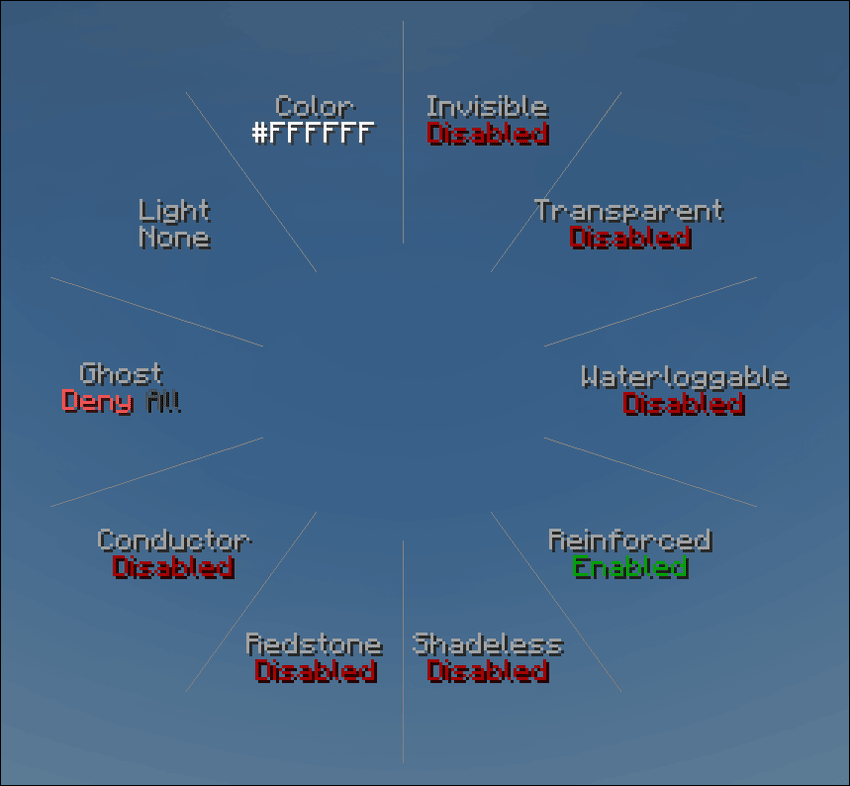
Vopens the radial editor, which allows you to customize the settings of the wand, including a color picker screen. - Pressing
Xwhile looking at a Crystalix Glass block will copy its properties to the wand. - Pressing
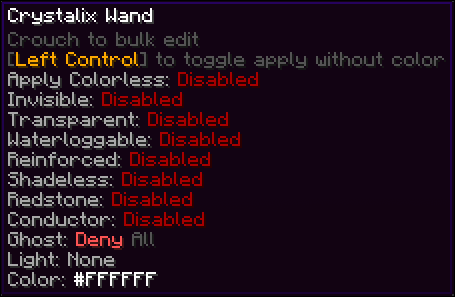
Left Controltoggles whether the wand should apply color as well or the properties only.

Properties
Invisibility
- Makes the block fully invisible.
- Useful for creating barrier-like blocks or if you simply want an invisible light or redstone source.
Material
- Changes the base texture of the block.
- Cycles between the available glass looks:
Normal: Default Vanilla glass look.Bordered: Glass without the scratches on the texture and only a border.Clear: Completely clear glass with no texture.
Tinted
- Switches between a tinted and a clear texture style.
- Matches the vanilla tinted glass vs default glass look.
Color
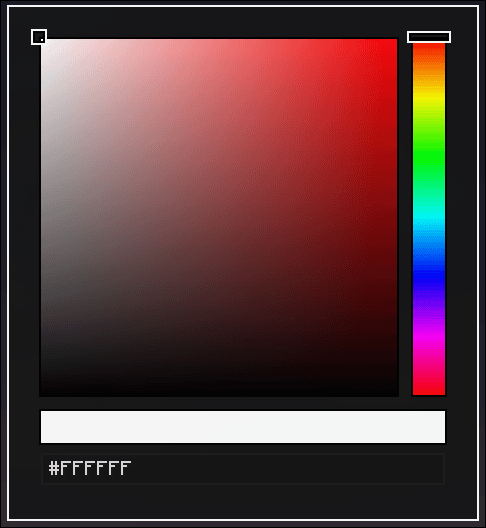
- Allows you to select any color via the color picker.
- You can use any RGB or HEX color freely.

Waterloggable
- Decides whether the block is allowed to change its waterlogged state.
- If disabled, you cannot remove water from the block if any is applied or add any if none is applied.
- If enabled, you can add and remove water like any other waterloggable block.
Reinforced
- Makes the block completely indestructible to any force but players mining it.
- Fully wither- and blastproof and will also contain explosions within it to prevent any damage from passing through the block.
- Also increases the time it takes for the block to be mined by 10x.
Shadeless
- Removes the shading effect from the block.
- Means no shadows will be rendered on the block which can be used for a more flat look.
Redstone
- Makes the block emit a configurable redstone signal from
0to15. - Lets you use the block as a redstone source with a specific signal level.
Conductor
- Makes the block conduct redstone like a solid block.
- Useful if you want to change the typical behavior of glass not transmitting signals.
Ghost
- Changes who can pass through the block:
- nothing
- everything
- only players
- everything except players
- only monsters
- everything except monsters
- only animals
- everything except animals
- only adult creatures
- everything except adult creatures
- Useful for mob filtering or creating passageways for players only
Light
- Cycles through several lighting modes:
Nonefor no special behavior.Lightto emit a light level of15.Darkto block light from passing through the block.Fake Lightto visually glow without the real gameplay impact of normal light emission.Fake Darkto visually appear dark while keeping the real light behavior separate.
Compatibility
Jade
- Displays the stored properties of the glass block in the tooltip.
- By default the tooltip is only shown while the player is holding the wand.
- This can be changed via the
jadeModeclient config:ALWAYS: Always show the tooltip.WAND: Show the tooltip only while holding a wand. (Default)NEVER: Never show the tooltip.

Framed Blocks
- Crystalix Glass can be placed into framed blocks; however, due to the way framed blocks function, unfortunately not all properties will function properly.
- Texture changes will function as normal, including
color,material,tinted,shadelessand the ability to switch betweenlightand no effect. - All other properties cannot be supported correctly
Information
The Crystalix Wand
The Wand allows you to cycle through all possible properties the config window to set the property of a block.
-
Crouching will let you edit all connecting blocks at once
-
CTRL will make it so you only apply properties but not color
-
X will copy the properties from the block you're currently targeting onto the wand
-
You can open the config window by holding V by default
-
Left Clicking or Scrolling Down will cycle forwards, Right Clicking or Scrolling Up cycles backwards
Blocks
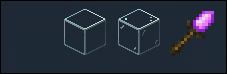
Unlike previous versions, the block variaty was cut down dramatically, since 2.3.0 there's only 3 different versions of glass what do you mean the first one is basically invisible. You can apply any color to any type of glass to have an infinity combination of colors
Properties
- Properties can be mixed and matches however you want
Invisibility
- Makes the block invisible (What did you expect)
- Useful if you want the properties of the glass without having a visual block there
Transparent
- With this toggled the texture of the glass will be fully transparent and color will only be applied to the few specs on the glass
Waterloggable
- Sets whether the block can be waterlogged or not
Reinforced
- Completly indestructible to everything, including wither and ender dragon, except for the player mining it
- Makes the block 10x harder to mine
Shadeless
- Removes the shadows and shade from the block
Redstone
- Makes the block emit a redstone signal of 15
Conductor
- Makes the block conduct redstone through it like a solid block
Ghost
- Makes the block passthough for one of the following
- Nothing
- Everything
- Only Players
- Everything except Players
- Only Hostile Mobs
- Everything except Hostile Mobs
- Only Passive Mobs
- Everything except Passive Mobs
Light
- Cycles through the following modes
- None: No special property
- Light: Glows at a light level of 15
- Dark: Blocks light the same way as tinted glass
- Fake Light: Glows with a light level of 15, still allowing for mobs to spawn
Color
-
Opens the color picker screen which lets you choose any color you like to apply to your glass
Screenshots
Gallery
Versions
Files
Relations
Project Relations
More like this
Similar Mods
Suggestions use data such as tags, dependencies, dependents, descriptions, titles, and more to rank how much they overlap with this mod.
On ModDex
Community snapshot
By the numbers
Statistics
Want to reach Minecraft players?
We're looking for a server hosting partner to feature here and other parts of the site. Interested? Send us a message!
Get in touchGet it on
Available Platforms
On ModDex
Community snapshot
By the numbers