
Community listing page, reviews here may not be monitored by the author.
Woodcutter

No reviews yet
Turn the stonecutter into a woodcutting station: convert logs, planks, stairs, slabs and boats for every vanilla and Nether wood type.

Community voices
Reviews
No reviews yet. Be the first to review this project!
Get it on
Available Platforms
About
Project Details
For authors
Embed Badge
If you're the author of this project, you can embed a live badge anywhere that supports HTML or Markdown. It updates automatically whenever ratings change.
Use HTML for any page that supports it, or Markdown for README files and Markdown-based descriptions.
Identifiers
Platform IDs
Resources
External Links
About
Description


Woodcutter
Use the stonecutter as a woodcutter!
This fully vanilla data pack adds new recipes to the stonecutter, letting it cut and recycle wood — the same way it already does for stone.
✨ Features
- Logs & wood: switch between logs, stripped logs, wood and stripped wood.
- Planks → wooden blocks: cut planks into stairs, slabs (×2), doors, trapdoors, fences, fence gates, buttons, pressure plates, signs, hanging signs, shelves, boats and chest boats (bamboo planks also give bamboo mosaic).
- Planks → utility blocks: any plank type gives sticks (×2), chests, barrels, bookshelves, chiseled bookshelves, lecterns and beehives.
- Recycling: turn stairs, fences, fence gates, doors, trapdoors, buttons, pressure plates, signs, hanging signs, shelves, boats and utility blocks back into planks — never waste wood on a bad build again. Boats and chest boats convert into each other.
- Slabs → planks: two slabs placed side by side in a crafting table give back one plank.
- Sticks: cut sticks into armor stands, item frames and paintings, and back again.
- Bamboo: bamboo blocks, bamboo planks and scaffolding give back bamboo; bamboo gives scaffolding.
- No new blocks or items: purely new recipes, 100% vanilla. No commands to learn, no new UI.
🌳 Supported wood types
Works with every wood type in the game:


Oak, Dark Oak, Birch, Spruce, Jungle, Acacia, Mangrove, Cherry, Pale Oak, Poplar, Bamboo, plus the Nether variants Crimson and Warped.
Recipes
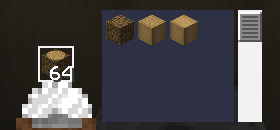
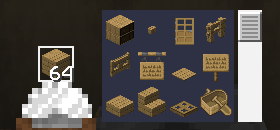
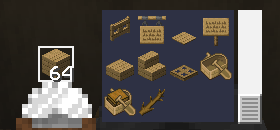
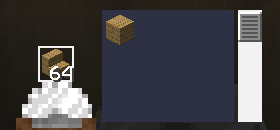
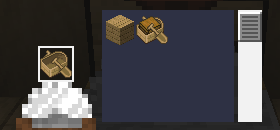
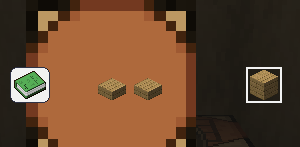
🕹️ How to use
- Install the data pack into your world's
datapacksfolder (see Installation). - Open a stonecutter as usual.
- Find your new wood recipes right next to the classic stone ones.
Survival- and multiplayer-safe, with zero performance impact.
📦 Compatibility
| Minecraft versions | 1.19.x · 1.20.x · 1.21.x · 26.1 · 26.2 · 26.3 |
| Type | Data Pack (no mods required) |
| License | MIT |
📥 Installation
Like any data pack: drop the downloaded folder into .minecraft/saves/<your_world>/datapacks/, then run /reload or restart the world.
Screenshots
Gallery
Versions
Files
Relations
Project Relations
More like this
Similar Mods
Suggestions use data such as tags, dependencies, dependents, descriptions, titles, and more to rank how much they overlap with this mod.
On ModDex
Community snapshot
By the numbers
Statistics

 (opens in a new tab)
Get it on
Available Platforms
On ModDex
Community snapshot
By the numbers
Statistics
Resources