Community listing page, reviews here may not be monitored by the author.
Custom Entity – The Stalker


No reviews yet
A terrifying AI horror mod that stalks players from the shadows, featuring dynamic difficulty, sanity mechanics, and jumpscares.
Community voices
Reviews
No reviews yet. Be the first to review this project!
Get it on
Available Platforms
Compatibility
Supported Environments
Must be installed on both the client and the server.
About
Project Details
For authors
Embed Badge
If you're the author of this project, you can embed a live badge anywhere that supports HTML or Markdown. It updates automatically whenever ratings change.
Use HTML for any page that supports it, or Markdown for README files and Markdown-based descriptions.
Identifiers
Platform IDs
Resources
External Links
About
Description
👁️ Custom Entity – The Stalker (Fabric)
A horror-based AI Fabric mod that adds a terrifying stalking entity with intelligent behavior, jumpscares, and dynamic difficulty.
👑 THE COMPLETE NIGHTMARE
This Fabric port includes all the terrifying features to make your survival experience a living nightmare:
- Sanity System: Beware the dark. Low sanity will cause nausea and terrifying Creeper hallucinations.
- Relentless Spawning: The Stalker will actively hunt you down, and on high difficulties, it will persistently respawn and track you even after you die.
- Dynamic Weather: The Stalker can manipulate the weather to summon thunderstorms upon its arrival.
🧠 AI System
- IDLE, STALKING, WATCHING, CHASING states
- Weeping Angel-style mechanic (freezes when looked at)
- Smart pathfinding and targeting
⚔️ Features
- In-game Configuration Menu: Press
Hin-game at any time to open the configuration menu and change your settings! - Melee combat with knockback
- Lightning strike effects
- Jumpscare system
- Camera shake support
🌙 Spawning
- Spawns at night (or always on high difficulty)
- Configurable per-player cooldown
- Spawns outside player vision
🎮 Commands
/ce spawn- Force spawn the Stalker on yourself/ce reload- Reload the configuration file
🎨 Custom Skins
No external plugins required! The Fabric mod handles custom skins natively.
1. Add Your Skin
Place your custom PNG skin on the server or your client inside:
config/stalker/skins/
2. Apply the Skin
You can apply the skin in two ways:

Press H to open the In-Game Config Menu, type your skin's filename into the Skin PNG box, and hit SAVE SETTINGS.
Run the command: /ce config skin your_skin_file.png
The mod will automatically sync the custom skin to all players on the server!

🤝 Compatibility & Dependencies
Modloader: Fabric
Minecraft Version: 26.2
Required Dependency: Fabric API (0.160.0+26.2)
🎨 Icon Credit
Icon artwork by Siednji Leon via Unsplash.

📜 License
All Rights Reserved © String Wire Gamer
👁️ Custom Entity – The Stalker
A horror-based plugin and Fabric mod that adds a stalking entity with terrifying behavior, jumpscares, and dynamic difficulty. Now fully rebuilt and available as a Fabric Mod for Minecraft 26.2!
👑 UPGRADE TO PREMIUM!
Want to make the nightmare even worse? Check out The Stalker (Premium Edition)! The Premium version includes exclusive features like a Sanity System (hallucinations), Torch Sabotage, Thunderstorm Spawning, Custom Loot Drops, and the relentless High-Difficulty Respawn System. 👉 Get the Premium Version Here!
⚡ NEW: Fabric Mod Version
The Custom Entity Experience has been completely rebuilt for Minecraft 26.2 with updated Fabric compatibility, safer entity cleanup, improved rendering, and seamless multiplayer support!
New Fabric Features:
- Improved Stalker behavior and appearance.
- Hallucination effects with safer, targeted entity cleanup (no more laggy world-border scanning).
- Client-Side Settings Menu for easy in-game configuration.
- Configurable Stalker name colors using Hex codes (e.g.,
#FF0000).
🧠 Core Features
- Dynamic States: IDLE, STALKING, WATCHING, and CHASING.
- Weeping Angel Mechanic: The Stalker freezes when you look directly at it.
- Advanced Pathfinding: Actively tracks and targets players.
- Combat & FX: Melee combat with knockback, lightning strike effects, camera shake support, and terrifying jumpscares.
- Dynamic Spawning: Spawns at night (or always on HIGH difficulty), out of the player's direct line of sight, with a per-player cooldown.
🎛️ In-Game Configuration Screen (Fabric Only)
Press the H key in-game to open the client-side settings menu! (If H conflicts, change it in Options → Controls → Key Binds).
From this menu, you can customize everything without touching a config file. Settings are automatically sent to the server (Requires OP/Permissions on multiplayer).
Left Column (Customization & Combat)
- Entity name: Changes the name displayed above the Stalker (Default: The_Stalker).
- Skin PNG: Selects the exact skin file used.
- Name color: Supports Hex colors (e.g.,
#FFBF00for orange/gold). - Chase speed: How fast it hunts you (Default:
0.34- Tip: Set to0.8for a truly terrifying chase!). - Attack damage: Damage per hit (Default:
6.0/ 3 hearts). - Spawn chance: Probability of a spawn attempt succeeding (Default:
0.1/ 10%). - Lightning: Toggle lightning effects on spawn.
Right Column (Spawning & Difficulty)
- Max Stalkers/player: Limit active stalkers per person (Default:
1). - Spawn interval: How often the game checks for spawning (Default:
20 ticks/ 1 second). - Difficulty: Changes overall behavior intensity (Recommended:
HIGH). - Auto spawning: Toggle automatic stalking
ON/OFF. - Day spawning: Allow daytime hunts
ON/OFF. - Stalker effects / Camera shake / Audio: Toggle sensory horror elements.
🎨 Custom Skins
Depending on which version you are using (Fabric Mod vs. Server Plugin), adding custom skins works differently:
🟩 For the Fabric Mod
- Click OPEN SKIN FOLDER from the in-game
Hmenu, or navigate directly toconfig/stalker/skins/. - Place your
.pngskin inside this folder (e.g.,my_stalker_skin.png). - Open the
Hmenu in-game and type your exact file name into the Skin PNG box. - Click SAVE SETTINGS.
🟦 For the Server Plugin (Bukkit/Spigot/Paper)
Custom skins require the Citizens plugin to be installed.
- Drop the Citizens plugin into your server's
pluginsfolder and restart. - Place your custom PNG skin inside:
plugins/CustomEntity/skins/ - Rename the skin exactly to:
stalker.png(Note: If Citizens is not installed, custom skins will not work and it will fall back to the default appearance).
📋 Commands & Permissions
Base Commands:
/ce spawn- Manually spawn the entity./ce reload- Reload configurations./ce removeall- Despawn all active Stalkers./ce whitelist <add/remove/list>- Manage who can be targeted (Hunt whitelist) or who is protected (Safe whitelist).
Fabric Configuration Commands:
Change the Stalker's name color via command using Hex values (#RRGGBB):
/ce config name-color #FF0000(Red)/ce config name-color #00FF00(Green)/ce config name-color #FFFFFF(White)
📦 Installation & Compatibility
Fabric Mod Requirements (26.2)
Requires installation on BOTH Client and Server for multiplayer.
- Minecraft: 26.2
- Mod Loader: Fabric (0.19.5 or newer)
- Fabric API: 0.160.0+26.2
- Java: 25 or newer
How to Install:
- Install Fabric Loader and Fabric API for MC 26.2.
- Download the latest mod
.jarfile. - Place the JAR file inside your Minecraft
modsfolder. - Launch Minecraft and press H to begin configuration!
Server Plugin Requirements (1.21.1+)
- Software: Paper / Spigot / Bukkit
- Minecraft: 1.21.1+
- Soft Dependency: Citizens (Optional, required for custom skins).
🎨 Credits & License
- Icon artwork: Siednji Leon via Unsplash.
- License: All Rights Reserved © String Wire Gamer.
🕷️ Made with 🖤 by STRING WIRE GAMER
⚠️ You may not copy, modify, redistribute, sell, or claim this code as your own without explicit permission.
Screenshots
Gallery
-
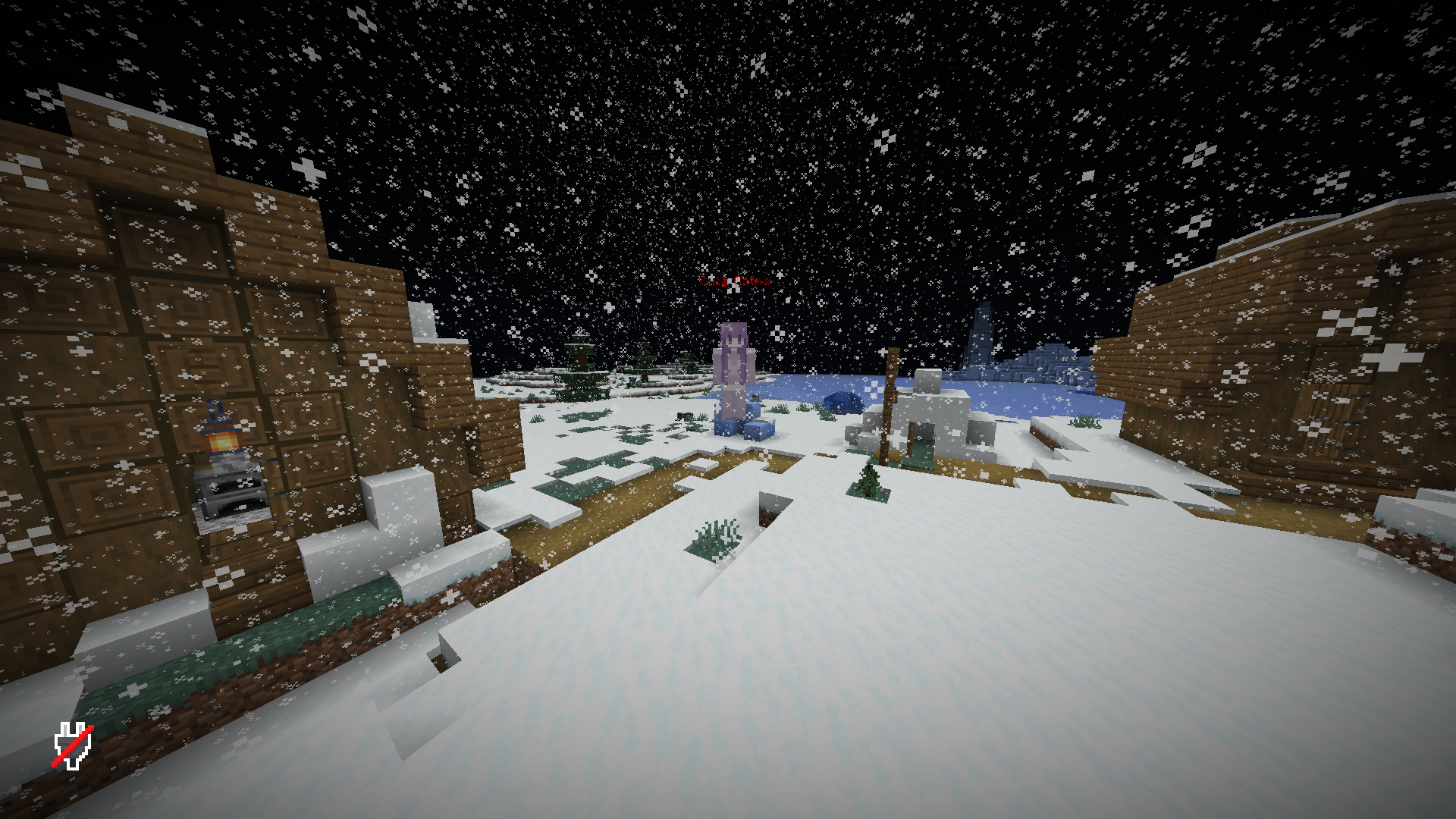 Stalker Spawn in Village The Stalker spawning at night and watching the player from a distance before beginning its hunt.
Versions
Files
Relations
Project Relations
More like this
Similar Mods
Suggestions use data such as tags, dependencies, dependents, descriptions, titles, and more to rank how much they overlap with this mod.
On ModDex
Community snapshot
By the numbers
Statistics
Want to reach Minecraft players?
We're looking for a server hosting partner to feature here and other parts of the site. Interested? Send us a message!
Get in touchGet it on
Available Platforms
On ModDex
Community snapshot
By the numbers
Statistics
Resources