Community listing page, reviews here may not be monitored by the author.
Custom TNT Igniter (Discontinued)

No reviews yet
This mod adds a new tnt igniter that allows customization of nearly all functional aspects of a tnt explosion.
Community voices
Reviews
No reviews yet. Be the first to review this project!
Get it on
Available Platforms
About
Project Details
For authors
Embed Badge
If you're the author of this project, you can embed a live badge anywhere that supports HTML or Markdown. It updates automatically whenever ratings change.
Use HTML for any page that supports it, or Markdown for README files and Markdown-based descriptions.
Identifiers
Platform IDs
About
Description

Custom TNT Igniter adds a new TNT igniter that allows customization of nearly all functional aspects of a TNT explosion. Right-clicking a TNT block with the igniter will ignite the TNT. The player igniting the TNT will be immune to the blast but is still vulnerable to the resulting physics.

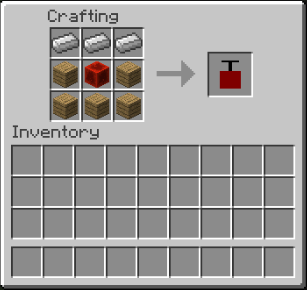
The igniter resembles that of a TNT plunger box and is crafted as shown in the following picture.
Crafting Recipe:
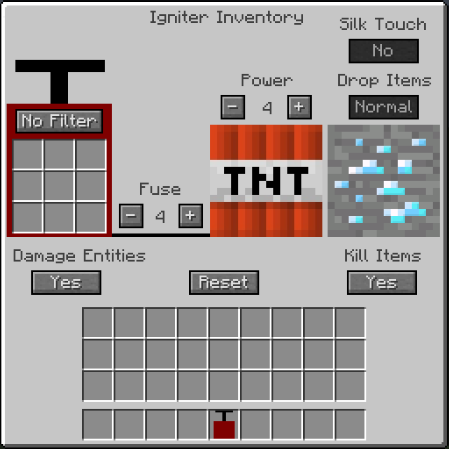
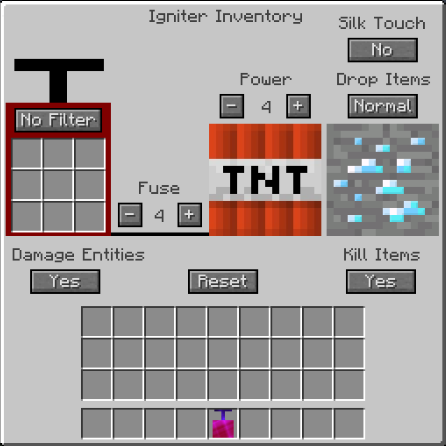
The igniter has its own interface, which is accessed via right-clicking with the item in hand. The interface displays all the adjustable parameters of the explosion along with the current settings. A few settings are limited to only being accessible if the silk touch enchantment is put on the igniter.
Interface (without Silk Touch):
Interface (with Silk Touch):
Adjustable Settings:
All of these settings are changed by clicking the buttons in the interface. The longer buttons cycle through the options, whereas the Fuse and Power increment the fuse time or power, indicated by the number between the - and + buttons.
Filter
This option, along with the 9 slots, enables the user to whitelist or blacklist certain blocks.
If "No Filter" is selected, the TNT explosion blows up all blocks normally. This is the default setting.
If "Whitelist" is selected, only blocks placed in the nine slots will be exploded.
If "Blacklist" is selected, blocks in the nine slots will be excluded from the explosion.
Both whitelist and blacklist are metadata specific, i.e. if oak wood log is placed in a whitelist, only oak wood log will be exploded but not any other version of log.
Default: No Filter
Power
This option changes the power of the explosion.
Clicking the +/- buttons will increment the power by 1 in the designated direction.
Shift-clicking the buttons will instead increment the power by 5 in the designated direction.
The lowest power setting is 0 and the highest is 64.
For explosions greater than the default power level, gunpowder is needed in an amount equal to the power level, i.e. you need 5 gunpowder for a power of 5 and 64 gunpowder for a power of 64, but no gunpowder is needed for below the default level.
Default: 4
Fuse
This option changes the fuse time (in seconds) before the explosion.
Clicking the +/- buttons will increment the time by 1 second in the designated direction.
Shift-clicking the buttons will instead increment the time by 5 seconds in the designated direction.
The lowest fuse time is 0 seconds and the highest is 20 seconds.
Default: 4
Damage Entities
This option changes whether or not mob entities will be damaged by the explosion.
Default: Yes
Note: The player igniting the TNT is immune regardless.
Kill Items
This option changes whether or not items already on the ground will be destroyed from the blast.
Default: Yes
Silk Touch
This option allows the explosion to drop the Silk-Touch drop from blocks (ore blocks, leaves, etc.).
Default: No
Note: This setting requires the silk-touch enchantment to be put on the igniter to be used.
Drop Items
This option allows the explosion to drop items in a set way.
If "Normal" is selected, the explosion will drop items with the same chance as normal TNT.
If "All" is selected, the explosion will drop all blocks as their given drop item.
If "None" is selected, no items will be dropped from the explosion.
Default: Normal
Note: This setting requires the silk-touch enchantment to be put on the igniter to be used.
Reset
This option sets all other settings back to the default.
Might only be working in SSP.
Screenshots
Gallery
Versions
Files
Relations
Project Relations
More like this
Similar Mods
Suggestions use data such as tags, dependencies, dependents, descriptions, titles, and more to rank how much they overlap with this mod.
On ModDex
Community snapshot
By the numbers
Statistics
Want to reach Minecraft players?
We're looking for a server hosting partner to feature here and other parts of the site. Interested? Send us a message!
Get in touchGet it on
Available Platforms
On ModDex
Community snapshot
By the numbers