
CustomWorldHeight
No reviews yet
A plugin for Paper that allows you to modify the height of the Minecraft world
General improvements to world generation, such as bug fixes, aesthetic overhauls, or misc additions.
Paper is a fork of Spigot that adds its own plugin API on top of the Bukkit API. All Spigot plugins are compatible with paper, not all paper plugins are compatible with Spigot.
Community voices
Reviews
Click once to include, again to exclude, again to clear
No reviews yet. Be the first to review this project!
Get it on
Available Platforms
 Modrinth
Compatibility
Supported Environments
About
Project Details
For authors
Embed Badge
If you're the author of this project, you can embed a live badge anywhere that supports HTML or Markdown. It updates automatically whenever ratings change.
Use HTML for any page that supports it, or Markdown for README files and Markdown-based descriptions.
Identifiers
Platform IDs
About
Description
CustomWorldHeight
CustomWorldHeight is a plugin for Paper that allows you to modify the height of the Minecraft world. It provides an easy and efficient way to extend or limit the vertical dimensions of your world for creative builds, gameplay tweaks, or server optimization.
Github page: https://github.com/Lumine1909/CustomWorldHeight
Important
This plugin is similar to the vanilla datapack, so there will be some similar issues as the datapack one.
Once you set the height of a certain world, it will be VERY DANGEROUS to shirk the world height, all the data will lose.
Expand the height is relatively unharmful, but if you decrease the min-Y, new chunks will be different from already generated chunks.
Increasing the height will only cause the chunk's height map to be recalculated, and all the data will be properly preserved.
Features
- Customize the height of your Minecraft world.
- Seamless integration with Paper.
- Easy-to-configure settings for server administrators.
Installation
Follow these steps to install the plugin:
- Download the latest release of CustomWorldHeight from the Releases page.
- Place the downloaded
.jarfile into your server'spluginsfolder, start the server. - After plugin generated the config template it will automatically disable, please finish the config.
- Restart your Minecraft server, and the configured world's height will be modified.
API Usage
repositories {
    mavenCentral()
}
dependencies {
    compileOnly("io.github.lumine1909:CustomWorldHeight-API:0.0.1")
}
public void modifyHeight() {
    /*
    All of these works only if the world is not loaded yet!
    This is not a permanent modification! If you want to set permanently,
    store the height data with your plugin and SET IT ON EACH STARTUP!
    */

    // Set the height of overworld
    WorldHeightService.get().registerWorld(
        Identifier.of("demo", "height1"), "world",
        new Height(1088, -64, 512, Height.CloudHeight.DEFAULT),
        BaseDimensionType.OVERWORLD
    );
    // Set the height of all worlds start with "test_"
    WorldHeightService.get().registerRegex(
        Identifier.of("demo", "height2"), "test_\\w+",
        new Height(1088, -64, 512, Height.CloudHeight.DEFAULT),
        BaseDimensionType.CUSTOM
    );
}
Configuration
# You can set to anything you want ([a-z0-9/._-]), will be used to generate Identifier (ResourceLocation)
example-namespace:

  # Set the height for certain world, you need set it to the world name you want to modify the height
  world: 'example-world-value'

  # Min Y position
  min-y: -64

  # Height (max Y position = min-y + height - 1)
  height: 1024

  # Height for Chorus Fruit teleport and etc., cannot be greater than height. See Minecraft wiki#DimensionType for details
  logical-height: 512

  # Height for the cloud (empty -> do not have cloud, default -> use default height)
  # This feature only works on 1.21.6+
  cloud-height: 'default'

  # For 'overworld', 'the_nether', 'the_end', 'overworld_cave', this will use built in data to generate before world is initializing
  dimension-type: 'overworld'

# You can set to anything you want ([a-z0-9/._-]), will be used to generate Identifier (ResourceLocation)
example-regex:

  # This plugin also support Regex matching
  regex: '^test_\w+'

  # Min Y position
  min-y: -64

  # Height (max Y position = min-y + height - 1)
  height: 1024

  # Height for Chorus Fruit teleport and etc., cannot be greater than height. See Minecraft wiki#DimensionType for details
  logical-height: 512

  # Height for the cloud (empty -> do not have cloud, default -> use default height)
  # This feature only works on 1.21.6+
  cloud-height: 256

  # This will let the plugin process registration data when world load
  dimension-type: 'custom'
License
This project is licensed under the GPL 3.0 License. The API part is licensed under the LGPL 3.0 License.
Support
If you encounter any issues or have questions, feel free to open an issue.

Screenshots
Gallery
-
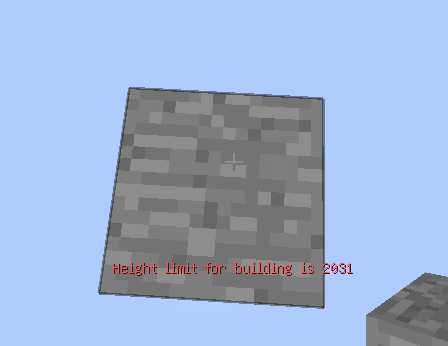 Maximize height
Versions
Files
Relations
Project Relations
More like this
Similar Mods
Suggestions use data such as tags, dependencies, dependents, descriptions, titles, and more to rank how much they overlap with this mod.
On ModDex
Community snapshot
By the numbers
Statistics

Want to reach Minecraft players?
We're looking for a server hosting partner to feature here and other parts of the site. Interested? Send us a message!
Get in touchGet it on
Available Platforms
On ModDex
Community snapshot
By the numbers