
Danganronpa
No reviews yet
Danganronpa? Witch Trial! A Module for Detective Game Design.This is a module created for detective-themed activities. It recreates certain elements from Danganronpa and Witch Trial, such as the investigation phase, class trial, and voting phase.
Forge is a popular mod loader for versions 1.1+ of Minecraft.
Community voices
Reviews
Click once to include, again to exclude, again to clear
No reviews yet. Be the first to review this project!
Get it on
Available Platforms
 Modrinth
Compatibility
Supported Environments
About
Project Details
For authors
Embed Badge
If you're the author of this project, you can embed a live badge anywhere that supports HTML or Markdown. It updates automatically whenever ratings change.
Use HTML for any page that supports it, or Markdown for README files and Markdown-based descriptions.
Identifiers
Platform IDs
Resources
External Links
About
Description
This is a module designed for reasoning-oriented activities, which recreates parts of Danganronpa and Witch Trial. As a basic system module, it has strong operability. The following is the content of this module:
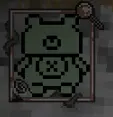
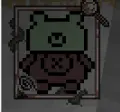
1. Health Display: A new health value display will appear in the top-left corner of the screen. When the player's health is above 15 points, it shows the full green healthy state. When the player's health is 15 points or below but above 11 points, it shows the minor limb injury state. When the player's health is 11 points or below but above 9 points, it shows the severe limb injury state. When the player's health is 9 points or below but above 7 points, it shows the minor torso injury state. When the player's health is 7 points or below, it shows the severe torso injury state. When the player's health is below 1 point, it shows the death state. If the player takes a single damage of over 9 points while their health is still above 9 points, it directly shows the minor torso injury state.
2. Investigation Phase:
Start the investigation phase: /search true
End the investigation phase: /search false
Pause the investigation phase: /search pause
When the investigation phase is started:
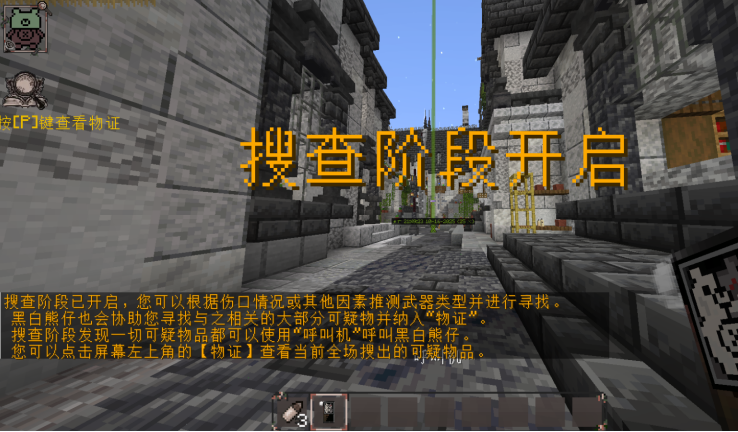
The title "Investigation Phase Initiated" will be displayed on all players' screens.
Players will receive one Investigation Pen, three Empty Bullets, and one Pager.
Once the investigation phase is active, players cannot take items from any containers (but may open them to view contents or place items inside).
An icon [Evidence] will appear below the health display in the top-left corner of the player's screen; clicking it will open a GUI interface.
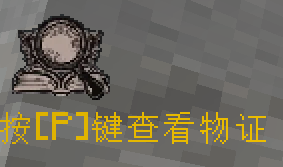
Description of the Evidence GUI Interface:The item display in the GUI interface is universal for all users, but only administrators can add or remove items within it; players can only view contents. Once the investigation phase is active, players can use the "Pager" to contact administrators. Upon activation, players will receive 3 "Empty Bullets". Right-clicking while holding a bullet opens a GUI to edit text. Bullets with edited text will store the data and become "Edited Bullets". The command /loseitem can be used to control whether players are allowed to drop items. Investigation System:After an administrator places an investigation block, right-clicking it opens a GUI for text editing. Once saved, the block becomes an "Investigation Block" with stored text data. When a player right-clicks an "Investigation Block" while holding an "Investigation Pen", the pen loses 1 durability, and the following message is sent to all players in the chat: "[XXX obtained information through investigation: Content of the discovered information]"
3. Class Trial Phase:
Start the trial: /classtrial on End the trial: /classtrial off Pause the trial: /classtrial pause When activated, the following will be displayed at the top of all players' screens: "Class Trial remaining time: XX minutes XX seconds". The initial default countdown is 60 minutes, and the countdown time can be modified via commands: Set countdown time: /classtrial time set Add time to the countdown: /classtrial time add During the [Class Trial], players can left-click while holding an "Edited Bullet" to use it. After use, the edited text content will appear in the chat, along with two options: Agree and Disagree. Players can click to choose either. If the number of "Agree" votes exceeds "Disagree" votes within 1 minute, the rebuttal succeeds; otherwise, it fails.
4. Voting Phase:
Enable/Disable: /classtriala_vote true/false When enabled: The title "Voting Started" will be displayed. Players will receive an Execution Phone. When the phase ends, vote counting will begin: The title "Voting Ended" will be displayed, and the phones will be retrieved. The voting results will be shown in the chat.
Screenshots
Gallery
-
 搜查开启
搜查开启 -
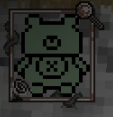 生命值
生命值 -
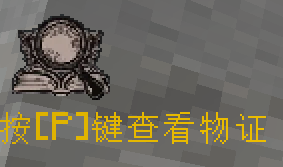 查看物证
查看物证
Versions
Files
Relations
Project Relations
More like this
Similar Mods
Suggestions use data such as tags, dependencies, dependents, descriptions, titles, and more to rank how much they overlap with this mod.
On ModDex
Community snapshot
By the numbers
Statistics

Want to reach Minecraft players?
We're looking for a server hosting partner to feature here and other parts of the site. Interested? Send us a message!
Get in touchGet it on
Available Platforms
On ModDex
Community snapshot
By the numbers
Statistics
Resources