
Community listing page, reviews here may not be monitored by the author.
Day Counter Plus

No reviews yet
Day Counter Plus is a Minecraft mod that displays the current in-game day and time on your screen. It has many customizable options and works on single player and multiplayer.
Community voices
Reviews
No reviews yet. Be the first to review this project!
Get it on
Available Platforms
Compatibility
Supported Environments
Runs entirely on the client. Works on vanilla servers.
About
Project Details
For authors
Embed Badge
If you're the author of this project, you can embed a live badge anywhere that supports HTML or Markdown. It updates automatically whenever ratings change.
Use HTML for any page that supports it, or Markdown for README files and Markdown-based descriptions.
Identifiers
Platform IDs
Resources
External Links
About
Description
Day Counter Plus - 
Day Counter Plus displays your Minecraft days and time played in a fancy way on your screen. It is fully customizable and works on singleplayer and multiplayer servers. It runs fast with almost no impact on game performance.
The cool thing about Day Counter Plus, is that it works on already existing worlds! This makes it available to use for Everyone at any time. This feature makes it able to work perfect on multiplayer servers aswell.
You can edit the way everything is displayed to the way you like it, including colors, format, sounds and visibility settings.
With the setting: "Dynamic Colors" you can change the color of the display automatically depending on your enviroment! You can see the demonstration here.
Features
- Shows current in-game day and time.
- Customizable display style (Action bar and Custom).
- Play sounds when a new day starts and when you're able to sleep.
- Compatible with singleplayer and multiplayer.
- Works with worlds you played before installing the mod
Why Use DCP?
- Never lose track of your days played.
- Easely know when you can sleep or not.
- You dont have to search the F3 menu anymore.
- Fully customizable to fit your personal style.
- Lightweight and performance-friendly for any server or world.
Clarity and Better HUD were used when making screenshots for the gallery
To do list
- Hide when time not changing- Start at Day 1 or Day 0 customizable setting
Settings
General Tab
| Setting | Default |
|---|---|
| Enabled | Yes |
| Enable on Singleplayer | Yes |
| Enable on Multiplayer | Yes |
| Only Show on New Day | No |
| Show Day | Yes |
| Show Time | Yes |
Formatting Tab
| Setting | Default |
|---|---|
| Time Format | 24h |
| Show Text Capitalized | No |
| Show Decimals | Commas |
| Show Separator | Yes |
| Separator Character | - |
| Show Line Terminators | No |
| Line Terminator Characters | « » |
| Terminator Spacing | 1 |
Colors Tab
| Setting | Default |
|---|---|
| Day Color | #fff |
| Time Color | #fff |
| Separator Color | #aaa |
| Line Terminator Color | #fff |
| Dynamic Colors | No |
| Dynamic Colors Transition Time | 15 |
| Darken Separator | Yes |
Background Tab
| Setting | Default |
|---|---|
| Show Text Shadow | Yes |
| Show Background | No |
| Background Color | #50000000 |
| Background Padding | 3 |
| Rounded Background | No |
Placement Tab
| Setting | Default |
|---|---|
| Placement Mode | Action Bar |
| Horizontal Alignment | Left |
| Vertical Alignment | Top |
| Horizontal Padding | 10 |
| Vertical Padding | 10 |
| Text Size | 1.0 |
| Time on Separate Line | No |
| Separate Line Height | 2 |
Sounds Tab
| Setting | Default |
|---|---|
| Enable New Day Sound | Yes |
| New Day Sound ID | minecraft:block.beacon.power_select |
| Enable Night Sound | Yes |
| Night Sound ID | minecraft:block.note_block.chime |
| Enable Thunder Sound | Yes |
| Thunder Sound ID | minecraft:entity.lightning_bolt.thunder |
| Play Toggle Visibility Sound | Yes |
Extras Tab
| Setting | Default |
|---|---|
| Start at Day 1 | No |
| Hide when Time isn't Changing | Yes |
Screenshots
Gallery
-
 Overworld Biomes The "Dyamic Colors" setting is used here
 -
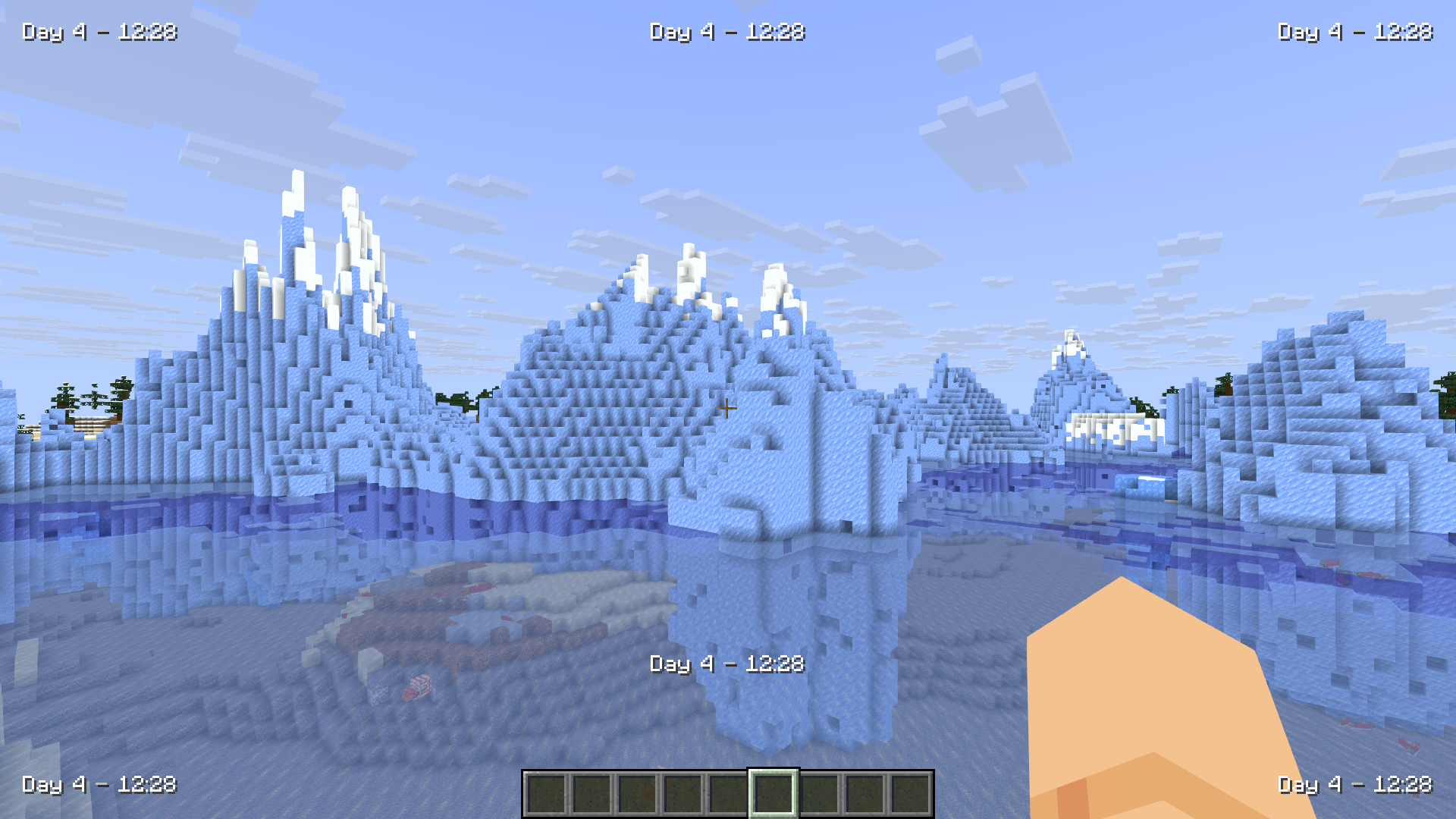 All Display Positions And you can even customize this further
 -
 Caves The "Dynamic Colors" setting was used here
 -
 Nether Biomes The "Dynamic Colors" setting was used here
 -
 End Biomes The "Dynamic Colors" setting was used here
 -
 Mod Card
Versions
Files
Relations
Project Relations
More like this
Similar Mods
Suggestions use data such as tags, dependencies, dependents, descriptions, titles, and more to rank how much they overlap with this mod.
On ModDex
Community snapshot
By the numbers
Statistics

Want to reach Minecraft players?
We're looking for a server hosting partner to feature here and other parts of the site. Interested? Send us a message!
Get in touchGet it on
Available Platforms
On ModDex
Community snapshot
By the numbers
Statistics
Resources