
Community listing page, reviews here may not be monitored by the author.
DeathLog


No reviews yet
Keeps track of the many embarrassing times you died

Community voices
Reviews
No reviews yet. Be the first to review this project!
Get it on
Available Platforms
Compatibility
Supported Environments
Works on the client or the server alone, but does more when on both.
About
Project Details
For authors
Embed Badge
If you're the author of this project, you can embed a live badge anywhere that supports HTML or Markdown. It updates automatically whenever ratings change.
Use HTML for any page that supports it, or Markdown for README files and Markdown-based descriptions.
Identifiers
Platform IDs
About
Description
DeathLog
DeathLog tracks your deaths in all worlds and servers. It does this completely client-side and records important metadata like coordinates, dimension and even your entire inventory. Since version 0.2.0 onward, DeathLog can also operate server-side and track all deaths of all players on that server, with native functionality for restoring a death snapshot. DeathLog can be used on both sides without being required on the other, however managing the server's database is significantly easier with a DeathLog-enabled client.
━◦○◦━◦○◦━◦○◦━◦○◦━◦○◦━◦○◦━◦○◦━◦○◦━◦○◦━
You can access your log from the vanilla Statistics screen. The search bar accounts for:
Item Names
Coordinates
World or Server Names
Death Messages
...
You can get your lost items back while in creative mode by simply clicking on them with your mouse wheel. Should you not have access to creative mode, it will copy an appropriate /give command
Join the Wisp Forest Discord if you have any questions, issues or other remarks - we'll be happy to help
DeathLog
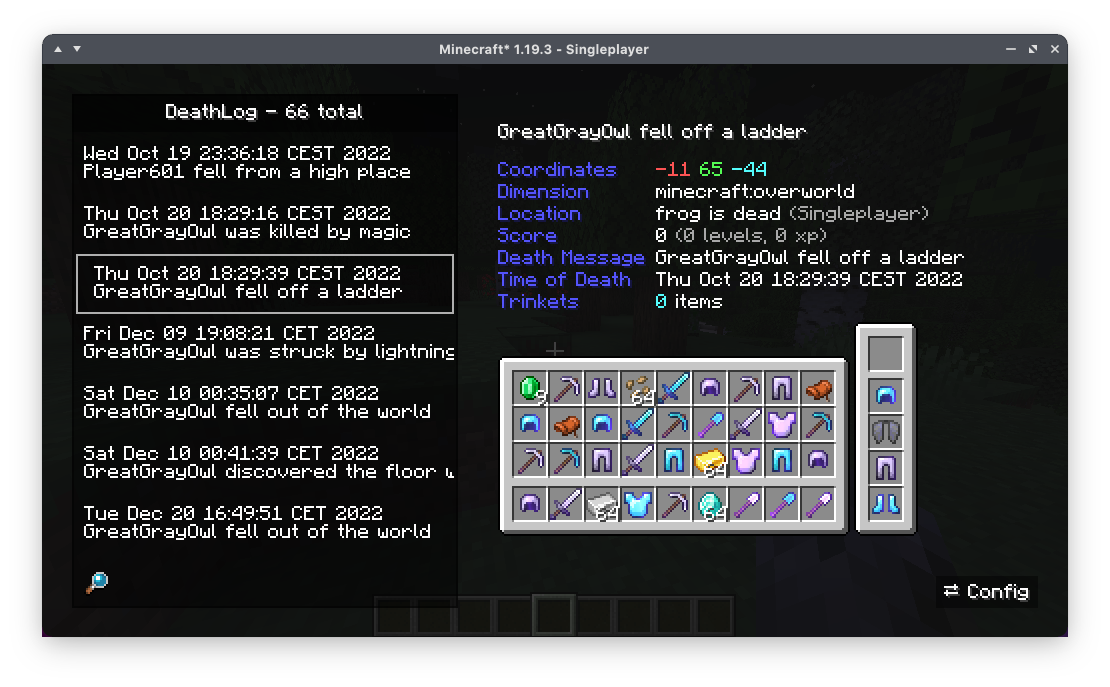
DeathLog tracks your deaths in all worlds and servers. It does this completely client-side and records important metadata like coordinates, dimension and even your entire inventory. Since version 0.2.0 onward, DeathLog can also operate server-side and track all deaths of all players on that server, with native functionality for restoring a death snapshot. DeathLog can be used on both sides without being required on the other, however managing the server's database is significantly easier with a DeathLog-enabled client.
You can access your log from the vanilla Statistics screen. The search bar accounts for
- Item Names
- Coordinates
- World or Server Names
- Death Messages
- ...
You can get your lost items back while in creative mode by simply clicking on them with your mouse wheel. Should you not have access to creative mode, it will copy an appropriate /give command
Screenshots
Gallery
Versions
Files
Relations
Project Relations
More like this
Similar Mods
Suggestions use data such as tags, dependencies, dependents, descriptions, titles, and more to rank how much they overlap with this mod.
On ModDex
Community snapshot
By the numbers
Statistics
 (opens in a new tab)
Get it on
Available Platforms
On ModDex
Community snapshot
By the numbers