
Community listing page, reviews may not be monitored by the author.
Debug Stick For Survival

No reviews yet
Craft and use the debug stick in singleplayer Survival without cheats. Change block properties with simple mouse controls.

Community voices
Reviews
No reviews yet. Be the first to review this project!
Get it on
Available Platforms
About
Project Details
For authors
Embed Badge
If you're the author of this project, you can embed a live badge anywhere that supports HTML or Markdown. It updates automatically whenever ratings change.
Use HTML for any page that supports it, or Markdown for README files and Markdown-based descriptions.
Identifiers
Platform IDs
Resources
External Links
About
Description
Survival Debug Stick Local
Craft and use Minecraft's original debug stick in singleplayer Survival, without enabling cheats or switching to Creative.
Edit block properties such as stair orientation, wall shapes, and fence connections to add more detail to your builds.
Recipe
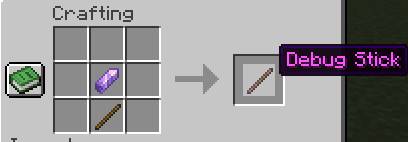
1 Stick + 1 Amethyst Shard = 1 Debug Stick
This shapeless recipe works in your inventory crafting grid or a crafting table.
Controls
Hold the debug stick in your main hand and aim at a block:
- Left-click: select a property without breaking the block.
- Right-click: change its value.
- Shift + click: cycle in reverse.
The selected property and value appear above the hotbar. Each stick remembers your selection for each block type.
Compatibility
- Minecraft Java: 1.21.11, 26.2, and 26.3.
- Loaders: Fabric, Forge, and NeoForge, with separate files for each combination.
- Fabric requires Fabric API for the matching Minecraft version.
Place the matching .jar in your mods folder and restart Minecraft.
Singleplayer only: install it on your client. It does not enable the debug stick on external multiplayer servers or Realms.
License: MIT.
Screenshots
Gallery
-
 Sin tÃtulo.jpg Sin tÃtulo.jpg
Versions
Files
Relations
Project Relations
More like this
Similar Mods
Suggestions use data such as tags, dependencies, dependents, descriptions, titles, and more to rank how much they overlap with this mod.
On ModDex
Community snapshot
By the numbers
Statistics

Get it on
Available Platforms
On ModDex
Community snapshot
By the numbers
Statistics
Resources