
Community listing page, reviews here may not be monitored by the author.
Dedicated Applied Energistics


No reviews yet
Cross Server AE2
Community voices
Reviews
No reviews yet. Be the first to review this project!
Get it on
Available Platforms
Compatibility
Supported Environments
Must be installed on both the client and the server.
About
Project Details
For authors
Embed Badge
If you're the author of this project, you can embed a live badge anywhere that supports HTML or Markdown. It updates automatically whenever ratings change.
Use HTML for any page that supports it, or Markdown for README files and Markdown-based descriptions.
Identifiers
Platform IDs
Resources
External Links
About
Description
Dedicated Applied Energistics
About
This Minecraft mod aims to make Applied Energistics 2 work across multiple servers.
Why is there a need for this mod?
In large modpacks, servers can get extremely laggy because of large scale automation. A solution to this problem would be to connect multiple ME systems, on different servers together in order to spread the load.
How dose the mod archive this?
Currently only the inventory is synchronised between servers. Meaning that cross server auto crafting doesn't work yet. The plan is to make the entire ME system work in the "cloud" with all features.
More Info
Issues
If you finde a bug or your game crashes please create a issue here!
Contacts
Credits
Thanks to everyone who contributed to AE2!
Donation
I am still a student and would appreciate a small donation. ;)
Dedicated Applied Energistics
Table of Contents
About
This Minecraft mod aims to make Applied Energistics 2 work across multiple servers.
Why is there a need for this mod?
In large modpacks, servers can get extremely laggy because of large scale automation. A solution to this problem would be to connect multiple ME systems, on different servers together in order to spread the load.
How dose the mod do this?
Currently only the inventory is synchronised between servers. Meaning that cross server auto crafting doesn't work yet. The plan is to make the entire ME system work in the "cloud" with all features.
Items
Inter Dimensional Storage Cell
The Inter Dimensional Storage Cell connects to the database and stores all items in it. It is optimised to work with as many item types as possible.

Quick Start
Install redis locally or get one for free here.
-
Use
/dae2 config set "<redis-url>"to configure the mod to use the database. If you use a database on the same machine as your minecraft server you can use/dae2 config set "redis://localhost:6379". If you need help with a cloud based database follow this Guide -
Then enable the virtual inventory
/dae2 virtual_inventory enable. This should only be enabled on ONE minecraft server that is running dae2. -
Enable autostart
/dae2 autostart enable. -
Start the mod
/dae2 start -
If everrything has gone well it should look like this now.
/dae2 status -
Now you can craft a Inter Dimenional storag Cell and go wild with your items. Yes it's nearly infinit...
Commands
Starting
/dae2 start/stop/restartStarts/Stops/Restart the mod./dae2 autostart enable/disableAutostarts the mod when the minecraft server starts.
Virtual Inventory
The virtual inventory must be enabled (default disabled) on only ONE server.
[!WARNING] If multiple server have it enabled items might be lost or duplicated.
/dae2 virtual_inventory enable/disable
Downloads
Installation
I created this mod to be used with ATM-8, please keep that in mind.
Basic Install
Forge version
Install the correct version of Forge
Jars
Add these jars to the mod folder!
- dae2-1.19.2-0.0.2-all.jar
- appliedenergistics2-forge-12.9.4.jar
- appliedenergistics2-forge-12.9.4-api.jar
Issues
If you finde a bug or your game crashes please create a issue here!
Contacts
Credits
Thanks to everyone who contributed to AE2!
Donation
I am still a student and would appreciate a small donation. ;)
Screenshots
Gallery
-
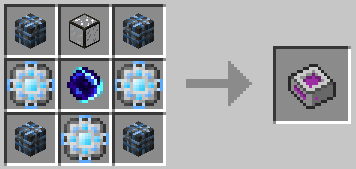 Inter Dimensional Storage Cell The Inter Dimensional Storage Cell connects to a redis database and stores all items in it. It is optimised to work with as many item types as possible.
 -
 Inter Dimensional Interface
-
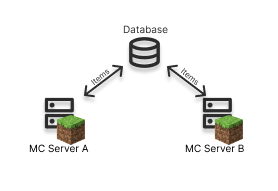 Networrking
 -
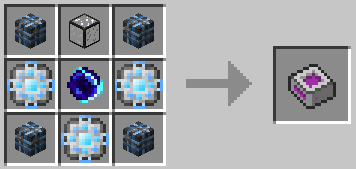 Inter Dimensional Storage Cell Recipe
Versions
Files
Relations
Project Relations
More like this
Similar Mods
Suggestions use data such as tags, dependencies, dependents, descriptions, titles, and more to rank how much they overlap with this mod.
On ModDex
Community snapshot
By the numbers
Statistics
Want to reach Minecraft players?
We're looking for a server hosting partner to feature here and other parts of the site. Interested? Send us a message!
Get in touchGet it on
Available Platforms
On ModDex
Community snapshot
By the numbers
Statistics
Resources