
Community listing page, reviews may not be monitored by the author.
Diagonal Walls


No reviews yet
The missing diagonal blocks are here! After all these years. Finally, you have them all.

Community voices
Reviews
No reviews yet. Be the first to review this project!
Get it on
Available Platforms
Compatibility
Supported Environments
Must be installed on both the client and the server.
About
Project Details
For authors
Embed Badge
If you're the author of this project, you can embed a live badge anywhere that supports HTML or Markdown. It updates automatically whenever ratings change.
Use HTML for any page that supports it, or Markdown for README files and Markdown-based descriptions.
Identifiers
Platform IDs
About
Description









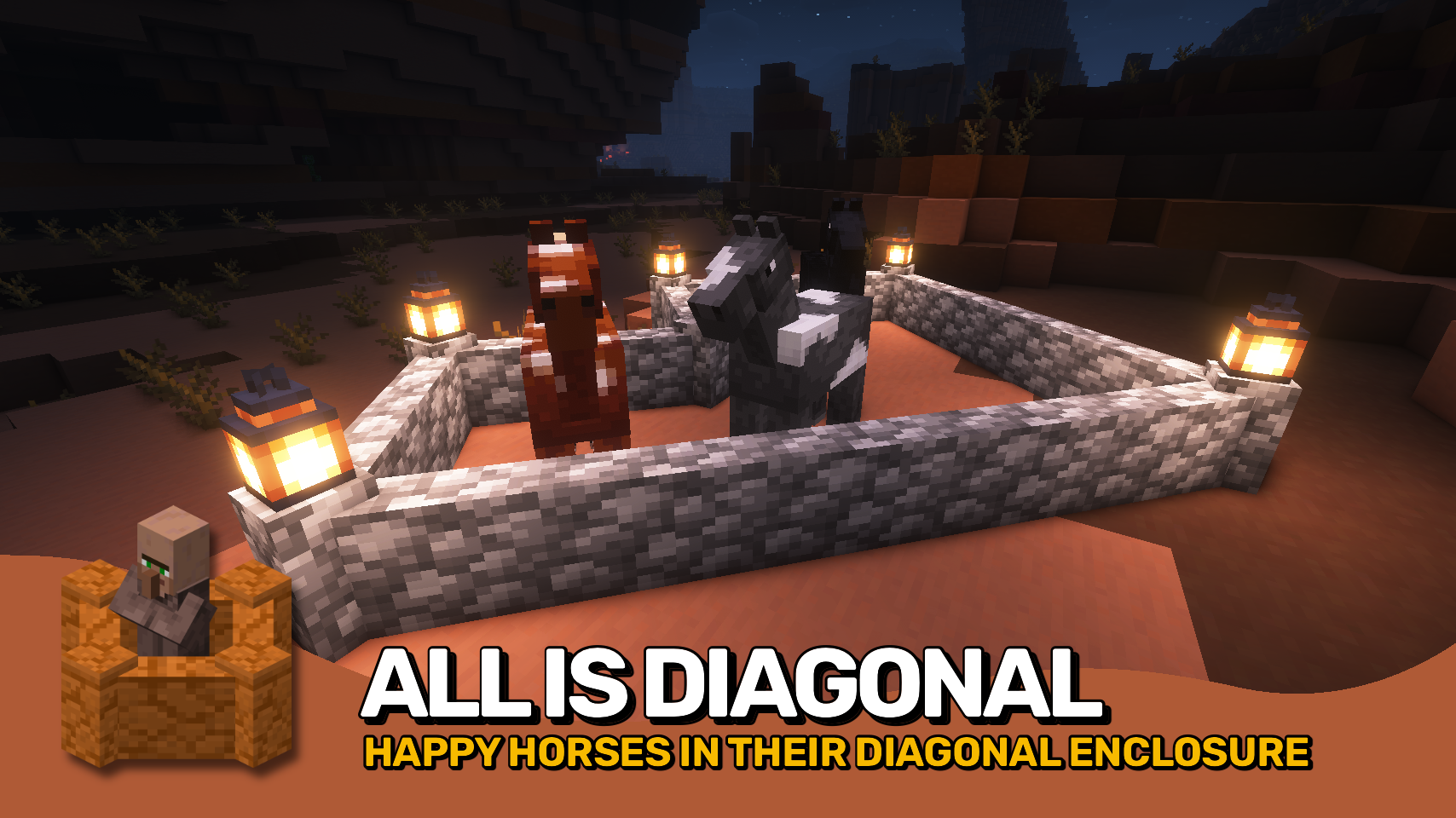
Diagonal Walls completes the Diagonal Blocks family, allowing walls to connect diagonally for more natural shapes and more freedom in your builds. 🧱 Castles, ruins, and city walls can now be designed without being locked to rigid angles.
Please note that for technical reasons, installing this mod removes vertical wall connections. Walls will no longer connect upwards and will show gaps when stacked, similar to Minecraft 1.15.2 and earlier. This behavior is not a bug, and restoring vertical connections is not technically feasible and is therefore not planned.
Blocks added by other mods are supported dynamically whenever possible, and any unintended behavior can be controlled using the diagonalwalls:non_diagonal_walls block tag. ⚙️ It also works seamlessly with most resource packs without extra setup.
Part of the Diagonal Blocks family, alongside Diagonal Fences and Diagonal Windows, expanding diagonal building in multiple directions. ✨


⏩ INSTALLATION REQUIRED ON CLIENT & REQUIRED ON SERVER
⏩ REQUIRES PUZZLES LIB TO BE INSTALLED (FABRIC & NEOFORGE)
⏩ REQUIRES FABRIC API TO BE INSTALLED (FABRIC)
⏩ REQUIRES FORGE CONFIG API PORT TO BE INSTALLED (FABRIC)

If available for a mod, configuration is possible directly from in-game using the mod menu (requires Mod Menu by Prospector to be installed on Fabric).
For manual configuration using an external text editor all files are found at .minecraft/config, named as MOD_ID-client.toml, MOD_ID-common.toml, or MOD_ID-server.toml, depending on the type of config. Not all types might exist for a mod, if any at all.

🌟 Thanks a lot to XFactHD for contributing the diagonal model transformation code and helping out during development in general!
 |
 |
|
 |
 |
|
 |
 |
|
 |
 |
|
 |
 |
|

© 2026 @heyitsfuzs. All rights reserved. This page was last edited on 11 September 2026, at 06:44 (UTC).
Diagonal Walls completes the Diagonal Blocks family, allowing walls to connect diagonally for more natural shapes and more freedom in your builds. 🧱 Castles, ruins, and city walls can now be designed without being locked to rigid angles.
Please note that for technical reasons, installing this mod removes vertical wall connections. Walls will no longer connect upwards and will show gaps when stacked, similar to Minecraft 1.15.2 and earlier. This behavior is not a bug, and restoring vertical connections is not technically feasible and is therefore not planned.
Blocks added by other mods are supported dynamically whenever possible, and any unintended behavior can be controlled using the diagonalwalls:non_diagonal_walls block tag. ⚙️ It also works seamlessly with most resource packs without extra setup.
Part of the Diagonal Blocks family, alongside Diagonal Fences and Diagonal Windows, expanding diagonal building in multiple directions. ✨
⏩ INSTALLATION REQUIRED ON CLIENT & REQUIRED ON SERVER
⏩ REQUIRES PUZZLES LIB TO BE INSTALLED (FABRIC & NEOFORGE)
⏩ REQUIRES FABRIC API TO BE INSTALLED (FABRIC)
⏩ REQUIRES FORGE CONFIG API PORT TO BE INSTALLED (FABRIC)
If available for a mod, configuration is possible directly from in-game using the mod menu (requires Mod Menu by Prospector to be installed on Fabric).
For manual configuration using an external text editor all files are found at .minecraft/config, named as MOD_ID-client.toml, MOD_ID-common.toml, or MOD_ID-server.toml, depending on the type of config. Not all types might exist for a mod, if any at all.
🌟 Thanks a lot to XFactHD for contributing the diagonal model transformation code and helping out during development in general!
 |
 |
|
 |
 |
|
 |
 |
|
 |
 |
|
 |
 |
© 2026 @heyitsfuzs. All rights reserved. This page was last edited on 11 September 2026, at 06:44 (UTC).
Screenshots
Gallery
Versions
Files
Relations
Project Relations
More like this
Similar Mods
Suggestions use data such as tags, dependencies, dependents, descriptions, titles, and more to rank how much they overlap with this mod.
- Cloudy Climb blocks MCD
- WesterosBlocks
- Epic Fight Mod & Other Mods Weapons Compabilities
- Lotr MiddleEarth Tweaks - The Lord of the Rings - Hobbit
- Conquest:Architects
- Cathedral
- Zrikon's Furniture : Medieval
- JJ Coats of Arms
- DAHUD - Medieval RPG HUD
- Ye Gamol Chattels
- Ren Paintings
- Elegant architecture
On ModDex
Community snapshot
By the numbers
Statistics
 (opens in a new tab)
Get it on
Available Platforms
On ModDex
Community snapshot
By the numbers