
Discord: JustSync
No reviews yet
Discord Bridge. Sync your Discord Chat with Minecraft. The mod allows for additional features like whitelisting.
Fabric is a mod loader for versions 1.14+ of Minecraft, particularly popular for client side and optimization mods.
Community voices
Reviews
Click once to include, again to exclude, again to clear
No reviews yet. Be the first to review this project!
Get it on
Available Platforms
 Modrinth
Compatibility
Supported Environments
About
Project Details
For authors
Embed Badge
If you're the author of this project, you can embed a live badge anywhere that supports HTML or Markdown. It updates automatically whenever ratings change.
Use HTML for any page that supports it, or Markdown for README files and Markdown-based descriptions.
Identifiers
Platform IDs
About
Description
Discord: JustSync
If your bot can see a total of 10k members or more you will need to verify the bot through discord!
Easily migrate from ErdbeerbaerLP's Discord Integration with Scripts on our Website tronka.de.
Features
- Send minecraft chat messages to discord
- Send discord messages to the minecraft chat
- Custom whitelisting through discord roles
- Configure alt account usage
- Webhook and Embed support with configurable message formats
- Commands and command logging support
Integrations
The mod easily integrates with:
- Floodgate/Geyser
- Luckperms
- Vanish
More on our wiki page
Config
The config file is located in <minecraft-folder>/config/discord-js/discord-justsync.toml,
it will be created on first launch.
To use the mod you must configure botToken with you discord bot token and
serverChatChannel with the id of the channel you want to use for the minecraft chat channel.
Without doing so minecraft will fail to start.
The Discord Bot
The bot will need following intents: SERVER_MEMBER, MESSAGE_CONTENT and following permissions: Send Messages, View Channels, Manage Webhooks, Manage Nicknames, Embed Links
For a more detailed step-by-step tutorial refer to our wiki page.
Linking
By enabling the linking.enableLinking option (default: true) players will be required to link their minecraft account to a discord account.
You can control which players can join by configuring linking.requiredRoles with a role id required to join the server.
By default, a player's discord account will be renamed to their ingame name whenever they join (linking.renameOnJoin).
For this to work the manage roles permission is required.
Commands
Minecraft
/discord reloadreload the configs/discord unlinkremove the link of your minecraft account/discord unlink <player>remove a link from a discord user to a minecraft account (op required)
Discord
/link <code>used to link to your minecraft account/justsync getquery link data for yourself/justsync get <player>query link data for other players (moderate member permission required)/unlinkunlink yourself/justsync unlink <player>unlink a player (moderate members permission required)/listList the currently online players/reloadreload the config file (admin only)
Problems, Suggestions and general Questions
If you encounter any problems or bugs, have a suggestion or have a question for this mod feel free please join our Discord Server.
Screenshots
Gallery
-
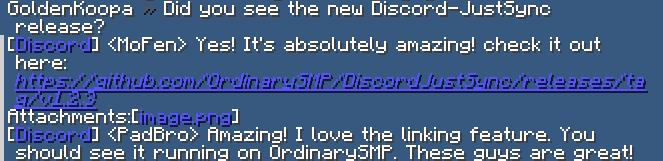 Ingame Chat Screenshot showing the mod in action
 -
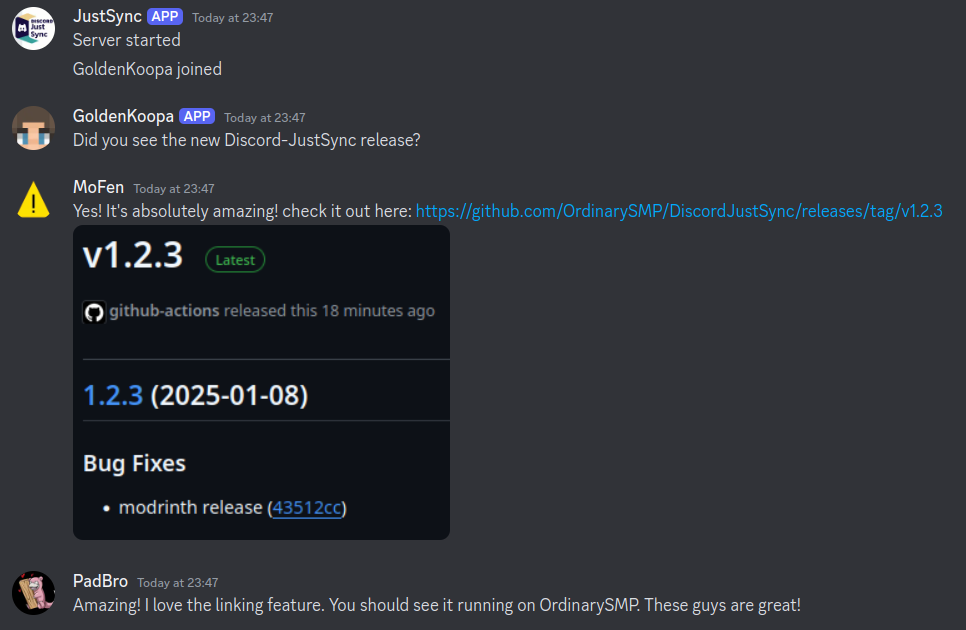 Discord Chat Screenshot showing the mod in action on the discord side
Versions
Files
Relations
Project Relations
More like this
Similar Mods
Suggestions use data such as tags, dependencies, dependents, descriptions, titles, and more to rank how much they overlap with this mod.
On ModDex
Community snapshot
By the numbers
Statistics

Want to reach Minecraft players?
We're looking for a server hosting partner to feature here and other parts of the site. Interested? Send us a message!
Get in touchGet it on
Available Platforms
On ModDex
Community snapshot
By the numbers