
Community listing page, reviews here may not be monitored by the author.
DiscordRPC

No reviews yet
A fully customizable Discord Rich Presence mod for Minecraft 1.8.9 that lets you show off your server status, player info, and current activity right on your Discord profile.
Community voices
Reviews
No reviews yet. Be the first to review this project!
Get it on
Available Platforms
Compatibility
Supported Environments
Runs entirely on the client. Works on vanilla servers.
About
Project Details
For authors
Embed Badge
If you're the author of this project, you can embed a live badge anywhere that supports HTML or Markdown. It updates automatically whenever ratings change.
Use HTML for any page that supports it, or Markdown for README files and Markdown-based descriptions.
Identifiers
Platform IDs
Resources
External Links
About
Description
🎮 Custom Discord RPC
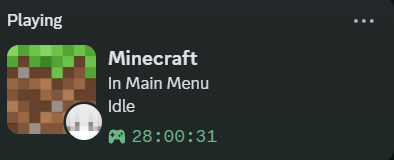
Custom Discord RPC is a lightweight, fully customizable Rich Presence mod for Minecraft 1.8.9 Forge. It lets you show off exactly what you are doing in Minecraft directly on your Discord profile with style!
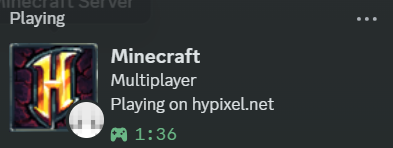
Whether you're grinding on Hypixel, relaxing in a Singleplayer world, or playing on a private SMP, this mod will dynamically update your Discord status with real-time information—and let your friends join in on the fun!
✨ Key Features
- 🖼️ Fully Customizable: Change the Discord RPC text, images, and tooltips to whatever you want.
- ⚙️ In-Game GUI Config: No need to mess with confusing text files! Just press
R(default keybind) in-game to open a clean, easy-to-use configuration menu. - 🌍 Dynamic Server Stats: Automatically displays the Server IP, Server Icon, and live Player Counts when playing on multiplayer servers.
- 👤 Player Details: Shows off your Minecraft username and a dynamic 2D image of your player's head.
- 🔗 Interactive Buttons: Add a clickable "Join Server" button to your profile! You can set it to the current server IP or any custom URL you want.
- ⏱️ Session Timers: Track how long you've been playing with custom timers (Time Elapsed).
🛠️ How to Use
- Drop the
.jarfile into your/.minecraft/mods/folder. - Launch Minecraft 1.8.9 with Forge.
- Once in-game, press the
Rkey on your keyboard to open the Custom Discord RPC settings menu. - Customize your text, images, and button links however you want. Your Discord status will update in real-time!
🔌 Compatibility
- Version: Minecraft 1.8.9
- Mod Loader: Forge
- Side: 💻 Client-Side Only. You can install this on your client to play on ANY vanilla or modded server. (Do not install this on a dedicated server).
- Dependencies: None! It works perfectly completely on its own.
Screenshots
Gallery
Versions
Files
Relations
Project Relations
More like this
Similar Mods
Suggestions use data such as tags, dependencies, dependents, descriptions, titles, and more to rank how much they overlap with this mod.
On ModDex
Community snapshot
By the numbers
Statistics

Want to reach Minecraft players?
We're looking for a server hosting partner to feature here and other parts of the site. Interested? Send us a message!
Get in touchGet it on
Available Platforms
On ModDex
Community snapshot
By the numbers
Statistics
Resources