
Community listing page, reviews here may not be monitored by the author.
Discy

No reviews yet
A Minecraft mod for custom music discs. Upload songs to the DJ deck, burn them onto blank discs, and play them in jukeboxes or compatible mods.
Community voices
Reviews
No reviews yet. Be the first to review this project!
Get it on
Available Platforms
Compatibility
Supported Environments
Must be installed on both the client and the server.
About
Project Details
For authors
Embed Badge
If you're the author of this project, you can embed a live badge anywhere that supports HTML or Markdown. It updates automatically whenever ratings change.
Use HTML for any page that supports it, or Markdown for README files and Markdown-based descriptions.
Identifiers
Platform IDs
About
Description
Discy
A Minecraft mod for custom music discs. Upload songs at the DJ Deck, design disc artwork in the Disc Design Studio, burn tracks onto blank discs, and play them in jukeboxes, Speakers, or compatible mods.
Repository: github.com/AlfieeLawrence/Discy-A-custom-Disc-mod-for-Minecraft-
Features
- DJ Deck — browse, search, upload, and burn custom audio (OGG/MP3) onto blank discs
- Custom discs — per-disc artwork and streaming playback via OpenAL
- Disc Design Studio — in-game pixel editor for disc textures; paint, erase, fill, and pick colors with brush sizes, undo/redo, and saved designs you can apply when burning
- Speaker system — wire up Speakers to a Speaker Controller and play the same track in sync across your whole base — great for surround sound or background music everywhere at once
- Permanent discs — add baked-in discs via
data/discy/permanent_discs.json - Optional compatibility — Sophisticated Core jukebox upgrades and Let's Do Furniture gramophones (install those mods separately)
Disc Design Studio
Craft and place a Disc Design Studio, then right-click to open the editor.
- Tools — Paint, Erase, Fill, and Pick
- Brush — adjustable size; drag or single-pixel modes
- Canvas — up to 64×64 pixels
- Colors — wheel, brightness slider, hex input, and quick palette
- Workflow — undo/redo, save named designs, load existing files, or start a new blank
- Saved textures appear in the DJ Deck when burning discs — no external image editor required
Speakers & Speaker Controller
Place Speakers around your build and connect them to a Speaker Controller. Insert a custom disc, hit Play, and every linked speaker plays the same song in sync — with per-speaker volume and range.
Quick setup
- Place a Speaker Controller and insert a custom disc.
- Place Speakers where you want audio.
- Link each speaker to the controller (wireless or wired — see below).
- Open the controller and use Play / Stop.
Wireless — Shard Sync (Speaker Link item)
- Right-click a Speaker with Shard Sync — it enters pairing mode for 30 seconds.
- Right-click the Speaker Controller with Shard Sync while that speaker is in range.
- The nearest unlinked pairing speaker connects (consumes one Shard Sync).
Wired — Speaker Wire
- Run Speaker Wire from the controller toward each speaker (click adjacent blocks to place cable).
- When the cable path reaches the speaker, it links automatically.
- Breaking any segment of the path unlinks that speaker and removes the cable run.
Per-speaker controls (in the controller GUI)
| Control | Action |
|---|---|
| − / + | Volume ±10% |
| < / > | Range ±4 blocks |
| x | Unpair (refunds Speaker Wire or Shard Sync) |
Each speaker row is prefixed with B (wireless / Shard Sync) or W (wired / Speaker Wire). Scroll the list with the mouse wheel when many speakers are paired (up to 16 per controller).
Connection distance
| Connection type | Item | Max distance |
|---|---|---|
| Wireless (Shard Sync) | Speaker Link | 32 blocks |
| Wired (Speaker Wire) | Speaker Wire | 64 blocks |
Wireless range is a straight line from controller to speaker. Wired range is the length of the cable path through placed wire blocks.
Optional compatibility mods
Discy does not bundle these mods. Install official releases from Modrinth or CurseForge under each mod's own license:
| Mod | Purpose |
|---|---|
| Sophisticated Core + Storage / Backpacks | Jukebox upgrade on backpacks and storage |
| Let's Do Furniture | Gramophone playback |
User-uploaded content
Discy lets players upload their own songs and disc textures at the DJ Deck or save designs from the Disc Design Studio. That content is created by players, not shipped with the mod.
- You are responsible for having the rights to any audio or images you upload.
- Do not upload copyrighted music or artwork without permission from the rights holder.
- Server owners may wish to set rules for what players may upload.
Discy stores uploads in the world's discy/ folder (songs, textures, sidecars). Removing content in-game deletes those files on the server.
Credits & assets
Bundled art in this repository is included with the creators' permission:
| Assets | Credit |
|---|---|
| Mod code | Alfie Lawrence |
| Mod icon, DJ Deck block textures, most item textures | Random Nautilus |
| Sap textures, UI textures, Disc Design Studio block textures | Mrdragonclaw |
Runtime-only references to vanilla Minecraft assets (for example the dispenser container GUI used by the DJ Deck screen) are not redistributed in this repository.
License
Discy mod code is licensed under the MIT License — see LICENSE.
Summary of other terms:
| Component | License | Where |
|---|---|---|
| Discy source & mod code | MIT | LICENSE |
| JLayer (bundled in release JARs) | LGPL 2.1 | COPYING.LGPL |
| All third-party notices | — | NOTICE |
LICENSE, NOTICE, and COPYING.LGPL are also packaged inside release JARs.
Third-party libraries (shipped in Discy JARs)
Discy bundles JLayer (javazoom:jlayer:1.0.1) for MP3 decoding.
- JLayer is copyright JavaZoom and licensed under LGPL 2.1
- Source: github.com/javazoom/jlayer or Maven
javazoom:jlayer:1.0.1 - Full license text: COPYING.LGPL (GNU LGPL 2.1)
- JavaLayer project page (archived)
Discy itself (excluding bundled third-party libraries) is MIT-licensed.
Optional mod compatibility (not included)
Discy provides optional integration with other mods via mixins and public APIs. Discy does not:
- Redistribute, patch, or repackage those mods
- Ship their source code, assets, or JARs
- Include modified versions of their files
Users must install compatible mods from their official authors. Discy only adds small optional mixins and API hooks when those mods are present at runtime.
- Sophisticated Core / Storage / Backpacks — copyright P3pp3rF1y, All Rights Reserved. Install from official releases only. Discy registers against public APIs (
IDiscHandler,SoundHandler) and does not redistribute or modify Sophisticated files. - Let's Do Furniture — copyright the Furniture mod authors. Install from official releases only, under that mod's own license. Discy provides optional gramophone integration via mixin when Furniture is installed and does not redistribute or modify Furniture files.
If you publish forks or derivatives of Discy, keep these mods as separate optional runtime dependencies and retain NOTICE and COPYING.LGPL for JLayer.
Screenshots
Gallery
-
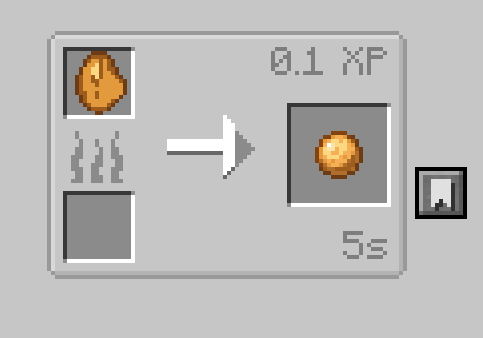 Smelting tree sap Smelting sap dropped from trees will turn it into moldable sap that can be crafted into blank discs.
 -
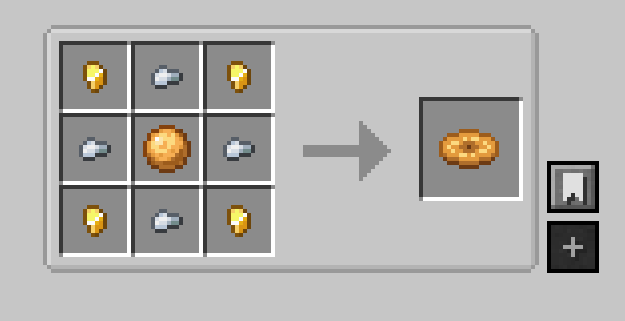 Blank Disc Recipe The crafting recipe for a blank disc using moldable sap, iron nuggets and golden nuggets.
 -
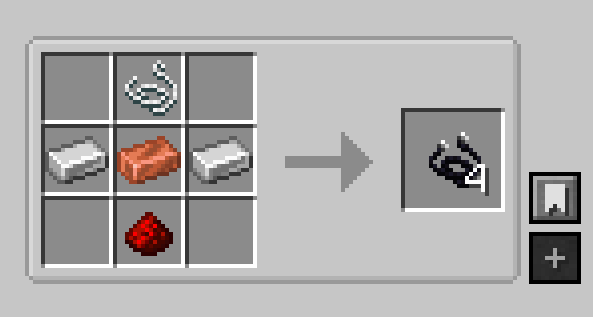 Speaker Wire Recipe How to make speaker wires to wire up speakers and speaker controllers.
 -
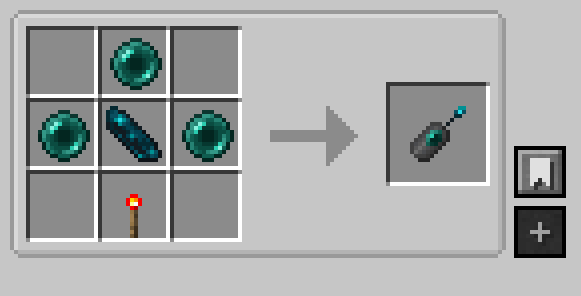 Shard Sync Recipe How to craft a shard sync for wireless connections between speaker and speaker controller.
 -
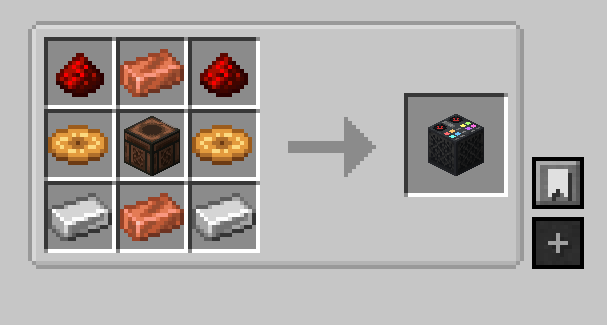 DJ Deck Crafting Recipe The crafting recipe for a DJ Deck made from redstone, copper ingots, 2 blank discs, a jukebox and 2 iron ingots.
 -
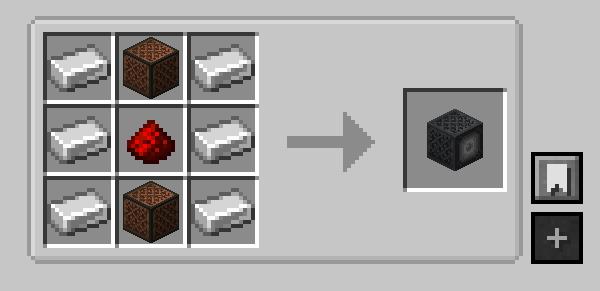 Speaker Recipe The recipe for making speakers to extend your music's range. Made with 6 iron, 2 noteblocks and redstone dust.
 -
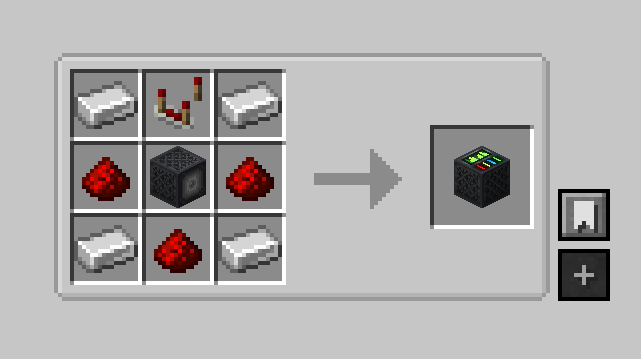 Speaker Controller Recipe The recipe for making a speaker controller with which you can control your speakers. Made with 4 iron, 3 redstone dust, a speaker and a repeater.
 -
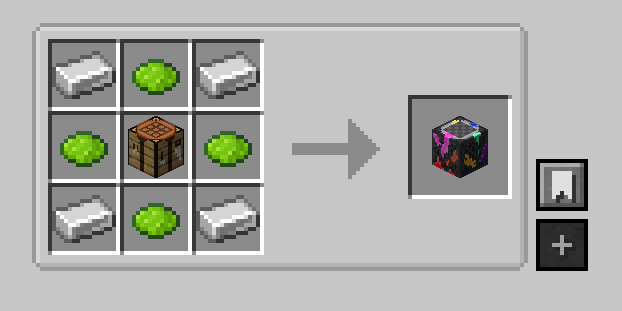 Disc Design Studio How to make a disc design studio where you can customize your own discs however you like. Made with any 4 dyes, doesn't matter what kind.
Versions
Files
Relations
Project Relations
More like this
Similar Mods
Suggestions use data such as tags, dependencies, dependents, descriptions, titles, and more to rank how much they overlap with this mod.
On ModDex
Community snapshot
By the numbers
Statistics

Want to reach Minecraft players?
We're looking for a server hosting partner to feature here and other parts of the site. Interested? Send us a message!
Get in touchGet it on
Available Platforms
On ModDex
Community snapshot
By the numbers