Community listing page, reviews here may not be monitored by the author.


Community voices
Reviews
No reviews yet. Be the first to review this project!
Get it on
Available Platforms
Compatibility
Supported Environments
Must be installed on both the client and the server.
About
Project Details
For authors
Embed Badge
If you're the author of this project, you can embed a live badge anywhere that supports HTML or Markdown. It updates automatically whenever ratings change.
Use HTML for any page that supports it, or Markdown for README files and Markdown-based descriptions.
Identifiers
Platform IDs
Resources
External Links
About
Description
The mod introduces 2 blocks and 1 item that allow you to build and control your own digital screens. Using a computer, you can program the display and draw anything you want — from simple text to complex graphics.
Features:
-
Display Block – a screen where your graphics are rendered
-
Controller Block – connect it to a computer to send code and control the display
-
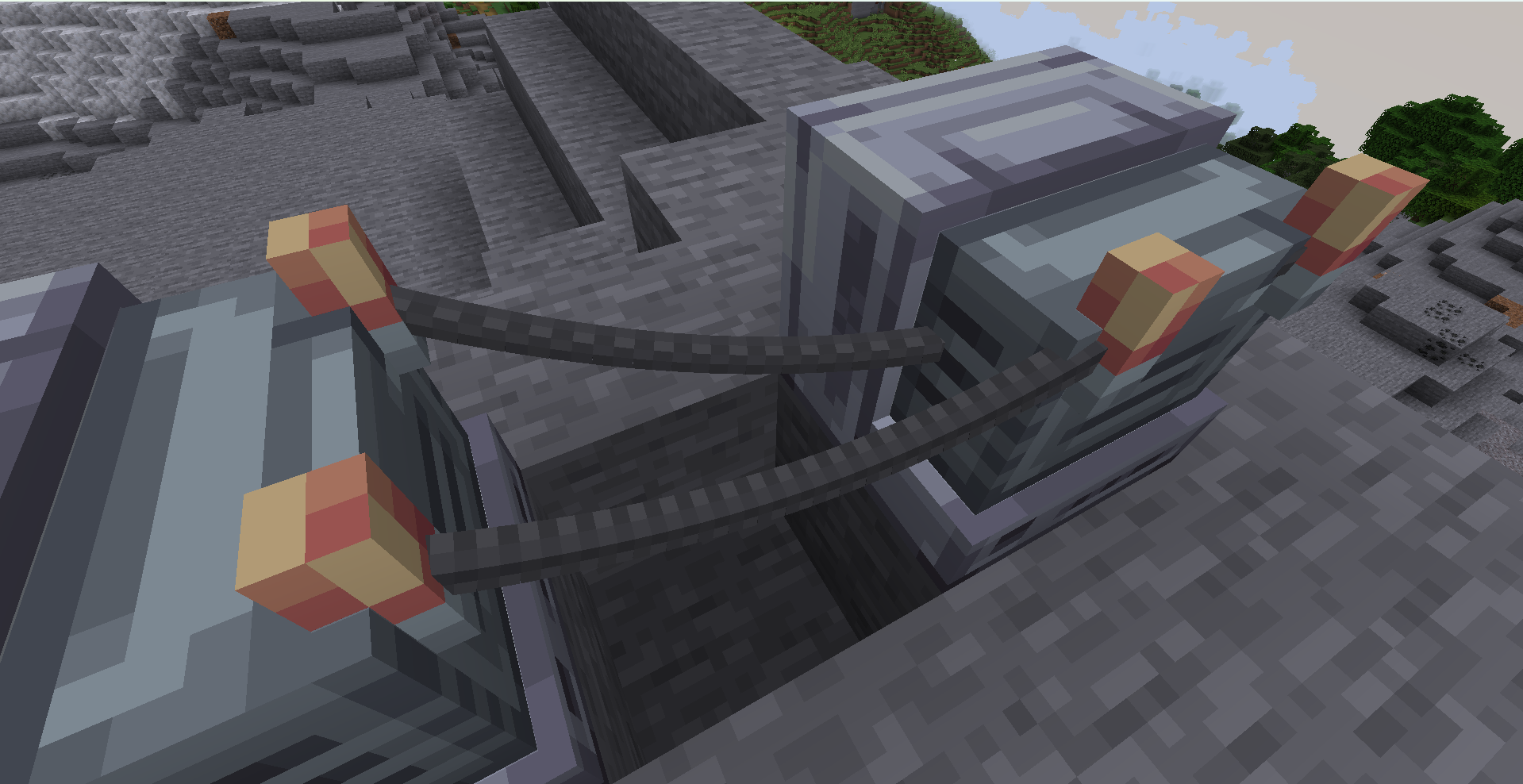
Wire Item – connect components using positive (+) and negative (–) wires
With Displadium, you can:
-
Create custom interfaces and HUDs
-
Display images, text, or animations
-
Build your own in-game control panels
-
Experiment with programming inside Minecraft
The wiring system allows you to connect blocks realistically, requiring proper positive and negative connections to function.
TUTORIAL
Below is the full list of available Lua commands, how they are implemented in the code, and an exact usage example.
All available commands
-
tick(t, dt)— a function called by the engine every tick.tis time in seconds,dtis the time step adjusted byspeed(). -
point(x, y)— sets the position of a point(x, y)within the 0..1 range. -
emit(x, y [, color [, glow [, size]]])— adds a point to the trail with optional parameters. Supports color as#RRGGBB, a number, orr,g,b. -
line(x1, y1, x2, y2 [, steps [, color [, glow [, size]]]])— draws a line using points.stepsis limited to 2..200. -
rotline(cx, cy, length, angle [, steps [, color [, glow [, size]]]])— draws a line using center, length, and angle (in radians). -
color(#RRGGBB)orcolor(r, g, b)— sets the color.r,g,bcan be in range 0..1 or 0..255. -
glow(value)— brightness, minimum 0. -
size(value)— point size, minimum 0.05. -
alpha(value)— transparency (0..1). -
speed(value)— time speed, minimum 0.05. -
trail(count)— trail length (10..400). -
subtick(value)— trail interpolation (1..20). -
show(true/false)— enables or disables rendering. -
time()— returns current timet(withspeedapplied).
Exact rules and limits
-
Coordinates
xandyare always clamped to 0..1. -
Color can be a
#RRGGBBstring, a number, or three componentsr,g,b(0..1 or 0..255). -
glow ≥ 0,size ≥ 0.05,alpha 0..1,speed ≥ 0.05,trail 10..400,subtick 1..20. -
line/rotline:stepsis limited to 2..200.
How to use
-
Connect the computer and display using wires (both + and - must go to the same computer).
-
Open the computer interface, paste your Lua code into the field, and press "Save".
-
The script is loaded, and the
tick(t, dt)function is called every client tick.
Example (fully accurate and working)
function tick(t, dt)
  speed(1.0)
  trail(120)
  subtick(6)
  alpha(0.9)
  glow(1.2)
  size(1.0)

  local x = 0.5 + math.cos(t * 1.3) * 0.35
  local y = 0.5 + math.sin(t * 1.3) * 0.35
  point(x, y)

  color("#66CCFF")
  emit(x, y)

  local angle = t * 2.0
  rotline(0.5, 0.5, 0.7, angle, 30, 1.0, 0.5, 0.2)
end
How the example works
-
tickis called every tick,tis time in seconds (affected byspeed). -
pointmoves the main point in a circle. -
emitadds a trail with the chosen color/brightness. -
rotlinedraws a rotating line around the center.
The mod introduces 2 blocks and 1 item that allow you to build and control your own digital screens. Using a computer, you can program the display and draw anything you want — from simple text to complex graphics.
Features:
Display Block – a screen where your graphics are rendered
Controller Block – connect it to a computer to send code and control the display
Wire Item – connect components using positive (+) and negative (–) wires
With Displadium, you can:
Create custom interfaces and HUDs
Display images, text, or animations
Build your own in-game control panels
Experiment with programming inside Minecraft
The wiring system allows you to connect blocks realistically, requiring proper positive and negative connections to function.
TUTORIAL Below is the full list of available Lua commands, how they are implemented in the code, and an exact usage example.
All available commands tick(t, dt) — a function called by the engine every tick. t is time in seconds, dt is the time step adjusted by speed().
point(x, y) — sets the position of a point (x, y) within the 0..1 range.
emit(x, y [, color [, glow [, size]]]) — adds a point to the trail with optional parameters. Supports color as #RRGGBB, a number, or r,g,b.
line(x1, y1, x2, y2 [, steps [, color [, glow [, size]]]]) — draws a line using points. steps is limited to 2..200.
rotline(cx, cy, length, angle [, steps [, color [, glow [, size]]]]) — draws a line using center, length, and angle (in radians).
color(#RRGGBB) or color(r, g, b) — sets the color. r,g,b can be in range 0..1 or 0..255.
glow(value) — brightness, minimum 0.
size(value) — point size, minimum 0.05.
alpha(value) — transparency (0..1).
speed(value) — time speed, minimum 0.05.
trail(count) — trail length (10..400).
subtick(value) — trail interpolation (1..20).
show(true/false) — enables or disables rendering.
time() — returns current time t (with speed applied).
Exact rules and limits Coordinates x and y are always clamped to 0..1.
Color can be a #RRGGBB string, a number, or three components r,g,b (0..1 or 0..255).
glow ≥ 0, size ≥ 0.05, alpha 0..1, speed ≥ 0.05, trail 10..400, subtick 1..20.
line / rotline: steps is limited to 2..200.
How to use Connect the computer and display using wires (both + and - must go to the same computer).
Open the computer interface, paste your Lua code into the field, and press "Save".
The script is loaded, and the tick(t, dt) function is called every client tick.
Example (fully accurate and working) function tick(t, dt) speed(1.0) trail(120) subtick(6) alpha(0.9) glow(1.2) size(1.0) local x = 0.5 + math.cos(t * 1.3) * 0.35 local y = 0.5 + math.sin(t * 1.3) * 0.35 point(x, y) color("#66CCFF") emit(x, y) local angle = t * 2.0 rotline(0.5, 0.5, 0.7, angle, 30, 1.0, 0.5, 0.2) end How the example works tick is called every tick, t is time in seconds (affected by speed).
point moves the main point in a circle.
emit adds a trail with the chosen color/brightness.
rotline draws a rotating line around the center.
Screenshots
Gallery
-
 Wires Conection
Versions
Files
Relations
Project Relations
More like this
Similar Mods
Suggestions use data such as tags, dependencies, dependents, descriptions, titles, and more to rank how much they overlap with this mod.
On ModDex
Community snapshot
By the numbers
Statistics
Want to reach Minecraft players?
We're looking for a server hosting partner to feature here and other parts of the site. Interested? Send us a message!
Get in touchGet it on
Available Platforms
On ModDex
Community snapshot
By the numbers
Statistics
Resources