Community listing page, reviews may not be monitored by the author.
DLC Manager


No reviews yet
Manage optional DLC content (mods, resource packs, data packs) in-game.

Community voices
Reviews
No reviews yet. Be the first to review this project!
Get it on
Available Platforms
Compatibility
Supported Environments
Runs entirely on the client. Works on vanilla servers.
Required on the client. Installing it on the server adds functionality.
Varies by version.
About
Project Details
For authors
Embed Badge
If you're the author of this project, you can embed a live badge anywhere that supports HTML or Markdown. It updates automatically whenever ratings change.
Use HTML for any page that supports it, or Markdown for README files and Markdown-based descriptions.
Identifiers
Platform IDs
About
Description
Introduction
DLC Manager is an in‑game DLC management mod for modpacks. It lets players enable/disable optional content (mods, resource packs, data packs, TACZ gun packs, etc.) directly from the UI, and guides them to restart or reload resources when needed.
✅ Features
- In‑game DLC manager UI
- Enable/disable DLC in one place
- Grouped list view
- Smart apply mode chosen
- Mod/TACZ changes → Restart required
- Non‑mod changes → Reload resources
- Auto tooltip system
- Hot update DLC
- Apply required resources
Place JSON files in DLC/info to show per‑DLC tooltips (multi‑language supported).
⚙ Configurable Paths
All paths are relative to the modpack root unless absolute paths are provided.
All entries support multiple paths separated by commas.
- DLC Root (
DLC) - TACZ DLC Directory (
tacz) - Resourcepack Directory (
resourcepacks) - Datapack Directory (
datapacks) - Other DLC Enable Directory (
dlc_other)
📁 DLC Folder Layout
<Modpack Root>
└─ DLC/
   ├─ example_mod.jar
   ├─ resource_pack.zip
   ├─ datapack.zip
   ├─ tacz/                 (TACZ DLC directory)
   ├─ info/                 (tooltip JSONs)
   ├─ remote/            (remote files)
   ├─ required/          (requird files)
   └─ update/            (hot update files)
💬 Wiki
Introduction
DLC Manager is an in‑game DLC management mod for modpacks. It lets players enable/disable optional content (mods, resource packs, data packs, TACZ gun packs, etc.) directly from the UI, and guides them to restart or reload resources when needed.
✅ Features
- In‑game DLC manager UI
- Enable/disable DLC in one place
- Grouped list view
- Smart apply mode chosen
- Mod/TACZ changes → Restart required
- Non‑mod changes → Reload resources
- Auto tooltip system
Place JSON files inDLC/infoto show per‑DLC tooltips (multi‑language supported).
⚙ Configurable Paths
All paths are relative to the modpack root unless absolute paths are provided.
All entries support multiple paths separated by commas.
- DLC Root (
DLC) - TACZ DLC Directory (
tacz) - Resourcepack Directory (
resourcepacks) - Datapack Directory (
datapacks) - Other DLC Enable Directory (
dlc_other)
📁 DLC Folder Layout
<Modpack Root>
└─ DLC/
   ├─ example_mod.jar
   ├─ resource_pack.zip
   ├─ datapack.zip
   ├─ tacz/                 (TACZ DLC directory)
   ├─ remote/
   ├─ required/
   └─ info/                 (tooltip JSONs)
💬 Wiki
Screenshots
Gallery
-
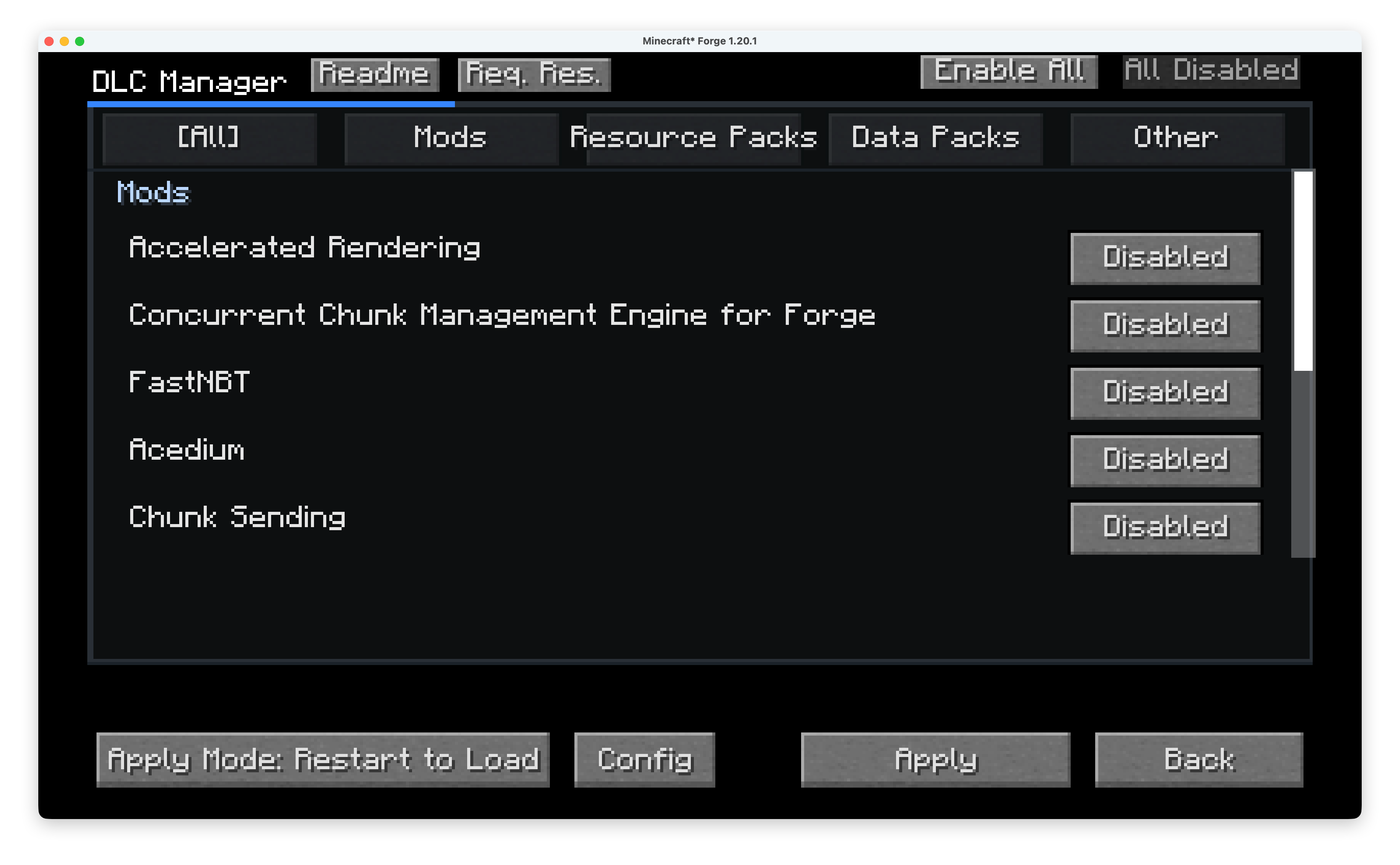 Main page
Versions
Files
Relations
Project Relations
More like this
Similar Mods
Suggestions use data such as tags, dependencies, dependents, descriptions, titles, and more to rank how much they overlap with this mod.
On ModDex
Community snapshot
By the numbers
Statistics
 (opens in a new tab)
Get it on
Available Platforms
On ModDex
Community snapshot
By the numbers