
Community listing page, reviews here may not be monitored by the author.
Don't Drop XP

No reviews yet
Disables dropping your XP when you die. Perfect for players who want to drop items upon death but not lose their levels.
Community voices
Reviews
No reviews yet. Be the first to review this project!
Get it on
Available Platforms
About
Project Details
For authors
Embed Badge
If you're the author of this project, you can embed a live badge anywhere that supports HTML or Markdown. It updates automatically whenever ratings change.
Use HTML for any page that supports it, or Markdown for README files and Markdown-based descriptions.
Identifiers
Platform IDs
Resources
External Links
About
Description
Overview
Drop Drop XP is a datapack that eliminates the hassle of losing your experience when dying. Unlike the gamerule keepInventory, players will drop their items upon death without worrying about losing their levels. It may be annoying to lose your XP when you want to enchant something, so this datapack removes players dropping XP while still losing their items. This datapack also has the option to have XP penalties when players die.
Scoreboard to Point Binary Decomposition by Cloud Wolf.
Optional Features
By default, the datapack's goal is to prevent any levels from being lost on death. However, there are a couple of options to have a penalty be applied upon death. By using the command, /function dont_drop_xp:_change_xp_penalty_type, you can change the type of XP penalty that will be applied when players die. Operators can additionally customize the percent of XP lost with /function dont_drop_xp:_change_xp_percent_lost.
Penalty Type Options:
- Don't Drop XP: Default option. Players will not lose any levels.
- Drop X% of XP: Players lose a percentage value of their XP ranging from 10% to 90%. Defaults to 60%.
- Do Both; Players Decide: A mixture of the two. Players will retain all XP by default. A new text message will appear and give players the option to take a penalty. This is to give more freedom to players to decide for fair or unfair deaths.
Installing and Uninstalling the Pack
This datapack can not be easier to install and uninstall.
Simply place the datapack file into the datapacks folder in your singleplayer or multiplayer world. Upon loading the world or by using the /reload command, the datapack will be installed.
To uninstall, use the command, /function #dont_drop_xp:uninstall. This will automatically remove all related objective scoreboards. You can then disable or delete the datapack from there.
Screenshots
Gallery
-
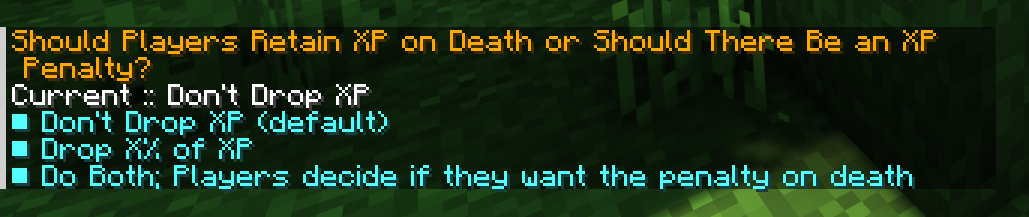 Enabling XP Penalties Optional ability for players to lose a fraction of their XP on death. Run the function, /function dont_drop_xp:_change_xp_penalty_type to change the penalty type.
 -
 Change Percent of XP Lost Set the percent that players will lose their xp when dying. Run /function dont_drop_xp:_change_xp_percent_lost to change this amount.
 -
 Banner
Versions
Files
Relations
Project Relations
More like this
Similar Mods
Suggestions use data such as tags, dependencies, dependents, descriptions, titles, and more to rank how much they overlap with this mod.
On ModDex
Community snapshot
By the numbers
Statistics

Want to reach Minecraft players?
We're looking for a server hosting partner to feature here and other parts of the site. Interested? Send us a message!
Get in touchGet it on
Available Platforms
On ModDex
Community snapshot
By the numbers
Statistics
Resources