Community listing page, reviews here may not be monitored by the author.
Dralard's Rock Candy Mod

No reviews yet
10 types of delicious Rock Candy complete with tools and armor that give special effects when used!

Community voices
Reviews
No reviews yet. Be the first to review this project!
Get it on
Available Platforms
About
Project Details
For authors
Embed Badge
If you're the author of this project, you can embed a live badge anywhere that supports HTML or Markdown. It updates automatically whenever ratings change.
Use HTML for any page that supports it, or Markdown for README files and Markdown-based descriptions.
Identifiers
Platform IDs
Resources
External Links
About
Description

Adds in 10 delicious flavors of rock candy, each giving different potion effects when consumed.
You can then condense 9 of the same colored candy into a block to create tools and armor.
Just holding the rock candy tools in your hand or wearing the full armor set gives you buffs!
5 types of rock candy ore are found between depth 0 and 45, so finding them is easy.
Combine those 5 into 5 additional types of unique rock candy!
So, grab a pickaxe and start hunting for your brand-new food source!
---
** To Modpack Creators **
I've been asked a few times now about adding this mod to modpacks.
Feel free to add this to your modpacks as long as you credit me in some way and do not claim the mod as your own.
---
Updates:
Version 1.1
Combination Update

5 new types of Rock Candy have been added.
Combine the 5 original candies in order to expand your horizons with brand new combinations!
Additionally, the original 5 candy tools have been majorly rebalanced. Check out the patch notes for more information.
---
Reviews:
---
Installation Instructions (Windows):
1. Locate the official Minecraft Forge website and download the latest version's installer.
2. Run the Minecraft Forge installer to create a new Minecraft profile called 'Forge'.
3. Locate your .minecraft folder. If you don't know how to do this, check the instructions below.
4. If you already have a Mods folder in .minecraft, simply place the mod .jar you downloaded there and play on the Forge profile!
If you don't, simply make a new folder called Mods and place the .jar inside it. Easy!
---
Locating your .minecraft Folder (Windows):
1. Open Run, this can be done by pressing the Windows Key on your keyboard and R at the same time, or by opening your Start Menu and searching for Run.
2. In the Run textbox, type %AppData% and click OK.
3. Locate the .minecraft folder on the list and return to the instructions above.
---
KNOWN BUGS:
** Bugs in italic have already been fixed and will be patched in the next release. **
Recipes:
Here is a list of the recipes included with this Mod.


Credits for the GIFs goes to Shadow3654.
Screenshots
Gallery
-
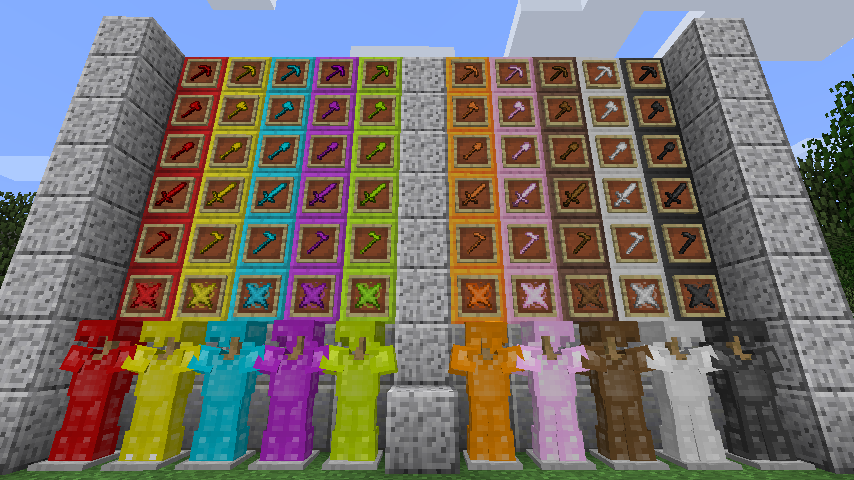 Candy Loadouts A screenshot depicting all the candy types and their associated tools and armor sets. Collect them all!
 -
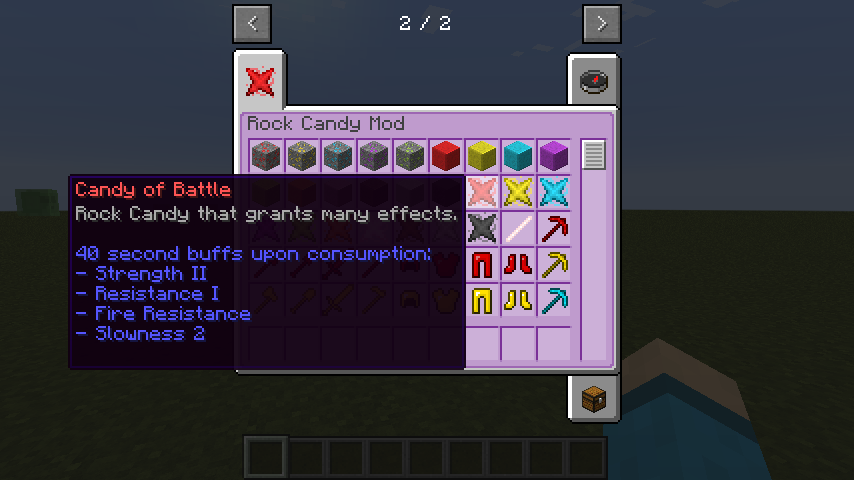 Candy of Battle The in-game tooltip for Candy of Battle.
Versions
Files
Relations
Project Relations
More like this
Similar Mods
Suggestions use data such as tags, dependencies, dependents, descriptions, titles, and more to rank how much they overlap with this mod.
On ModDex
Community snapshot
By the numbers
Statistics
 (opens in a new tab)
Get it on
Available Platforms
On ModDex
Community snapshot
By the numbers
Statistics
Resources