Community listing page, reviews here may not be monitored by the author.
Drawers & Bits

No reviews yet
Drawers & Bits is an addon for the Minecraft mods Chisels & Bits by AlgorithmX2 and Storage Drawers by jaquadro. The mod adds special drawers and support for bits.
Community voices
Reviews
No reviews yet. Be the first to review this project!
Get it on
Available Platforms
About
Project Details
For authors
Embed Badge
If you're the author of this project, you can embed a live badge anywhere that supports HTML or Markdown. It updates automatically whenever ratings change.
Use HTML for any page that supports it, or Markdown for README files and Markdown-based descriptions.
Identifiers
Platform IDs
About
Description
Drawers & Bits
Drawers & Bits is an addon for the Minecraft mods Chisels & Bits by AlgorithmX2 and Storage Drawers by jaquadro. The mod adds special drawers and support for bits.
This mod highly relies on the version of storage drawers, so it can break with an update. I will try to fix that as soon as I notice.
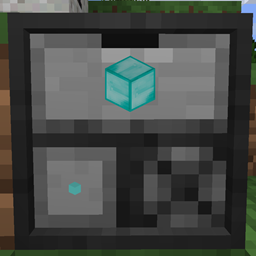
Bit Drawer
The Bit Drawer basically works similar to a compacting drawer by automatically converting between bits and the full block. It can only store blocks that can be broken down into bits. Otherwise it acts as any drawer, aka it can be part of a drawer controller network, accepts upgrades and can be locked etc.
A small warning, since a block has 4096 bits the drawer gets close to how many items Storage Drawers internally supports. With default settings you are fine, but if you upgrade the storage capacity of the bit drawer or upgrades in the config, you will rapidly hit the limit (at 8191 stacks à 64 blocks).
Special Interactions
For now all of these only work when manually interacting with the bit drawer. Sneak/non-sneak left-click behaviour will be inverted if the respective option is set for Storage Drawers.
Bags: Right-clicking with a bag will deposit everything in the bag matching the clicked slot into the drawer. This works with the bit bag but can also work with other mod's bags if they support the correct Forge capability. Bit bags do not need to target the bit slot, right-clicking to deposit bits works on the whole front. Left-clicking with a bit bag on the front will fill a slot in the bag with bits from the drawer (fill up a partial one or a new one if there is no partially filled slot), sneaking while doing so fills the bag with as many bits as are available/will fit.
Designs: Left-clicking the bit slot with a design gives you the block described by the design, sneaking gives you a stack. The bit composition is ignored, it will be made entirely from the bit in the drawer. Right-clicking the custom slot (bottom right) with a design will set the chiseled block you get from the custom slot. Use an empty design to clear.
Chiseled blocks: Left-clicking the bit slot works like left-clicking with a design. Right-clicking the drawer front with a chiseled block will insert the stack into the drawer if it's made entirely from the stored bit (and there is enough space). This only works if the drawer contents are set.
Bit Drawer Controller
The Bit Drawer Controller is an enhanced Drawer Controller adding some new interactions similar to the Bit Drawer. Note: It is still a drawer controller, so only one or the other can be on a drawer network. It works with other drawers, so it's not specific to Bit Drawers.
Special Interactions
For now all of these only work when manually interacting with the bit drawer controller. Sneak/non-sneak left-click behaviour will be inverted if the respective option is set for Storage Drawers.
Bags: Right-clicking with a bag will deposit everything in the bag into the drawer network. This works with the bit bag but can also work with other mod's bags if the support the correct Forge capability. Left-clicking with a bit bag on the front will fill the bag with a stack of each available bit from the drawer network (fill up a partial one or a new one if there is no partially filled slot) as long as there is space.
Designs or Chiseled blocks: Left-clicking will give you the block described by the design or block, sneaking gives you a stack. Right-clicking with a chiseled block will insert the stack into the drawer network if all of the bits fit.
Important: By default a double right-click will insert the contents of all compatible bags into the drawer network (if there is space). You can turn that behaviour off in the config file. There is also a configuration option to insert all chiseled blocks in your inventory on a double right-click. It is off by default so people unaware will not loose their chiseled blocks by accident.
Technical Details (mostly for other modders)
For a bag to be compatible it needs to support the IItemHandler capability.
Screenshots
Gallery
Versions
Files
Relations
Project Relations
More like this
Similar Mods
Suggestions use data such as tags, dependencies, dependents, descriptions, titles, and more to rank how much they overlap with this mod.
On ModDex
Community snapshot
By the numbers
Statistics
Want to reach Minecraft players?
We're looking for a server hosting partner to feature here and other parts of the site. Interested? Send us a message!
Get in touchGet it on
Available Platforms
On ModDex
Community snapshot
By the numbers