
Community listing page, reviews may not be monitored by the author.
Dual-dye shulkers

No reviews yet
Apply different colors to the top and bottom of shulker boxes

Community voices
Reviews
No reviews yet. Be the first to review this project!
Get it on
Available Platforms
Compatibility
Supported Environments
The author has not specified where this runs.
About
Project Details
For authors
Embed Badge
If you're the author of this project, you can embed a live badge anywhere that supports HTML or Markdown. It updates automatically whenever ratings change.
Use HTML for any page that supports it, or Markdown for README files and Markdown-based descriptions.
Identifiers
Platform IDs
About
Description
Dual-Dye Shulkers

A Fabric mod for Minecraft 1.21.1 – 26.3 that lets you apply different colors to the top (lid) and bottom (base) of shulker boxes!
Features
- Dual-color shulker boxes - Apply one color to the lid, another to the base
- Configurable controls (default):
- Shift + right-click with dye → colors the top (lid)
- Ctrl + right-click with dye → colors the bottom (base)
- Crafting recipe - Dye above the shulker colors the lid, dye below colors the base
- Works with all 16 dye colors (256 combinations!)
- Colors persist through break/place cycles
- Creative pick-block copies the exact colors
- Cauldron washing - Remove custom colors with a water cauldron
- Tooltip display - See applied colors when hovering over items
- Full 3D rendering - Colors display correctly on placed blocks and items
Usage
- Place a shulker box
- Hold any dye and Shift+right-click the shulker to color the lid
- Hold any dye and Ctrl+right-click to color the base
- Or craft it: put the shulker box in a crafting grid with a dye above it (lid) and/or below it (base)
- To remove colors, use a water cauldron on the shulker box item
Configuration
Install Cloth Config and Mod Menu for an in-game config screen.
Options:
- Show Color Tooltip - Toggle tooltip display on shulker items
- Dye Top (Lid) - Customize key combo for coloring the top (default: Shift + Right Click)
- Dye Bottom (Base) - Customize key combo for coloring the bottom (default: Ctrl + Right Click)
Key combos can be any combination of two keys/mouse buttons.
Requirements
- Minecraft 1.21.1, 1.21.4 – 1.21.8, 26.2 or 26.3
- Fabric Loader 0.16.0+ (1.21.x) or 0.19.0+ with Java 25 (26.x)
- Fabric API
Optional:
- Cloth Config - For config screen
- Mod Menu - For config screen access
Installation
- Install Fabric Loader
- Download Fabric API
- Download this mod from Modrinth
- Place both mods in your
modsfolder
Building from Source
This project uses Stonecutter for multi-version support.
# Windows
# Build for the active version (manage active version with ./gradlew chiseled)
gradlew.bat build

# Linux/macOS
./gradlew build
The output JAR will be in versions/<mc-version>/build/libs/.
Minecraft 1.21.x is built from the master branch, 26.x from the 26.x branch.
Tests
End-to-end tests use Fabric GameTest and live in src/gametest.
# Server game tests (headless, also run by `build`)
./gradlew 26.3:runGameTest

# Client game tests: real client with simulated input and screenshot checks
./gradlew 26.3:runClientGameTest
Screenshots are saved to versions/<mc-version>/build/run/clientGameTest/screenshots/.
License
MIT License - see LICENSE for details.
Screenshots
Gallery
-
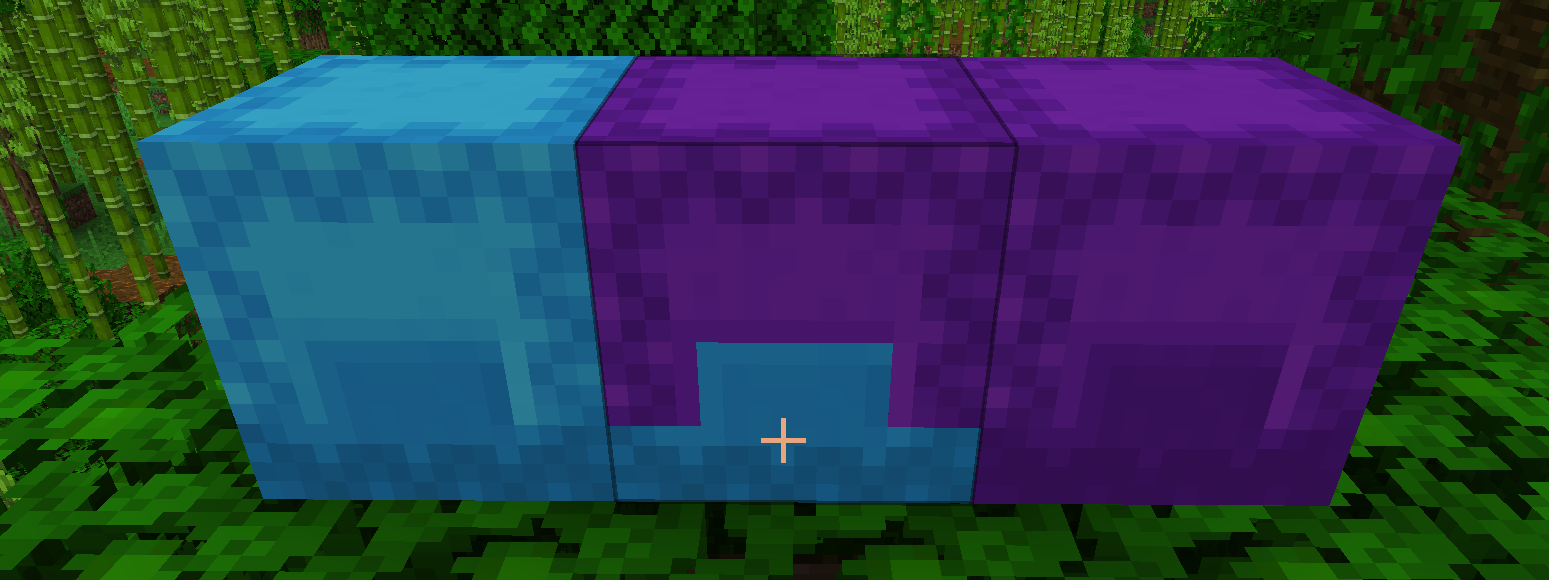 Custom shulker between 2 normal of the same color
Versions
Files
Relations
Project Relations
More like this
Similar Mods
Suggestions use data such as tags, dependencies, dependents, descriptions, titles, and more to rank how much they overlap with this mod.
On ModDex
Community snapshot
By the numbers
Statistics


Get it on
Available Platforms
On ModDex
Community snapshot
By the numbers