
Community listing page, reviews may not be monitored by the author.
DurabilityView

No reviews yet
Color-coded durability buckets on visible players’ diamond and netherite armor, using server-reported equipment data.

Community voices
Reviews
No reviews yet. Be the first to review this project!
Get it on
Available Platforms
About
Project Details
For authors
Embed Badge
If you're the author of this project, you can embed a live badge anywhere that supports HTML or Markdown. It updates automatically whenever ratings change.
Use HTML for any page that supports it, or Markdown for README files and Markdown-based descriptions.
Identifiers
Platform IDs
Resources
External Links
About
Description
DurabilityView
Color-coded durability numbers on visible players’ diamond and netherite armor. Separate client-only Fabric and NeoForge files for Minecraft Java 1.21.8, 1.21.9, 1.21.10, 1.21.11, 26.1, 26.1.1, 26.1.2, 26.2 and 26.3.
Reading the labels
- ~40 means 1–40 remaining durability, ~80 means 41–80, and ~120 means 81–120. Values round upward in steps of 40.
- ~ marks a server-reported bucket, not an exact or independently verified value.
- ? means unknown or ambiguous. Remote zero/missing damage can mean pristine armor or data stripped by the server; the mod does not guess.
- Red means 20% or less, yellow 50% or less, and green above 50%, using the unrounded remaining/max ratio. Unknown is gray.
Display and controls
Labels follow the front/back armor surfaces of other visible players standing or crouching within 16 blocks by default. They are depth-tested and require line of sight. Invisible players, spectators, your own player, mobs, unsupported armor assets and sleeping/swimming/crawling/flying poses are excluded. Capes, shields and other geometry may cover labels naturally. This is a rendered overlay rather than a shared texture replacement.
F7 toggles labels, F8 cycles size, and F9 cycles the green/yellow/red and blue/yellow/orange palettes. Rebind under Options → Controls → Key Binds → DurabilityView. F1 hides labels with the HUD. Settings stay in config/durabilityview-client.properties; colors, range (2–32 blocks) and scale (0.65–1.5) can be edited with Minecraft closed.
Install
Use Java 21 for Minecraft 1.21.x or Java 25 for 26.x. Place one JAR for your exact Minecraft version and loader in your client’s mods folder. Each file’s changelog lists its matching loader and Fabric API requirements.
- Fabric 26.2: Loader 0.19.5+ and Fabric API 0.161.0+26.2 or a compatible later 26.2 release
- Fabric 26.3: Loader 0.19.5+ and Fabric API 0.162.0+26.3 or a compatible later 26.3 release
- NeoForge 26.2: NeoForge 26.2.0.90 or a compatible later 26.2 release
- NeoForge 26.3: NeoForge 26.3.0.71-beta or a compatible later 26.3 release
NeoForge needs no extra configuration library. Do not install both loader variants. No server installation is needed.
Servers can hide or substitute equipment data, which a client cannot recover or authenticate. DurabilityView does not infer hidden values, bypass obfuscation, reveal invisible players, alter equipment or send custom network requests. Follow your server’s rules.
MIT licensed. An independent community mod, unrelated to other similarly named projects and not affiliated with Mojang or Microsoft.
Screenshots
Gallery
-
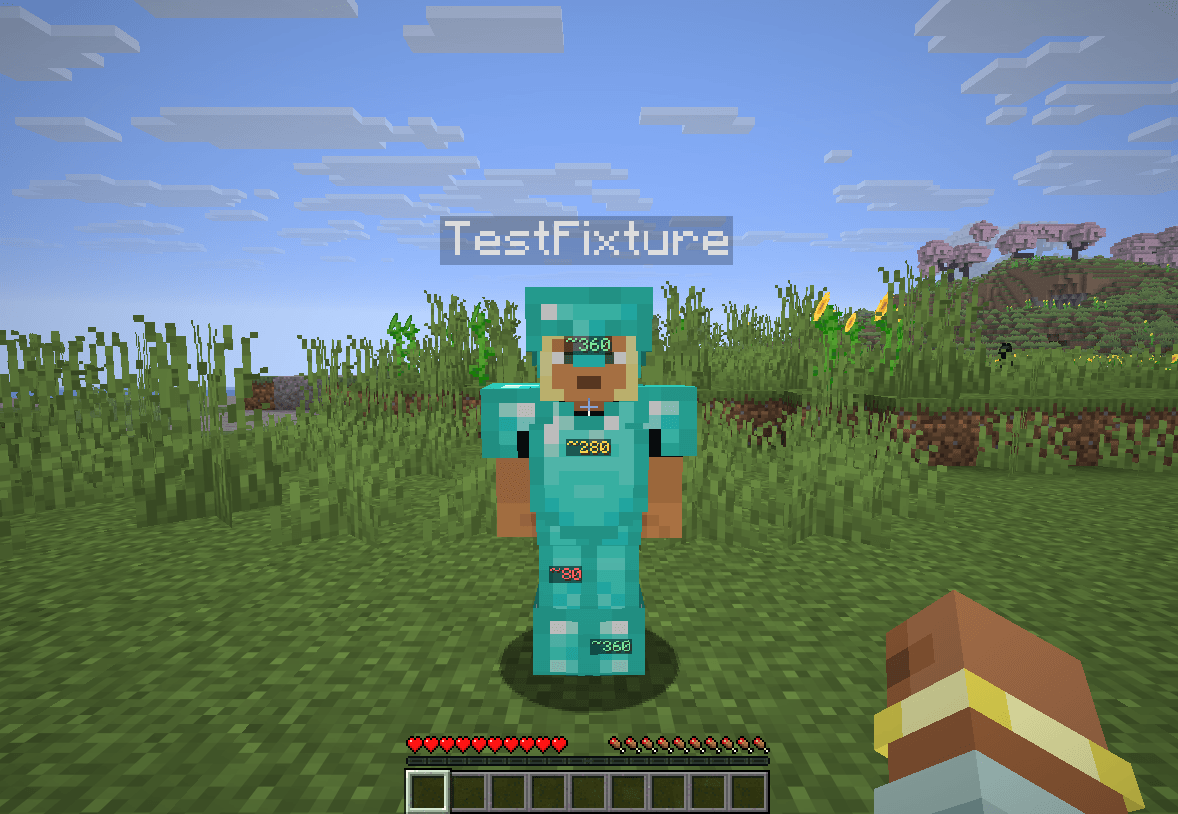 Armor durability labels Synthetic test player in a private single-player world, rendered in Minecraft.
Versions
Files
Relations
Project Relations
More like this
Similar Mods
Suggestions use data such as tags, dependencies, dependents, descriptions, titles, and more to rank how much they overlap with this mod.
On ModDex
Community snapshot
By the numbers
Statistics

Get it on
Available Platforms
On ModDex
Community snapshot
By the numbers
Statistics
Resources