
Dynamic Damage
No reviews yet
Displays stylish, animated damage numbers above entities in the world.
Neoforge is a fork of the Minecraft Forge available for versions 1.20.1+ of Minecraft. Many Forge mods are compatible with Neoforge and vice versa.
Fabric is a mod loader for versions 1.14+ of Minecraft, particularly popular for client side and optimization mods.
Community voices
Reviews
Click once to include, again to exclude, again to clear
No reviews yet. Be the first to review this project!
Get it on
Available Platforms
 Modrinth
Compatibility
Supported Environments
About
Project Details
For authors
Embed Badge
If you're the author of this project, you can embed a live badge anywhere that supports HTML or Markdown. It updates automatically whenever ratings change.
Use HTML for any page that supports it, or Markdown for README files and Markdown-based descriptions.
Identifiers
Platform IDs
About
Description
Preview

This mod displays customizable damage indicators above entities when they take damage. It is a server-side mod that accurately transmits damage events to clients, ensuring full compatibility and consistency in multiplayer environments.
Features
- Server-Authoritative: Damage is detected on the server and sent to nearby clients, meaning the numbers you see are the real damage dealt.
- Critical Hit Distinction: Critical hits are visually distinct from normal hits, with their own configurable color, size multiplier, and animation intensity. The mod uses vanilla logic to detect critical hits from players.
- Smooth Animations: Indicators have a fluid life cycle, featuring an initial 'pop' effect, a gentle upward drift with easing, and a clean fade-out animation.
In-Game Configuration
The mod is fully configurable in-game using ModMenu (recommended) and Cloth Config (required). The configuration file is also available at config/damage_indicator.json.
You can fine-tune nearly every aspect of the indicators:
-
Display Settings:
- Enable or disable the mod entirely.
- Set the maximum render distance for indicators.
- Adjust the base scale (size) of the numbers.
-
Text & Color:
- Define a custom damage format string (e.g.,
%.1ffor one decimal place). - Toggle between showing decimals or rounding to whole numbers.
- Set custom colors for both normal and critical damage using a color picker.
- Define a custom damage format string (e.g.,
-
Animation:
Lifetime: How long an indicator stays on screen.Pop Duration: The length of the initial bounce/pop animation.Fade Start Time: When the indicator should begin to fade out.Vertical Speed: How fast the indicator floats upwards.Horizontal Spread: The random horizontal offset for new indicators.
-
Critical Hits:
Critical Scale Multiplier: How much larger critical hits are compared to normal ones.Critical Pop Effect: The intensity of the pop animation specifically for critical hits.Normal Pop Effect: The intensity of the pop animation for normal hits.
Screenshots
Gallery
-
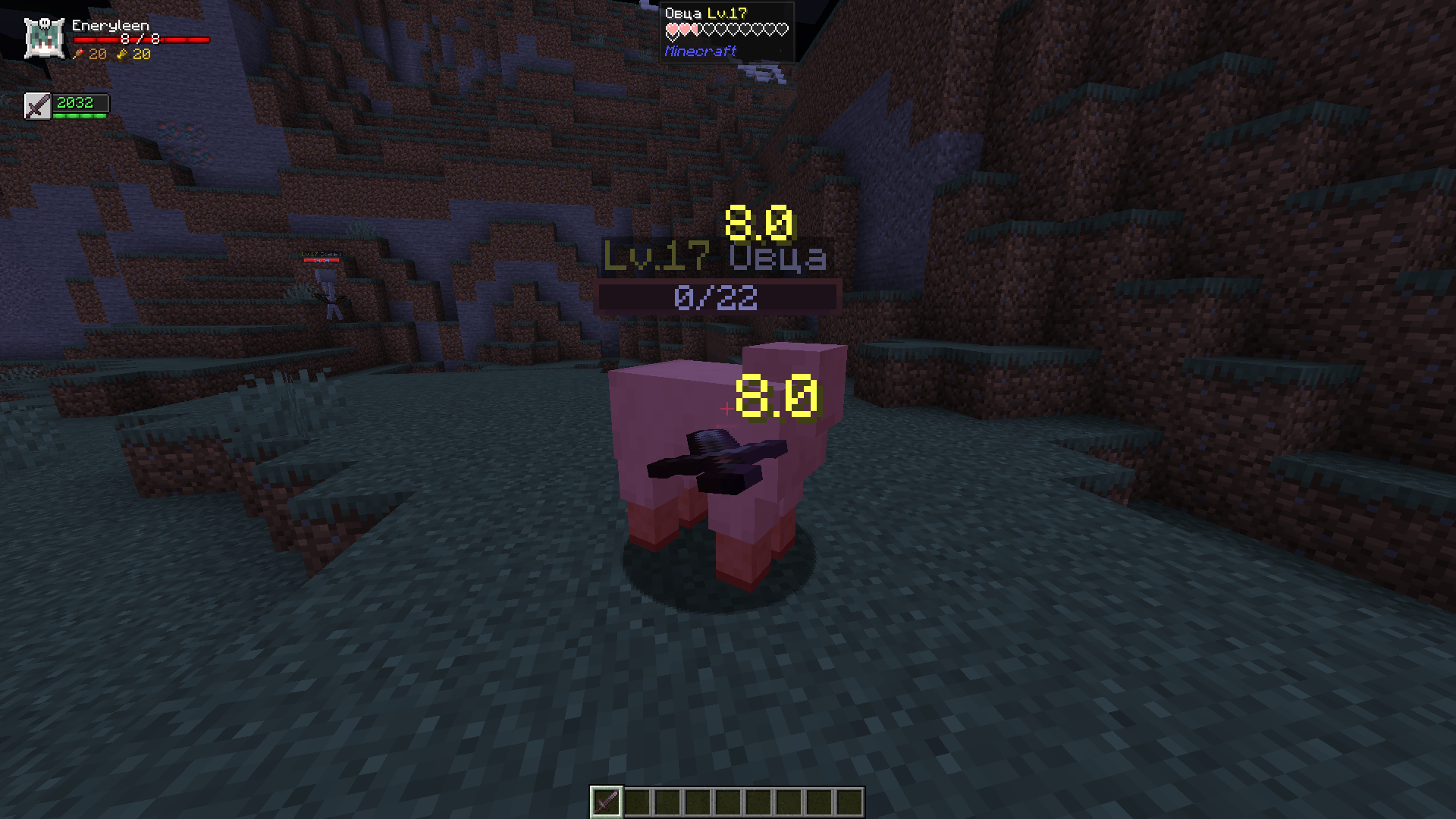 Preview
Versions
Files
Relations
Project Relations
More like this
Similar Mods
Suggestions use data such as tags, dependencies, dependents, descriptions, titles, and more to rank how much they overlap with this mod.
On ModDex
Community snapshot
By the numbers
Statistics

Want to reach Minecraft players?
We're looking for a server hosting partner to feature here and other parts of the site. Interested? Send us a message!
Get in touchGet it on
Available Platforms
On ModDex
Community snapshot
By the numbers