Community listing page, reviews here may not be monitored by the author.
Dynamic Views


No reviews yet
Automatically adjusts render distance to match your FPS. Low FPS = less view distance, high FPS = more. Fully configurable in-game.
Community voices
Reviews
No reviews yet. Be the first to review this project!
Get it on
Available Platforms
Compatibility
Supported Environments
Runs entirely on the client. Works on vanilla servers.
About
Project Details
For authors
Embed Badge
If you're the author of this project, you can embed a live badge anywhere that supports HTML or Markdown. It updates automatically whenever ratings change.
Use HTML for any page that supports it, or Markdown for README files and Markdown-based descriptions.
Identifiers
Platform IDs
Resources
External Links
About
Description
Dynamic View Distance
No more manually fiddling with your render distance. Dynamic View Distance monitors your framerate in real time and adjusts the view distance automatically — giving you the best possible view your PC can currently run smoothly.
How it works
The mod measures your FPS at regular intervals and compares it against two thresholds:
- FPS too low → render distance is decreased by one chunk until things run smoothly again.
- FPS high enough → render distance is increased by one chunk to show more of the world.
- FPS in the sweet spot → everything stays as it is.
This way the mod finds the optimal balance between view range and performance on its own — whether you're running across a simple plains biome or standing in a complex redstone base.
Features
- Automatic adjustment of render distance based on your current framerate
- Custom in-game settings menu — no Cloth Config or ModMenu required
- Freely configurable limits: minimum and maximum view distance, lower and upper FPS thresholds
- Cooldown system prevents the view distance from constantly flickering back and forth
- Adjustable check interval — how often your FPS is measured
- Settings are saved to a simple JSON file and persist across game sessions
How to use
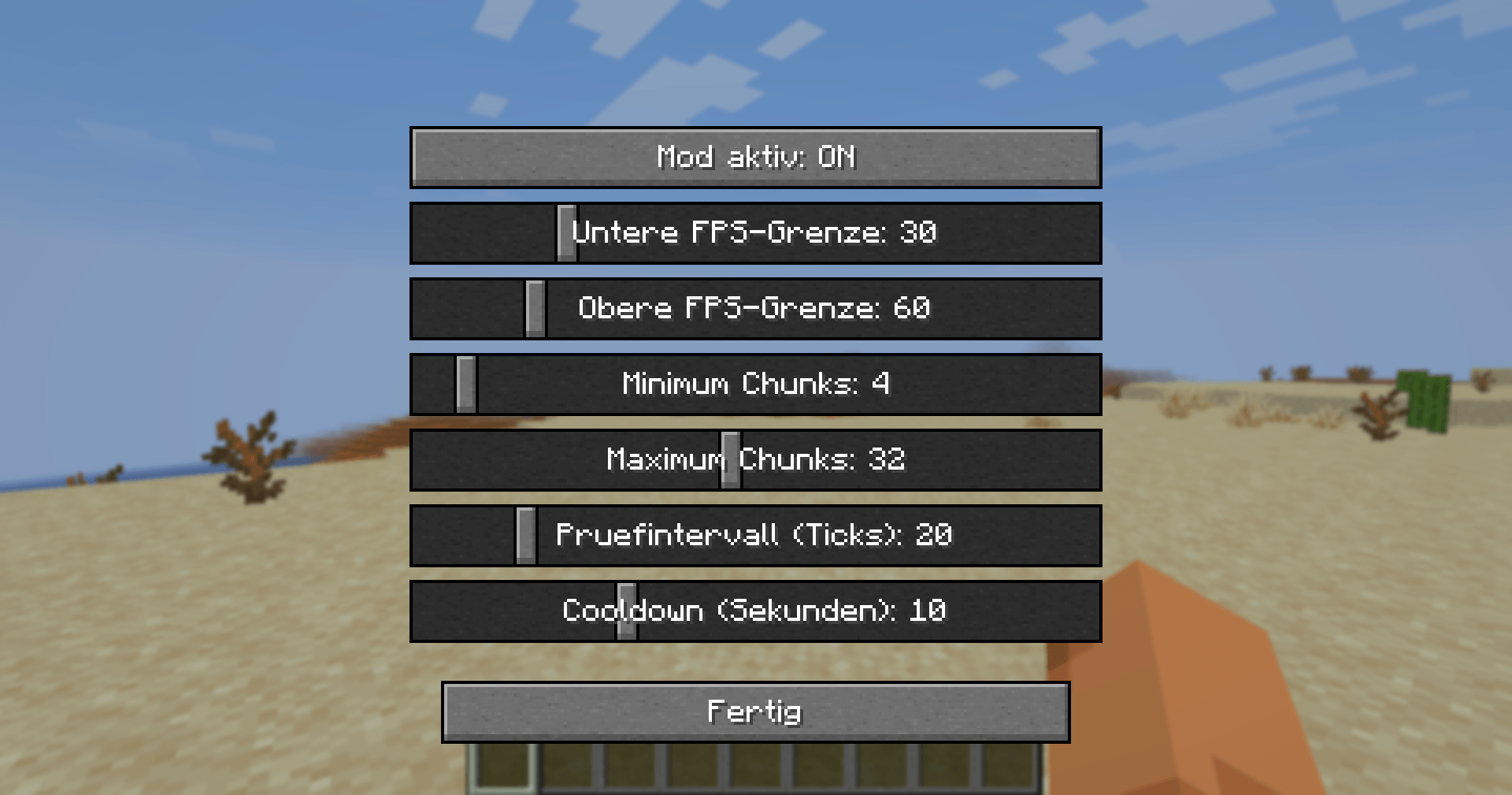
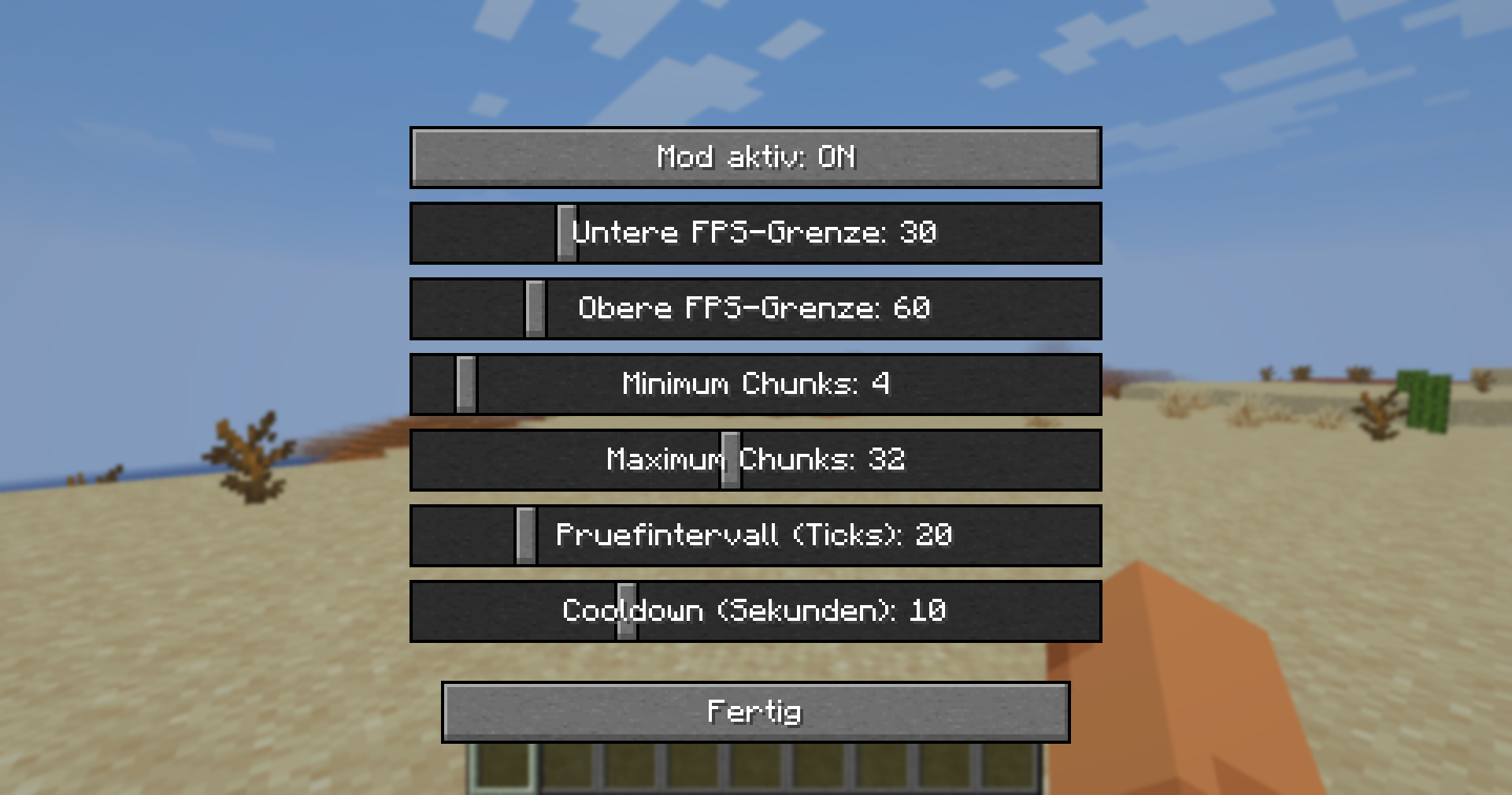
Press V in-game to open the settings menu (the key can be rebound under Options → Controls). There you can adjust the following with sliders:
| Setting | What it does |
|---|---|
| Mod enabled | Turns automatic adjustment on/off |
| Lower FPS threshold | Below this, view distance is decreased |
| Upper FPS threshold | Above this, view distance is increased |
| Minimum chunks | View distance never goes below this value |
| Maximum chunks | View distance never goes above this value |
| Check interval | How often FPS is measured (in ticks) |
| Cooldown | Pause after each change (in seconds) |
Installation
- Install Fabric Loader for Minecraft 26.1.2
- Download Fabric API and place it in your
modsfolder - Place Dynamic View Distance in your
modsfolder as well - Launch the game — done!
Notes
- This is a client-side mod — it works on any server, even ones that don't have the mod installed.
- Requires Fabric API.
- Built for Minecraft 26.1.2.
Dynamic View Distance
No more manually fiddling with your render distance. Dynamic View Distance monitors your framerate in real time and adjusts the view distance automatically — giving you the best possible view your PC can currently run smoothly.
How it works
The mod measures your FPS at regular intervals and compares it against two thresholds:
- FPS too low → render distance is decreased by one chunk until things run smoothly again.
- FPS high enough → render distance is increased by one chunk to show more of the world.
- FPS in the sweet spot → everything stays as it is.
This way the mod finds the optimal balance between view range and performance on its own — whether you're running across a simple plains biome or standing in a complex redstone base.
Features
- Automatic adjustment of render distance based on your current framerate
- Custom in-game settings menu — no Cloth Config or ModMenu required
- Freely configurable limits: minimum and maximum view distance, lower and upper FPS thresholds
- Cooldown system prevents the view distance from constantly flickering back and forth
- Adjustable check interval — how often your FPS is measured
- Settings are saved to a simple JSON file and persist across game sessions
How to use
Press V in-game to open the settings menu (the key can be rebound under Options → Controls). There you can adjust the following with sliders:
| Setting | What it does |
|---|---|
| Mod enabled | Turns automatic adjustment on/off |
| Lower FPS threshold | Below this, view distance is decreased |
| Upper FPS threshold | Above this, view distance is increased |
| Minimum chunks | View distance never goes below this value |
| Maximum chunks | View distance never goes above this value |
| Check interval | How often FPS is measured (in ticks) |
| Cooldown | Pause after each change (in seconds) |
Installation
- Install Fabric Loader for Minecraft 26.1.2
- Download Fabric API and place it in your
modsfolder - Place Dynamic View Distance in your
modsfolder as well - Launch the game — done!
Notes
- This is a client-side mod — it works on any server, even ones that don't have the mod installed.
- Requires Fabric API.
- Built for Minecraft 26.1.2.
Screenshots
Gallery
-
 2026-06-04_23.57.43.png 2026-06-04_23.57.43.png
Versions
Files
Relations
Project Relations
More like this
Similar Mods
Suggestions use data such as tags, dependencies, dependents, descriptions, titles, and more to rank how much they overlap with this mod.
On ModDex
Community snapshot
By the numbers
Statistics
Want to reach Minecraft players?
We're looking for a server hosting partner to feature here and other parts of the site. Interested? Send us a message!
Get in touchGet it on
Available Platforms
On ModDex
Community snapshot
By the numbers
Statistics
Resources