
Community listing page, reviews here may not be monitored by the author.
Easy Navigator


No reviews yet
Navigate coordinates efficiently by having a compass that shows you the way!
Community voices
Reviews
No reviews yet. Be the first to review this project!
Get it on
Available Platforms
Compatibility
Supported Environments
Runs entirely on the client. Works on vanilla servers.
About
Project Details
For authors
Embed Badge
If you're the author of this project, you can embed a live badge anywhere that supports HTML or Markdown. It updates automatically whenever ratings change.
Use HTML for any page that supports it, or Markdown for README files and Markdown-based descriptions.
Identifiers
Platform IDs
About
Description
Easy Navigator
Allows you to easily travel to coordinates by providing a compass that leads the way.
This mod is fully clientside!
If there is a bug or an incompatibility with another mod please let me know on github issues

How to use
There are two different ways you can start the navigation mode. The easiest is by receiving a message with coordinates. You can simply click the highlighted coordinates to start your journey.

Ingame this would look something like this

You can also use commands to start and stop your travels. The following two commands are available
/navigate <x> <z>or/navigate <x> <y> <z>to dial in the compass/navigation stopto stop navigating
Dependencies
- Yet Another Config Lib 3.2.0 or higher is required
- Fabric API is required
- Modmenu is suggested
Settings
When modmenu is installed you can change a number of settings

Easy Navigator
Currently not frequently updated
Allows you to easily travel to coordinates by providing a compass that leads the way.
This mod is fully clientside!
If there is a bug or an incompatibility with another mod please let me know on github issues
Dependencies
- Yet Another Config Lib is required
- Fabric API is required
- Modmenu is suggested
How to use
There are two different ways you can start the navigation mode. The easiest is by receiving a message with coordinates. You can simply click the highlighted coordinates to start your journey.
Ingame this would look something like this
You can also use commands to start and stop your travels. The following two commands are available
/navigate <x> <z>or/navigate <x> <y> <z>to dial in the compass/navigation stopto stop navigating
Settings
When modmenu is installed you can change a number of settings
Screenshots
Gallery
-
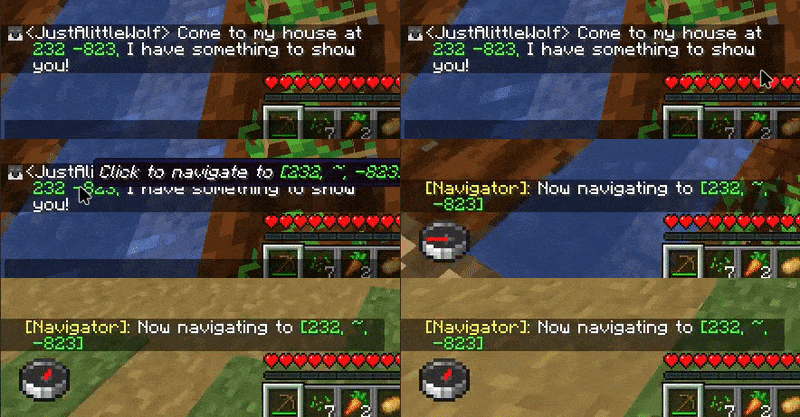 Navigation Example
 -
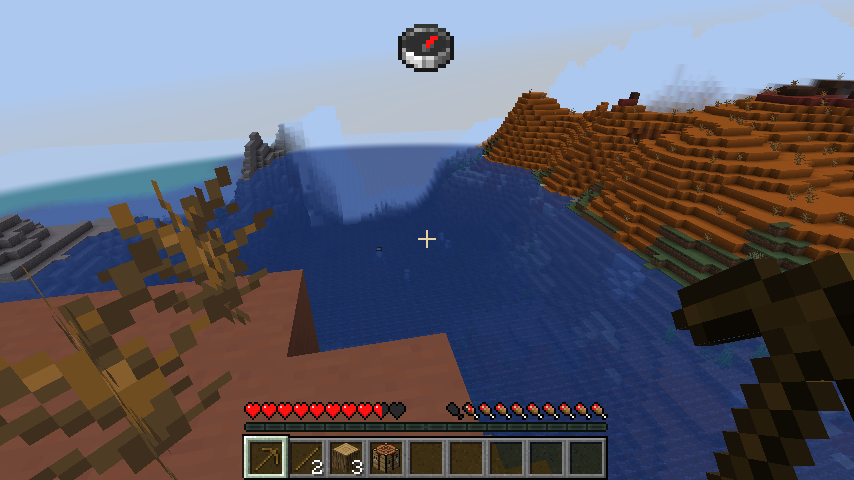 Another Example
Versions
Files
Relations
Project Relations
More like this
Similar Mods
Suggestions use data such as tags, dependencies, dependents, descriptions, titles, and more to rank how much they overlap with this mod.
On ModDex
Community snapshot
By the numbers
Statistics
Want to reach Minecraft players?
We're looking for a server hosting partner to feature here and other parts of the site. Interested? Send us a message!
Get in touchGet it on
Available Platforms
On ModDex
Community snapshot
By the numbers