Community listing page, reviews may not be monitored by the author.
Edit Mob Drops


No reviews yet
Edit Mob Drops is an easily configurable mod that lets you edit what mobs drop.

Community voices
Reviews
No reviews yet. Be the first to review this project!
Get it on
Available Platforms
Compatibility
Supported Environments
Runs entirely on the server. Also works in singleplayer.
About
Project Details
For authors
Embed Badge
If you're the author of this project, you can embed a live badge anywhere that supports HTML or Markdown. It updates automatically whenever ratings change.
Use HTML for any page that supports it, or Markdown for README files and Markdown-based descriptions.
Identifiers
Platform IDs
About
Description
Edit Mob Drops
Edit Mob Drops is an easily configurable mod that lets you edit what mobs drop, including adding items to specific groups of mobs, adding additional items, and even clearing existing drops!
All vanilla and modded items are supported, including NBT data. All mobs should be supported, vanilla and modded.
Editing mob drops is as simple as editing the config file of the mod, config\editmobdrops\editmobdrops.cfg (in 1.7.10 and 1.12.2), or config\editmobdrops\editmobdrops.toml (in 1.14+).
Sample Config (Mod version 1.4+)
Sample config for 1.7.10
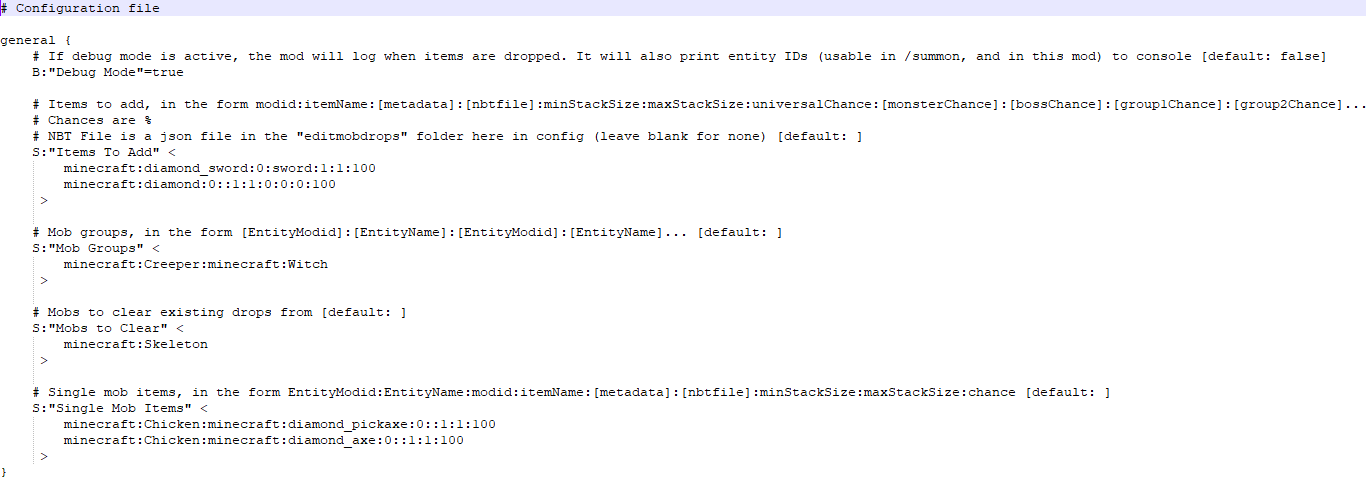
Sample config for 1.12.2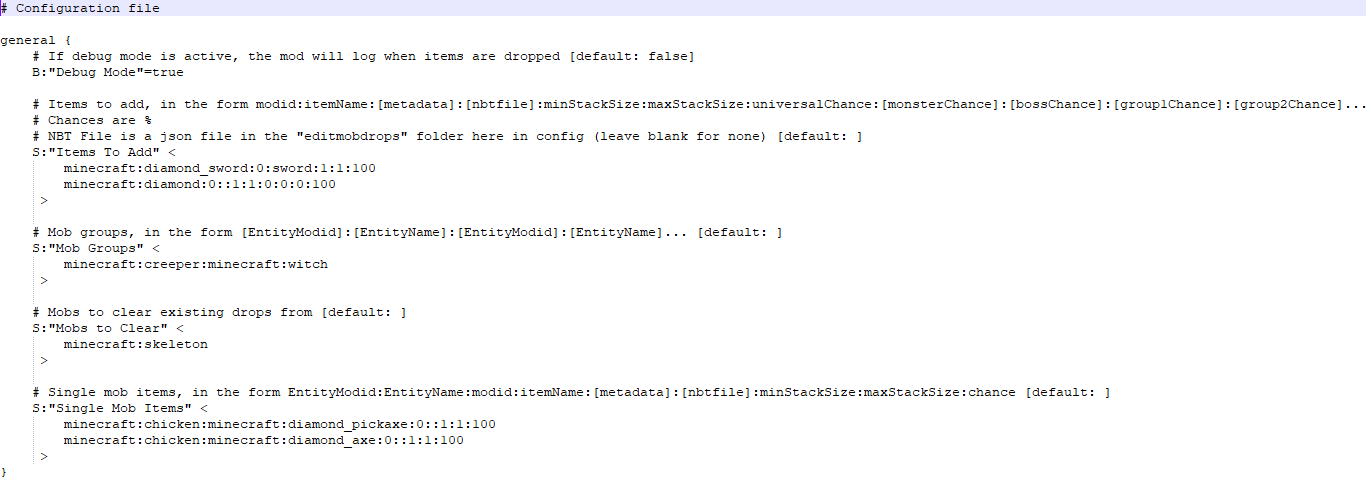
For 1.14+ (1.16.5 and latest)

Both of these configs do the same thing for different versions of Minecraft.
This config adds a chance to drop a stack of minecraft:diamond_sword, with between 1 and 1 (so 1) swords, with metadata 0 (an ordinary diamond sword), using the file "sword.json" for NBT, to everything, with a 100% chance.
"sword.json" contains the following in 1.7.10:
<code>{display:{Name:"A sword"}}</code><br />It contains the following in 1.12.2:<code><br />{"display": {"Name": "A sword"}}</code><br />In 1.16.5 and latest, it instead contains the following:<br />{"display":{"Name":"[{\"text\":\"A sword\"}]"}}
This NBT data gives the sword the name "A sword".
The .json files can contain any valid NBT in json format. Check the syntax with a /give command if you're not sure whether it'll work.
After the sword, this config adds a chance to drop a stack of minecraft:diamond, with 1 diamond of metadata 0, not using an NBT file (as that section is blank).
The diamond has a 0% chance for anything to drop it, a 0% chance for monsters, a 0% chance for bosses, and a 100% chance for group 1, defined lower in the config as Creepers and Witches.
Lower down in the config, skeletons are listed as being a "Mob to Clear". This means default drops are cleared, but this happens before the extra items are added, so skeletons will still drop a diamond sword called "A sword".
Finally, the "Single Mob Items" section adds items to a single type of mob - in this case, adding a diamond pickaxe (metadata 0, no NBT) to chickens with a 100% chance to drop, and the same for a diamond axe.
In 1.7.10, entity names can be found by having debug mode on.
After 1.12.2, metadata was removed entirely, so the 1.14+ version of the config file does not include it.
Old Sample Config (Before mod version 1.4.0)
Sample config for 1.7.10 and 1.12.2
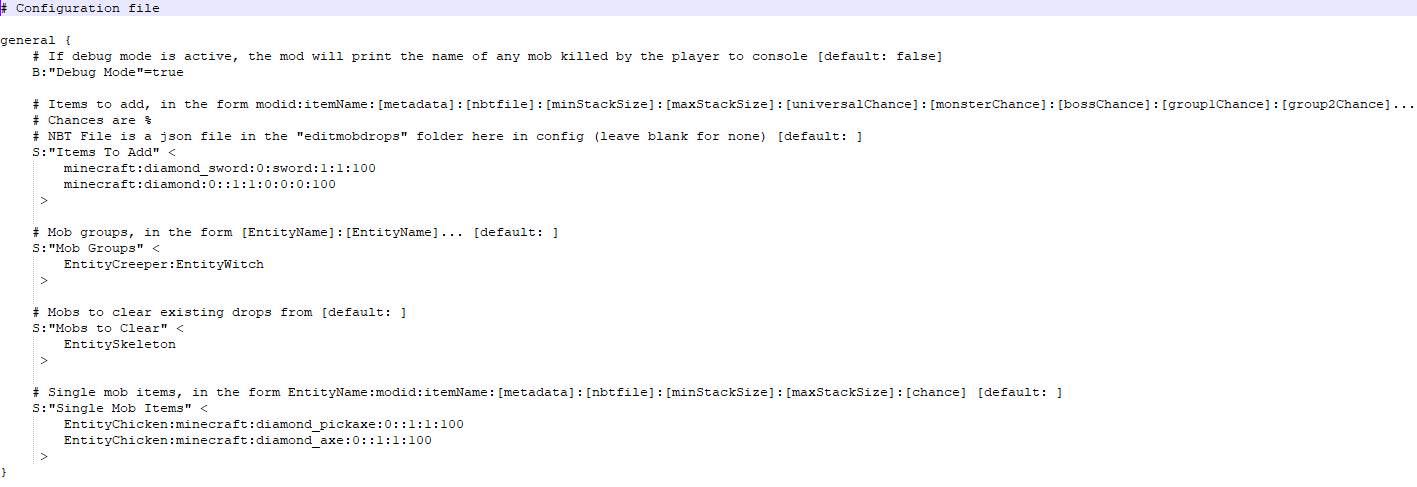
For 1.14+

Both of these configs do the same thing for different versions of Minecraft.
This config adds a chance to drop a stack of minecraft:diamond_sword, with between 1 and 1 (so 1) swords, with metadata 0 (an ordinary diamond sword), using the file "sword.json" for NBT, to everything, with a 100% chance.
"sword.json" contains the following:
{"display": {"Name": "A sword"}}
This NBT data gives the sword the name "A sword".
The .json files can contain any valid NBT in json format. Check the syntax with a /give command if you're not sure whether it'll work.
After the sword, this config adds a chance to drop a stack of minecraft:diamond, with 1 diamond of metadata 0, not using an NBT file (as that section is blank).
The diamond has a 0% chance for anything to drop it, a 0% chance for monsters, a 0% chance for bosses, and a 100% chance for group 1, defined lower in the config as Creepers and Witches.
Lower down in the config, skeletons are listed as being a "Mob to Clear". This means default drops are cleared, but this happens before the extra items are added, so skeletons will still drop a diamond sword called "A sword".
Finally, the "Single Mob Items" section adds items to a single type of mob - in this case, adding a diamond pickaxe (metadata 0, no NBT) to chickens with a 100% chance to drop, and the same for a diamond axe.
After 1.12.2, metadata was removed entirely, so the 1.15+ version of the config file does not include it.
Discord Server
Edit Mob Drops
Edit Mob Drops is an easily configurable mod that lets you edit what mobs drop, including adding items to specific groups of mobs, adding additional items, and even clearing existing drops!
All vanilla and modded items are supported, including NBT data. All mobs should be supported, vanilla and modded.
Editing mob drops is as simple as editing the config file of the mod, config\editmobdrops\editmobdrops.cfg (in 1.7.10 and 1.12.2), or config\editmobdrops\editmobdrops.toml (in 1.14+).
Sample Config (1.7.10)
# Configuration file

general {
    # If debug mode is active, the mod will log when items are dropped. It will also print entity IDs (usable in /summon, and in this mod) to console [default: false]
    B:"Debug Mode"=true

    # Items to add, in the form modid:itemName:[metadata]:[nbtfile]:minStackSize:maxStackSize:universalChance:[monsterChance]:[bossChance]:[group1Chance]:[group2Chance]...
    # Chances are %
    # NBT File is a json file in the "editmobdrops" folder here in config (leave blank for none) [default: ]
    S:"Items To Add" <
        minecraft:diamond_sword:0:sword:1:1:100
        minecraft:diamond:0::1:1:0:0:0:100
     >

    # Mob groups, in the form [EntityModid]:[EntityName]:[EntityModid]:[EntityName]... [default: ]
    S:"Mob Groups" <
        minecraft:Creeper:minecraft:Witch
     >

    # Mobs to clear existing drops from [default: ]
    S:"Mobs to Clear" <
        minecraft:Skeleton
     >

    # Single mob items, in the form EntityModid:EntityName:modid:itemName:[metadata]:[nbtfile]:minStackSize:maxStackSize:chance [default: ]
    S:"Single Mob Items" <
        minecraft:Chicken:minecraft:diamond_pickaxe:0::1:1:100
        minecraft:Chicken:minecraft:diamond_axe:0::1:1:100
     >
}
Sample Config (1.12.2)
# Configuration file

general {
    # If debug mode is active, the mod will log when items are dropped [default: false]
    B:"Debug Mode"=true

    # Items to add, in the form modid:itemName:[metadata]:[nbtfile]:minStackSize:maxStackSize:universalChance:[monsterChance]:[bossChance]:[group1Chance]:[group2Chance]...
    # Chances are %
    # NBT File is a json file in the "editmobdrops" folder here in config (leave blank for none) [default: ]
    S:"Items To Add" <
        minecraft:diamond_sword:0:sword:1:1:100
        minecraft:diamond:0::1:1:0:0:0:100
     >

    # Mob groups, in the form [EntityModid]:[EntityName]:[EntityModid]:[EntityName]... [default: ]
    S:"Mob Groups" <
        minecraft:creeper:minecraft:witch
     >

    # Mobs to clear existing drops from [default: ]
    S:"Mobs to Clear" <
        minecraft:skeleton
     >

    # Single mob items, in the form EntityModid:EntityName:modid:itemName:[metadata]:[nbtfile]:minStackSize:maxStackSize:chance [default: ]
    S:"Single Mob Items" <
        minecraft:chicken:minecraft:diamond_pickaxe:0::1:1:100
        minecraft:chicken:minecraft:diamond_axe:0::1:1:100
     >
}
Sample Config (1.14+, eg 1.16.5 and latest)
#If debug mode is active, the mod will log when items are dropped
debugMode = true
#Items to add, in the form modid:itemName:[nbtfile]:minStackSize:maxStackSize:universalChance:[monsterChance]:[bossChance]:[group1Chance]:[group2Chance]...
#Chances are %
#NBT File is a json file in the "editmobdrops" folder here in config (leave blank for none)
itemsToAdd = ["minecraft:diamond_sword:sword:1:1:100", "minecraft:diamond::1:1:0:0:0:100"]
#Mob groups, in the form [EntityModid]:[EntityName]:[EntityModid]:[EntityName]...
mobGroups = ["minecraft:creeper:minecraft:witch"]
#Mobs to clear existing drops from
mobsToClear = ["minecraft:skeleton"]
#Single mob items, in the form EntityModid:EntityName:modid:itemName:[nbtfile]:minStackSize:maxStackSize:chance
singleMobItems = ["minecraft:chicken:minecraft:diamond_pickaxe::1:1:100", "minecraft:chicken:minecraft:diamond_axe::1:1:100"]
Both of these configs do the same thing for different versions of Minecraft. This config adds a chance to drop a stack of minecraft:diamond_sword, with between 1 and 1 (so 1) swords, with metadata 0 (an ordinary diamond sword), using the file "sword.json" for NBT, to everything, with a 100% chance.
"sword.json" contains the following in 1.7.10:
{display:{Name:"A sword"}}
It contains the following in 1.12.2:
{"display": {"Name": "A sword"}}
In 1.16.5 and latest, it instead contains the following:
{"display":{"Name":"[{\"text\":\"A sword\"}]"}}
This NBT data gives the sword the name "A sword". The .json files can contain any valid NBT in json format. Check the syntax with a /give command if you're not sure whether it'll work.
After the sword, this config adds a chance to drop a stack of minecraft:diamond, with 1 diamond of metadata 0, not using an NBT file (as that section is blank). The diamond has a 0% chance for anything to drop it, a 0% chance for monsters, a 0% chance for bosses, and a 100% chance for group 1, defined lower in the config as Creepers and Witches.
Lower down in the config, skeletons are listed as being a "Mob to Clear". This means default drops are cleared, but this happens before the extra items are added, so skeletons will still drop a diamond sword called "A sword".
Finally, the "Single Mob Items" section adds items to a single type of mob - in this case, adding a diamond pickaxe (metadata 0, no NBT) to chickens with a 100% chance to drop, and the same for a diamond axe.
In 1.7.10, entity names can be found by having debug mode on. After 1.12.2, metadata was removed entirely, so the 1.14+ version of the config file does not include it.
Screenshots
Gallery
-
Sample config for 1.7.10 1.4+ Sample config for 1.7.10 for mod version 1.4+
-
Sample Config 1.14+ 1.4+ Sample config for 1.14+ for mod version 1.4+
-
Sample Config 1.12.2 1.4+ Sample config for 1.12.2 for mod version 1.4+
-
Sample Config 1.15+ Sample config for 1.15+
-
Sample Config 1.7.10/1.12.2 Sample config for 1.7.10 and 1.12.2
Versions
Files
Relations
Project Relations
More like this
Similar Mods
Suggestions use data such as tags, dependencies, dependents, descriptions, titles, and more to rank how much they overlap with this mod.
On ModDex
Community snapshot
By the numbers
Statistics

Get it on
Available Platforms
On ModDex
Community snapshot
By the numbers