Eminus
LOD terrain beyond your render distance, built from the chunks you have explored. OpenGL and Vulkan.
No ratings yet
Be the first to rate it.
Community listing page
Community listing page, reviews may not be monitored by the author.

Community voices
Reviews
No reviews yet. Be the first to review this project!
Get it on
Available Platforms
Compatibility
Supported Environments
Runs entirely on the client. Works on vanilla servers.
About
Project Details
For authors
Embed Badge
If you're the author of this project, you can embed a live badge anywhere that supports HTML or Markdown. It updates automatically whenever ratings change.
Use HTML for any page that supports it, or Markdown for README files and Markdown-based descriptions.
Identifiers
Platform IDs
About
Description
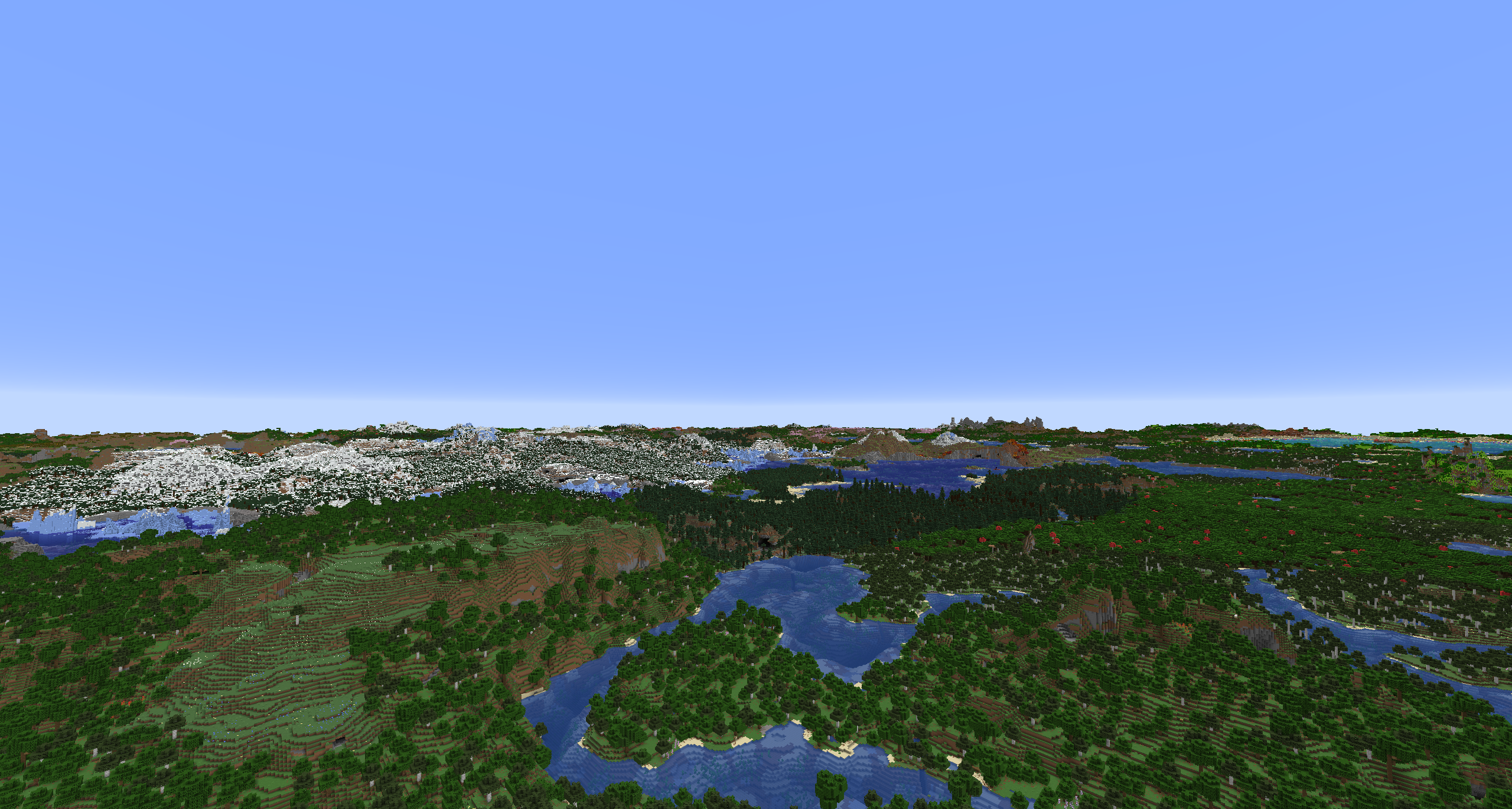
See terrain far beyond your render distance. Eminus keeps a low-detail (LOD) copy of the chunks you have seen and draws it past the edge of the game's own terrain.
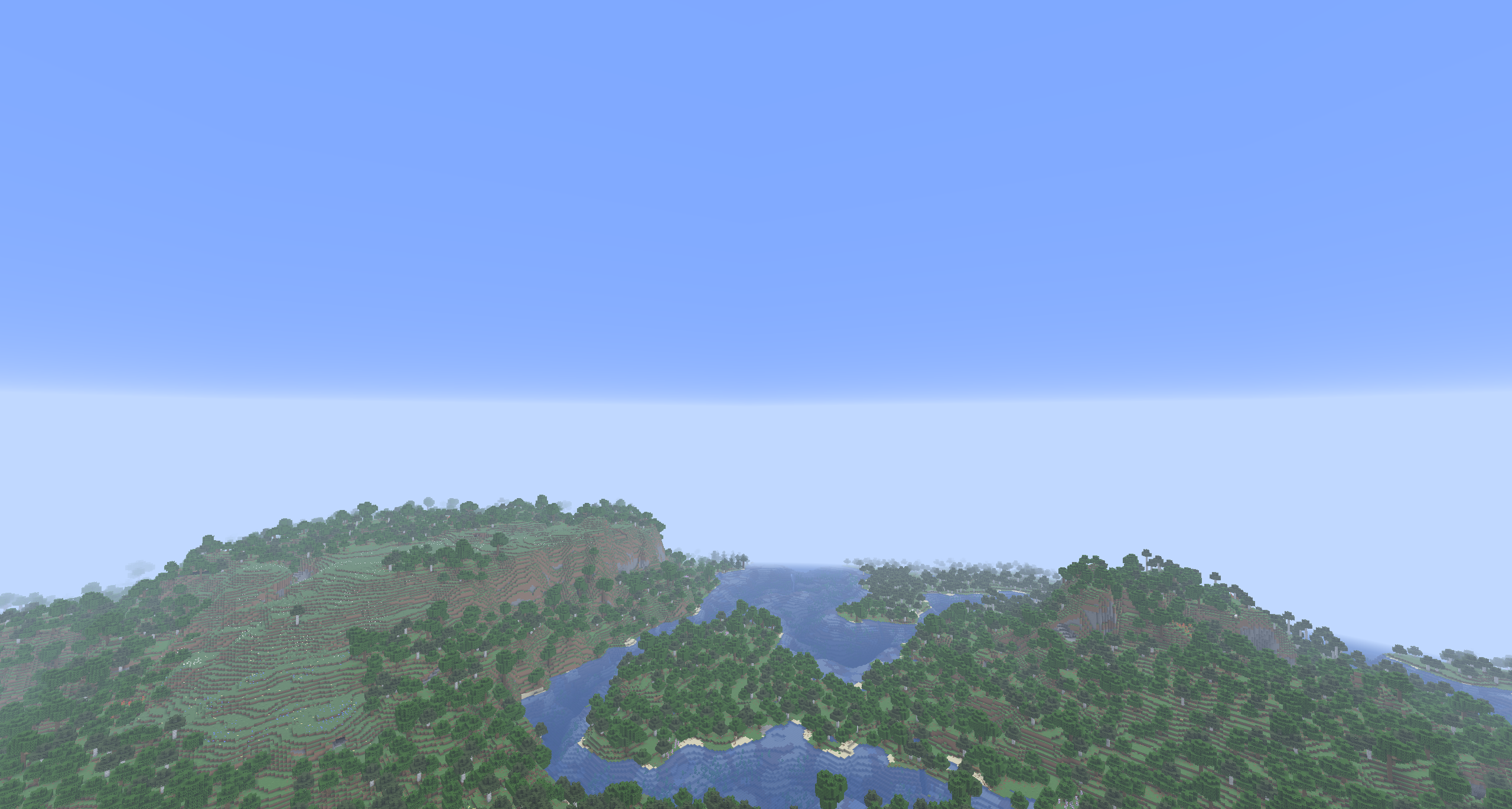
The same spot with the game's render distance alone, then with LOD at the default 512 chunks:
What you get
- Terrain out to 2048 chunks, 512 by default, with water, plants, light and biome colors.
- Works on any server. Nothing is installed on the server side.
Compatibility
NeoForge and Fabric. OpenGL, and Vulkan where the game offers it.
Sodium on both loaders. Mod Menu is optional on Fabric.
Under an Iris or Vitrail shader pack LOD shows in Eminus's own look. An Iris pack can draw LOD itself, with its own light, fog and shadows; no pack does this yet.
Settings
Config on NeoForge, Configure through Mod Menu on Fabric, or the Eminus page in Sodium's video settings. The main ones:
- LOD Quality: Low, Medium, High, Ultra or Custom.
- LOD Distance: 32 to 2048 chunks, 512 by default.
- Detail Distance: how far the finer detail of LOD reaches. Each step up doubles it and costs more video memory.
- Fog: fog over LOD, carried on from the game's own.
- Fade: LOD fades out over its last 512 blocks instead of ending in a hard line.
Every setting has a hint on the screen. The same values live in config/eminus.json.
Before you download
LOD appears only where you have already been. There is no import of existing worlds and no pregeneration.
Bug reports
Found something broken? Report it on the issue tracker.
See terrain far beyond your render distance. Eminus keeps a low-detail (LOD) copy of the chunks you have seen and draws it past the edge of the game's own terrain.
The same spot with the game's render distance alone, then with LOD at the default 512 chunks:
What you get
- Terrain out to 2048 chunks, 512 by default, with water, plants, light and biome colors.
- Works on any server. Nothing is installed on the server side.
Compatibility
NeoForge and Fabric. OpenGL, and Vulkan where the game offers it.
Sodium on both loaders. Mod Menu is optional on Fabric.
Under an Iris or Vitrail shader pack LOD shows in Eminus's own look. An Iris pack can draw LOD itself, with its own light, fog and shadows; no pack does this yet.
Settings
Config on NeoForge, Configure through Mod Menu on Fabric, or the Eminus page in Sodium's video settings. The main ones:
- LOD Quality: Low, Medium, High, Ultra or Custom.
- LOD Distance: 32 to 2048 chunks, 512 by default.
- Detail Distance: how far the finer detail of LOD reaches. Each step up doubles it and costs more video memory.
- Fog: fog over LOD, carried on from the game's own.
- Fade: LOD fades out over its last 512 blocks instead of ending in a hard line.
Every setting has a hint on the screen. The same values live in config/eminus.json.
Before you download
LOD appears only where you have already been. There is no import of existing worlds and no pregeneration.
Bug reports
Found something broken? Report it on the issue tracker.
Screenshots
Gallery
Versions
Files
Relations
Project Relations
More like this
Similar Mods
Suggestions use data such as tags, dependencies, dependents, descriptions, titles, and more to rank how much they overlap with this mod.
Stats
- Downloads
-
3k
 1k
 1k
- Used in
- 0 modpacks
- Followers
- 0
- In stacks
- 0
- Created
-
- Last synced
-
Nov 21, 2026 1:22 PM UTC
New file updates sync automatically.
When ModDex last fully re-synced this project from CurseForge or Modrinth. A new file release triggers a resync usually within minutes, and every project is also re-synced on a schedule. Edits that don't ship a file, such as a new description or screenshots, are checked every few hours and can appear before this date changes.
How syncing works
External Links

Stats
- Downloads
-
3k
1k
1k
- Used in
- 0 modpacks
- Followers
- 0
- In stacks
- 0
- Created
-
- Last synced
-
Nov 21, 2026 1:22 PM UTC
New file updates sync automatically.
When ModDex last fully re-synced this project from CurseForge or Modrinth. A new file release triggers a resync usually within minutes, and every project is also re-synced on a schedule. Edits that don't ship a file, such as a new description or screenshots, are checked every few hours and can appear before this date changes.
How syncing works