
Emote
No reviews yet
Server-side emotes rendered with your player skin
Fabric is a mod loader for versions 1.14+ of Minecraft, particularly popular for client side and optimization mods.
Community voices
Reviews
Click once to include, again to exclude, again to clear
No reviews yet. Be the first to review this project!
Get it on
Available Platforms
 Modrinth
Compatibility
Supported Environments
About
Project Details
For authors
Embed Badge
If you're the author of this project, you can embed a live badge anywhere that supports HTML or Markdown. It updates automatically whenever ratings change.
Use HTML for any page that supports it, or Markdown for README files and Markdown-based descriptions.
Identifiers
Platform IDs
About
Description
Emote
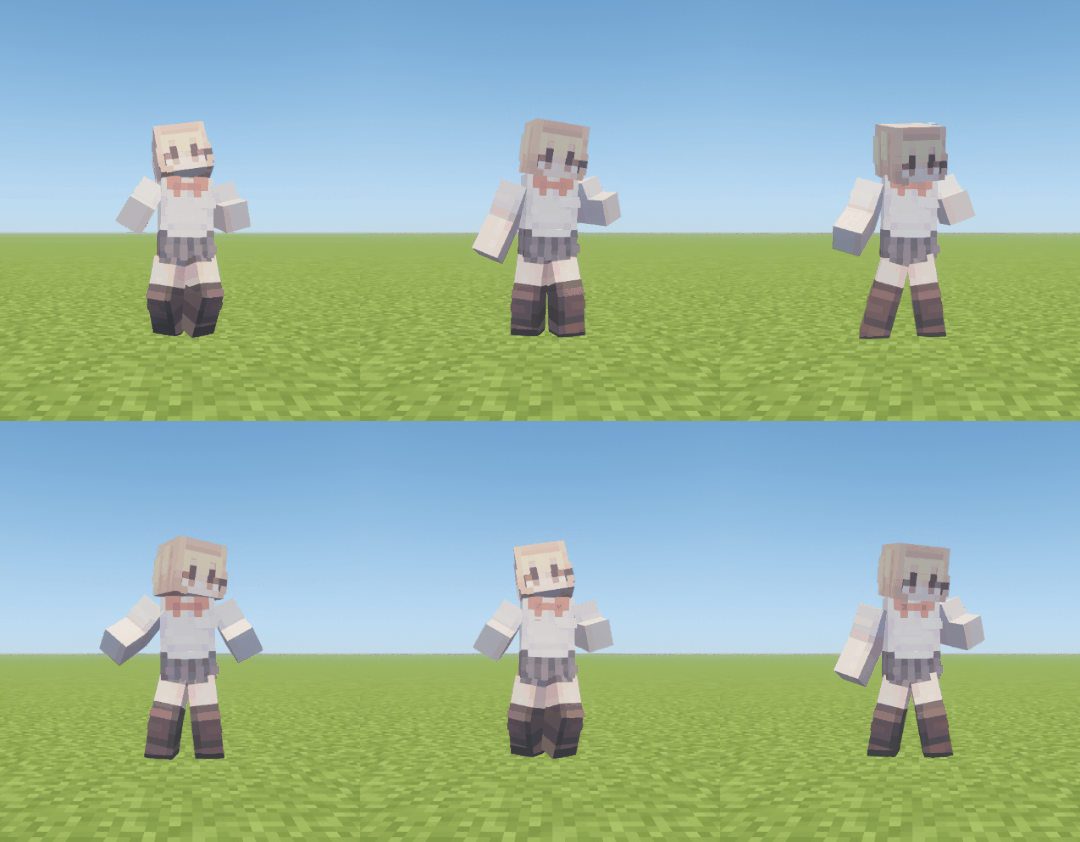
Special thanks to Popular Vibe for allowing me to use their animation!
Emote is a server-side emote player that uses Minecraft display entities to play animations created with BD Engine and Animated Java.
The mod can be installed on the server only. Installing it on the client also adds an emote wheel and automatic third-person view while an emote is playing.
Compatible emotes can use the playing player’s skin. The web converter exports BD Engine projects, BD Engine datapacks, and Animated Java blueprints as Emote animation JSON files.


Want to share your emotes? Join the Discord server and share them with the community!
User Commands
| Command | Description |
|---|---|
/emote |
Opens the emote menu. |
/emote stop |
Stops the currently playing emote. |
V |
Opens the client-side emote wheel. The key can be changed in Minecraft’s controls. |
Admin Commands
| Command | Description |
|---|---|
/emote list |
Lists loaded emotes and their source information. |
/emote reload |
Reloads configuration and animation JSON files. |
/emote enable <id> |
Enables an emote and reloads the emote list. |
/emote disable <id> |
Disables an emote and stops its active instances. |
/emote stop-all |
Stops every active emote. |
/emote load-test <count> |
Runs an emote load test and reports server performance. |
Server Configuration
The following files and directories are created in config/emote when the server starts for the first time:
config/emote/
├── config.json
├── emotes.json
└── animations/
config.json
{
  "schema_version": 1,
  "menu_page_size": 6,
  "mineskin_api_key": "",
  "mineskin_poll_interval_seconds": 3,
  "mineskin_cache_retention_days": 30,
  "mineskin_cache_max_mib": 256
}
| Setting | Description |
|---|---|
menu_page_size |
Number of emotes displayed on each menu page. |
mineskin_api_key |
MineSkin API key used to apply player skins to emotes. |
mineskin_poll_interval_seconds |
Interval between MineSkin job checks. Must be between 1 and 60 seconds. |
mineskin_cache_retention_days |
Removes MineSkin cache files unused for this many days. Defaults to 30. |
mineskin_cache_max_mib |
Maximum MineSkin disk cache size before the oldest files are removed. Defaults to 256. |
Player Skin Support
To apply the playing player’s skin to compatible emotes, set mineskin_api_key in config/emote/config.json to an API key from MineSkin.
Skin parts and their order can be assigned in the web converter. If no API key is configured or MineSkin is unavailable, the textures stored in the animation JSON are used instead.
emotes.json
Controls emote availability and play permissions.
{
  "disabled": [
    "example:disabled"
  ],
  "permissions": [
    {
      "permission": "emote.vip",
      "emotes": [
        "example:dance",
        "example:cry"
      ],
      "idle": {
        "delay_seconds": 600,
        "emote": [
          "example:dance",
          "example:cry"
        ]
      }
    },
    {
      "permission": "emote.default",
      "emotes": [
        "example:hello",
        "example:yes",
        "example:no"
      ]
    },
    {
      "permission": "emote.admin",
      "emotes": [
        "*"
      ]
    }
  ]
}
disabledcontains the exact IDs of emotes that should not be loaded.permissionspreserves the listed order, which determines idle emote selection.permissionis the permission node for the entry.emote.defaultis granted to every player by default.emotescontains the emotes granted by the permission.idleis optional. The first matching permission entry withidleplays a randomly selectedemoteafterdelay_secondsof inactivity, then repeats at the same interval while the player remains idle. A new candidate is selected after each successful playback without immediately repeating the previous emote when alternatives are available.*grants access to every enabled emote.
Run /emote reload after editing the file manually.
Animation Files
Put .json files exported by the converter in config/emote/animations:
config/emote/animations/
├── hello.json
├── dance.json
└── another-emote.json
The file name is only used for storage. The root id field is the identifier used by commands, permissions, enable/disable settings, and the UI.
See the animation format and reference JSON for details.
Invalid files are skipped independently. If multiple files declare the same id, every file sharing that ID is rejected.
To protect server tick time when many players use emotes together, animations are limited to 8 MiB, 32 total nodes, 24 display nodes, 10 minutes, an average of 12 transforms and 4 visibility changes per tick, and 16 commands at one timeline boundary. These limits also apply to runtime API registrations.
Mod API
Emote provides a server-side API under io.github.hanhy06.emote.api.
Access it through EmoteApi.getInstance().
The API supports playback control, runtime emote registration, state queries, cancellable play listeners, and playback lifecycle listeners.
API mutations must run on the server thread. Runtime registrations survive /emote reload and are automatically removed when the server stops.
Troubleshooting
An emote does not appear
Run /emote reload and check the server log.
An emote may be skipped when:
- its animation JSON is invalid;
- its Minecraft version does not match the server;
- its exact ID is listed in
disabledinemotes.json; or - another file declares the same ID.
An emote cannot be played
Check that:
- the emote is granted in
emotes.json; - the player has the required permission; and
- the exact
namespace:pathID is being used.
The player’s skin is not applied
Confirm that mineskin_api_key is configured and check the server log.
If MineSkin is unavailable, the textures stored in the animation JSON are used instead.
Configuration changes are ignored
Check that the JSON syntax is valid, then run /emote reload.
Invalid configuration is rejected and the previously loaded configuration remains active.
License
Apache License 2.0
Screenshots
Gallery
-
Thank you, Popular Vibe!
-
 hello
hello
Versions
Files
Relations
Project Relations
More like this
Similar Mods
Suggestions use data such as tags, dependencies, dependents, descriptions, titles, and more to rank how much they overlap with this mod.
On ModDex
Community snapshot
By the numbers
Statistics

Want to reach Minecraft players?
We're looking for a server hosting partner to feature here and other parts of the site. Interested? Send us a message!
Get in touchGet it on
Available Platforms
On ModDex
Community snapshot
By the numbers