
Enchant Plus
No reviews yet
Introduces over 100+ custom enchantments into the game.
Data Packs were introduced to vanilla Minecraft in version 1.13 and allow the server to modify data about the game, or run commands. Data Packs are compatible with all mod loaders.
Forge is a popular mod loader for versions 1.1+ of Minecraft.
Neoforge is a fork of the Minecraft Forge available for versions 1.20.1+ of Minecraft. Many Forge mods are compatible with Neoforge and vice versa.
Fabric is a mod loader for versions 1.14+ of Minecraft, particularly popular for client side and optimization mods.
Quilt is a fork of the Fabric mod loader. Many Fabric mods are compatible with Quilt and vice versa.
Community voices
Reviews
Click once to include, again to exclude, again to clear
No reviews yet. Be the first to review this project!
Get it on
Available Platforms
 Modrinth
Compatibility
Supported Environments
About
Project Details
For authors
Embed Badge
If you're the author of this project, you can embed a live badge anywhere that supports HTML or Markdown. It updates automatically whenever ratings change.
Use HTML for any page that supports it, or Markdown for README files and Markdown-based descriptions.
Identifiers
Platform IDs
Resources
External Links
About
Description



Enchant Plus elevates Minecraft’s enchantment system by extending vanilla mechanics with higher-tier upgrades without sacrificing balance or immersion. Designed to feel like a natural progression of the base game, it empowers players to push their gear beyond traditional limits while maintaining a fair and rewarding experience.
- Advanced Enchantment Tiers – Go beyond vanilla caps with enhanced levels like Speed III and Haste III, bringing noticeable improvements to movement, mining, and combat performance.
- Vanilla-Accurate Balance – Each enchantment is carefully tuned to preserve progression and avoid power creep, ensuring a consistent and fair gameplay loop.
- Native System Integration - Built to work flawlessly with Minecraft’s default enchanting, commands, and loot systems, no hacks, no conflicts.
- Versatile Across Playstyles – Whether in survival, creative builds, RNG-based systems, or adventure maps, Enchant Plus adds depth, efficiency, and replay value to every mode.


All Enchant Plus commands use the ep. prefix to ensure compatibility with other datapacks and avoid conflicts.
/trigger ep.buy_random_book1: Buy 1 random enchanted book./trigger ep.buy_random_book16: Buy 16 random enchanted books./trigger ep.buy_random_book64: Buy 64 random enchanted books./trigger ep.buy_random_book256: Buy 256 random enchanted books./trigger ep.buy_random_book_menu: Open the enchant book shop menu./trigger ep.help: To get helpfull links!/trigger ep.fix_repair_cost: Fix hand item repair cost (anvil cost reset)./trigger ep.mute_datapack_load_message: Disable datapack load messages./trigger ep.unmute_datapack_load_message: Enable datapack load messages.


Why doesn't it support versions below 1.21.X?
Because Minecraft versions below 1.21.X have limited support for custom enchantments, making it difficult to implement them reliably.Why am I getting an experimental features warning?
Because custom enchantments are still marked as experimental features in Minecraft. This warning is expected and safe to ignore.Can I use Enchant Plus in multiplayer?
Yes, Enchant Plus works in multiplayer. Just make sure the datapack or mod is installed on the server.How to know what each enchantment does?
You can visit the wiki page or download the Enchantment Description resource pack! https://modrinth.com/resourcepack/enchant-descriptionHow do I buy random enchanted books?
Use/trigger ep.buy_random_book_menu and select the amount you want from the menu.
How much does each book cost?
Each book costs approximately 100 XP levels.Is Enchant Plus compatible with other datapacks?
Yes, it is designed to work alongside most datapacks. However, conflicts may occur if another datapack modifies enchantments or uses the same namespaces.Does this datapack affect vanilla gameplay balance?
Enchant Plus is carefully balanced to feel like a natural extension of vanilla gameplay, providing stronger enchantments without making the game overpowered.Does Enchant Plus impact performance?
The datapack is optimized for minimal performance impact. It uses efficient functions and avoids unnecessary loops. However, heavy use of multiple datapacks or large-scale systems may slightly affect performance depending on your setup.Is it safe to remove the datapack from an existing world?
Removing the datapack may leave behind unused scoreboards, tags, or items with custom data. It is recommended to clean up or avoid removing it mid-playthrough unless necessary.Can this datapack break with future Minecraft updates?
Yes. Since it relies on experimental features, future updates may change how custom enchantments work, which could require updates to the datapack. However, older Minecraft versions will continue to work with the existing release.

Datapack (Singleplayer / Server)
- Download the datapack.
- Place it in your world's datapacks folder.
- Exit and rejoin the world. Search on YouTube ↗
- Tip: Use
/datapack listto verify that it is installed correctly.

Mod Version (Client / Server)
- Install the mod file into your
modsfolder. - Launch the game or server with a compatible mod loader.
- No additional setup required. Search on YouTube ↗
- Tip: It will appear in the mod menu if installed correctly.


Looking for a better, cleaner Minecraft launcher?
Check out Cubi Launcher a modern, feature-rich launcher with a polished UI, and it's completely free to use. Download Now↗

Screenshots
Gallery
-
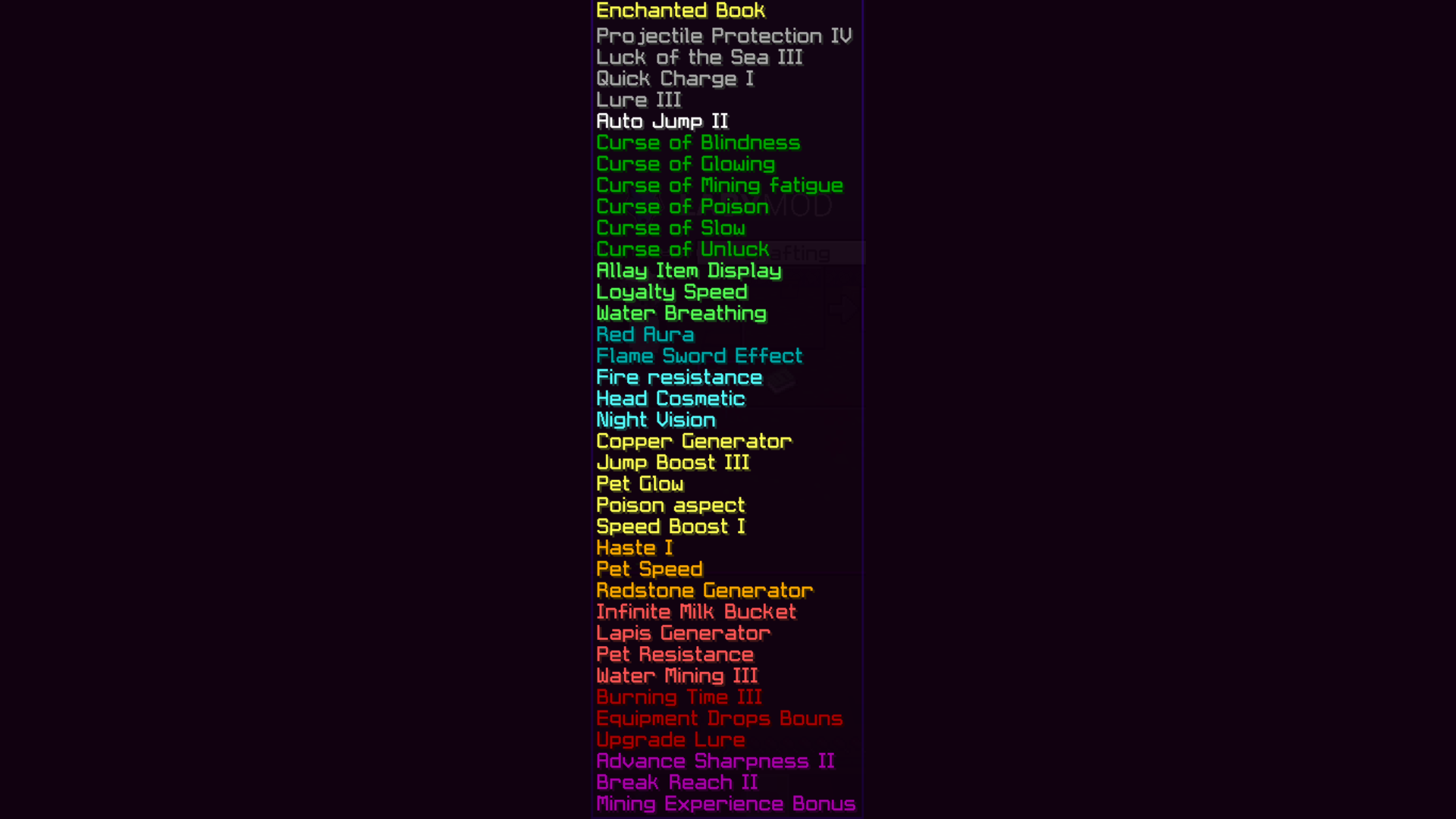 Enchantment List Order Preview of enchant order with each groups
 -
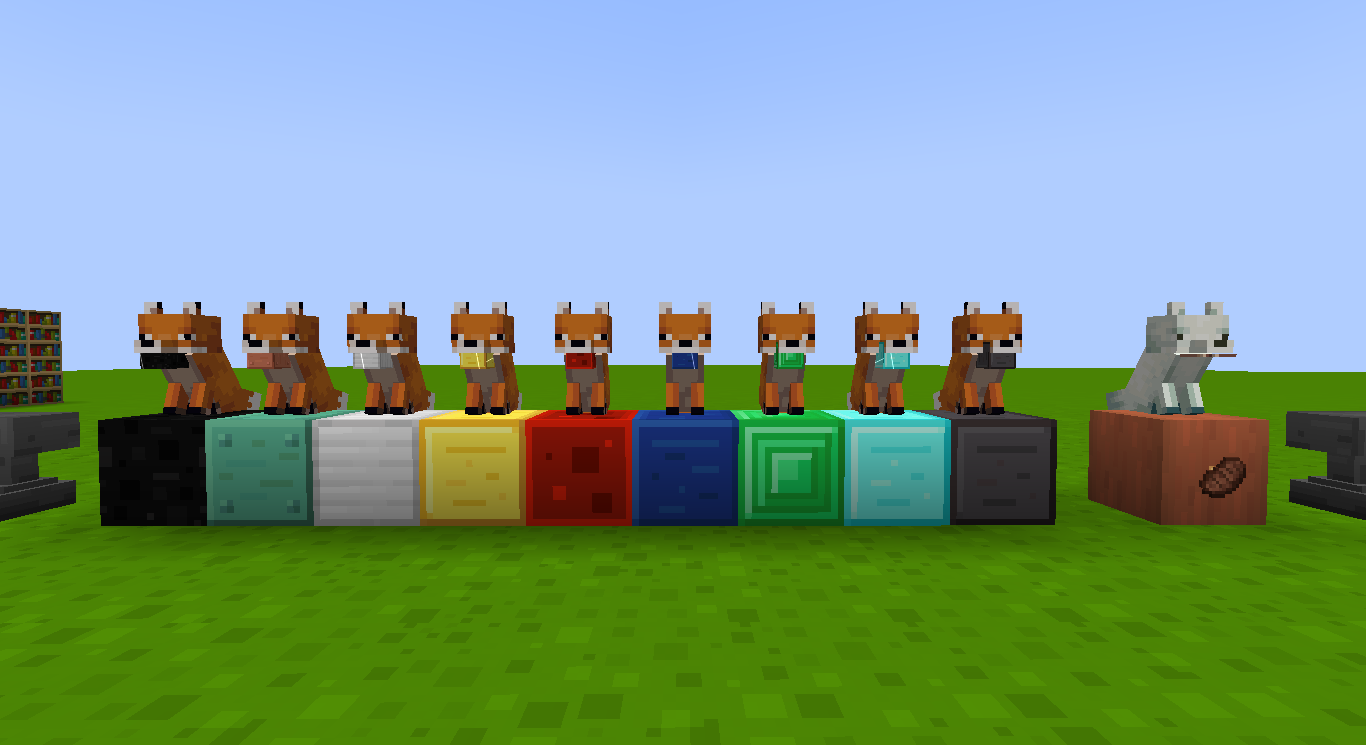 Item generator A enchant that let to summon fox and it will work as item generator.
 -
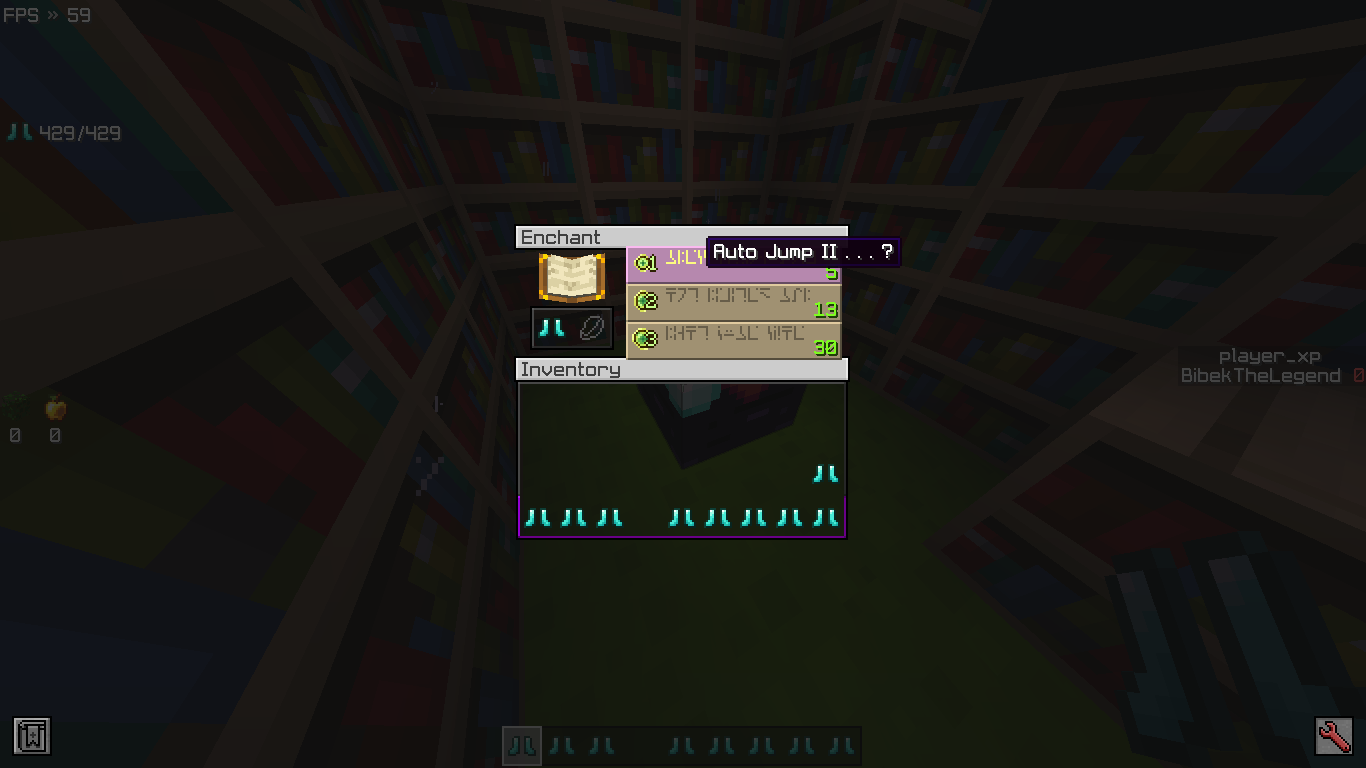 Custom Enchant You can get custom enchant from enchanting table as well.
 -
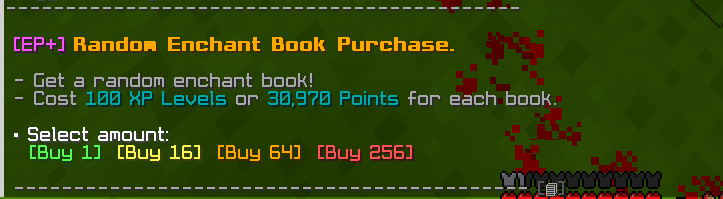 Buy Random enchant book. By Click [Buy 1] You can get a random enchant books.. To Open Shop use command on chat `/trigger ep.buy_random_book`
 -
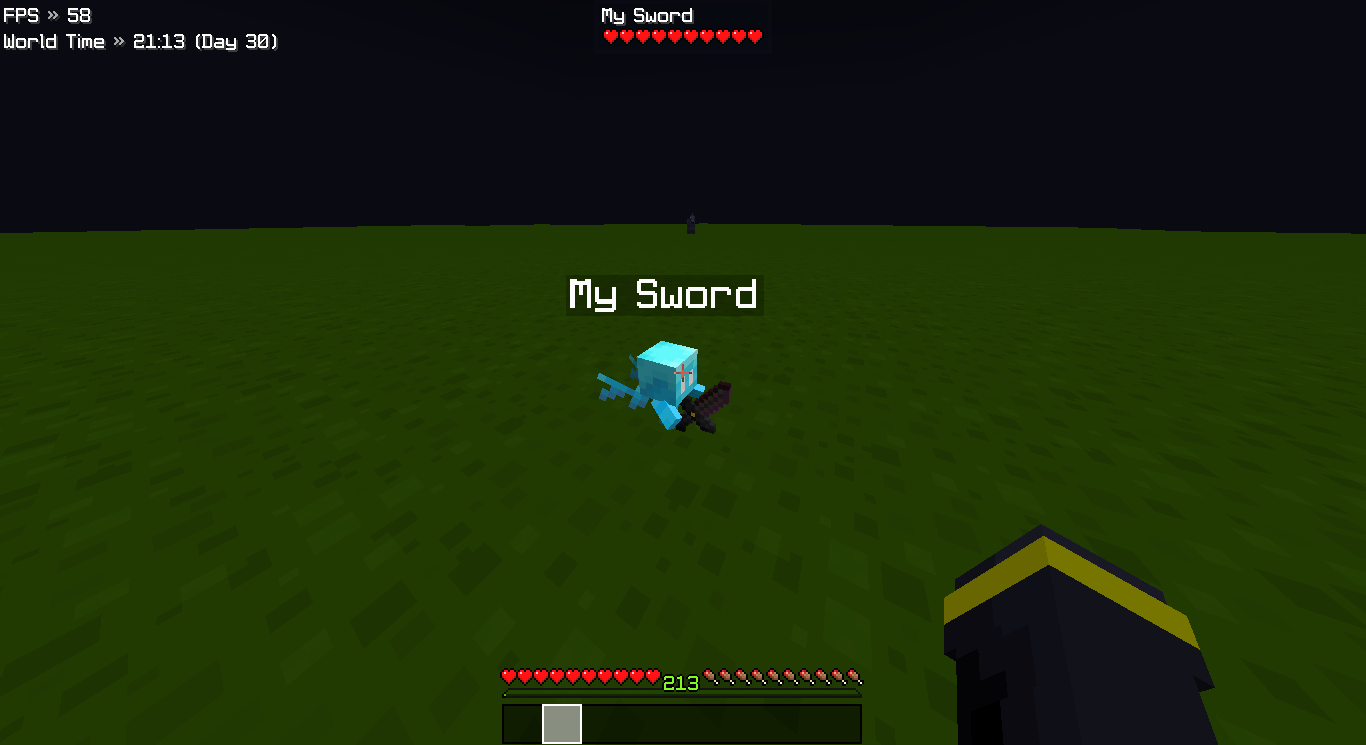 Allay item display Allow player to use allay like item display.
 -
 Enchant plus Cover page
Versions
Files
Relations
Project Relations
More like this
Similar Mods
Suggestions use data such as tags, dependencies, dependents, descriptions, titles, and more to rank how much they overlap with this mod.
On ModDex
Community snapshot
By the numbers
Statistics

Want to reach Minecraft players?
We're looking for a server hosting partner to feature here and other parts of the site. Interested? Send us a message!
Get in touchGet it on
Available Platforms
On ModDex
Community snapshot
By the numbers
Statistics
Resources