Enchantips
No reviews yet
Provides utilities for viewing things related to enchantments.
Fabric is a mod loader for versions 1.14+ of Minecraft, particularly popular for client side and optimization mods.
Community voices
Reviews
Click once to include, again to exclude, again to clear
No reviews yet. Be the first to review this project!
Get it on
Available Platforms
 Modrinth
Compatibility
Supported Environments
About
Project Details
For authors
Embed Badge
If you're the author of this project, you can embed a live badge anywhere that supports HTML or Markdown. It updates automatically whenever ratings change.
Use HTML for any page that supports it, or Markdown for README files and Markdown-based descriptions.
Identifiers
Platform IDs
About
Description
Enchantips
A mod that enhances tooltips related to enchanting or enchantments.
You will need Fabric API.
For in-game configuration, you will need Mod Menu and YetAnotherConfigLib.
Features
Repair Cost: any item that was worked in an anvil has an added penalty for future operations, this can be made visible.
Enchantability: each tool has an inherent value that determines how well it responds to getting enchanted; this can be made visible.
Enchantment Anvil Cost: This is a per-enchantment value that indicates how much it costs to add via an anvil; this can be made visible.
Enchantment Targets: The set of items that the enchantment can go on, either through an enchanting table or through an anvil. This can be made visible as a series of icons next to the enchantment name. By default, only items which are applicable to vanilla survival are listed, but more may be added via resource packs.
Enchantment Tags: The set of tags an enchantment is a member of. This can be made visible as a series of icons next to the enchantment name. By default, only tags that are applicable to vanilla survival are listed (curse, tradeable, etc.) but more may be added via resource packs.
Enchanting Power: when enchanting an item, the game modifies the given level offer (e.g. level 30 enchantment) and uses that modified value to determine which enchantments you get. Enchantips gives a range of possible values that this value could be and displays it.
Anvil Optimizer: Sometimes, swapping the two input items in an anvil reduces the cost of the operation without influencing the output enchantments. Enchantips adds an indicator that displays when an operation could be optimized like this and also a button that swaps the items for you with one click. Note that using the button could flag anticheats on servers.
Enchantment Sorting: Enchantips sorts enchantments in item tooltips.
Item Highlights: Enchantips highlights slots with enchanted items in them.
Enchantment Info Screen: Press a configurable keybind to view every enchantment and some of its internal values.
Item Highlights
Enchantips gives the option to highlight enchanted items based on the enchantments they have. Highlighting a slot with multiple enchantments is supported.
By default, every normal (non-treasure non-curse) enchantment has the same settings. You will need to configure colors manually to leverage this feature fully.
You can also configure the order in which enchantments are highlighted. As an example, you can set the mod to prioritize mending so mending will always be the leftmost highlight in the slot. This also influences enchantment tooltip sorting, so mending would also be the topmost enchantment in the item's tooltip.
Configuration
Nearly every feature is configurable, however not all features are enabled by default. Enchantments in item tooltips are always sorted, there is no way to disable this.
For per-enchantment configuration, you will need to enter a world to initialize the configuration. This is because enchantments are now defined per-world. On later game sessions, before entering a world, any previously saved per-enchantment configurations will have an Enchantips: Unknown title; this is also due to enchantments being defined per-world. There is no guarantee of enchantment names staying consistent since the server's/world's enchantment definition (which includes the name) may change any time.
Screenshots
Gallery
-
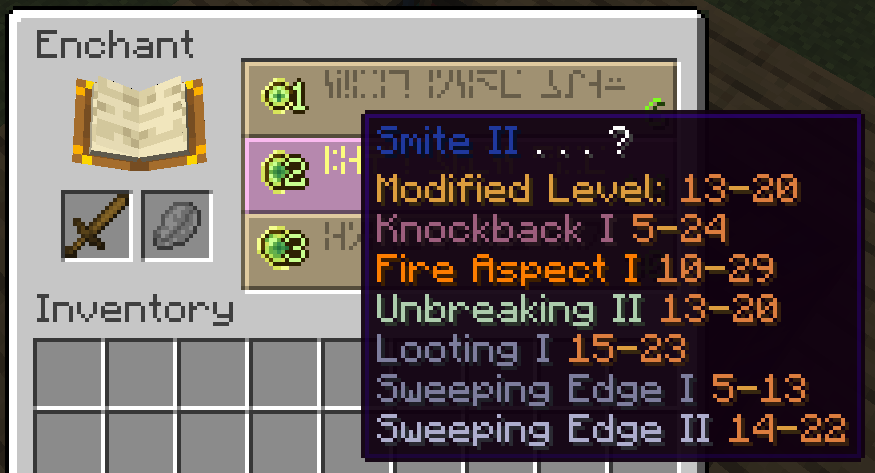 Enchantment table Enchantips estimates a modified level of 13-20 on a level 14 smite II offer
 -
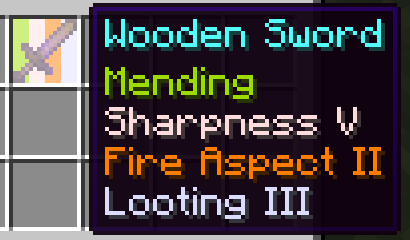 Enchantments tooltip Order of enchantments is configurable
 -
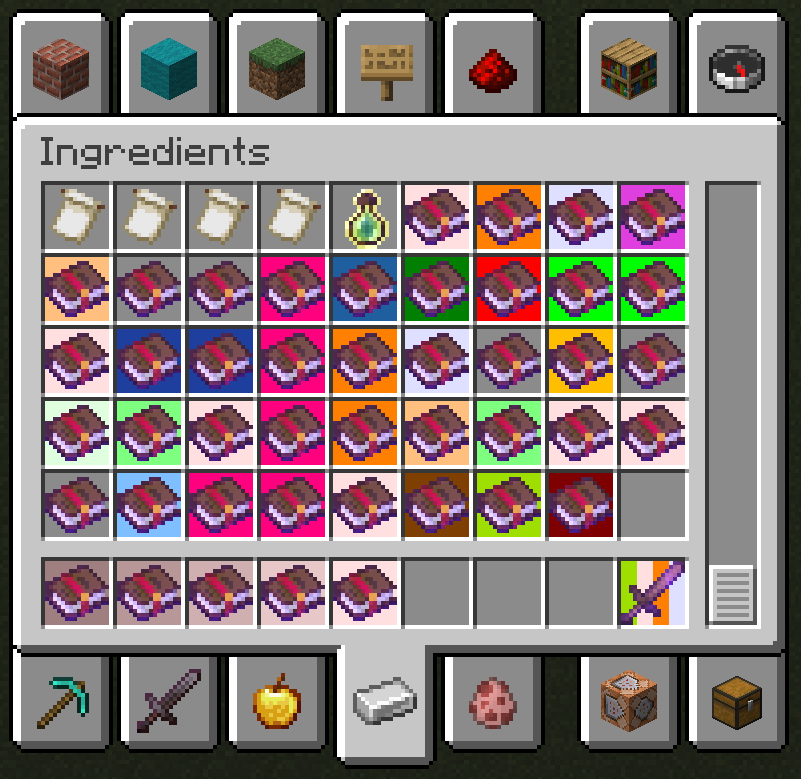 Enchantment highlights
 -
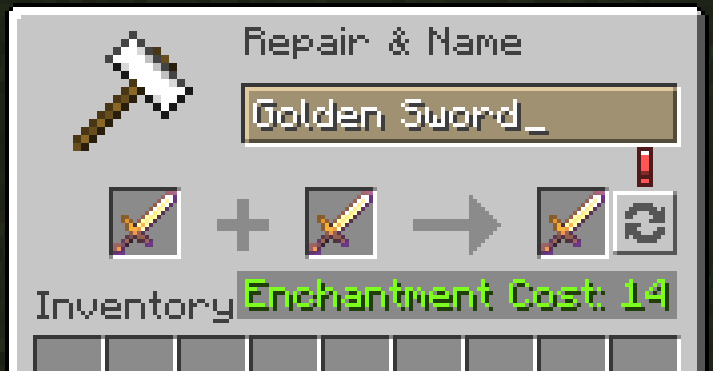 Anvil swap button
Versions
Files
Relations
Project Relations
More like this
Similar Mods
Suggestions use data such as tags, dependencies, dependents, descriptions, titles, and more to rank how much they overlap with this mod.
On ModDex
Community snapshot
By the numbers
Statistics

Want to reach Minecraft players?
We're looking for a server hosting partner to feature here and other parts of the site. Interested? Send us a message!
Get in touchGet it on
Available Platforms
On ModDex
Community snapshot
By the numbers