Community listing page, reviews may not be monitored by the author.
Enchantment Library Standalone


No reviews yet
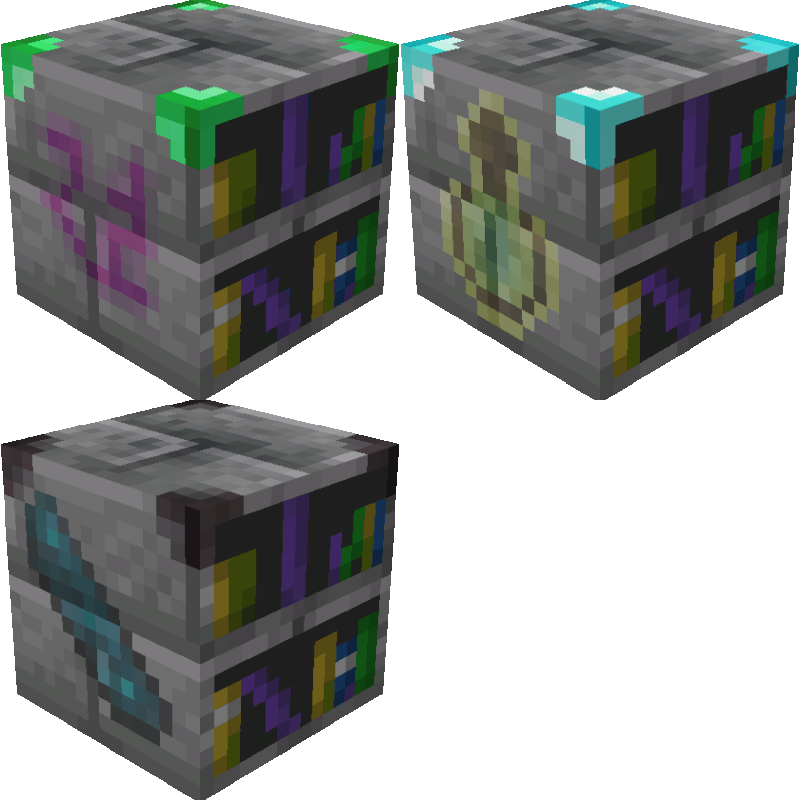
This mod is a standalone version of the Enchantment Library block from the Apothic Enchanting mod, with additional features.

Community voices
Reviews
No reviews yet. Be the first to review this project!
Get it on
Available Platforms
Compatibility
Supported Environments
Must be installed on both the client and the server.
About
Project Details
For authors
Embed Badge
If you're the author of this project, you can embed a live badge anywhere that supports HTML or Markdown. It updates automatically whenever ratings change.
Use HTML for any page that supports it, or Markdown for README files and Markdown-based descriptions.
Identifiers
Platform IDs
About
Description
Enchantment Library Standalone


This mod is a standalone, feature-expanded version of the Enchantment Library block originally from the Apothic Enchanting mod by Shadows_of_Fire.
Mechanics
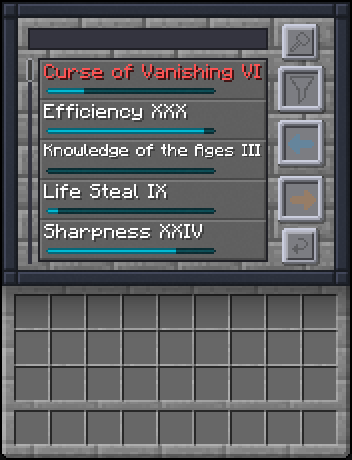
The Enchantment Library is your ultimate long-term storage solution for magic. Say goodbye to chests overflowing with mismatched enchanted books. The Library converts enchantments into raw "points" stored directly within the block, allowing you to seamlessly reconstruct exactly the book you need, at the exact level you want.
Adding Enchantments
- Insertion: Simply place any Enchanted Book into the input slot. The library will consume the book, break down the enchantments into raw mathematical points, and add them to your pool.
- The Disenchant Mechanic: Place any enchanted item in the
FILTERslot and click the Disenchant Button. This destroys the item but adds its enchantments directly to the library.
Extracting & Refunding
You can extract stored enchantments onto an output book or refund them back into the library using the following unified controls:
Left-Click: Extracts exactly 1 level of the enchantment.Shift + Left-Click: Extracts the maximum possible level of the enchantment based on your available points and library Tier.Ctrl + Left-Click: Refunds 1 level of the enchantment from your output book back into the library.Ctrl + Shift + Left-Click: Refunds the entire enchantment from your output book back into the library.- Return Button: Instantly refunds all enchantments present on the output book back into the library's storage.
The Dynamic XP Cost System
Extracting pure magic from the library isn't completely free; it requires player Experience Points.
To maintain late-game balance, the required XP amount scales quadratically based on the enchantment level you are actively extracting:
XpCost = baseMultiplier * (enchlevel * enchlevel)
- Level 1 cost:
40 XP Points(~4 Levels) - Level 10 cost:
400 XP Points(~17 Levels) - Level 30 cost:
36,000 XP Points(~106 Levels)
Refunds: If you refund a book back into the library using Ctrl, the exact XP cost originally required for those enchantments is refunded directly back to you. No lost XP.
Advanced Tooltips
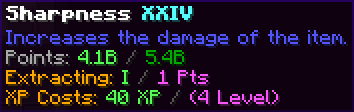
Hovering over any stored enchantment in the library reveals a detailed tooltip that gives you useful information at a glance.
What you can see:
- Max Learned Level: The highest level of this enchantment the library has currently recorded.
- Description: The explanation of the enchantment (Requires the Enchantment Descriptions mod by DarkhaxDev).
- Stored vs. Max Points: Your current magical point bank versus the Tier's cap.
- Resulting Level: What level the book will actually have if you follow through with the current click interaction.
- Point & XP Cost: The exact transaction costs.
Library Tiers & Capacities
The Enchantment Library operates on a three-tier system. Higher tiers are significantly harder to craft but vastly expand both your storage capacity and the maximum level of enchantment you are allowed to reconstruct.
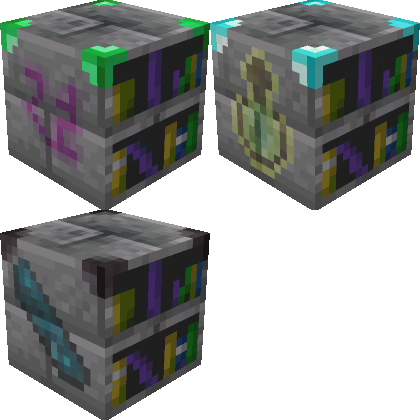
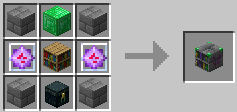
Tier 1: Default Max Level V (5)
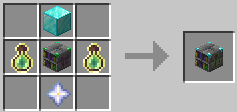
Tier 2: Default Max Level X (10)
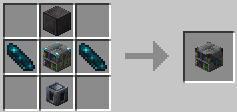
Tier 3: Default Max Level XXX (30)
Configuration Options
The Enchantment Library Standalone is quite customizable especially for modpack creators. You can edit these values in the config file or via UI using a mod like Configured by MrCrayfish.
| Setting | Default | What It Does (The Why) |
|---|---|---|
| Require Xp For Extraction | true |
Toggles the entire Experience Cost mechanic. |
| Base Xp Multiplier | 40 |
The core multiplier used in the quadratic XP cost formula (baseMultiplier * level^2). Lower this to make high-level extractions cheaper. |
| Enable Disenchant Button | true |
Toggles the functionality of the GUI Disenchant feature. |
| Keep Inventory | true |
If true, breaking the block retains all stored enchantment points inside the dropped item's data components. |
| Require Silk Touch | false |
If true, you must use a Silk Touch tool to successfully trigger Keep Inventory. Otherwise, all stored enchantments are lost upon break. |
| Enchantment Blacklist | (Empty) | A list of enchantments (e.g., minecraft:mending) that the library will completely refuse to store. |
| Tier 1 Max Level | 5 |
The maximum enchantment level you can extract from a Tier 1 Library. |
| Tier 2 Max Level | 10 |
The maximum enchantment level you can extract from a Tier 2 Library. |
| Tier 3 Max Level | 30 |
The maximum enchantment level you can extract from a Tier 3 Library. |
| Tier 1 Max Points | 160 (10 max books) |
The maximum point capacity for a single enchantment type in Tier 1. |
| Tier 2 Max Points | 5,120 (10 max books) |
The maximum point capacity for a single enchantment type in Tier 2. |
| Tier 3 Max Points | 5,368,709,120 (10 max books) |
The maximum point capacity for a single enchantment type in Tier 3. |
Frequently Asked Questions (FAQ)
Q: Is Apothic Enchanting required to run this mod?
A: No. This is a standalone mod and does not require Apothic Enchanting or any other mods.
Q: Can I store modded enchantments?
A: Yes! Modded enchantments are fully supported unless blacklisted in the config.
Q: Does breaking the block destroy all my stored enchantments?
A: No. Unless Keep Inventory is disabled in the configs.
Q: Will the Disenchant button give me my original item back?
A: No. Disenchanting destroys the item in the process.
Modpacks
You are completely free to use this mod in any modpack. Enjoy!
Enchantment Library Standalone
This mod is a standalone, feature-expanded version of the Enchantment Library block originally from the Apothic Enchanting mod by Shadows_of_Fire.
Mechanics
The Enchantment Library is your ultimate long-term storage solution for magic. Say goodbye to chests overflowing with mismatched enchanted books. The Library converts enchantments into raw "points" stored directly within the block, allowing you to seamlessly reconstruct exactly the book you need, at the exact level you want.
Adding Enchantments
- Insertion: Simply place any Enchanted Book into the input slot. The library will consume the book, break down the enchantments into raw mathematical points, and add them to your pool.
- The Disenchant Mechanic: Place any enchanted item in the
FILTERslot and click the Disenchant Button. This destroys the item but adds its enchantments directly to the library.
Extracting & Refunding
You can extract stored enchantments onto an output book or refund them back into the library using the following unified controls:
Left-Click: Extracts exactly 1 level of the enchantment.Shift + Left-Click: Extracts the maximum possible level of the enchantment based on your available points and library Tier.Ctrl + Left-Click: Refunds 1 level of the enchantment from your output book back into the library.Ctrl + Shift + Left-Click: Refunds the entire enchantment from your output book back into the library.- Return Button: Instantly refunds all enchantments present on the output book back into the library's storage.
The Dynamic XP Cost System
Extracting pure magic from the library isn't completely free; it requires player Experience Points.
To maintain late-game balance, the required XP amount scales quadratically based on the enchantment level you are actively extracting:
XpCost = baseMultiplier * (enchlevel * enchlevel)
- Level 1 cost:
40 XP Points(~4 Levels) - Level 10 cost:
400 XP Points(~17 Levels) - Level 30 cost:
36,000 XP Points(~106 Levels)
Refunds: If you refund a book back into the library using Ctrl, the exact XP cost originally required for those enchantments is refunded directly back to you. No lost XP.
Advanced Tooltips
Hovering over any stored enchantment in the library reveals a detailed tooltip that gives you useful information at a glance.
What you can see:
- Max Learned Level: The highest level of this enchantment the library has currently recorded.
- Description: The explanation of the enchantment (Requires the Enchantment Descriptions mod by DarkhaxDev).
- Stored vs. Max Points: Your current magical point bank versus the Tier's cap.
- Resulting Level: What level the book will actually have if you follow through with the current click interaction.
- Point & XP Cost: The exact transaction costs.
Library Tiers & Capacities
The Enchantment Library operates on a three-tier system. Higher tiers are significantly harder to craft but vastly expand both your storage capacity and the maximum level of enchantment you are allowed to reconstruct.
Tier 1: Default Max Level V (5)
Tier 2: Default Max Level X (10)
Tier 3: Default Max Level XXX (30)
Configuration Options
The Enchantment Library Standalone is quite customizable especially for modpack creators. You can edit these values in the config file or via UI using a mod like Configured by MrCrayfish.
| Setting | Default | What It Does (The Why) |
|---|---|---|
| Require Xp For Extraction | true |
Toggles the entire Experience Cost mechanic. |
| Base Xp Multiplier | 40 |
The core multiplier used in the quadratic XP cost formula (baseMultiplier * level^2). Lower this to make high-level extractions cheaper. |
| Enable Disenchant Button | true |
Toggles the functionality of the GUI Disenchant feature. |
| Keep Inventory | true |
If true, breaking the block retains all stored enchantment points inside the dropped item's data components. |
| Require Silk Touch | false |
If true, you must use a Silk Touch tool to successfully trigger Keep Inventory. Otherwise, all stored enchantments are lost upon break. |
| Enchantment Blacklist | (Empty) | A list of enchantments (e.g., minecraft:mending) that the library will completely refuse to store. |
| Tier 1 Max Level | 5 |
The maximum enchantment level you can extract from a Tier 1 Library. |
| Tier 2 Max Level | 10 |
The maximum enchantment level you can extract from a Tier 2 Library. |
| Tier 3 Max Level | 30 |
The maximum enchantment level you can extract from a Tier 3 Library. |
| Tier 1 Max Points | 160 (10 max books) |
The maximum point capacity for a single enchantment type in Tier 1. |
| Tier 2 Max Points | 5,120 (10 max books) |
The maximum point capacity for a single enchantment type in Tier 2. |
| Tier 3 Max Points | 5,368,709,120 (10 max books) |
The maximum point capacity for a single enchantment type in Tier 3. |
Frequently Asked Questions (FAQ)
Q: Is Apothic Enchanting required to run this mod?
A: No. This is a standalone mod and does not require Apothic Enchanting or any other mods.
Q: Can I store modded enchantments?
A: Yes! Modded enchantments are fully supported unless blacklisted in the config.
Q: Does breaking the block destroy all my stored enchantments?
A: No. Unless Keep Inventory is disabled in the configs.
Q: Will the Disenchant button give me my original item back?
A: No. Disenchanting destroys the item in the process.
Modpacks
You are completely free to use this mod in any modpack. Enjoy!
Screenshots
Gallery
Versions
Files
Relations
Project Relations
More like this
Similar Mods
Suggestions use data such as tags, dependencies, dependents, descriptions, titles, and more to rank how much they overlap with this mod.
On ModDex
Community snapshot
By the numbers
Statistics
 (opens in a new tab)
Get it on
Available Platforms
On ModDex
Community snapshot
By the numbers