
Community listing page, reviews here may not be monitored by the author.
Enchantment Tooltip Cleaner

No reviews yet
Enchantment Tooltip Cleaner can remove enchantment lines and/or the gray description text beneath them.
Community voices
Reviews
No reviews yet. Be the first to review this project!
Get it on
Available Platforms
Compatibility
Supported Environments
Runs entirely on the client. Works on vanilla servers.
About
Project Details
For authors
Embed Badge
If you're the author of this project, you can embed a live badge anywhere that supports HTML or Markdown. It updates automatically whenever ratings change.
Use HTML for any page that supports it, or Markdown for README files and Markdown-based descriptions.
Identifiers
Platform IDs
About
Description
Enchantment Tooltip Cleaner

A modern, high-performance, and deeply configurable Minecraft tooltip cleaner and rule manager.
现代化、高纯净、零延迟的 Minecraft 物品提示净化与自定义管理模组。





English
Overview
Enchantment Tooltip Cleaner is a client-side enhancement mod designed to declutter and optimize Minecraft item tooltips. In modern modpacks, tooltips often become overwhelming due to excessive enchantment lines, lengthy description text, and cluttered attribute modifiers. This mod provides a flexible, millisecond-responsive rule engine to restore clean, tidy tooltips while maintaining 100% vanilla feel, zero click bleed, and zero performance overhead.
Key Features
-
Core Toggles:
- Hide or remove enchantment lines (e.g., Sharpness V, Protection IV) across vanilla and modded items.
- Hide enchantment descriptions (gray explanatory text added by description mods).
- Hide attribute modifier lines (e.g., Attack Damage, Attack Speed, Armor).
- Hide potion and food status effect duration tooltips.
-
In-Game Draggable Overlay:
- Press the shortcut key (
Hby default, configurable in Controls) inside inventory or container screens to summon a quick configuration panel. - Freely draggable with persistent position memory and a one-click reset button.
- Instantly hot-toggle core cleaning switches and custom filter categories.
- Press the shortcut key (
-
Slot Shielding & EMI Integration:
- Independent event boundary shields background inventory slots from cursor hover, click, drag, and item pickup penetration.
- Dynamically registers exclusion zones with EMI to prevent overlapping with side recipe item lists.
-
5-Tier Custom Rule Engine:
- Text - Contains: Hides lines containing specified keywords.
- Text - Exact: Hides lines matching the exact rule text.
- Text - Regex: Advanced regular expression matching with built-in ReDoS timeout protection (>25ms abort with 64-character sparse timer sampling, reducing clock syscall overhead by >98%).
- Key - Contains: Fuzzy-match underlying translation keys, unaffected by in-game language switching.
- Key - Exact: Exact-match specific translation keys.
-
Instant Whitelist Management:
- Hover over any item and press
Xto quickly add or remove it from the exclusion whitelist. - One-click mod-wide exclusion (by Mod ID namespace).
- Right-click the tag button on the overlay to rotate through and exclude item tags (e.g.,
#minecraft:swords).
- Hover over any item and press
-
Preset Library & Clipboard Sync:
- Ships with an out-of-the-box "Clean Experience" preset.
- Save current rules as standalone preset files; manage, rename, delete, and inspect preset files directly.
- Export full rule sets to system clipboard in standard JSON format, or import and merge shared configurations.
-
Full Internationalization (100% i18n):
- English (
en_us) - Simplified Chinese (
zh_cn) - Traditional Chinese (
zh_tw, tailored for Taiwanese regional idioms) - Zero hardcoded UI strings across all screens, buttons, badges, headers, and status toasts.
- English (
Controls & Keybindings
| Key / Action | Context | Description |
|---|---|---|
| H | Inventory / Container GUI | Toggle quick settings overlay (rebindable in Controls) |
| X | Inventory / Container GUI | Quickly add or remove hovered item to/from exclusion whitelist |
| Right-Click | Overlay Tag Button | Cycle through item tags for selective exclusion |
| Ctrl + Left-Click | Debug Mode | Click tooltip line to copy item ID and translation key to clipboard |
| ESC / Enter | Rule Manager Screen | Standard accessibility tree: Enter confirms/adds, ESC steps backward |
Project Architecture
This repository is organized as a Monorepo containing both supported mod loader versions with strict architectural parity:
Forge 1.20.1/: Implementation for Minecraft 1.20.1 Forge.NeoForge 1.21.1/: Implementation for Minecraft 1.21.1 NeoForge.
Building from Source
Requirements: JDK 17+ and Git.
- Forge 1.20.1:
cd "Forge 1.20.1" && ./gradlew build - NeoForge 1.21.1:
cd "NeoForge 1.21.1" && ./gradlew build
Artifacts are generated in each subproject's build/libs/ directory.
AI Transparency & Quality Assurance
This project was developed and refined with modern AI programming assistance (Google DeepMind Antigravity & GitHub Copilot). Development adhered to strict engineering standards:
- Dual-platform event handler and API symmetry audits.
- ReDoS defense with nano-sampling clock throttling against adversarial regex.
- Strict 271/271 key alignment across all three supported languages.
- Continuous verification with automated Gradle builds.
License
Licensed under the MIT License.
中文说明
概述
Enchantment Tooltip Cleaner 是一款专为优化 Minecraft 物品提示(Tooltip)视觉体验而设计的客户端增强模组。针对大型模组包中附魔条目冗长、附魔说明文字泛滥、属性修饰符刷屏等痛点,提供高自由度、毫秒级响应的定制化清理与规则引擎。
本模组采用纯事件拦截与紧凑缓存架构,在保证游戏原生手感的同时实现零性能损耗与零点击穿透。
核心特性
-
核心净化开关:
- 一键隐藏/移除原版及模组物品上的附魔条目(如锋利、保护等)。
- 隐藏附魔详细说明文字(由附魔描述模组添加的灰色说明文本)。
- 隐藏攻击伤害、攻击速度、护甲值等属性修饰符行。
- 隐藏药水、食物等赋予的状态效果与持续时间行。
-
游戏内可拖拽快捷悬浮窗:
- 在背包或任意容器界面按快捷键(默认
H,可在按键设置中自定义)呼出快捷设置悬浮窗。 - 面板支持自由拖拽与记忆定位,提供一键重置默认坐标功能。
- 支持即时开关各项核心清理功能与自定义过滤器。
- 在背包或任意容器界面按快捷键(默认
-
背景防护与防穿透隔离:
- 悬浮面板建立独立事件阻断层,彻底隔绝背景容器槽位的鼠标悬浮、点击、抓取与拖拽穿透。
- 动态对接 EMI 排除区域(Exclusion Zones),自动规避侧边栏物品列表,避免图层重叠或遮挡。
-
五重自定义规则过滤库:
- 文本 - 包含: 只要提示行包含指定的关键词即隐藏该行。
- 文本 - 精准: 整行文本与规则完全相同时隐藏。
- 文本 - 正则 (Regex): 使用正则表达式灵活匹配,内置 ReDoS 超时保护(>25ms 自动熔断阻断,采用 64 字符稀疏采样,将系统时钟开销降低 98% 以上)。
- 翻译键 - 包含: 根据底层语言 Key 模糊匹配隐藏,不受客户端语言切换影响。
- 翻译键 - 精准: 根据完整翻译 Key 精准匹配隐藏。
-
极速白名单管理:
- 悬停任意物品按快捷键(默认
X)一键将该物品加入/移出白名单,保留其完整原始提示。 - 悬浮窗支持一键将特定 Mod 命名空间加入白名单。
- 支持右键轮转切换并排除物品所属的标签(Tags,如
#minecraft:swords)。
- 悬停任意物品按快捷键(默认
-
预设库与剪贴板同步:
- 内置开箱即用的「纯净体验预设」。
- 支持将当前规则导出为独立预设文件,支持预设新建、重命名、删除与目录定位。
- 支持一键导出全量规则到系统剪贴板(标准 JSON 格式),或从剪贴板导入合并社区规则。
-
完整国际化多语言支持 (100% i18n):
- 英语 (
en_us) - 简体中文 (
zh_cn) - 正体中文 (
zh_tw,采用地道规范的台湾繁体用词) - 全界面(按钮、表头、状态提示、微反馈)零硬编码。
- 英语 (
快捷操作指引
| 按键 / 操作 | 触发场景 | 功能说明 |
|---|---|---|
| H | 背包 / 容器界面 | 开关快捷设置悬浮窗(可在控制设置中修改按键绑定) |
| X | 背包 / 容器界面 | 快速将当前悬停的物品加入或移出排除白名单 |
| 鼠标右键 | 悬浮窗标签按钮 | 在当前物品所属的多个 Tags 标签之间轮转切换 |
| Ctrl + 左键 | 调试模式 (Debug) | 点击物品提示快速复制其物品 ID 与翻译键名至剪贴板 |
| ESC / Enter | 规则管理全屏 | 遵循原版焦点交互树,按 Enter 快速添加/确认,按 ESC 逐层回退 |
项目架构
本项目采用 Monorepo 单仓库架构管理双平台版本,保持双端业务逻辑与资源文件严格对称:
Forge 1.20.1/: Minecraft 1.20.1 Forge 平台版本源码与构建。NeoForge 1.21.1/: Minecraft 1.21.1 NeoForge 平台版本源码与构建。
源码构建
构建环境要求:JDK 17+ 与 Git。
- Forge 1.20.1:
cd "Forge 1.20.1" && ./gradlew build - NeoForge 1.21.1:
cd "NeoForge 1.21.1" && ./gradlew build
编译生成的 Jar 文件位于对应子工程的 build/libs/ 目录中。
AI 辅助说明与透明度
本项目代码与架构重构是在现代 AI 编程助手(Google DeepMind Antigravity、GitHub Copilot)协同辅助下完成的。在开发流程中严格执行了:
- 双端接口与事件模型的对称性审计;
- 正则表达式 ReDoS 极端恶意输入的纳秒时钟性能熔断防护;
- 多语言本地化(包含繁体中文台湾习惯词映射)的 271/271 严格一致性比对;
- 每一行代码均经过人工与自动化构建流程编译验证。
开源许可
本项目基于 MIT License 开源。欢迎提交 Issue 与 Pull Request。
Screenshots
Gallery
-
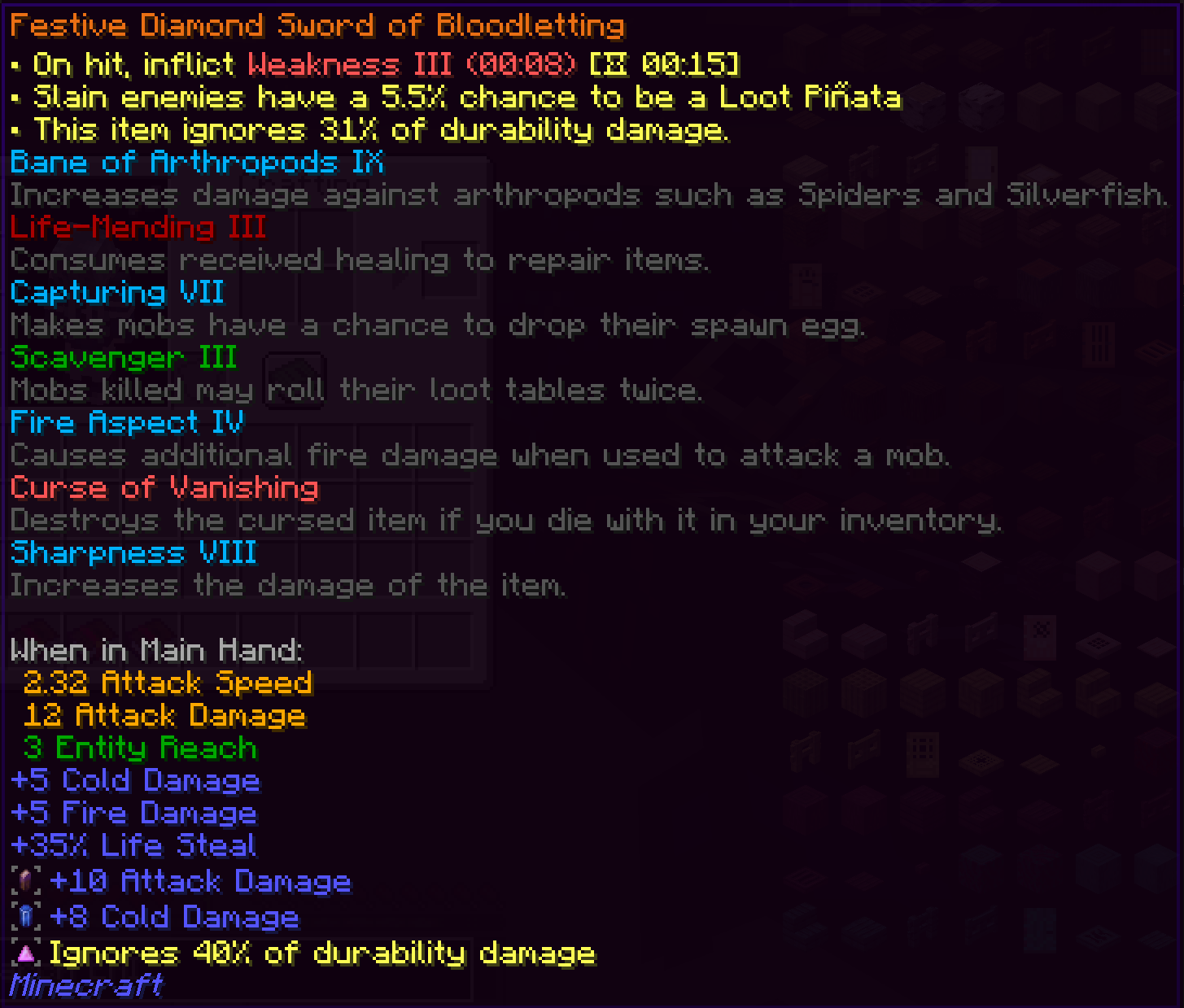 OFF Apotheosis
 -
 ON Apotheosis
 -
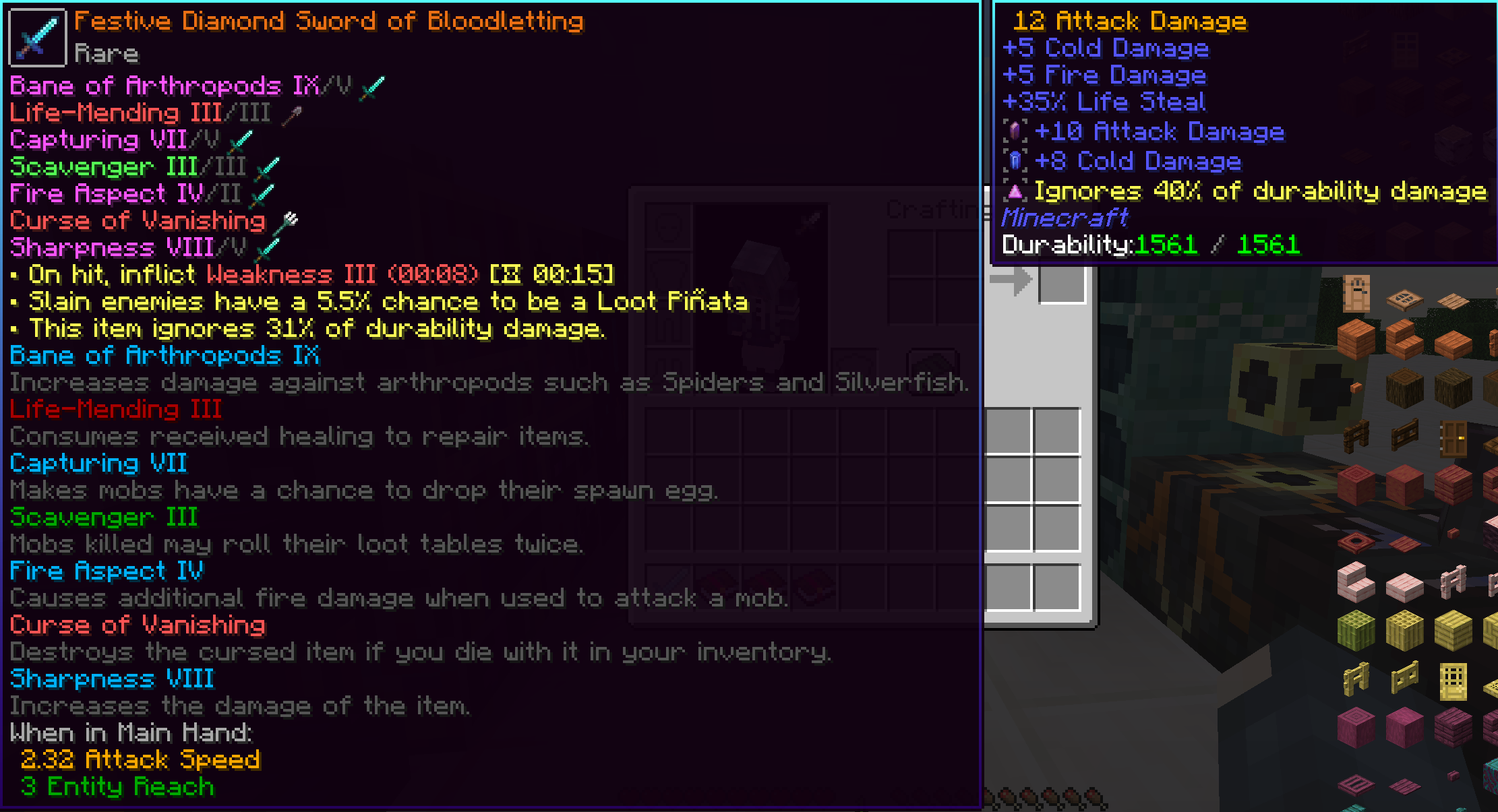 OFF - Apotheosis, Tooltips Reforged Apotheosis, Tooltips Reforged
 -
 ON - Apotheosis, Tooltips Reforged ON - Apotheosis, Tooltips Reforged
Versions
Files
Relations
Project Relations
More like this
Similar Mods
Suggestions use data such as tags, dependencies, dependents, descriptions, titles, and more to rank how much they overlap with this mod.
On ModDex
Community snapshot
By the numbers
Statistics

Want to reach Minecraft players?
We're looking for a server hosting partner to feature here and other parts of the site. Interested? Send us a message!
Get in touchGet it on
Available Platforms
On ModDex
Community snapshot
By the numbers