
Community listing page, reviews here may not be monitored by the author.
Enhance Buffs

No reviews yet
The Enhance Buff Mod gives naturally spawning mobs various functional enhancement modifiers to turn them into "Enhancers," and allows players to defeat these Enhancers to obtain such modifiers via the dropped items.

Community voices
Reviews
No reviews yet. Be the first to review this project!
Get it on
Available Platforms
About
Project Details
For authors
Embed Badge
If you're the author of this project, you can embed a live badge anywhere that supports HTML or Markdown. It updates automatically whenever ratings change.
Use HTML for any page that supports it, or Markdown for README files and Markdown-based descriptions.
Identifiers
Platform IDs
Resources
External Links
About
Description
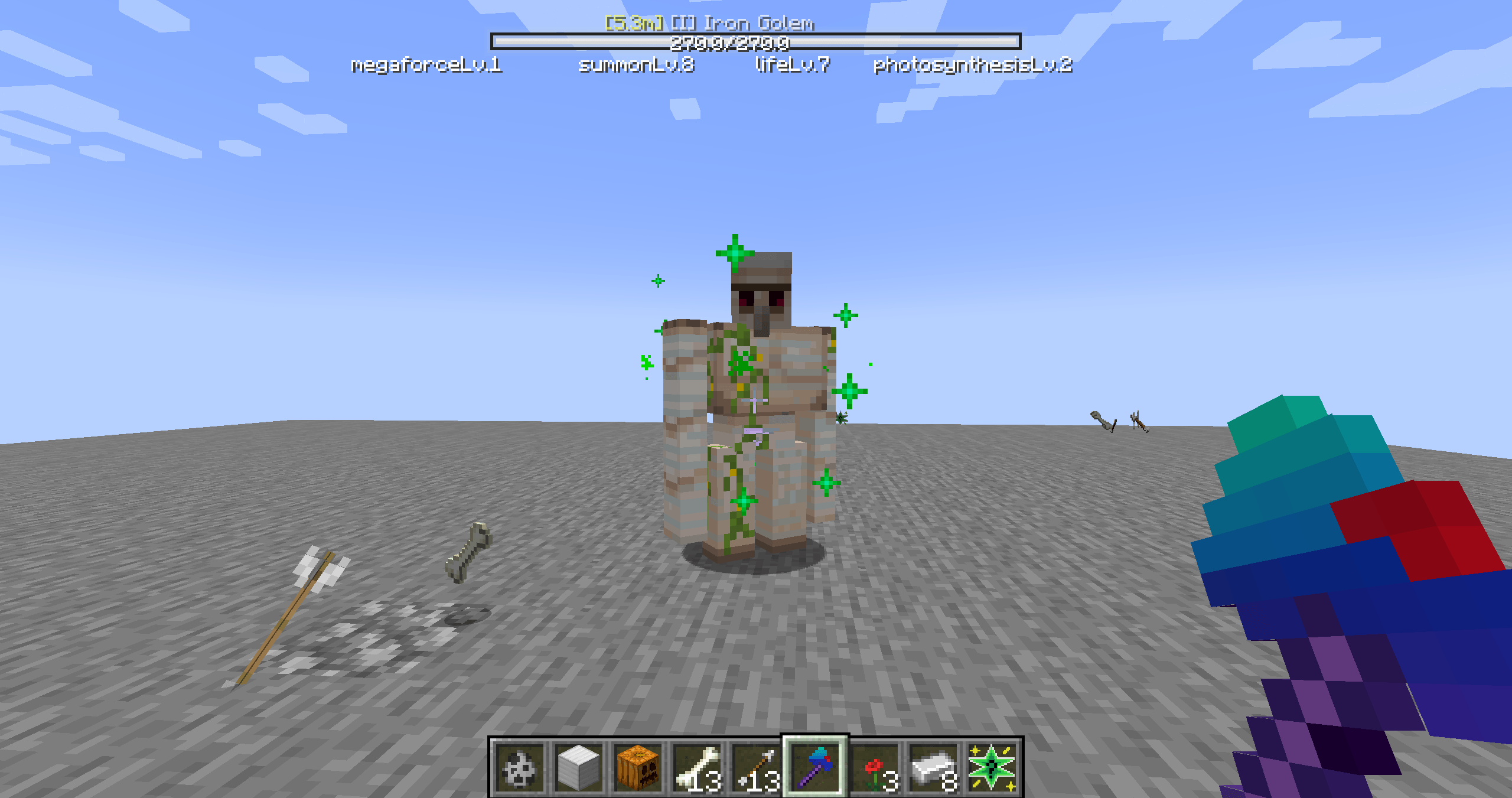
30% of naturally spawned mobs in the Enhance Mod have a chance to become "Enhancers", which are divided into three tiers: Green (Tier 1), Blue (Tier 2), and Red (Tier 3). The higher the tier, the more terrifying the base attributes — Tier 3 Enhancers have a maximum health pool 12 times that of the original version and an attack power surged to 6 times the original. Besides, they will obtain enhance passives corresponding to their tier.
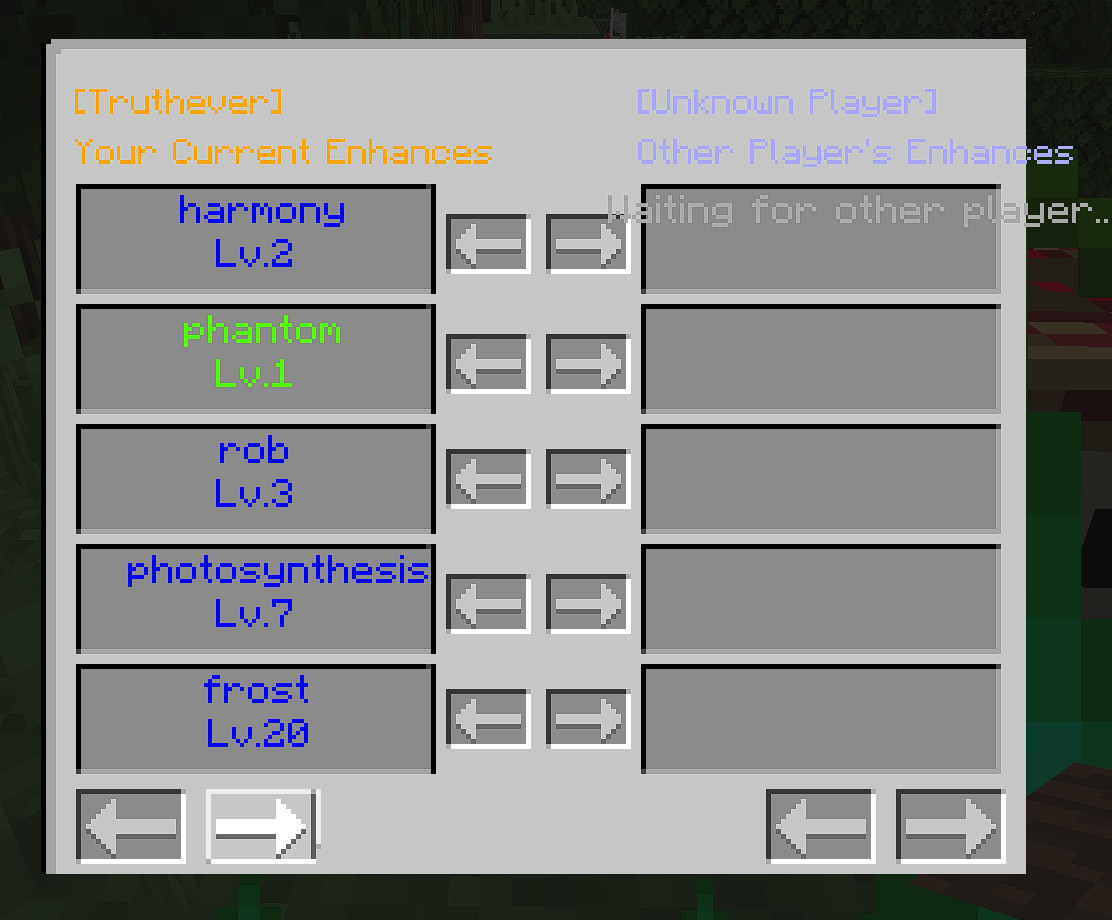
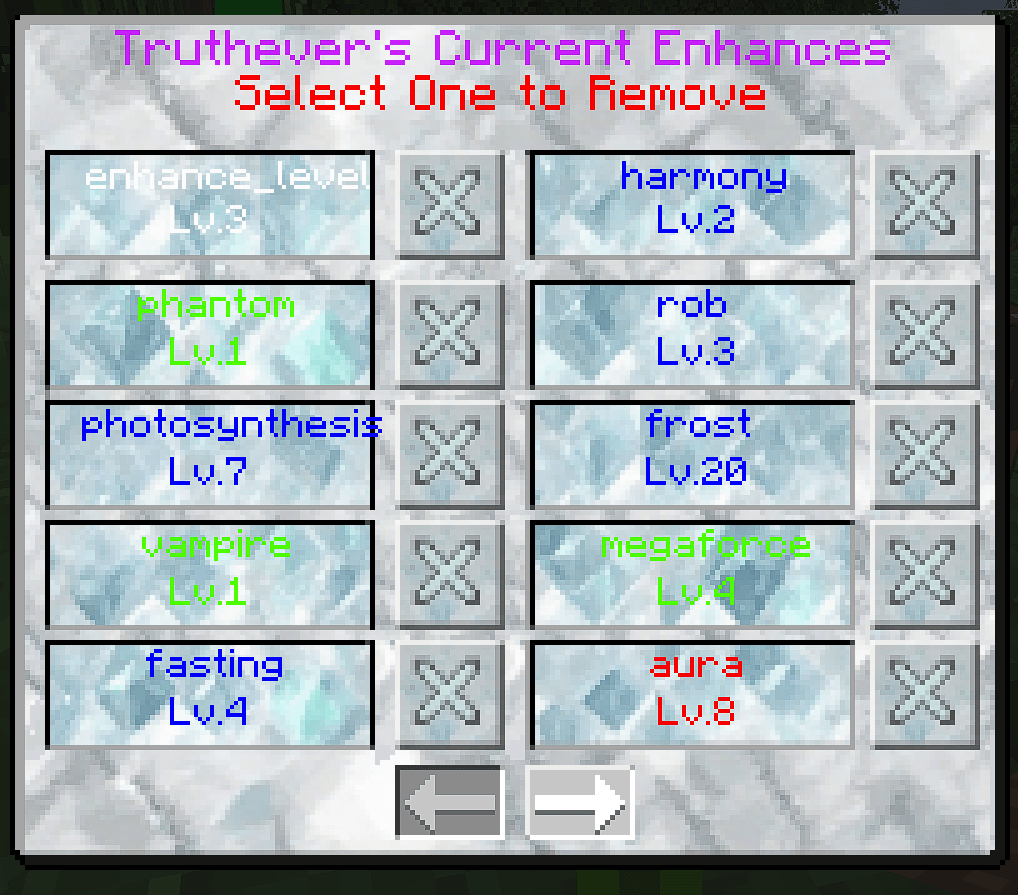
- Defeating an Enhancer gives a chance to get a gift of the corresponding tier; opening the gift unlocks powerful enhance passives same as those of the mob. You can check your enhance passives at any time via the exclusive "Z-key UI". Moreover, you can sacrifice enhance passives at the "Sacrifice Block" to exchange them for permanent attribute boosts, comprehensively enhancing attack, defense, speed, and health.
List of Enhance Passive Effects
1. Vampire: Restores 2×level health points on attack.
2. Rob : Knocks 1×level items off the target on attack.
3. Megaforce: Increases melee damage by 10%×level per tier; for ranged attacks, it increases projectile speed by 5%×level.
4. Thunder: Each attack has a (5 + 3×level)% chance to summon a thunderbolt, which may strike the attacker.
5. Frost: Inflicts a frost (slowdown) effect on the target on attack, lasting for 2×level seconds. Tier 1 Frost (slowdown level 1) applies when the enhance passive level is 1–5, Tier 2 Frost (slowdown level 2) when 6–15, and Tier 3 Frost (slowdown level 3) when above 15.
6. Ricochet: Level has no effect. After a ranged attack hits a target, it searches for other targets within 3 blocks of the hit point and fires tracking arrows at them.
7. Curse : Increases melee damage by 5% per level and ranged attack speed by 5% per level. However, after attacking, the user suffers a backlash effect lasting 10 seconds, causing 1% health loss per second.
8. Life : Increases maximum health by 5% per level.
9. Harmony : Provides different buffs in different biomes.
10. Thorns : Reflects 5% of damage taken per level when attacked.
11. Aura : Prevents the target from jumping for (10 + 2×level) seconds when attacking.
12. Hunger: Inflicts a hunger effect of (10 + 3×level) duration on the target on attack. Hunger Level 1 applies when the duration is 1–5, Hunger Level 2 when 6–10, and Hunger Level 3 when above 10.
13. Attack: Increases attack power by 5% per level.
14. Displacement: A one-time enhance passive. After attacking the target, it replaces the target's chestplate with a Cursed Golden Chestplate, lasting 2 minutes. This golden chestplate has both the Binding Curse and Vanishing Curse, and randomly comes with one of the following effects: 20% slowdown, -5 armor points, or -3×level maximum health. It disappears naturally after 2 minutes, and the replaced armor is retained in the inventory.
15. Death_Bomb: Triggers a self-explosion upon death, dealing (4 + 3×level) damage.
16. Tracking : Locks onto the target's aggro for 3 minutes after attacking; the user will track the target wherever it goes during this period. Not applicable to ranged attacks.
17. Unyielding : A one-time enhance passive. Immunes the user to a lethal damage instance when taking it, and grants immunity to all damage for the next (3 + 2×level) seconds (maximum 30 seconds).
18. Summon : Each time the user takes damage, there is a 3×level% chance to summon a mob of the same type.
19. Phantom : Each time the user takes damage, there is a 5×level% chance to dodge the damage.
20. Photosynthesis: Restores 0.5 health points per second per level, triggerable when the light level is 9 or higher.
21. Fasting : Prevents the target from eating for (10 + 2×level) seconds after attacking (no swallowing animation).
Enhance Mod Configuration & New Content
- The mod supports configuration files, which can be found and modified in the `config/enhance` directory.
- A new mineral "Enhance Ore" is added, supporting both Fortune and Silk Touch enchantments. Obtaining Enhance Stones from this ore allows further crafting of enhance tools and armor sets.
- Enhance Sword: Increases attack speed based on the level of the player's `enhance_level` passive, with a 50% chance to have an exclusive damage-increase enhance passive.
- Enhance Pickaxe: Enables 3×3×3 large-area mining, has a tool tier of 3, and comes with an exclusive "Pickaxe Strike" enhance passive that increases damage.
- Enhance Axe: Allows chain tree cutting and has an exclusive "Bleeding" enhance passive — inflicts the target with (2×level) health loss per second for 5 seconds after attacking (level is based on `enhance_level`).
- Enhance Shovel: Enables automatic smelting of mined blocks and has an exclusive "Knockback II" enhance passive.
- Enhance Hoe: Increases crop yield and accelerates crop growth.
- Collecting all 4 pieces of the Enhance Armor Set triggers a set bonus: +5 defense points + a chance to reduce damage taken by 20%.
- End Return Staff: Enables instant return to the Overworld when used in the End. (Tip: It is recommended to use the Return Staff to return to the Overworld from the End; using an Overworld portal may clear NBT data, resulting in the loss of enhance passives and attributes.)
Built-in Original Commands for Enhance Mod
The mod includes original commands for easy debugging, with their syntax and effects as follows:
1. Command: `/enhance`; Syntax: `/enhance [target] [enhance passive name] [level]`; Effect: Adds the specified level of an enhance passive to the designated target.
2. Command: `/enhanceremove`; Syntax: `/enhanceremove [target] [enhance passive name]` (omit the enhance passive name to remove all enhance passives); Effect: Removes the specified enhance passive (or all enhance passives) from the designated target.
3. Command: `/dimensionlist`; Syntax: `/dimensionlist`; Effect: Detects and displays all registered dimension IDs in the current save file (facilitates checking dimension information for enhance-related operations).
4. Command: `/nbtentity`; Syntax: `/nbtentity [target]`; Effect: Reads and displays the attribute list of the target (useful for checking enhance passives and related attributes).
5. Command: `/next`; Syntax: `/next [time] [command]`; Effect: Executes the specified command (including enhance-related commands) after a delayed time.
6. Command: `/setattack`; Syntax: `/setattack [target] [mode] [value]` (modes: `set`, `increase`, `reduce`); Effect: Modifies the target's base attack power according to the selected mode (complements the effect of Attack Boost Enhance passive).
7. Command: `/setdimensionspawn`; Syntax: `/setdimensionspawn [dimension ID] [coordinates]`; Effect: Sets the user's spawn point in another dimension (follows vanilla rules for the Overworld; prevents loss of enhance passives due to improper spawn points).
8. Command: `/setflyspeed`; Syntax: `/setflyspeed [target] [value]`; Effect: Modifies the player's flying speed (can be used with enhance passives related to speed).
9. Command: `/sethealthmax`; Syntax: `/sethealthmax [target] [mode] [value]` (modes: `increase`, `reduce`, `set`); Effect: Modifies the target's base maximum health according to the selected mode (complements the effect of Health Boost Enhance passive).
10. Command: `/setresistance`; Syntax: `/setresistance [target] [mode] [value]` (modes: `increase`, `reduce`, `set`); Effect: Modifies the target's base defense (complements the effect of enhance passives related to defense, such as Mountain Blessing in Natural Resonance Enhance).
11. Command: `/setspeed`; Syntax: `/setspeed [target] [mode] [value]` (modes: `increase`, `reduce`, `set`); Effect: Modifies the target's base movement speed. (Note: The base movement speed of players is 0.1, and the base flying speed is 0.05. Do not set the value too high, otherwise the character may move out of view! This command can be used with speed-related enhance passives.)
Enhance Mod Version & Future Plans
- More versions will be updated in the future, and a Fabric port is planned, along with the addition of new enhance passives, tools, and gameplay mechanics.
You can use this in anything including packs
Contact us:[email protected]
- Players are welcome to provide suggestions and new ideas for enhance-related content to the developer.
Screenshots
Gallery
-
 2025-10-02_17.15.31.png 2025-10-02_17.15.31.png
 -
 QQ_1759325109529.png QQ_1759325109529.png
 -
 QQ_1759325102141.png QQ_1759325102141.png
 -
 QQ_1759325088750.png QQ_1759325088750.png
 -
 QQ_1759325072166.png QQ_1759325072166.png
 -
 2025-09-28_16.52.51.png 2025-09-28_16.52.51.png
Versions
Files
Relations
Project Relations
More like this
Similar Mods
Suggestions use data such as tags, dependencies, dependents, descriptions, titles, and more to rank how much they overlap with this mod.
On ModDex
Community snapshot
By the numbers
Statistics
 (opens in a new tab)
Get it on
Available Platforms
On ModDex
Community snapshot
By the numbers
Statistics
Resources