Community listing page, reviews here may not be monitored by the author.
Entangled Chests


No reviews yet
Store items from anywhere. Entangled Chests adds a bundle you can link to a chest — anything you drop into the bundle is teleported straight into its linked chest, no matter how far away you are. Think of it as a personal chute to your base storage.
Community voices
Reviews
No reviews yet. Be the first to review this project!
Get it on
Available Platforms
Compatibility
Supported Environments
Must be installed on both the client and the server.
About
Project Details
For authors
Embed Badge
If you're the author of this project, you can embed a live badge anywhere that supports HTML or Markdown. It updates automatically whenever ratings change.
Use HTML for any page that supports it, or Markdown for README files and Markdown-based descriptions.
Identifiers
Platform IDs
About
Description
Entangled Chests
Store items from anywhere. Entangled Chests adds a bundle you can link to a chest — anything you drop into the bundle is teleported straight into its linked chest, no matter how far away you are. Think of it as a personal chute to your base storage.
Available for Fabric and NeoForge.
✨ Features
- Entangled Bundle — a bundle that beams its contents into a linked chest.
- Entangled Chest — a chest with a unique identity that bundles can lock onto. Name it on an anvil to tell your chests apart.
- Entanglement Crystal — the crafting ingredient that powers it all.
- Link as many bundles as you like to a single chest.
- Bundles remember their link across saves, dimensions, and even while you're offline.
- Subtle enchantment glint so you can tell at a glance what's linked.
📖 How to use it
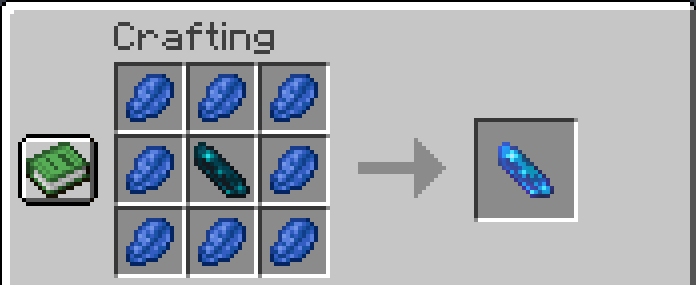
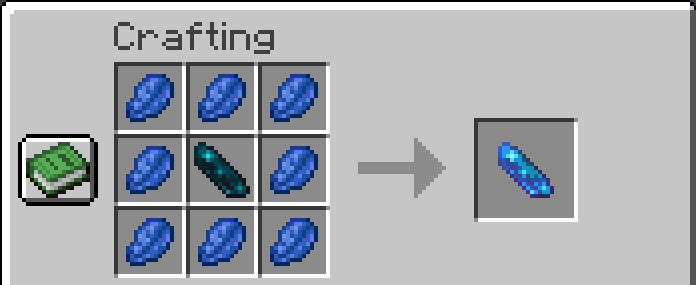
1. Craft an Entanglement Crystal
An Echo Shard surrounded by Lapis Lazuli:
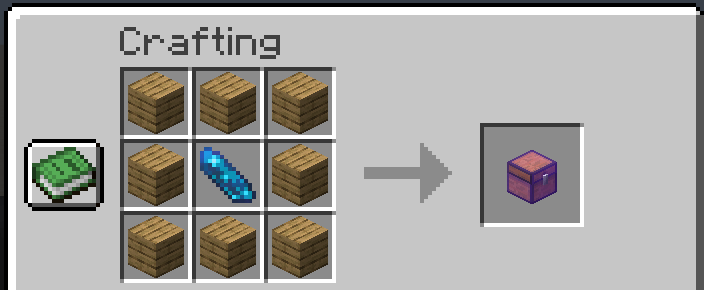
2. Craft an Entangled Chest
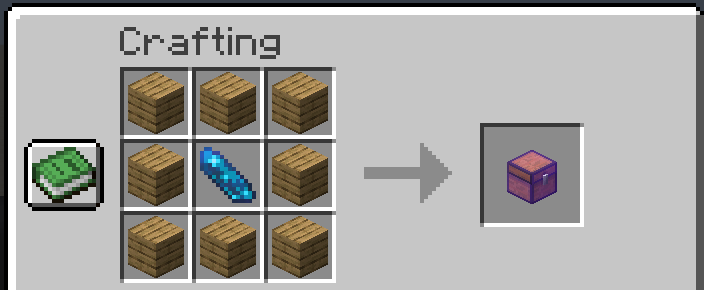
A normal Chest recipe with an Entanglement Crystal in the middle:
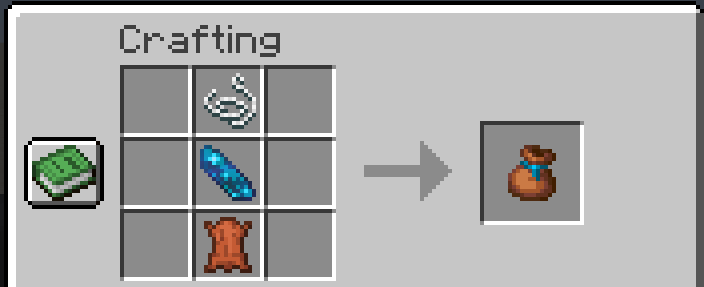
3. Craft an Entangled Bundle
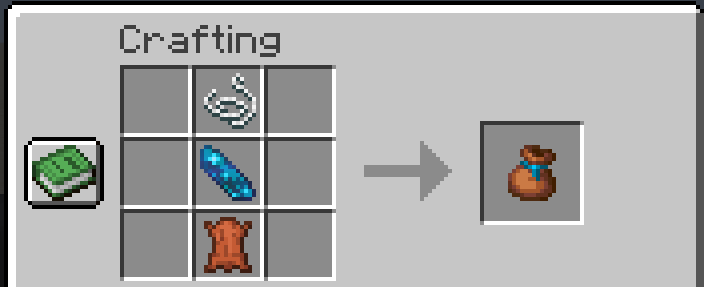
A normal Bundle recipe (String over Leather) with an Entanglement Crystal added in the middle:
4. Link and go
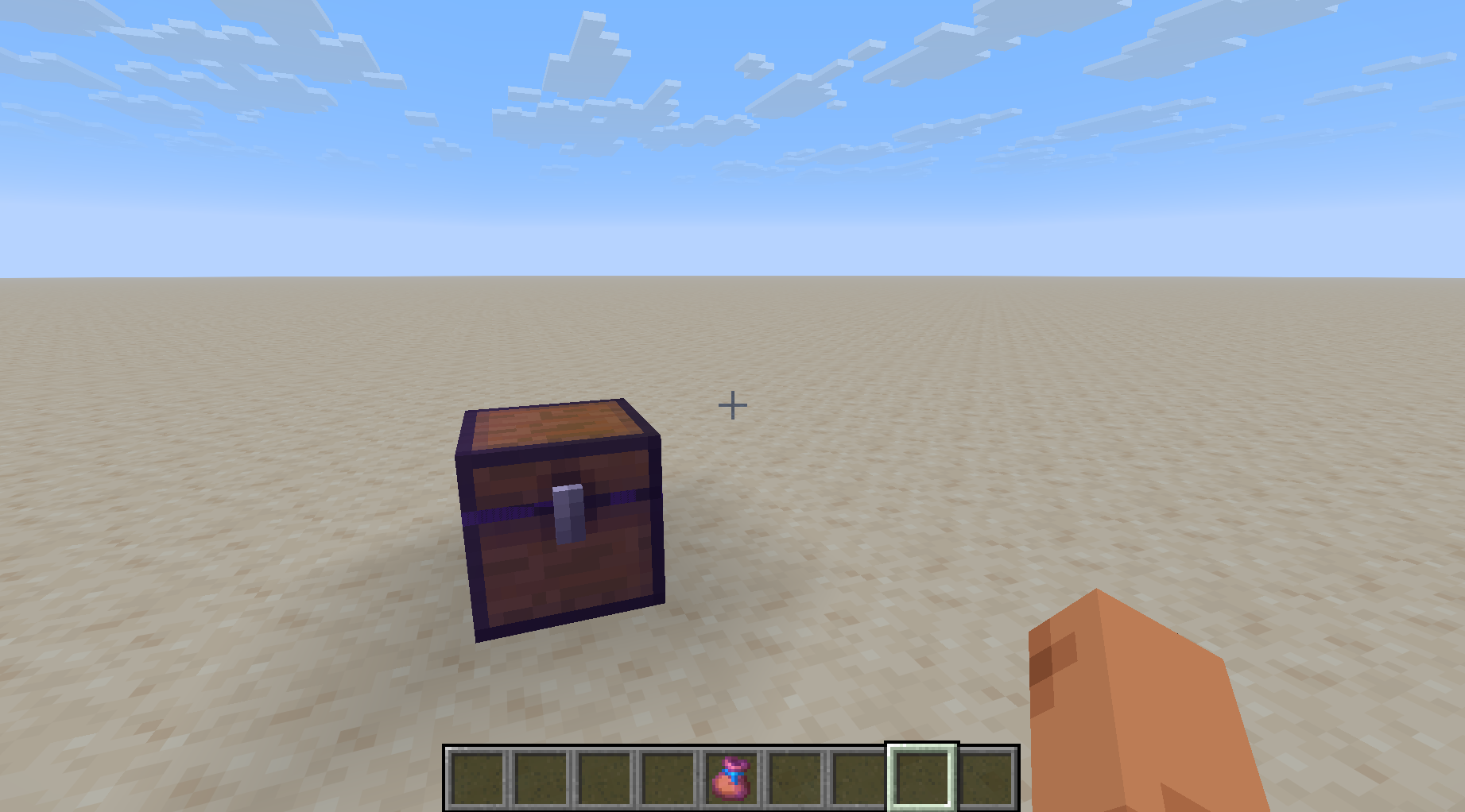
- Place your Entangled Chest. When first placed it already contains one Entangled Bundle, pre-linked to itself — grab it and go, or link more later.
- Link a bundle: hold an unlinked Entangled Bundle and right-click the chest. The bundle now glints and its tooltip shows the chest it's linked to.
- Store from anywhere: put items into the linked bundle just like a normal bundle (drop a stack onto it). They're whisked into the chest instantly. Head out mining and deposit ore into your base chest without a single trip home.
🔎 Good to know
- Unlinked bundles are just normal bundles — carry items, take them out, whatever you like. The magic starts once you link one to a chest.
- You can't pull items out of a linked bundle by hand — its contents belong to the chest now. (Break the chest and the bundle unlinks, freeing anything still inside.)
- If the linked chest is full, items wait in the bundle until space opens up.
- Destroying or picking up a chest instantly unlinks every bundle tied to it — even ones in other players' inventories, online or not.
- Name a chest on an anvil (before placing it) and linked bundles will show that name instead of an ID — handy for "Ores", "Food", "Junk", and so on.
- Each bundle links to one chest at a time. Link it to a new chest to move it.
📦 Requirements
- Minecraft 1.21.11
- Java 21+
- Architectury API 19.0.1+ (required on both loaders)
Then, depending on your loader:
| Loader | Also needs |
|---|---|
| Fabric | Fabric Loader 0.19.3+ and Fabric API |
| NeoForge | NeoForge 21.11.44+ |
Download the jar matching your loader. Works in single-player and on servers — install on both the client and the server for multiplayer.
❓ FAQ
Do items get lost if the chest fills up? No. They stay safe in the bundle and flow into the chest as soon as room frees up.
What happens to a linked bundle if I break its chest? It unlinks and becomes a normal bundle again. Anything buffered inside becomes retrievable.
Can several bundles feed the same chest? Yes — link as many as you want to one chest.
Does linking work across dimensions? Yes. A bundle stays linked to its chest wherever you both are.
Can I rename a chest after placing it? Naming is done on the item before placement. To rename, break the chest, rename the item on an anvil, and place it again (this makes a fresh chest).
📝 License
Released under the MIT License.
Enjoy, and happy hoarding!
Entangled Chests
Store items from anywhere. Entangled Chests adds a bundle you can link to a chest — anything you drop into the bundle is teleported straight into its linked chest, no matter how far away you are. Think of it as a personal chute to your base storage.
Available for Fabric and NeoForge.
✨ Features
- Entangled Bundle — a bundle that beams its contents into a linked chest.
- Entangled Chest — a chest with a unique identity that bundles can lock onto. Name it on an anvil to tell your chests apart.
- Entanglement Crystal — the crafting ingredient that powers it all.
- Link as many bundles as you like to a single chest.
- Bundles remember their link across saves, dimensions, and even while you're offline.
- Subtle enchantment glint so you can tell at a glance what's linked.
📖 How to use it
1. Craft an Entanglement Crystal
An Echo Shard surrounded by Lapis Lazuli:
2. Craft an Entangled Chest
A normal Chest recipe with an Entanglement Crystal in the middle:
3. Craft an Entangled Bundle
A normal Bundle recipe (String over Leather) with an Entanglement Crystal added in the middle:
4. Link and go
- Place your Entangled Chest. When first placed it already contains one Entangled Bundle, pre-linked to itself — grab it and go, or link more later.
- Link a bundle: hold an unlinked Entangled Bundle and right-click the chest. The bundle now glints and its tooltip shows the chest it's linked to.
- Store from anywhere: put items into the linked bundle just like a normal bundle (drop a stack onto it). They're whisked into the chest instantly. Head out mining and deposit ore into your base chest without a single trip home.
🔎 Good to know
- Unlinked bundles are just normal bundles — carry items, take them out, whatever you like. The magic starts once you link one to a chest.
- You can't pull items out of a linked bundle by hand — its contents belong to the chest now. (Break the chest and the bundle unlinks, freeing anything still inside.)
- If the linked chest is full, items wait in the bundle until space opens up.
- Destroying or picking up a chest instantly unlinks every bundle tied to it — even ones in other players' inventories, online or not.
- Name a chest on an anvil (before placing it) and linked bundles will show that name instead of an ID — handy for "Ores", "Food", "Junk", and so on.
- Each bundle links to one chest at a time. Link it to a new chest to move it.
📦 Requirements
- Minecraft 1.21.11
- Java 21+
- Architectury API 19.0.1+ (required on both loaders)
Then, depending on your loader:
| Loader | Also needs |
|---|---|
| Fabric | Fabric Loader 0.19.3+ and Fabric API |
| NeoForge | NeoForge 21.11.44+ |
Download the jar matching your loader. Works in single-player and on servers — install on both the client and the server for multiplayer.
❓ FAQ
Do items get lost if the chest fills up? No. They stay safe in the bundle and flow into the chest as soon as room frees up.
What happens to a linked bundle if I break its chest? It unlinks and becomes a normal bundle again. Anything buffered inside becomes retrievable.
Can several bundles feed the same chest? Yes — link as many as you want to one chest.
Does linking work across dimensions? Yes. A bundle stays linked to its chest wherever you both are.
Can I rename a chest after placing it? Naming is done on the item before placement. To rename, break the chest, rename the item on an anvil, and place it again (this makes a fresh chest).
📝 License
Released under the MIT License.
Enjoy, and happy hoarding!
Screenshots
Gallery
-
 entangled_bundle.png entangled_bundle.png
 -
 entanglement_crystal.png entanglement_crystal.png
 -
 entangled_chest.png entangled_chest.png
-
 Entangled Chests
Versions
Files
Relations
Project Relations
More like this
Similar Mods
Suggestions use data such as tags, dependencies, dependents, descriptions, titles, and more to rank how much they overlap with this mod.
On ModDex
Community snapshot
By the numbers
Statistics
Want to reach Minecraft players?
We're looking for a server hosting partner to feature here and other parts of the site. Interested? Send us a message!
Get in touchGet it on
Available Platforms
On ModDex
Community snapshot
By the numbers