Community listing page, reviews here may not be monitored by the author.
Even More Gems

No reviews yet
Adds Even More Gem - Ores, Tools, Combat Weapons, Armour and Other Items

Community voices
Reviews
No reviews yet. Be the first to review this project!
Get it on
Available Platforms
About
Project Details
For authors
Embed Badge
If you're the author of this project, you can embed a live badge anywhere that supports HTML or Markdown. It updates automatically whenever ratings change.
Use HTML for any page that supports it, or Markdown for README files and Markdown-based descriptions.
Identifiers
Platform IDs
Resources
External Links
About
Description
Even More Metals
This mod really emphasises the "mine" in Minecraft by focusing on "Fancy" and extremely rare Precious Gems.
41 new materials are introduced in the mod.
In addition to the vanilla ores, blocks, ingots, gems, nuggets, armour, tools, sword, doors, trapdoors, bars etc. this mod adds Daggers, Battleaxes, Warhammers and Maces into the mix.
Note - This mod has a dependency on the mod "More Gems and Metals".
https://legacy.curseforge.com/minecraft/mc-mods/more-gems-and-metals/
What Materials are Included?
Precious Gems
- Diamonds (13 "fancy" variants) - Red, Orange, Yellow, Lime Green, Green, Cyan, Light Blue, Blue, Purple, Magenta, Pink, Brown and Black
- Sapphires (12 "fancy" variants) - Orange, Yellow, Lime Green, Green, Cyan, Light Blue, Purple, Magenta, Pink, Brown, Black and White
- Sapphires (2 extremely rare variants) - Kashmir and Padparadscha
- Beryls (7 variants) - Aquamarine, Golden Beryl, Goshenite, Green Beryl, Heliodor, Maxixe, Morganite and Red Beryl
- Rubies (1 extremely rare variant) - Burma
- Stars (4 variants) - Blue Star Sapphire, Black Star Sapphire, Green Star Emerald and Red Star Ruby
What's New?
Adapted vanilla items
- Armour (Helmet, Chestplate, Leggings, Boots)
- Pickaxe
- Axe
- Hoe
- Shovel
- Sword
- Gem
- Block or Gem
New items
- Dagger
- Battleaxe
- Warhammer
- Mace
- Ring
New Recipes
- Rainbow Gem
(Light Blue + Green + Red + Yellow + Orange + Purple + Pink + Brown + White Diamonds)
What's Next?
- TBA
FAQ
Trivia
- Only 1 / 10, 000 colourless diamonds is classed as a fancy colour diamond.
Legal
You are free to use this mod in any modpacks. You do not have the right to repost this mod anywhere else without my explicit permission.
Config (1.20.1 onwards)
Follow the steps below to amend which ores generate in the world:
1. Launch Minecraft and play a new or existing world - this will generate the config file
2. Navigate to emg_ores.toml in your Minecraft profile folder
3. Set the ores you do not wish to generate in the world to false
Note - chunks already loaded in any existing world will not be updated
Forge Tags
- Gems: gems/gem_name
Screenshots
Gallery
-
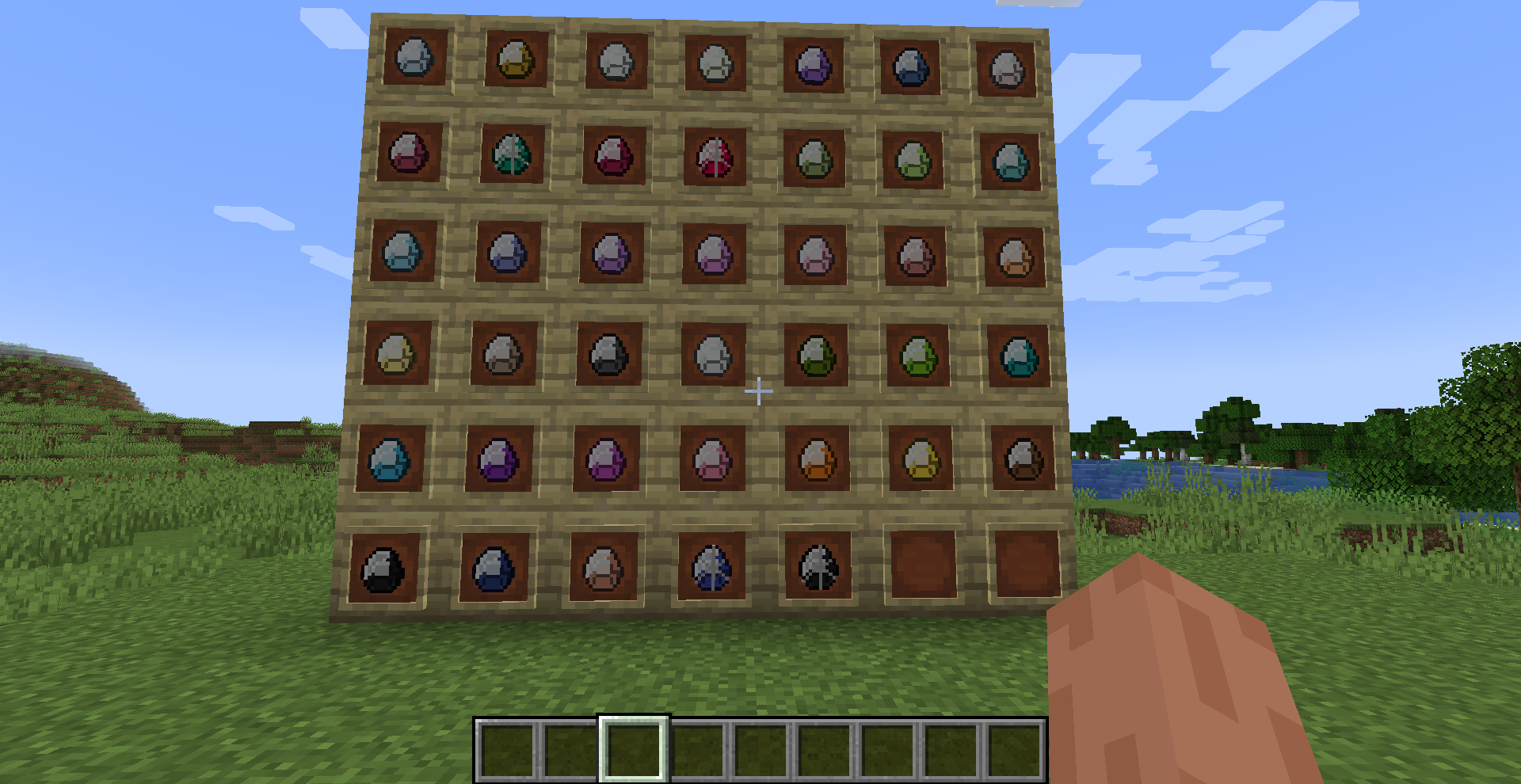 Gems All Gems added in mod
Versions
Files
Relations
Project Relations
More like this
Similar Mods
Suggestions use data such as tags, dependencies, dependents, descriptions, titles, and more to rank how much they overlap with this mod.
On ModDex
Community snapshot
By the numbers
Statistics
 (opens in a new tab)
Get it on
Available Platforms
On ModDex
Community snapshot
By the numbers
Statistics
Resources