
Community listing page, reviews here may not be monitored by the author.

Community voices
Reviews
No reviews yet. Be the first to review this project!
Get it on
Available Platforms
Compatibility
Supported Environments
Runs entirely on the client. Works on vanilla servers.
About
Project Details
For authors
Embed Badge
If you're the author of this project, you can embed a live badge anywhere that supports HTML or Markdown. It updates automatically whenever ratings change.
Use HTML for any page that supports it, or Markdown for README files and Markdown-based descriptions.
Identifiers
Platform IDs
About
Description
EverLight (エバーライト)
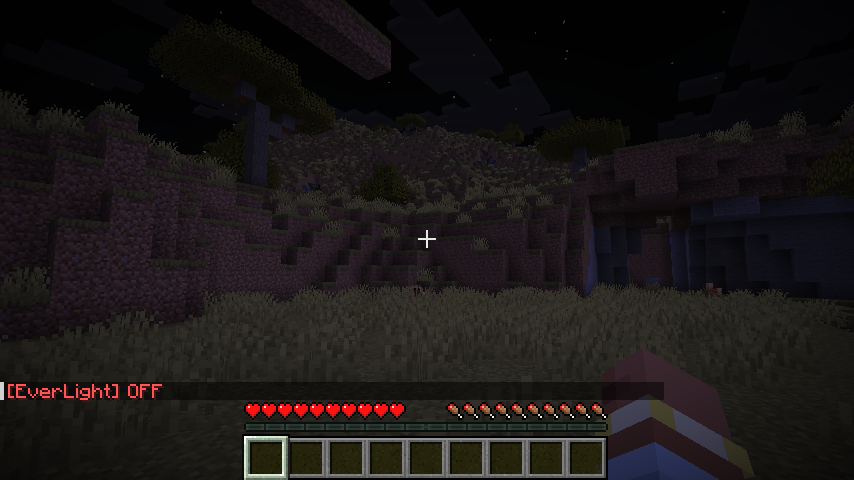
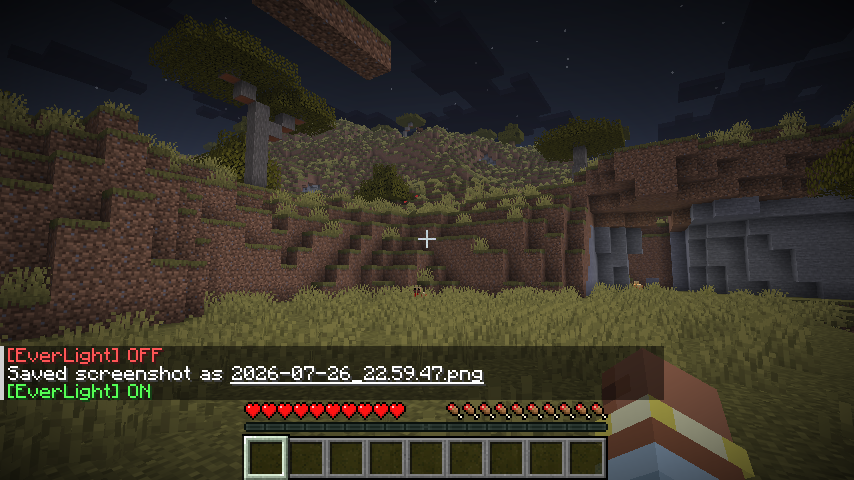
EverLight は、明暗調整・暗視(Fullbright)Mod です。
✨ 主な機能
- 💡 ワンタッチ視界全開 (Fullbright): 洞窟や夜間、水中でもワンキーで即座に昼間同様の明瞭な視界を確保。
- 🎚️ 明るさレベルの自由調整 (1.0 〜 10.0):
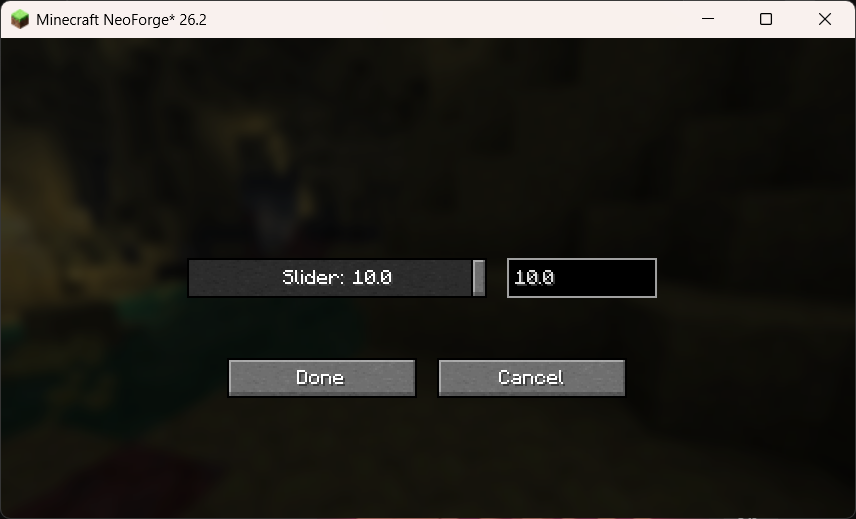
- スライドバー + 数値入力ボックス による直感的な設定 GUI。
- 🔌 ローダー標準設定メニューとの統合:
- NeoForge: 組み込み Mod リスト画面の「設定 / Config」ボタンから遷移。
- Fabric: ModMenu の GUI メニューから遷移。
- 💾 設定の自動永続化: 変更した設定は
config/mc_ever_light.propertiesへ自動保存されます。
⌨️ 操作方法・キー割り当て
| 操作 | デフォルトキー | 説明 |
|---|---|---|
| ライト ON / OFF 切替 | G |
ゲーム中に EverLight の有効・無効を切り替えます(HUDメッセージ表示)。 |
| 設定画面表示 | 各Modメニュー | スライダーで明るさレベル(1.0 〜 10.0)を調整する設定画面を開きます。 |
※キー割り当てはバニラの「操作設定 (Key Binds)」から自由に変更できます。
⚙️ 設定 GUI メニュー
EverLight の設定画面は、スライダーと数値入力ボックスが双方向に連動します:
- スライダー操作: マウスドラッグで数値を連続変更。
- 数値入力: キーボードで
1.0〜10.0の数値を直接入力すると、スライダー位置が即座に同期。 - Done (完了) ボタン押下で即座にゲーム内に反映され、設定ファイルへ保存されます。
📄 ライセンス
本 Mod は MIT License の下で公開されています。Modpack への組み込みや再配布は自由に行っていただけます。
(English)
EverLight is a clean, lightweight, and customizable Fullbright / Night Vision mod for Minecraft .
✨ Features
- 💡 Instant Fullbright Toggle: Toggle full daylight visibility in caves, underwater, and night with a single keypress.
- 🎚️ Customizable Brightness Level (1.0 - 10.0):
- Interactive Slider + Numeric Input Box configuration GUI.
- Adjust brightness dynamically from subtle enhancement to full illumination.
- 🔌 Seamless Mod Loader Integration:
- NeoForge: Configurable directly from the built-in Mod List option screen.
- Fabric: Fully integrated with ModMenu GUI.
- 💾 Persistent Settings: Automatically saved to
config/mc_ever_light.properties.
⌨️ Controls & Usage
| Action | Default Key | Description |
|---|---|---|
| Toggle Light | G |
Toggles EverLight ON or OFF with an in-game HUD message. |
| Config Screen | Mod Menu / Mods List | Opens the interactive brightness slider settings screen. |
⚙️ Configuration GUI
EverLight features a bi-directionally synchronized Slider + Numeric Input Box:
- Move the slider to update the numeric value in real time.
- Type any precise number between
1.0and10.0to set the slider position automatically. - Changes are applied live in game and saved upon pressing Done.
📄 License
This mod is available under the MIT License. Feel free to include it in your modpacks!
Screenshots
Gallery
-
config-screen
-
 bright-off
 -
 bright-on
Versions
Files
Relations
Project Relations
More like this
Similar Mods
Suggestions use data such as tags, dependencies, dependents, descriptions, titles, and more to rank how much they overlap with this mod.
On ModDex
Community snapshot
By the numbers
Statistics

Want to reach Minecraft players?
We're looking for a server hosting partner to feature here and other parts of the site. Interested? Send us a message!
Get in touchGet it on
Available Platforms
On ModDex
Community snapshot
By the numbers