
Extra Hotbar
No reviews yet
Fabric client mod that adds dual-hotbar swapping utilities and compact HUD info overlays.
Fabric is a mod loader for versions 1.14+ of Minecraft, particularly popular for client side and optimization mods.
Community voices
Reviews
Click once to include, again to exclude, again to clear
No reviews yet. Be the first to review this project!
Get it on
Available Platforms
 Modrinth
Compatibility
Supported Environments
About
Project Details
For authors
Embed Badge
If you're the author of this project, you can embed a live badge anywhere that supports HTML or Markdown. It updates automatically whenever ratings change.
Use HTML for any page that supports it, or Markdown for README files and Markdown-based descriptions.
Identifiers
Platform IDs
Resources
External Links
About
Description
Extra Hotbar
Fabric client mod that adds dual-hotbar swapping utilities and compact HUD info overlays.
Features
- Dual hotbar swap system:
- Swaps between your visible hotbar and a configurable secondary inventory row.
- Supports full-row swap and single-slot swap logic.
- Hold and tap swap behavior:
- Tap or hold the swap key for different actions (configurable).
- Per-slot double-tap swap:
- Double-tap number keys
1-9to swap only that slot.
- Double-tap number keys
- Slot lock support:
- Lock specific hotbar slots to prevent them from being swapped.
- Active bar indicator:
- Shows whether primary or secondary bar is currently active.
- Panel cycle mode:
- Cycle HUD info display through:
Off -> Armor -> Food -> Both.
- Cycle HUD info display through:
- Armor panel info:
- Shows equipped armor pieces and remaining durability.
- Food panel info:
- Lists edible items currently in inventory with hunger and saturation.
- Persistent client config:
- Settings are saved and reloaded from JSON config.
Controls (Default Keybinds)
R: Swap hotbars.H: Cycle HUD panels (Off -> Armor -> Food -> Both).K: Toggle lock on the currently selected hotbar slot.1-9double-tap: Swap a single corresponding hotbar slot.
You can rebind these in Minecraft controls.
In-Game Behavior
- Spectator mode: swapping logic is skipped.
- Locked slots:
- Full-row swaps skip locked slots.
- Single-slot swaps do not run for locked slots.
Configuration
Config file: config/extar_hotbar.json
Main settings:
secondaryInventoryRow(1-3)showSecondHotbarshowActiveIndicatorsecondHotbarYOffsetactiveIndicatorYOffsetenableDoubleTapSwapdoubleTapWindowMs(100-1000)enableHoldSwapholdSwapMs(100-1200)holdSwapsSingleSlotpanelMode(0-3)0 = Off,1 = Armor,2 = Food,3 = Both
panelXpanelYshowArmorDurabilityPercentlockedSlots(array of slot indices0-8)
Screenshots
Gallery
-
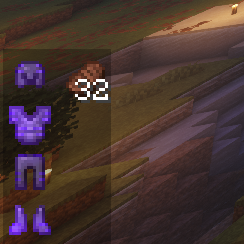 Armor and Food Example
 -
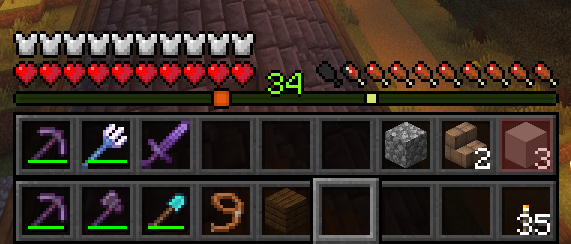 Hotbar Example
Versions
Files
Relations
Project Relations
More like this
Similar Mods
Suggestions use data such as tags, dependencies, dependents, descriptions, titles, and more to rank how much they overlap with this mod.
On ModDex
Community snapshot
By the numbers
Statistics

Want to reach Minecraft players?
We're looking for a server hosting partner to feature here and other parts of the site. Interested? Send us a message!
Get in touchGet it on
Available Platforms
On ModDex
Community snapshot
By the numbers
Statistics
Resources